Introduzione
This manual provides essential instructions for setting up, operating, maintaining, and troubleshooting your OPPO Reno 12 F 5G CPH2637 smartphone. Please read this guide thoroughly to ensure proper use and to maximize the device's capabilities.
1. Impostazione
1.1 Disimballaggio e ispezione iniziale
Rimuovere con cautela tutti gli articoli dall'imballaggio. Verificare che siano presenti i seguenti componenti:
- Smartphone OPPO Reno 12 F 5G CPH2637
- Cavo USB di tipo C.
- Adattatore di alimentazione
- Strumento di espulsione della SIM
- Guida rapida (questo documento)
Prima di procedere, ispezionare il dispositivo per verificare che non presenti danni fisici.
1.2 Inserimento delle schede SIM
The OPPO Reno 12 F 5G CPH2637 supports Dual SIM functionality.
- Individuare il vassoio della scheda SIM sul lato del dispositivo.
- Inserire lo strumento di espulsione della SIM nel piccolo foro accanto al vassoio e premere delicatamente finché il vassoio non fuoriesce.
- Inserire le schede Nano-SIM negli appositi slot sul vassoio, assicurandosi che i contatti dorati siano rivolti verso il basso.
- Spingere con cautela il vassoio nel dispositivo finché non è a filo con il lato.
1.3 Ricarica del dispositivo
Prima del primo utilizzo, si consiglia di caricare completamente il dispositivo.
- Collegare il cavo USB Type-C alla porta di ricarica nella parte inferiore del telefono.
- Collegare l'altra estremità del cavo all'adattatore di alimentazione.
- Collegare l'adattatore di corrente a una presa a muro.
- L'indicatore di carica apparirà sullo schermo.
1.4 Accensione e configurazione iniziale
To power on the device, press and hold the Power button located on the side until the OPPO logo appears. Follow the on-screen instructions to complete the initial setup, including language selection, Wi-Fi connection, Google account setup, and security settings.
2. Istruzioni per l'uso
2.1 Navigazione di base
The OPPO Reno 12 F 5G CPH2637 features a touchscreen interface. Use gestures such as tapping, swiping, pinching, and spreading to interact with the device. The navigation bar at the bottom of the screen typically includes Back, Home, and Recent Apps buttons.
2.2 Effettuare chiamate e inviare messaggi
Per effettuare una chiamata, aprire il Telefono app, inserisci il numero e tocca l'icona di chiamata. Per inviare un messaggio, apri Messaggi app, tocca l'icona del nuovo messaggio, inserisci il destinatario e il messaggio, quindi tocca Invia.
2.3 Connessione alle reti
Your device supports both Wi-Fi and 5G cellular networks.
- Wifi: Vai a Impostazioni > Wi-Fi, attiva il Wi-Fi, seleziona la rete desiderata e inserisci la password, se richiesta.
- 5G Cellular Data: Ensure your SIM card has an active 5G plan. Go to Settings > Mobile Network > Data usage to manage your cellular data.
2.4 Utilizzo della fotocamera
Aprire il Telecamera app from your home screen or app drawer. Tap the shutter button to take a photo. Swipe left or right to switch between different camera modes such as Photo, Video, Portrait, and Night. Tap on the screen to focus on a specific area.
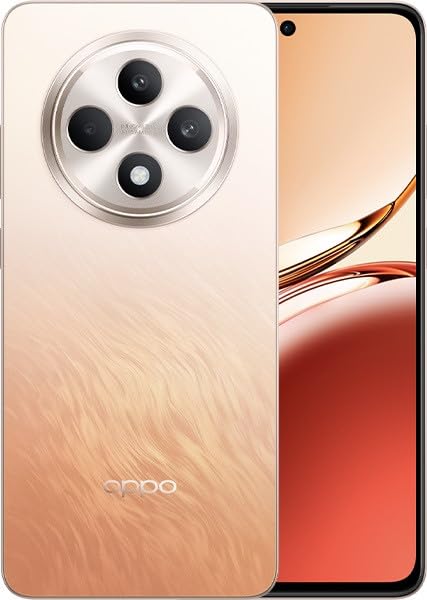
Image: OPPO Reno 12 F 5G CPH2637 smartphone in Amber Orange. This image displays the front and back of the device, highlighting its design and camera module.
2.5 Funzionalità di sicurezza
The device offers various security options to protect your data:
- Sblocco delle impronte digitali: Registra le tue impronte digitali in Settings > Password & Biometrics > Fingerprint.
- Sblocco facciale: Imposta il riconoscimento facciale in Settings > Password & Biometrics > Face.
- Blocco schermo: Choose a PIN, pattern, or password for screen lock in Settings > Password & Biometrics > Lock screen password.
3. Manutenzione
3.1 Pulizia del dispositivo
Use a soft, lint-free cloth to clean the screen and body of your phone. Avoid using harsh chemicals, abrasive materials, or aerosol sprays, as these can damage the device's finish and coatings. For stubborn smudges, slightly dampimmergi il panno nell'acqua.
3.2 Aggiornamenti software
Controlla e installa regolarmente gli aggiornamenti software per garantire prestazioni ottimali, sicurezza e accesso alle nuove funzionalità. Vai a Impostazioni > Informazioni sul dispositivo > Aggiornato per verificare la disponibilità di aggiornamenti.
3.3 Cura della batteria
To prolong battery life, avoid exposing the device to extreme temperatures. It is recommended to keep the battery charge between 20% and 80% for daily use. Avoid leaving the phone plugged in for extended periods after it is fully charged.
3.4 Gestione dell'archiviazione
Periodicamente riview ed eliminare ciò che non è necessario files, app e contenuti multimediali per liberare spazio di archiviazione. Puoi controllare l'utilizzo dello spazio di archiviazione in Impostazioni > Informazioni sul dispositivo > Archiviazione.
4. Risoluzione Dei Problemi
4.1 Il dispositivo non si accende
If your device does not turn on, ensure it is sufficiently charged. Connect it to the charger for at least 15 minutes, then try pressing and holding the Power button again for 10-15 seconds.
4.2 Problemi di connettività di rete
If you experience issues with cellular data or Wi-Fi:
- Attiva e disattiva la modalità aereo.
- Riavviare il dispositivo.
- For cellular issues, ensure your SIM card is properly inserted and your plan is active.
- For Wi-Fi issues, restart your router and ensure you are within range.
4.3 App che si bloccano o si bloccano
If an app is not responding, try force-closing it from the Recent Apps screen. If the issue persists, clear the app's cache and data in Impostazioni > App > [Nome app] > Utilizzo spazio di archiviazioneCome ultima risorsa, disinstalla e reinstalla l'app.
4.4 Ripristino delle impostazioni di fabbrica
A factory reset will erase all data on your device and restore it to its original factory settings. Back up all important data before performing a factory reset. Vai a Impostazioni > Impostazioni di sistema > Backup e ripristino > Ripristina telefono > Cancella tutti i dati.
5. Specifiche
| Caratteristica | Specificazione |
|---|---|
| Marca | OPPO |
| Nome del modello | Reno 12 F 5G |
| Numero di modello | CPH2637 |
| Capacità di archiviazione della memoria | 256 GB |
| Dimensione della memoria RAM installata | 12 GB |
| Tecnologia cellulare | 5G |
| Tecnologia di connettività | 5G |
| Numero di slot per schede SIM | Doppia SIM |
| Colore | Arancione ambrato |
| Input dell'interfaccia umana | Schermo tattile |
| Fattore di forma | Ardesia |
6. Garanzia e supporto
Your OPPO Reno 12 F 5G CPH2637 is covered by a limited warranty. Please refer to the warranty card included in your product packaging for specific terms and conditions, including warranty period and coverage details. For technical support, service inquiries, or further assistance, please visit the official OPPO support websito o contattare la hotline del servizio clienti della tua zona.


