1. Introduzione
This instruction manual provides essential information for the safe and efficient use of your NIIMBOT D110M Bluetooth Label Maker. Please read this manual thoroughly before operating the device and retain it for future reference. The NIIMBOT D110M is a compact, wireless thermal label printer designed for various organizational tasks in home, office, and school environments.

Image 1.1: The NIIMBOT D110M Label Maker, a roll of blank labels, and three example labels showing a barcode, 'Biscuits', and 'Tools'.
2. Contenuto della confezione
Verifica che tutti gli articoli elencati di seguito siano inclusi nel pacco. Se alcuni articoli risultano mancanti o danneggiati, contatta l'assistenza clienti.

Image 2.1: The complete package contents for the NIIMBOT D110M, neatly arranged.
- NIIMBOT D110M Label Maker
- Manuale d'uso
- Cavo di ricarica di tipo C.
- Scatola di imballaggio
- Label Paper Roll (12x40mm)
3. Prodotto finitoview e Caratteristiche
The NIIMBOT D110M is designed for ease of use and portability, featuring advanced thermal printing technology.
Caratteristiche principali:
- Connettività Bluetooth: Seamless wireless connection to smartphones via the NIIMBOT app.
- Stampa termica: Utilizza la tecnologia termica diretta senza BPA, eliminando la necessità di inchiostro o toner.
- Alta risoluzione: 203 DPI per una qualità di stampa nitida e chiara.
- Design portatile: Compact and lightweight, powered by a built-in 1500mAh rechargeable Lithium-Ion battery.
- Ricarica rapida: Fully charged in approximately 2 hours via Type-C cable.
- Batteria a lunga durata: Up to 5 hours of continuous printing on a full charge.
- Intelligent Identification: Built-in RFID chip automatically recognizes label types for simplified setup.
- Etichette durevoli: Compatible labels are waterproof, oil-proof, abrasion-resistant, and fade-resistant.

Image 3.1: Visual representation of the NIIMBOT D110M's key features, including text printing, scanning, inkless operation, portability, high-speed printing, and Bluetooth connectivity.

Image 3.2: Details on the D110M's upgraded battery performance, highlighting its 1500mAh capacity, charging time, and print speed.
4. Impostazione
4.1 Ricarica del dispositivo
Before first use, fully charge the label maker. Connect the provided Type-C charging cable to the device and a compatible USB power adapter. The indicator light will show charging status.
4.2 Installazione della carta per etichette
- Aprire il coperchio dello scomparto delle etichette.
- Insert the label roll with the printing surface facing upwards, ensuring the first label extends slightly out of the printing slot.
- Close the cover securely. The device's RFID chip will automatically detect the label type.
4.3 Download dell'app e connessione Bluetooth
- Download the "NIIMBOT" app from your smartphone's app store (available for iOS and Android).
- Turn on the NIIMBOT D110M label maker by pressing the power button. The indicator light will illuminate.
- Abilita il Bluetooth sul tuo smartphone.
- Open the NIIMBOT app and follow the on-screen instructions to connect to your D110M device. The device name typically appears as "D110_XXXX".
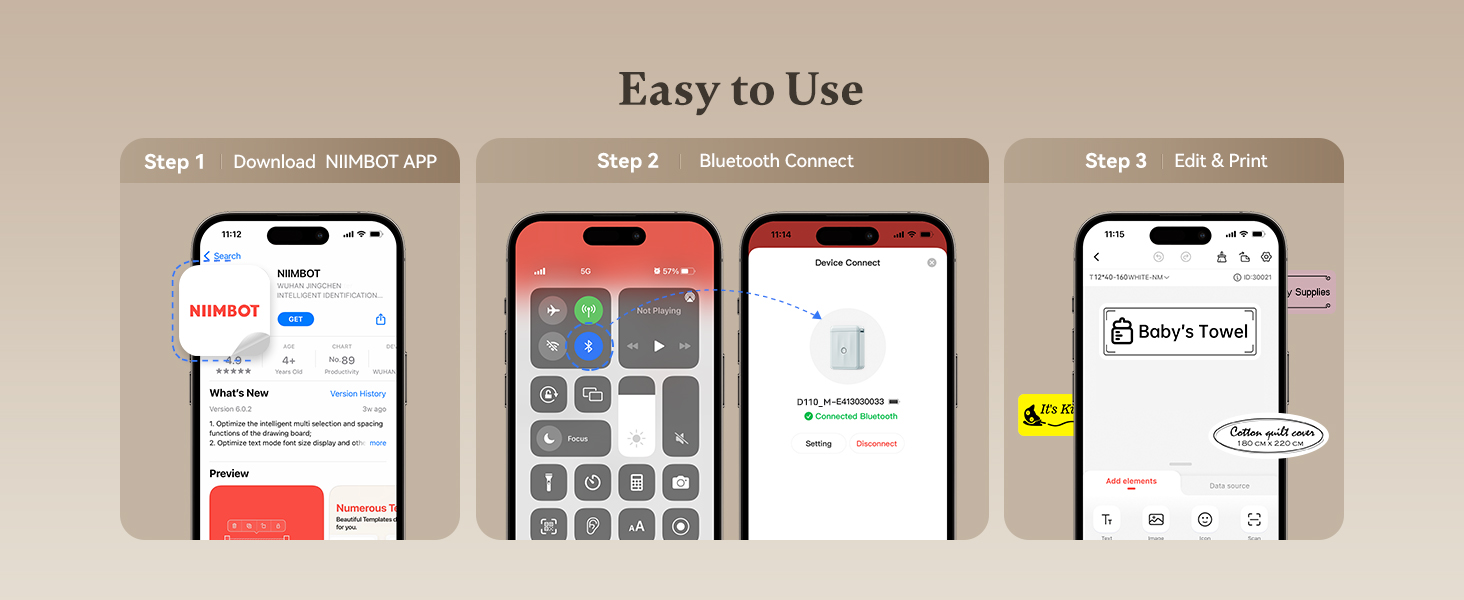
Image 4.1: A visual guide to the three-step setup process: downloading the app, connecting via Bluetooth, and then editing and printing labels.
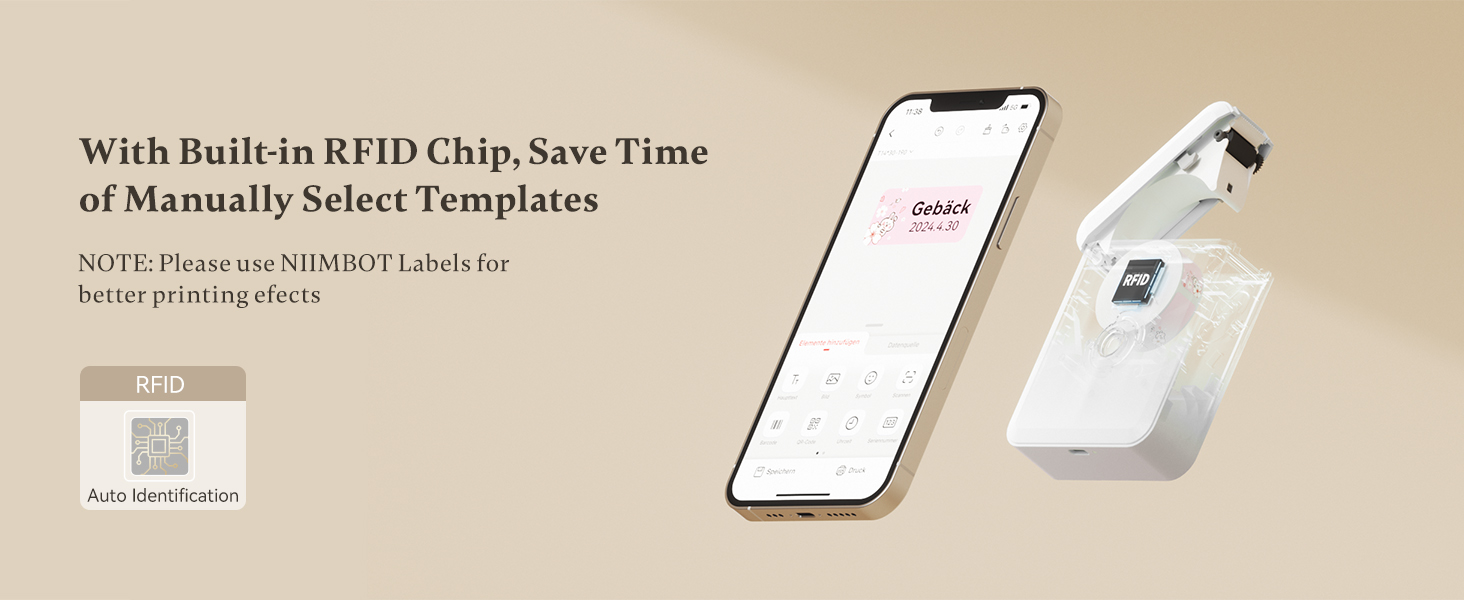
Image 4.2: The NIIMBOT app interface on a smartphone, demonstrating the automatic label identification feature via the built-in RFID chip.
5. Istruzioni per l'uso
5.1 Creazione e modifica delle etichette
Once connected, use the NIIMBOT app to design your labels. The app offers various templates, fonts, symbols, and customization options.
- Seleziona un modello o inizia a progettare una nuova etichetta.
- Enter text, add icons, barcodes, or QR codes.
- Adjust font size, style, and alignment.
- Preview your label before printing.

Image 5.1: The NIIMBOT app displaying options for personalizing labels, including different categories of icons and templates.
5.2 Stampa delle etichette
After designing your label, tap the print button in the app. You can choose to print a single label or multiple copies (batch printing).
- Ensure the label maker has sufficient battery and label paper.
- Confirm the label design in the app.
- Tap "Print" and select the number of copies.
- The label will print rapidly from the device.

Image 5.2: Illustration of different printing modes available with the D110M, including real-time printing and reprinting previous labels.
5.3 Label Applications
The NIIMBOT D110M is versatile for various labeling needs:
- Organizzazione della casa: Labeling storage bins, kitchen containers, spice jars, and personal items.
- Uso in ufficio: Organizzazione files, folders, cables, and office supplies.
- School Supplies: Naming school items, books, and craft materials.
- Vedere al dettaglio: Creazione del prezzo tags and product labels for small businesses.

Immagine 5.3: Es.amples of the D110M label maker's versatility across different categories like toys, kitchen, pricing, cosmetics, and personal items.

Image 5.4: Demonstrations of label durability, showcasing resistance to water, grease, abrasion, and fading.
6. Manutenzione
6.1 Pulizia della testina di stampa
Per garantire una qualità di stampa ottimale, pulire regolarmente la testina di stampa. Utilizzare un batuffolo di cotone leggermenteampened with isopropyl alcohol to gently wipe the print head surface. Allow it to dry completely before use.
6.2 Cura della batteria
To prolong battery life, avoid fully discharging the device frequently. Charge the device regularly, even if not in constant use. Store the device in a cool, dry place.
6.3 Conservazione delle etichette
Store label rolls in a cool, dry place away from direct sunlight and heat to prevent degradation of the thermal material.
7. Risoluzione Dei Problemi
If you encounter issues with your NIIMBOT D110M, refer to the following common problems and solutions:
| Problema | Possibile causa | Soluzione |
|---|---|---|
| Il dispositivo non si accende | Batteria scarica | Caricare il dispositivo utilizzando il cavo Type-C. |
| Impossibile connettersi tramite Bluetooth | Bluetooth off on phone; Device not discoverable; App issue | Ensure phone Bluetooth is on. Restart the label maker. Restart the NIIMBOT app. |
| Scarsa qualità di stampa / Stampa sbiadita | Dirty print head; Incorrect label orientation; Low battery | Clean the print head. Ensure label paper is inserted correctly. Charge the device. |
| Le etichette non vengono alimentate correttamente | Label roll improperly installed; Obstruction | Re-install the label roll, ensuring it's straight. Check for any debris in the paper path. |
| App does not recognize label type | Non-NIIMBOT labels; RFID chip issue | Ensure you are using genuine NIIMBOT labels. Restart the device and app. |
8. Specifiche
Detailed technical specifications for the NIIMBOT D110M Label Maker:
- Modello: D110M (Item model number: D110-M-New)
- Tecnologia di stampa: Termico
- Risoluzione di stampa: 203 DPI
- Velocità di stampa: 30 millimetri/secondo
- Connettività: Bluetooth
- Dispositivi compatibili: Smartphone (Android, iOS)
- Fonte di energia: 1500mAh Lithium-Ion Battery (rechargeable)
- Interfaccia di ricarica: Tipo-C USB
- Dimensioni del prodotto: 0.8 x 2.7 x 3.9 pollici
- Peso dell'articolo: 10.9 once
- Colore dell'inchiostro: Monocromatico (solo testo nero)
- Caratteristica speciale: Portable, RFID Automatic Label Identification
9. Garanzia e supporto
9.1 Informazioni sulla garanzia
The NIIMBOT D110M Label Maker comes with a Limited Warranty. Please refer to the warranty card included in your package or contact NIIMBOT customer service for specific terms and conditions.
9.2 Assistenza clienti
For further assistance, technical support, or inquiries regarding your product, please visit the official NIIMBOT websito o fare riferimento alle informazioni di contatto fornite sulla confezione del prodotto.
È possibile scaricare la versione elettronica del manuale utente: Manuale utente (PDF)


