1. Introduzione
Grazie per l'acquistoasing the PRUNUS J-120 Retro Portable Radio. This device combines classic aesthetics with modern functionality, offering AM, FM, and SW radio reception, Bluetooth connectivity, and playback options via USB disk, TF card, and AUX input. This manual provides essential information for safe and efficient use of your radio.
2. Informazioni sulla sicurezza
- Non esporre la radio a pioggia, umidità o temperature estreme.
- Avoid placing the unit near heat sources or in direct sunlight for extended periods.
- Non smontare o tentare di riparare l'unità autonomamente. Per qualsiasi intervento di assistenza, rivolgersi a personale qualificato.
- Tenere la radio lontana da forti campi magnetici.
- Utilizzare solo l'adattatore di alimentazione e il cavo di ricarica forniti.
3. Contenuto della confezione
Si prega di selezionare la casella per i seguenti elementi:
- PRUNUS J-120 Radio (x1)
- Manuale utente (x1)
- Cavo di alimentazione CA (x1)
- Cavo di ricarica USB (x1)
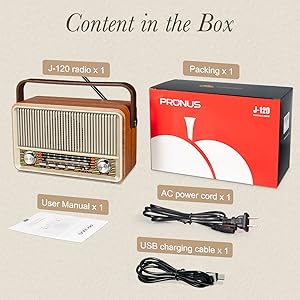
Image: Contents of the PRUNUS J-120 package.
4. Prodotto finitoview
Familiarize yourself with the controls and ports of your PRUNUS J-120 radio.
Controlli del pannello frontale:
- Manopola del volume: Controlla l'accensione/spegnimento e il livello del volume.
- Manopola di sintonia: Regola la frequenza radio per le bande AM/FM/SW.
- Band Selector Buttons: Switches between FM, AM, SW, Bluetooth, USB, TF, and AUX modes.
- Quadrante di sintonia: Visualizza la frequenza radio corrente.
Porte del pannello posteriore:
- Antenna telescopica: Per una migliore ricezione radio.
- Ingresso alimentazione CA: Connects to the AC power cord for wall power.
- Porta di ricarica CC 5V (USB-C): Per caricare la batteria interna ricaricabile.
- Porta USB: For playing audio from a USB disk.
- Slot per schede TF: Per riprodurre l'audio da una scheda TF (MicroSD).
- Jack di ingresso AUX: Per collegare dispositivi audio esterni.

Immagine: Frontale view of the PRUNUS J-120 radio with dimensions.
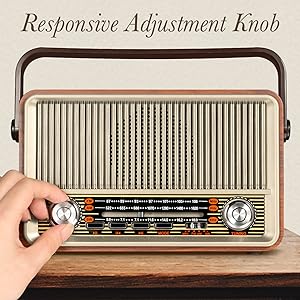
Image: Responsive Adjustment Knob.
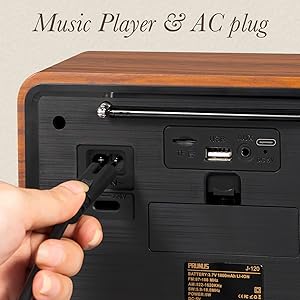
Image: AC power input and media ports.
5. Impostazione
5.1 Accensione della radio
The PRUNUS J-120 offers two power options: AC power and a built-in rechargeable battery.
- Alimentazione CA: Connect the provided AC power cord to the AC input on the rear of the radio and plug it into a standard wall outlet.
- Batteria ricaricabile: The radio has an internal 1800mAh rechargeable battery. To charge, connect the USB charging cable to the DC 5V charging port on the rear of the radio and a USB power source (e.g., computer, USB wall adapter). The charging indicator light will illuminate during charging.

Image: Two ways to supply power: AC plug-in and rechargeable battery.
Video: Demonstrates tuning the radio, connecting via Bluetooth, inserting a TF card, plugging in a USB disk, connecting an AUX cable, and charging the radio.
6. Istruzioni per l'uso
6.1 Accensione/spegnimento e controllo del volume
Rotate the Volume knob clockwise to turn the radio ON. Continue rotating to increase the volume. Rotate counter-clockwise to decrease volume and turn the radio OFF.
6.2 Modalità radio (AM/FM/SW)
- Press the corresponding band selector button (FM, AM, or SW) to choose your desired radio band.
- Estendere l'antenna telescopica per una ricezione ottimale, in particolare per le bande FM e SW.
- Slowly rotate the Tuning knob to scan for stations. The tuning dial will indicate the frequency.

Image: Radio with extended antenna for great reception.
6.3 Modalità Bluetooth
- Press the Bluetooth mode button. The radio will enter pairing mode, indicated by an audible prompt.
- Sul tuo dispositivo mobile, attiva il Bluetooth e cerca i dispositivi disponibili. Seleziona "PRUNUS J-120" per associarlo.
- Una volta effettuato l'abbinamento, puoi riprodurre l'audio dal tuo dispositivo tramite la radio.

Image: Bluetooth connection setup.
6.4 Riproduzione da disco USB/scheda TF
- Insert a USB disk into the USB port or a TF (MicroSD) card into the TF card slot on the rear of the radio.
- Press the corresponding mode button (USB or TF) to switch to the playback mode.
- The radio will automatically detect and play audio files dal dispositivo di archiviazione inserito.
6.5 Ingresso AUX
- Connect an external audio device (e.g., smartphone, MP3 player) to the AUX input jack on the rear of the radio using a 3.5mm audio cable (not included).
- Press the AUX mode button.
- Play audio from your external device, and the sound will be output through the radio's speaker.
7. Manutenzione
- Pulizia: Pulire la radio con un panno morbido e asciutto. Non utilizzare detergenti abrasivi o solventi.
- Cura della batteria: Per prolungare la durata della batteria, evitare di scaricarla completamente frequentemente. Caricare la radio regolarmente, anche se non viene utilizzata per lunghi periodi.
- Magazzinaggio: When storing the radio for a long time, ensure it is fully charged and stored in a cool, dry place.
8. Risoluzione Dei Problemi
| Problema | Possibile causa | Soluzione |
|---|---|---|
| La radio non si accende. | Battery is depleted or AC power is not connected. | Connect the AC power cord or charge the internal battery. |
| Ricezione radiofonica scadente. | Antenna non estesa, segnale debole o interferenza. | Extend the telescopic antenna fully. Try repositioning the radio. Avoid sources of electronic interference. |
| Il Bluetooth non si connette. | Radio not in pairing mode, device too far, or already connected to another device. | Ensure the radio is in Bluetooth mode and pairing. Move your device closer to the radio. Disconnect from other Bluetooth devices. |
| No sound from USB/TF/AUX. | Incorrect mode selected, file format not supported, or cable/device issue. | Ensure the correct mode (USB, TF, AUX) is selected. Check if audio files are in a supported format. Verify cable connections and external device functionality. |
9. Specifiche
| Caratteristica | Dettaglio |
|---|---|
| Numero di modello | J-120 |
| Dimensioni del prodotto | 9 x 3.9 x 5.2 pollici (L x L x A) |
| Peso dell'articolo | 2.68 libbre |
| Tecnologia di connettività | Bluetooth |
| Tecnologia sintonizzatore | AM/FM/SW |
| Bande radio supportate | 3-Band (FM: 87-108MHz, AM: 522-1620KHz, SW: 5.9-18.0MHz) |
| Fonte di alimentazione | Battery Powered (1800mAh rechargeable) / AC Power |
| Componenti inclusi | Owner's Manual, AC Power Cord, USB Charging Cable |
10. Garanzia e supporto
The PRUNUS J-120 radio comes with a standard manufacturer's warranty. For specific warranty details, please refer to the warranty card included in your package or contact PRUNUS customer support.
If you encounter any issues or have questions regarding your product, please contact PRUNUS customer support through the retailer's platform or the official PRUNUS website. Please have your model number (J-120) and purchase information ready when contacting support.


