1. Introduzione
Thank you for choosing the Defender Enjoy S200 Portable Bluetooth Speaker. This manual provides essential information for setting up, operating, and maintaining your speaker to ensure optimal performance and longevity. Please read this manual thoroughly before use.
The Defender Enjoy S200 is a versatile portable speaker featuring Bluetooth 5.3 connectivity, True Wireless Stereo (TWS) pairing, an integrated FM radio, and MP3 playback capabilities via USB flash drive or microSD card. It also includes an LED light and supports hands-free calling. Designed for portability, it offers up to 9 hours of playback on a single charge and convenient USB Type-C charging.
2. Prodotto finitoview
2.1 Caratteristiche principali
- Bluetooth 5.3: For stable and efficient wireless audio streaming.
- Stereo senza fili (TWS): Connect two Enjoy S200 speakers for a stereo sound experience.
- Molteplici modalità di riproduzione: Bluetooth, FM Radio, USB Flash Drive, MicroSD Card (up to 32GB).
- Luce LED integrata: Provides visual ambiance.
- Chiamate in vivavoce: Microfono integrato per telefonate.
- Batteria a lunga durata: Fino a 9 ore di riproduzione musicale continua.
- Ricarica USB di tipo C: Porta di ricarica moderna e comoda.
- Design portatile: Compact and lightweight with a carrying strap.
2.2 Contenuto della confezione
- Defender Enjoy S200 Portable Bluetooth Speaker
- Cavo di ricarica di tipo C.
- Guida rapida
- Cinghia di trasporto

Image: The Defender Enjoy S200 Portable Bluetooth Speaker, showcasing its compact design and front grille with an illuminated LED ring.

Image: An infographic highlighting key features such as multi-colored LED lighting, True Wireless Stereo (TWS) pairing, Bluetooth 5.3, MP3 player, FM receiver, and hands-free calling.
3. Impostazione
3.1 Ricarica dell'altoparlante
- Locate the Type-C charging port on the back of the speaker.
- Connect the provided Type-C charging cable to the speaker and the other end to a USB power adapter (not included) or a computer's USB port.
- L'indicatore LED mostrerà lo stato di carica. Una ricarica completa richiede in genere circa 3-4 ore.
- Una volta completata la carica, scollegare il cavo.
3.2 Accensione/Spegnimento
- To power on, slide the ON/OFF switch located on the back of the speaker to the 'ON' position.
- Per spegnere, far scorrere l'interruttore ON/OFF in posizione 'OFF'.
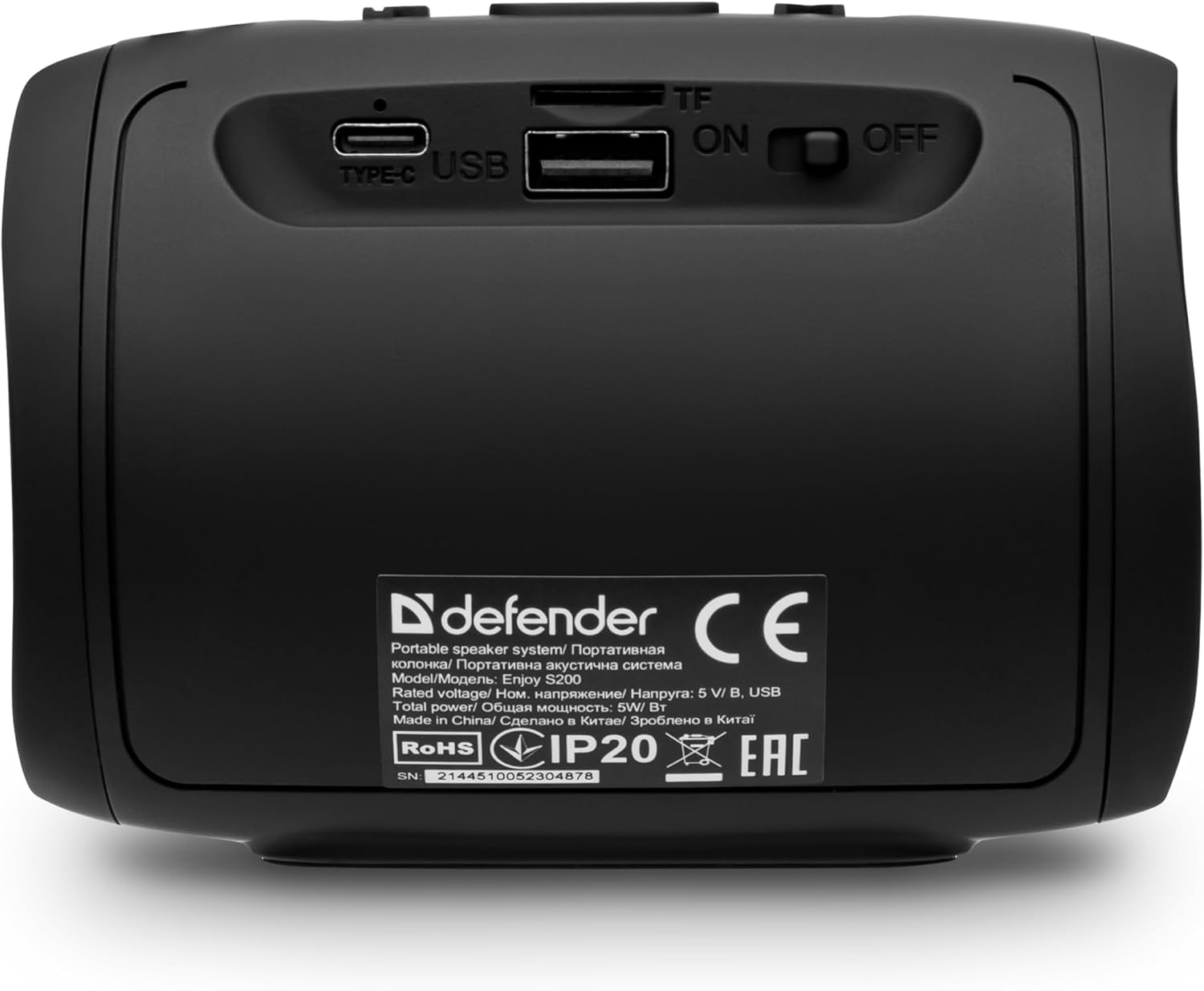
Immagine: Posteriore view of the Defender Enjoy S200 speaker, showing the Type-C charging port, USB port, TF (microSD) card slot, and the ON/OFF power switch.
3.3 Associazione Bluetooth
- Assicurarsi che l'altoparlante sia acceso e in modalità di associazione Bluetooth (indicata da un LED lampeggiante).
- Sul tuo dispositivo (smartphone, tablet, ecc.), attiva il Bluetooth e cerca i dispositivi disponibili.
- Select "Defender Enjoy S200" from the list of devices.
- Una volta effettuato l'accoppiamento, l'altoparlante emetterà un suono di conferma e il LED smetterà di lampeggiare.
3.4 Accoppiamento True Wireless Stereo (TWS)
To pair two Defender Enjoy S200 speakers for stereo sound:
- Assicurarsi che entrambi gli altoparlanti siano accesi e non connessi ad alcun dispositivo Bluetooth.
- On one speaker (this will be the primary speaker), press and hold the TWS button (often indicated by a double-arrow icon) until you hear a pairing tone.
- The two speakers will automatically search and connect to each other. A confirmation tone will sound once connected.
- Ora collega il tuo dispositivo all'altoparlante principale tramite Bluetooth come descritto nella sezione 3.3. L'audio verrà riprodotto in stereo da entrambi gli altoparlanti.

Image: A visual representation of two Defender Enjoy S200 speakers pairing wirelessly to create a True Wireless Stereo system, alongside icons for Bluetooth 5.3, MP3 player, FM receiver, and hands-free calling.
4. Istruzioni per l'uso
4.1 Button Functions (Refer to top panel controls)
- Pulsante di accensione: Long press to power on/off. Short press to play/pause in music mode, or answer/end calls.
- Volume su (+): Short press to increase volume. Long press for next track/station.
- Volume basso (-): Short press to decrease volume. Long press for previous track/station.
- Pulsante Modalità (M): Short press to switch between Bluetooth, FM Radio, USB, and MicroSD modes.
- Pulsante luce LED: Short press to cycle through LED light modes or turn off the LED.
4.2 Riproduzione Bluetooth
After successful Bluetooth pairing (Section 3.3), open your music application on your device and begin playback. Use the speaker's volume buttons or your device's volume controls to adjust the audio level.
4.3 Modalità radio FM
- Press the 'M' (Mode) button until you hear the FM radio prompt.
- Premere a lungo il pulsante Play/Pausa per eseguire la scansione automatica e salvare le stazioni FM disponibili.
- Utilizzare i pulsanti Volume su (+) e Volume giù (-) (pressione prolungata) per navigare tra le stazioni salvate.
4.4 Riproduzione USB/MicroSD
- Insert a USB flash drive or a microSD card (up to 32GB) containing MP3 audio files nella rispettiva porta sul retro dell'altoparlante.
- Press the 'M' (Mode) button until the speaker automatically switches to USB or MicroSD mode and begins playback.
- Use the speaker's control buttons for play/pause, next track, and previous track.
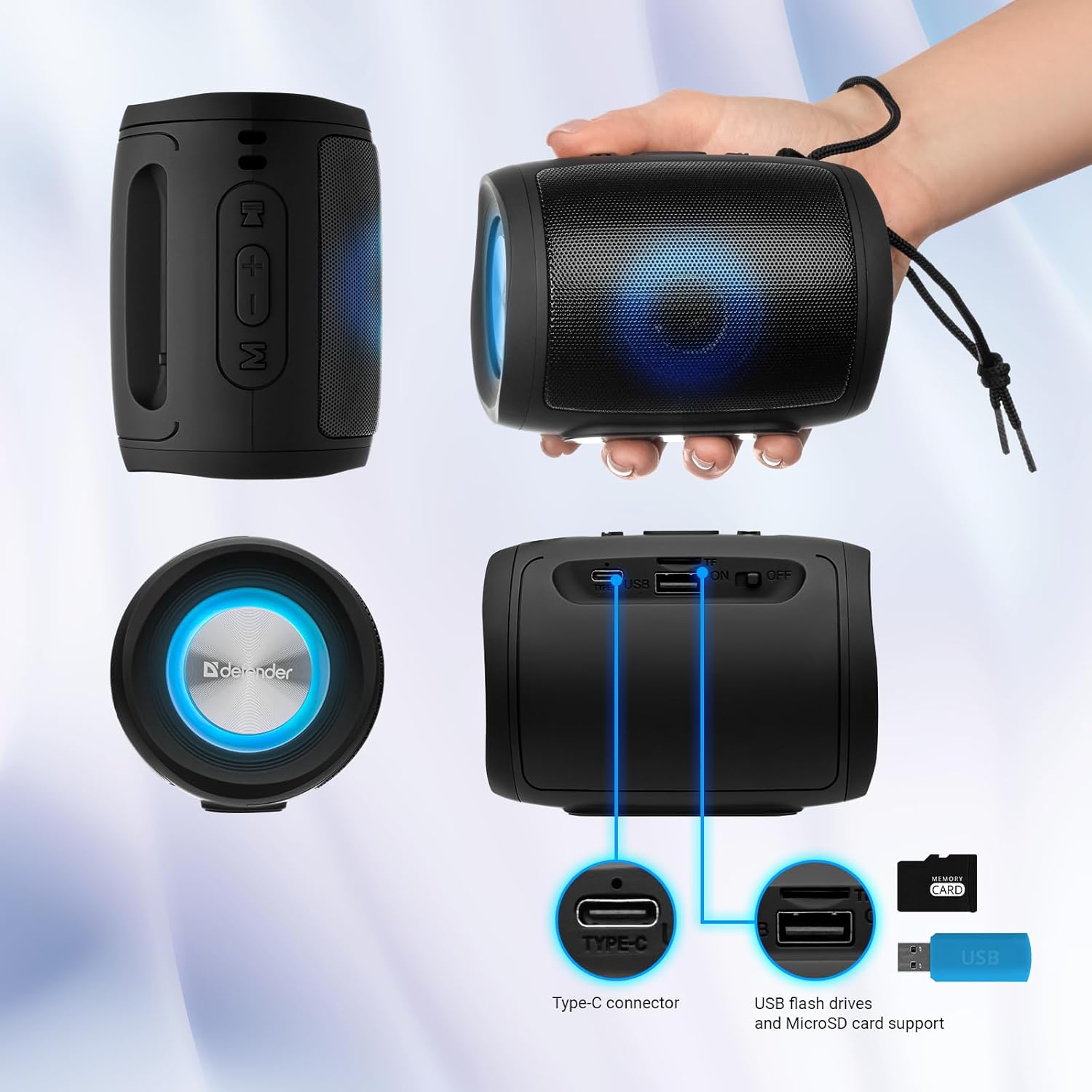
Image: A detailed diagram illustrating the Type-C connector, USB flash drive port, and MicroSD card slot on the Defender Enjoy S200 speaker.
4.5 Chiamate in vivavoce
When connected to your smartphone via Bluetooth, the speaker's built-in microphone allows for hands-free calls.
- Rispondi alla chiamata: Premi brevemente il pulsante Riproduci/Pausa.
- Termina chiamata: Premi brevemente il pulsante Riproduci/Pausa.
- Rifiuta chiamata: Premi a lungo il pulsante Riproduci/Pausa.
5. Manutenzione
- Pulizia: Utilizzare un panno morbido e asciutto per pulire la superficie dell'altoparlante. Non utilizzare detergenti abrasivi o solventi.
- Magazzinaggio: Conservare l'altoparlante in un luogo fresco e asciutto, lontano dalla luce solare diretta e da temperature estreme.
- Resistenza all'acqua: The speaker has an IP20 rating, meaning it is protected against solid objects larger than 12.5mm but has no protection against water. Avoid exposure to rain, splashes, or immersion in water.
- Cura della batteria: Per prolungare la durata della batteria, caricare completamente l'altoparlante prima del primo utilizzo e ricaricarlo almeno una volta ogni tre mesi se non viene utilizzato regolarmente.
6. Risoluzione Dei Problemi
- Nessun potere: Ensure the speaker is charged. Connect the Type-C cable and allow it to charge for a few minutes before attempting to power on again.
- Nessun suono: Check the volume levels on both the speaker and your connected device. Ensure the speaker is in the correct mode (Bluetooth, FM, USB, MicroSD).
- Problemi di accoppiamento Bluetooth: Ensure the speaker is in pairing mode. Turn off Bluetooth on your device and turn it back on. Try unpairing and re-pairing the speaker. Move closer to the speaker to ensure you are within the 10-meter range.
- Ricezione radio FM scarsa: Ensure you are in an area with good signal. The charging cable can sometimes act as an antenna; try connecting it for improved reception.
- USB/MicroSD Not Playing: Garantire l'audio files are in a compatible format (e.g., MP3). Check that the USB drive or microSD card is inserted correctly and is not corrupted.
7. Specifiche
| Nome del modello | Godetevi S200 |
| Numero modello articolo | 65200 |
| Marca | Difensore |
| Tecnologia di connettività | Bluetooth 5.3, USB |
| Tecnologia di comunicazione wireless | Bluetooth, radiofrequenza |
| Tipo di altoparlante | Multimedia |
| Dimensioni dell'altoparlante | 2 pollici |
| Potenza in uscita | 5 Watt |
| Modalità di uscita audio | Stereo |
| Fonte di alimentazione | Alimentato a batteria (1 batteria agli ioni di litio inclusa) |
| Caratteristiche speciali | Integrated Microphone, USB Port, Portable Bluetooth, LED Light, FM Radio, MicroSD Card Support, TWS |
| Dimensioni del prodotto (L x P x A) | Dimensioni: 8 x 11 x 8 cm |
| Peso | 330 grammi |
| Portata massima | 10 metri |
| Grado di protezione IP | Grado di protezione IP20 |
8. Garanzia e supporto
8.1 Informazioni sulla garanzia
I dettagli specifici della garanzia sono in genere forniti con la documentazione di acquisto o sul documento ufficiale del produttore website. Please refer to these resources for information regarding warranty coverage and duration.
8.2 Assistenza clienti
For technical assistance, troubleshooting beyond this manual, or inquiries about your Defender Enjoy S200 speaker, please contact Defender Global customer support. Contact information can usually be found on the product packaging, the manufacturer's websito o la ricevuta d'acquisto.


