Introduzione
The BOSS DM-101 Delay Machine is an advanced analog delay pedal that combines classic bucket-brigade device (BBD) sound with modern control capabilities. It features eight BBDs under smart CPU control, offering 12 unique delay modes, stereo operation, and a wide range of tonal colors while maintaining a 100 percent analog signal path.
This manual provides essential information for setting up, operating, and maintaining your DM-101 Delay Machine to ensure optimal performance and longevity.
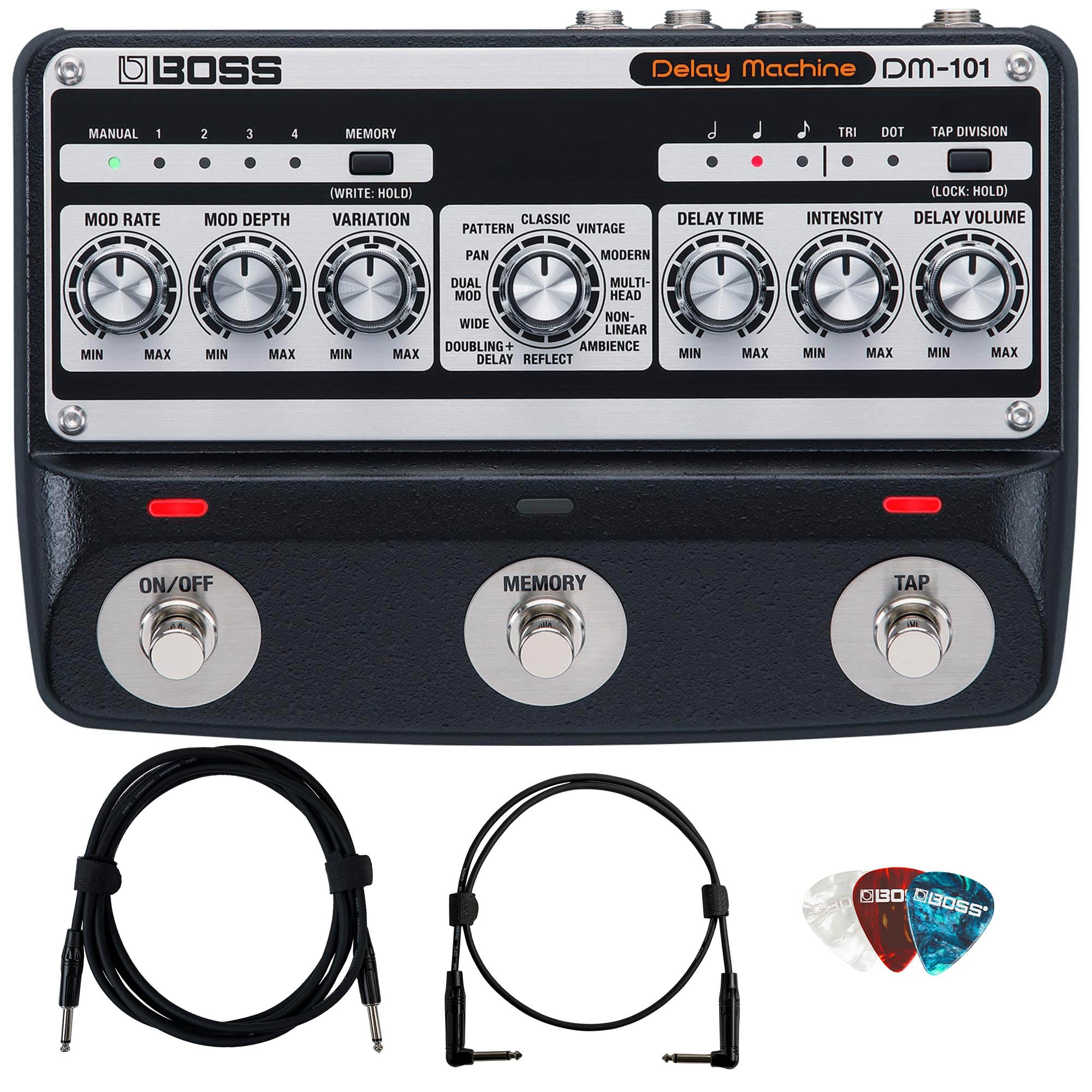
Immagine: Frontale view of the BOSS DM-101 Delay Machine, showcasinle sue manopole di controllo e i suoi pedali.
Impostare
Disimballaggio e ispezione iniziale
Carefully remove the DM-101 from its packaging. Inspect the unit for any signs of damage that may have occurred during transit. Ensure all included accessories, such as the instrument cable, patch cable, and picks, are present.
Collegamento di potenza
- Connect a compatible 9V DC power adapter (sold separately, BOSS PSA adaptor recommended) to the Ingresso CC jack on the rear panel of the DM-101.
- Collegare l'adattatore di corrente a una presa CA.
Connessioni audio
The DM-101 offers flexible input and output options:
- Presa INGRESSO: Connect your guitar or other instrument to this 1/4-inch phone type jack.
- OUTPUT A/MONO Jack: For mono output, connect this 1/4-inch phone type jack to your amplifier o pedale effetto successivo.
- OUTPUT B Jack: For stereo output, connect this 1/4-inch phone type jack to a second amplifier or stereo input.
Collegamenti di controllo
- CTL 1, 2/EXP Jack: This 1/4-inch TRS phone type jack allows connection of external footswitches (CTL 1, 2) or an expression pedal (EXP) for expanded control.
- MIDI (IN, OUT) Jacks: Stereo miniature phone type jacks for MIDI input and output, enabling external control and synchronization.
- Porta USB: A USB micro B-type port is provided for program updates only.

Image: Rear panel of the BOSS DM-101, showing the INPUT, OUTPUT A/MONO, OUTPUT B, CTL 1, 2/EXP, MIDI IN/OUT, DC IN, and USB ports.
Operating the DM-101
Controlli di base
The DM-101 features a range of knobs and footswitches for intuitive control over your delay effects:
- MOD RATE: Adjusts the speed of the modulation applied to the delay.
- MOD DEPTH: Controls the intensity of the modulation.
- VARIAZIONE: This knob cycles through parameters unique to the selected delay mode, offering diverse sound shaping.
- RITARDO: Sets the duration of the delay repeats.
- INTENSITÀ: Controls the feedback of the delay, determining how many repeats occur.
- DELAY VOLUME: Adjusts the output level of the delay effect.
Funzioni del pedale
- ACCESO/SPENTO: Toggles the delay effect on or off.
- MEMORIA: Cycles through user memories (presets). Hold to save current settings.
- RUBINETTO: Tap this footswitch multiple times to set the delay time manually (tap tempo).
Modalità di ritardo
The DM-101 offers 12 distinct analog delay modes. Each mode utilizes different internal circuit elements, including the number of active BBDs, their connection order, low-pass filter settings, and clocking rates, to create unique sonic characteristics. Six of these modes support stereo operation.
Le modalità disponibili includono:
- Modello
- Padella
- Dual Mod
- Largo
- Doubling+Delay
- Classico
- Vinotage
- Moderno
- Multitesta
- Non lineare
- Ambiente
- Riflettere
Sperimenta con il VARIAZIONE knob within each mode to explore its full sonic potential, from gritty vintage echoes to modern analog tones with extended high-frequency clarity.

Immagine: Primo piano view of the BOSS DM-101's control knobs, including MOD RATE, MOD DEPTH, and VARIATION, along with the mode selection area.
Manutenzione
- Pulizia: Utilizzare un panno morbido e asciutto per pulire l'unità. Evitare detergenti abrasivi, cere o solventi.
- Magazzinaggio: When not in use for extended periods, disconnect the power adapter and store the unit in a dry, cool place away from direct sunlight and extreme temperatures.
- Evitare l'umidità: Non esporre l'unità all'acqua o a umidità eccessiva.
- Maneggiare con cura: Evitare di far cadere l'unità o di sottoporla a forti urti.
Risoluzione dei problemi
If you encounter issues with your DM-101, refer to the following common troubleshooting steps:
- Nessun potere:
- Ensure the power adapter is securely connected to both the DM-101 and a working AC outlet.
- Verify that you are using a compatible 9V DC power adapter.
- Nessun suono:
- Controllare tutti i cavi audio (ingresso e uscita) per verificare che i collegamenti siano saldi.
- Assicurare il DELAY VOLUME knob is not set to minimum.
- Verifica che il tuo strumento e amplifier funzionino correttamente.
- Effetto non coinvolgente:
- Premere il tasto ACCESO/SPENTO footswitch to ensure the effect is active.
- Rumore indesiderato:
- Check for faulty cables or power supply issues.
- Assicurare la corretta messa a terra di tutte le apparecchiature.
Se il problema persiste, contattare l'assistenza clienti BOSS per ulteriore assistenza.
Specifiche
| Parametro | Valore |
|---|---|
| Numero di modello | BOS-DM-101 |
| Dimensioni del prodotto | 6 x 8 x 4 pollici |
| Tipi di connettori | INPUT jack, OUTPUT A/MONO jack, OUTPUT B jack (1/4-inch phone type); CTL 1, 2/EXP jack (1/4-inch TRS phone type); MIDI (IN, OUT) jacks (Stereo miniature phone type); DC IN jack; USB port (USB micro B-type) |
| Interfaccia Hardware | USB |
| Formato del segnale | Analogico |
| Tipo di materiale | Rame, Plastica |
| Fonte di alimentazione | Corded Electric (9V DC, BOSS PSA adaptor recommended) |
| Effetti di uscita audio | Ritardo, Riverbero |
| Tipo di controlli | Knob, Footswitch |
Garanzia e supporto
For detailed warranty information and customer support, please refer to the warranty card included with your product or visit the official BOSS website. You can also contact BOSS customer service directly for technical assistance or service inquiries.
BOSS ufficiale Websito: https://www.boss.info/global/


