
1. Introduzione e oltreview
This manual provides comprehensive instructions for the assembly, operation, and maintenance of your Desky Single Sit Stand Desk. Designed for ergonomic well-being, this electric standing desk allows for seamless height adjustments to promote healthy work habits.
Key features include a smooth and quiet motor, three programmable height presets, and a robust frame capable of supporting significant weight.

Image 1: The Desky Single Sit Stand Desk, showcasing its adjustable height design with a monitor and laptop setup.
2. Informazioni importanti sulla sicurezza
- Limite di peso: Exceeding the maximum weight recommendation of 176.4 lbs (80 kg) may compromise the stability and longevity of the desk.
- Prima dell'uso, assicurarsi che tutti i collegamenti siano ben saldi.
- Tenere bambini e animali domestici lontani dalla scrivania durante la regolazione dell'altezza.
- Evitare di versare liquidi direttamente sul pannello di controllo o sui componenti del motore.
3. Contenuto della confezione
Prima di iniziare il montaggio, assicurarsi che tutti i componenti elencati di seguito siano presenti e integri:
- Scrivania
- Desk Frame (includes crossbars and side brackets)
- Motorized Electric Desk Legs (2)
- Controller da tavolo
- Scatola di alimentazione
- Spina a muro GPO
- Cavi di collegamento
- Asta di sincronizzazione
- Hardware (screws, hex key)
- Fascette adesive
4. Installazione e assemblaggio
The Desky Single Sit Stand Desk is designed for easy, tool-free installation. For a visual guide, please refer to the official assembly video below. It is recommended to assemble the desk in the location where it will be used to avoid unnecessary movement.
Video 1: Official Desky Single Sit Stand Desk Assembly Guide. This video demonstrates the step-by-step process of putting together your desk, from unboxing to final power-up.
4.1. Prepara il tuo spazio di lavoro
Clear an open, clean, and dry area for assembly. It is advisable to keep the desktop box unopened until the frame is assembled to protect the surface.
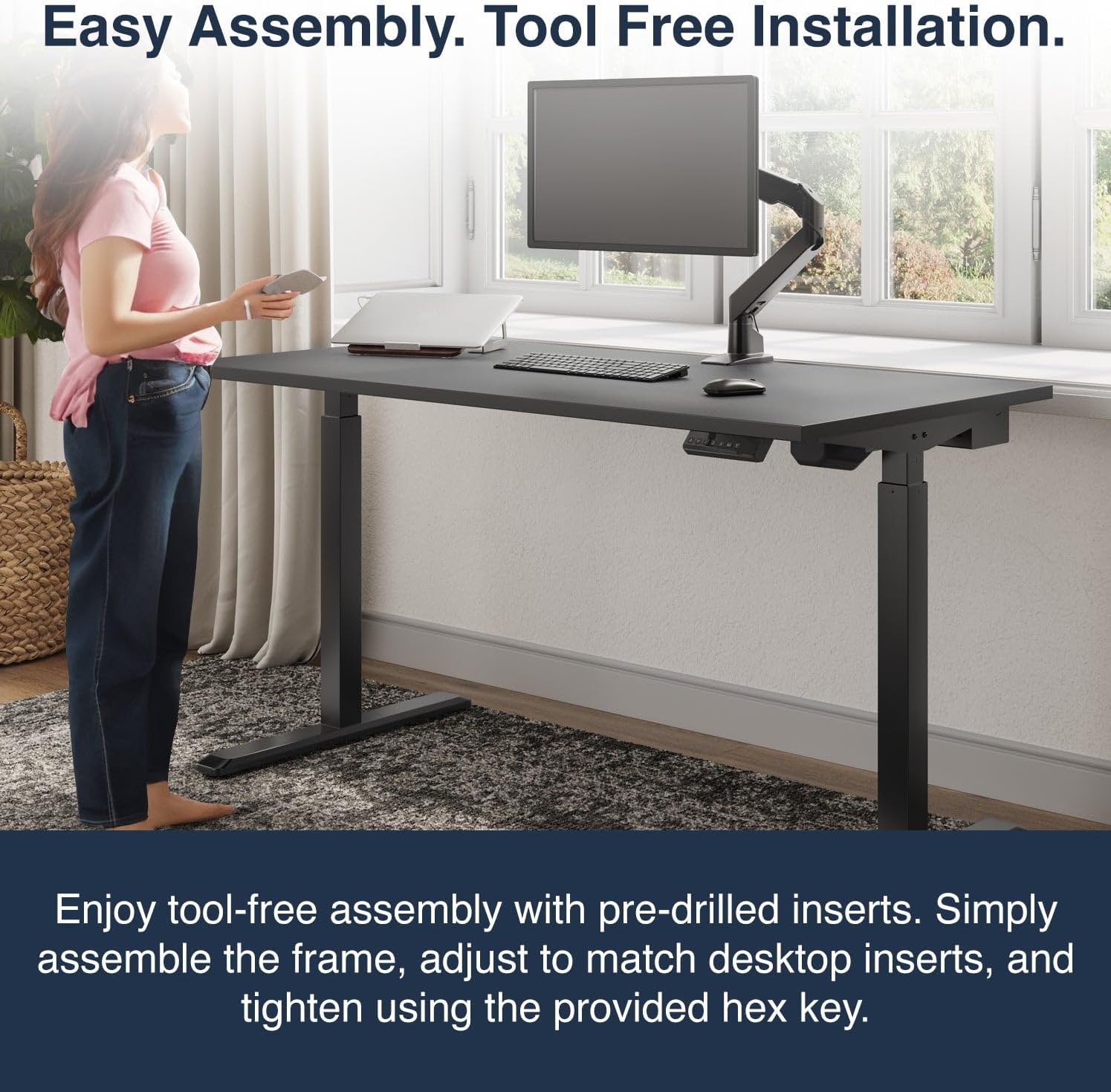
Image 2: The desk frame assembled, highlighting the ease of setup with pre-drilled inserts.
4.2. Assemblare il telaio
- Crossbar Adjustment: Loosen the grub screws on the crossbar ends using the provided hex key. Slide the crossbar ends apart to the desired width, then retighten the grub screws to secure them.
- Attaccare le gambe:
- Position the leg with the lifting motor facing inward and the cord away from the frame. Match the two widely spaced holes on the crossbar with the bumps on the leg.
- Press the leg firmly against the crossbar until flush. Insert and tighten two screws through the crossbar into the leg using the hex key.
- Repeat for the opposite leg, ensuring the single hole for the sync rod faces inward. Match the four bumps on the leg with the holes on the crossbar, press firmly, and secure with two screws.
- Fissare le staffe laterali: Attach the side brackets to the back of each leg. Ensure the cable management channel hole faces the opposite side to the motor. Position the bracket flush against the leg, aligning holes and bumps. Insert and tighten two screws to secure. Repeat for the other side.
- Position Desktop: Carefully place the desktop with its bottom side facing up. Position the assembled frame onto the desktop, ensuring the gearbox faces the front. The front of the desktop is identified by small pre-drilled holes on either side of the edge.
- Adjust Frame Width: Slightly loosen the grub screws on the crossbar ends. Adjust the frame width to align the six pre-drilled holes on the desktop with those on the side brackets and center crossbar. Retighten the grub screws.
- Fissare i piedi: With the pads facing up, position each foot on top of its respective leg, aligning all four holes. Insert and slightly hand-tighten four screws into the leg. Then, tighten them firmly in a criss-cross pattern to ensure the feet are level. Repeat for the other foot.
- Install Cable Management Tray (Optional): Align the mounting holes on the hangers with the screw holes on the inside of the cable management tray. Hold the hanger in place, flip the tray over, and insert two screws through the bottom of the tray to attach the hanger securely. Repeat for the opposite hanger.
- Attach Cable Management Tray to Frame: From the back of the desk, with the tray facing upside down and hangers pointing away, gently lift the frame and slide the cable management tray into place. Position it either in the middle or close to the motor end, ensuring it faces away from the motor side. Tighten the screws on the tray hangers to secure it to the frame.
- Secure Frame to Desktop: Ensure all holes on the frame align with the holes on the desktop. Insert and tighten all six screws (two in the middle of the frame, two on each side bracket) into the pre-drilled holes to firmly fix the desktop and frame together.
- Insert Sync Rod: Insert the sync rod into the leg without the motor. Unscrew the nut to loosen the rod and extend it to meet the opposite leg. Match the hex-shaped rod with the hex-shaped opening in the leg (you may need to rotate it to fit). Press it in to secure. Undo the nut on the opposite end of the sync rod to extend it and position it onto the gearbox shaft. Tighten the middle nut on the sync rod to secure its length, then return to tighten the nut at the end of the rod inside the motor.
- Allega pannello di controllo: Line up the pre-drilled holes on the desktop with those of the controller. Use two screws to secure the controller in place. It is recommended to leave them slightly loose until the desk is upright for final alignment.
- Capovolgi la scrivania: Carefully flip the desk over. This can be done by one person in stages, ensuring not to lean on the edge with the control panel. Alternatively, seek assistance for this step.
- Connetti alimentazione: Connect the cables from the control panel to the control box, ensuring a tight connection. Then connect the motor to the control panel. Connect the control box to the power lead and plug it into a wall outlet.
5. Istruzioni per l'uso
Your Desky Single Sit Stand Desk features an intuitive control panel for easy height adjustment and memory presets.
5.1. Regolazione base dell'altezza
- Utilizzare il Freccia su (▲) pulsante per sollevare la scrivania.
- Utilizzare il Freccia giù (▼) pulsante per abbassare la scrivania.
- The desk moves at approximately 1.5 inches per second and operates with a whisper-quiet motor (45db).
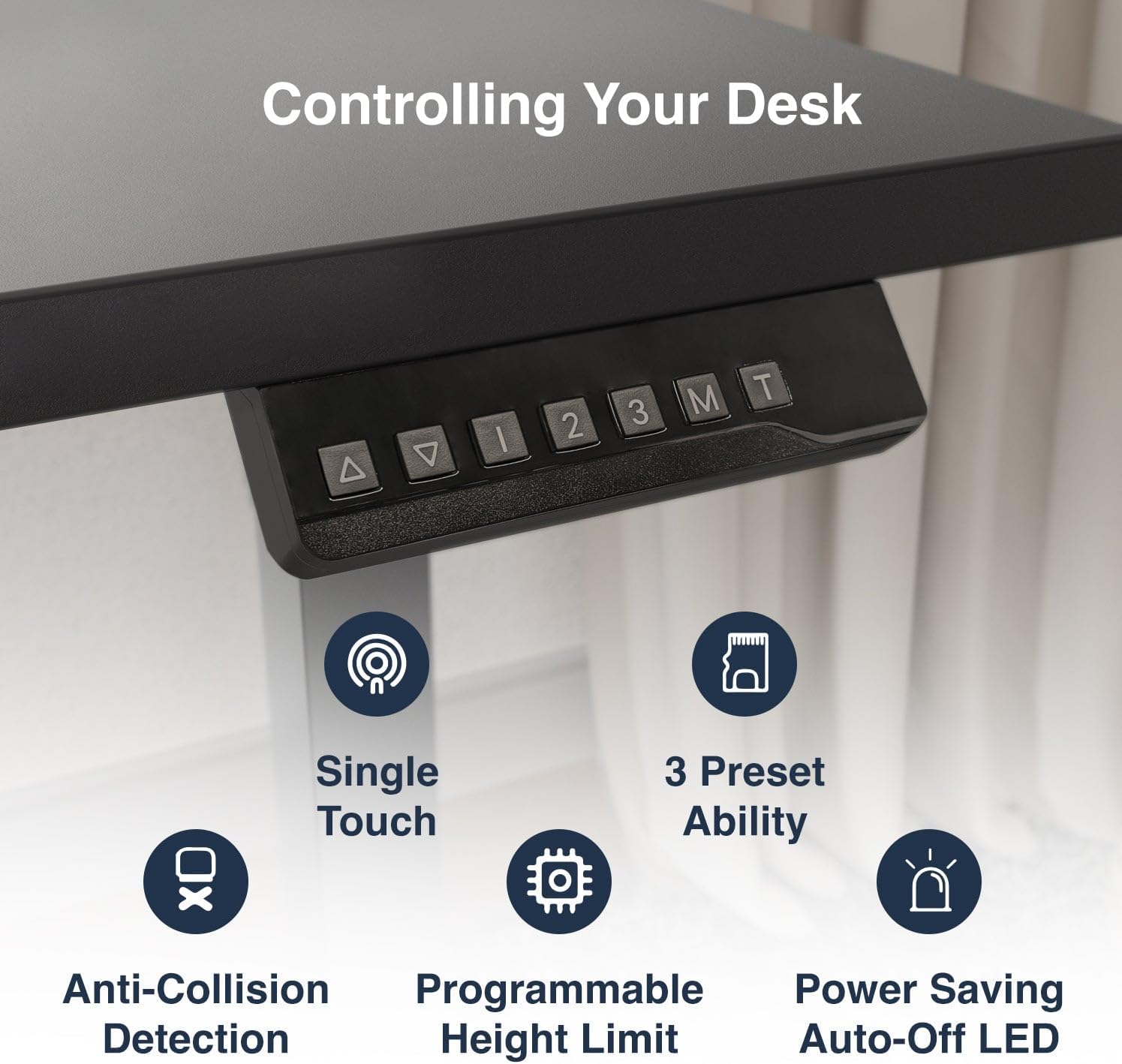
Image 3: The control panel, featuring buttons for height adjustment and memory presets.
5.2. Preimpostazioni di memoria
The desk features three programmable height memory presets:
- Regolare la scrivania all'altezza desiderata utilizzando le frecce Su/Giù.
- Premere il tasto 'M' pulsante. Il display mostrerà 'S-'.
- Press one of the number buttons ('1', '2', O '3') per salvare l'altezza corrente su quella preimpostazione.
- Per richiamare un'altezza salvata, basta premere il pulsante numerico corrispondente.
5.3. Sistema anticollisione
The desk is equipped with an anti-collision system that automatically stops movement if an obstruction is detected during adjustment, preventing damage to the desk or objects.
5.4. Gestione dei cavi
Utilize the integrated cable management system and sticky cable ties to keep your workspace organized and clutter-free.
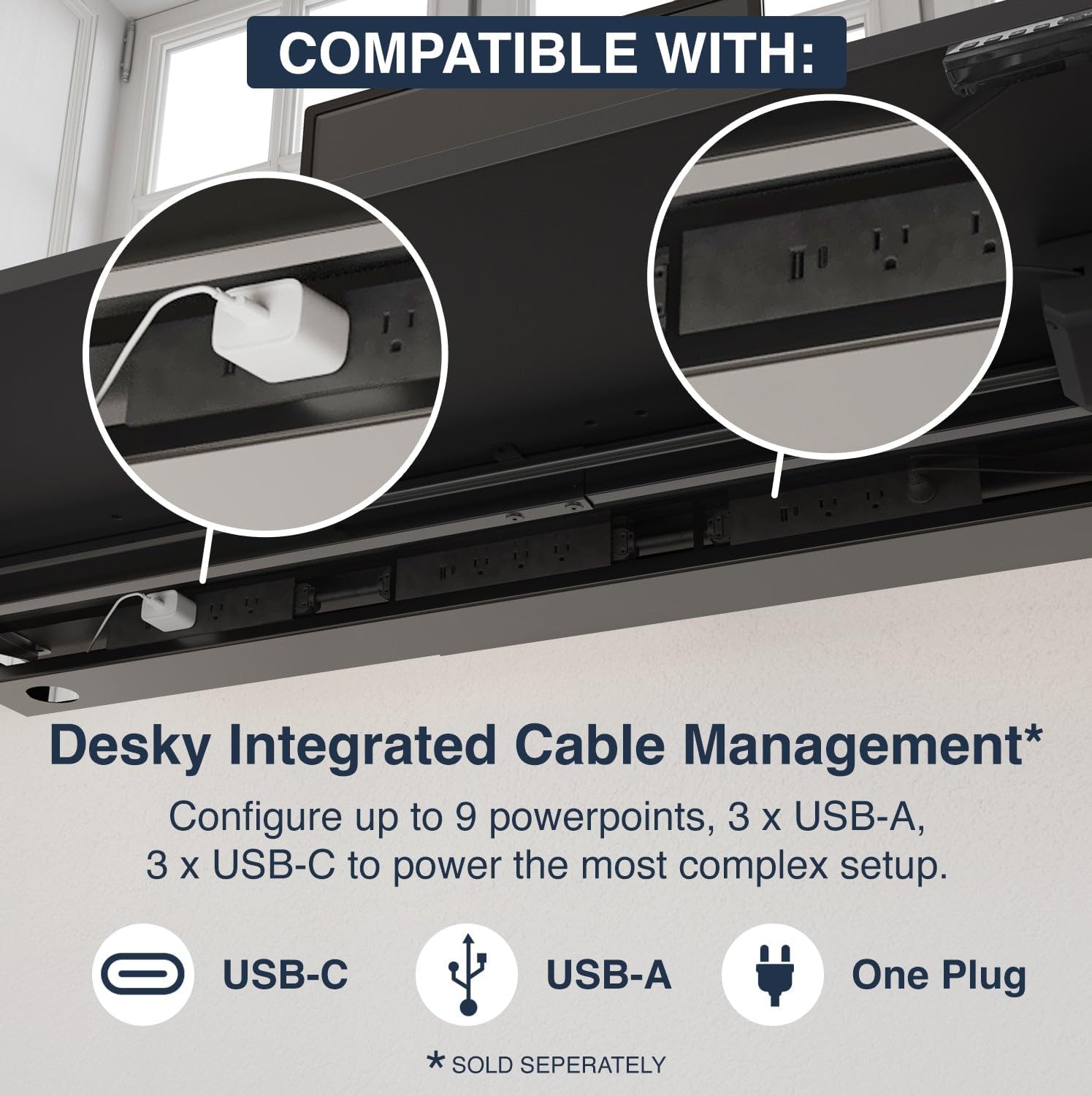
Image 4: Integrated cable management system, designed to keep cables tidy and out of sight.
6. Manutenzione
- Pulizia: Pulisci il desktop e la cornice con un panno morbido eamp panno. Evitare detergenti abrasivi o prodotti chimici aggressivi.
- Controlli regolari: Controllare periodicamente tutte le viti e i collegamenti per assicurarsi che siano sempre ben serrati e sicuri.
- Gestione dei cavi: Ensure cables are neatly managed and not interfering with the desk's movement.
7. Risoluzione Dei Problemi
7.1. Resetting the Desk
If the desk is not functioning correctly or displaying an error code, a reset may resolve the issue:
- Turn off the power to the desk at the wall outlet.
- Wait for approximately 10 seconds for the system to completely power down.
- Turn the power back on at the wall outlet.
- Premere e tenere premuto il tasto Freccia giù (▼) button until the desk reaches its lowest height.
- Continua a tenere premuto il tasto Freccia giù (▼) button until the display shows 'RST' or 'reset'. The desk will briefly move up and down, then display its lowest height (e.g., 73.0).
- The desk is now reset and ready for use.
For other issues, please refer to the support section or contact customer service.
8. Specifiche
| Caratteristica | Dettaglio |
|---|---|
| Marca | Desky |
| Numero di modello | 7964320923970 |
| Dimensioni del prodotto | 29.53"D x 55"W x 37"H (Note: This appears to be a general dimension, actual desktop size is 70.9 x 29.5 in) |
| Desktop Size (Current Variant) | 70.9 x 29.5 pollici |
| Colore | Nero / Grigio |
| Altezza minima | 28.7 pollici |
| Altezza massima | 48.4 pollici |
| Peso massimo raccomandato | 176.4 libbre (80 kg) |
| Materiale di base | Acciaio legato |
| Tipo di finitura | Laminate Decorative Surface |
| Tipo di motore | Single Motor (Top-mounted for smooth power) |
| Livello di rumore | 45db (funzionamento silenzioso) |
| Caratteristiche speciali | 3-Stage Frame Design, 4 Height Memory Presets, Adjustable Height, Anti-Collision System, BIFMA Compliant, Dual Motor Lifting System (Note: Product title indicates 'Single Sit Stand Desk', but features mention 'Dual Motor Lifting System'. Please refer to product packaging for definitive motor configuration.), Ergonomically Suited for 95% of Users, Leading Stability and Strength, Tool Free Installation, Whisper Quiet Operation. |
| Assemblaggio richiesto | SÌ |
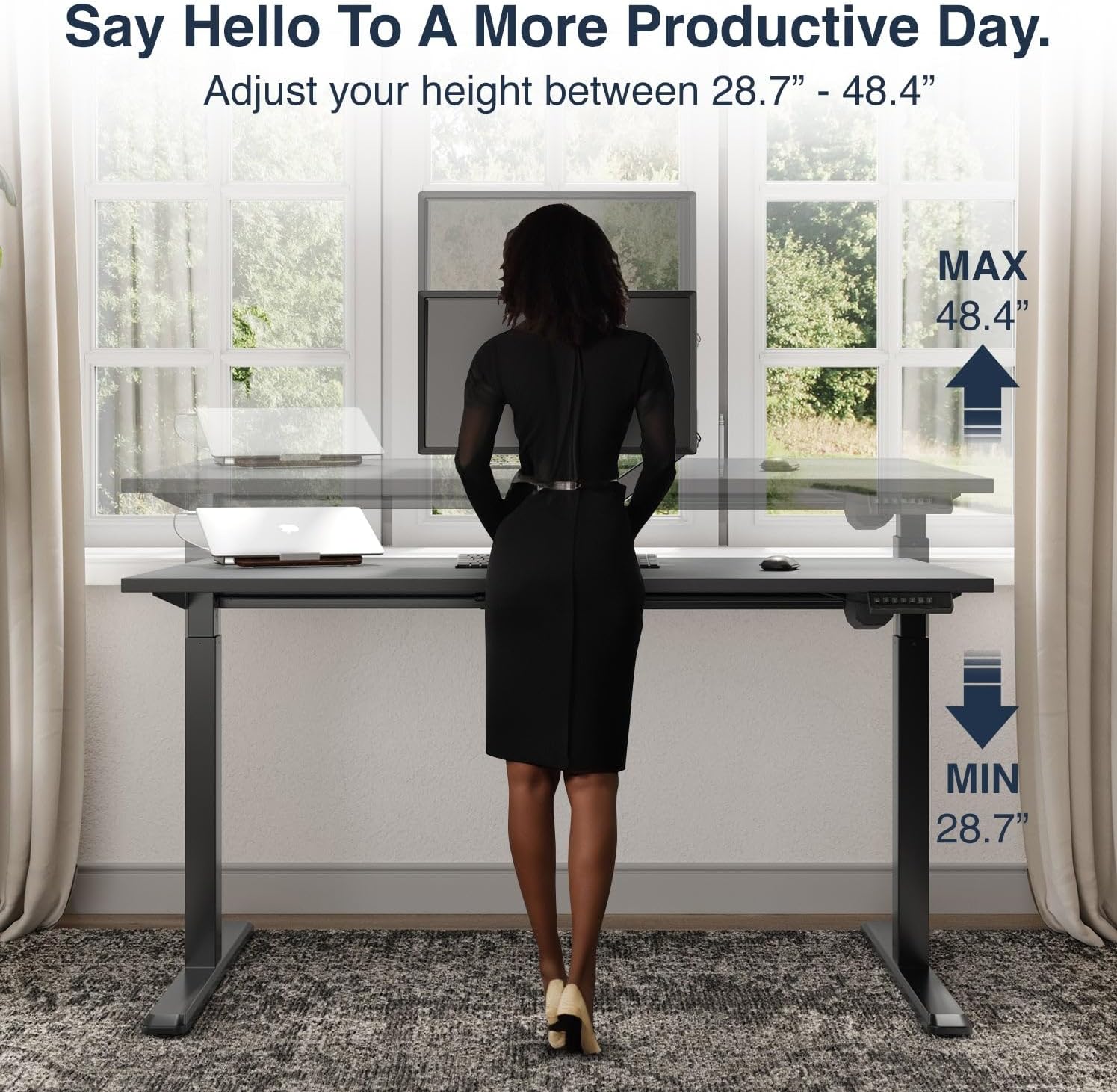
Image 5: Visual representation of the desk's adjustable height range, from 28.7" to 48.4".

Image 6: Demonstration of the desk's robust lifting capacity, supporting up to 176 lbs and tested for durability.
9. Garanzia e supporto
9.1. Informazioni sulla garanzia
Your Desky Single Sit Stand Desk comes with a Garanzia del fornitore di 3 anni, che copre difetti di fabbricazione e malfunzionamenti in normali condizioni d'uso.
9.2. Assistenza clienti
For any questions, technical assistance, or warranty claims, please contact Desky customer support through their official websito o rivenditore presso cui è stato acquistato il prodotto.
Visita desky.com.au for more information and additional resources.