1. Introduzione
This manual provides detailed instructions for the installation, operation, and maintenance of your VIMIN VM-GS1620 18-Port Gigabit Ethernet Switch. Please read this manual thoroughly before using the device to ensure proper setup and optimal performance. Keep this manual for future reference.
2. Prodotto finitoview
The VIMIN VM-GS1620 is an unmanaged 18-port Gigabit Ethernet switch designed for high-speed network expansion. It features 16 Gigabit Ethernet ports (10/100/1000 Mbps) and 2 dedicated 1000Mbps uplink ports. The switch supports IEEE802.3af/at standards and includes a One Key VLAN function for enhanced network security and bandwidth management. Its durable metal housing allows for versatile desktop or rack-mount installation.
2.1 Pannelli anteriore e posteriore

Figura 1: Front and Rear Panels of the VIMIN VM-GS1620 Switch. The front panel displays 16 Gigabit ports (1-16), 2 Uplink ports (17-18), LED indicators for Power and Data, and a VLAN switch. The rear panel shows the AC power input.
Caratteristiche del pannello frontale:
- Porte 1-16: 10/100/1000 Mbps Gigabit Ethernet ports for connecting network devices.
- Porte 17-18 (Uplink): Dedicated 1000 Mbps Gigabit uplink ports for connecting to a router or main network.
- LED di potenza: Indica lo stato dell'alimentazione.
- Data/Link/Act LEDs: Indicate data activity and link status for each port.
- Switch VLAN: Toggles the One Key VLAN function on or off.
Caratteristiche del pannello posteriore:
- Ingresso alimentazione CA: Connects to the provided power cord (AC/IN 100-240V).
2.2 Caratteristiche principali
- Connettività ad alta velocità: 16 Gigabit Ethernet ports and 2 Gigabit uplink ports for fast data transfer.
- One Key VLAN: Enhances network security by isolating ports 1-16 while allowing communication with uplink ports.
- Protezione robusta: Features 4KV lightning protection for device and network safety.
- Design durevole: Sturdy metal housing ensures longevity and efficient heat dissipation.
- Funzionamento senza ventola: Provides quiet operation, suitable for various environments.
- Collega e usa: No complex configuration required for basic network setup.
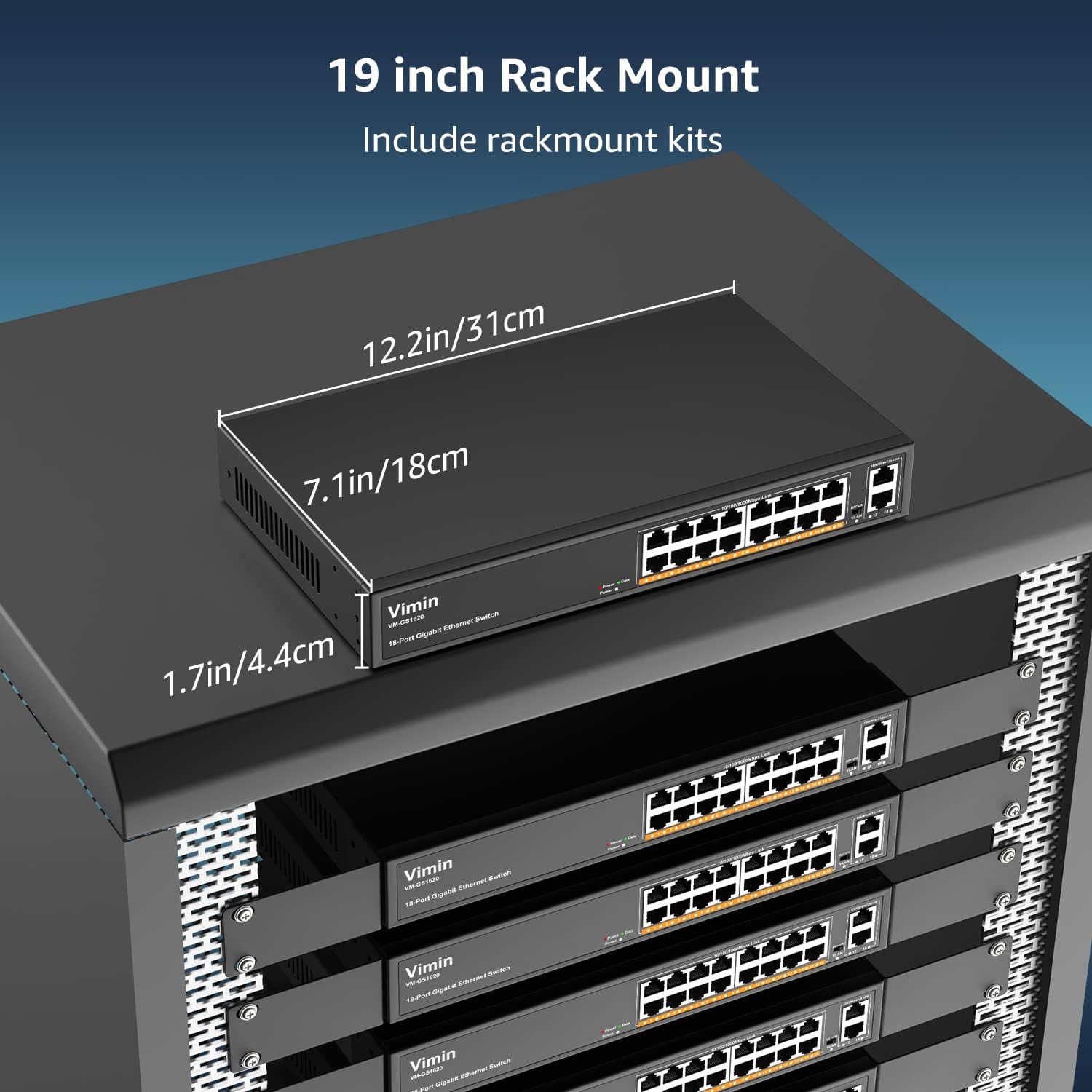
Figura 2: The VIMIN VM-GS1620 features a fanless, quiet design within a durable metal case for reliable performance.
3. Contenuto della confezione
Please verify the contents of your package. If any items are missing or damaged, contact VIMIN support immediately.
- VIMIN VM-GS1620 18-Port Gigabit Ethernet Switch
- Cavo di alimentazione CA
- Rack-Mount Kits (for 19-inch rack installation)
- Manuale dell'utente (questo documento)
4. Istruzioni per l'installazione
4.1 Installazione fisica
The VIMIN VM-GS1620 switch can be installed on a desktop or mounted in a 19-inch rack.
Posizionamento sul desktop:
- Posizionare l'interruttore su una superficie piana e stabile.
- Assicurare un'adeguata ventilazione attorno al dispositivo. Non ostruire le prese d'aria.
- Keep the switch away from heat sources, direct sunlight, and excessive moisture.
Installazione su rack:
- Fissare le staffe di montaggio su rack fornite ai lati dello switch utilizzando le viti in dotazione.
- Fissare lo switch in un rack standard da 19 pollici utilizzando le apposite viti per rack (non incluse).
- Ensure proper airflow within the rack to prevent overheating.

Figura 3: The VIMIN VM-GS1620 switch can be installed in a 19-inch rack using the included rack-mount kits. Dimensions are approximately 12.2in (31cm) wide, 7.1in (18cm) deep, and 1.7in (4.4cm) high.
4.2 Collegamento di alimentazione
- Connect one end of the AC power cord to the power input on the rear panel of the switch.
- Plug the other end of the power cord into a standard electrical outlet (AC 100-240V).
- The Power LED on the front panel should illuminate, indicating the switch is receiving power.
4.3 Connessioni di rete
The VIMIN VM-GS1620 is a Plug and Play device, requiring no software configuration for basic operation.
- Connect your network devices (e.g., computers, printers, IP cameras, access points) to any of the Gigabit Ports 1-16 using standard Ethernet cables.
- Connect your router or main network backbone to one of the Uplink Ports 17-18.
- Once a device is connected and powered on, the corresponding Link/Act LED for that port will illuminate, indicating a successful connection and activity.

Figura 4: Simple Plug and Play connection. Insert an Ethernet cable into any available port.

Figura 5: Connection diagram illustrating power connection, device connections to the switch, and the resulting network functionality.
5. Istruzioni per l'uso
5.1 Funzionamento di base
Once the switch is powered on and devices are connected, the VIMIN VM-GS1620 operates automatically. It functions as an unmanaged switch, forwarding data packets between connected devices at Gigabit speeds without requiring any user configuration.
5.2 One Key VLAN Mode
The switch features a physical VLAN switch on the front panel. This function allows you to quickly enable or disable VLAN isolation.
- VLAN OFF (Default): All ports (1-18) operate as a standard switch, allowing all connected devices to communicate with each other.
- VLAN ON: When the VLAN switch is set to ON, ports 1-16 are isolated from each other. Devices connected to ports 1-16 can only communicate with the uplink ports (17-18) and not directly with other devices on ports 1-16. This enhances network security and can improve bandwidth utilization by preventing broadcast storms within the isolated segments.

Figura 6: The One Key VLAN switch isolates ports 1-16 from each other, allowing them to communicate only with the uplink ports (17-18). This setup is useful for segmenting a network for security or performance.
6. Manutenzione
The VIMIN VM-GS1620 switch is designed for minimal maintenance. Follow these guidelines to ensure its longevity:
- Pulizia: Utilizzare un panno morbido e asciutto per pulire l'esterno dell'interruttore. Non utilizzare detergenti liquidi o spray.
- Ventilazione: Ensure that the ventilation holes are not obstructed to allow for proper heat dissipation.
- Ambiente: Operate the switch within its specified environmental conditions (temperature, humidity).
- Gestione dei cavi: Mantenere i cavi di rete in ordine e privi di pieghe o piegature eccessive per evitare il degrado del segnale.
7. Risoluzione Dei Problemi
If you encounter issues with your VIMIN VM-GS1620 switch, refer to the following common troubleshooting steps:
- Nessun potere:
- Controllare che il cavo di alimentazione sia collegato saldamente sia all'interruttore che alla presa elettrica.
- Verificare che la presa elettrica sia funzionante.
- Assicurarsi che il LED di alimentazione sul pannello frontale sia illuminato.
- Nessun collegamento/attività su una porta:
- Assicurarsi che il cavo Ethernet sia collegato saldamente sia alla porta dello switch sia al dispositivo collegato.
- Provare un cavo Ethernet diverso per escludere che si tratti di un cavo difettoso.
- Collegare il dispositivo a una porta diversa dello switch.
- Verificare che il dispositivo collegato sia acceso e funzioni correttamente.
- Bassa velocità di rete:
- Assicurarsi che tutti i dispositivi e i cavi collegati supportino Gigabit Ethernet (Cat5e o superiore).
- Verificare la presenza di traffico di rete eccessivo o di applicazioni che richiedono molta larghezza di banda.
- Consider enabling VLAN mode if network segmentation is desired to reduce broadcast domains.
- Devices Cannot Communicate (VLAN ON):
- If the VLAN switch is ON, devices on ports 1-16 are isolated from each other and can only communicate with uplink ports. This is expected behavior.
- If you require direct communication between all devices, ensure the VLAN switch is set to OFF.
If the problem persists after trying these steps, please contact VIMIN technical support.
8. Specifiche
| Caratteristica | Descrizione |
|---|---|
| Modello | VM-GS1620 |
| Porti | 16 x 10/100/1000Mbps RJ45 Ports, 2 x 1000Mbps Uplink RJ45 Ports |
| Velocità di trasferimento dati | 1000 Megabit al secondo (Gigabit) |
| Capacità di commutazione | 36 Gbps |
| Standard | IEEE 802.3, IEEE 802.3u, IEEE 802.3ab, IEEE 802.3x, IEEE 802.3af/at |
| Supporto VLAN | One Key VLAN (Port Isolation) |
| Protezione contro i fulmini | 4KV |
| Potenza in ingresso | CA 100-240 V |
| Materiale della cassa | Metallo |
| Installazione | Desktop, 19-inch Rack-Mount |
| Dimensioni (dispositivo) | Circa. 12.2 x 7.1 x 1.7 pollici (31 x 18 x 4.4 cm) |
| Peso dell'articolo | 3.85 libbre (1.75 kg) |
| Dispositivi compatibili | Desktop, Gaming Console, Laptop, Printer, IP Camera, Access Point |
9. Garanzia e supporto
VIMIN stands behind the quality and reliability of its products.
9.1 Informazioni sulla garanzia
This VIMIN VM-GS1620 switch comes with a garanzia di un anno dalla data di acquisto. La presente garanzia copre difetti di fabbricazione e malfunzionamenti in condizioni di normale utilizzo. Non copre danni causati da uso improprio, incidenti, modifiche non autorizzate o calamità naturali.
9.2 Supporto tecnico
VIMIN provides supporto tecnico a vita for this product. If you have any questions, require assistance with installation, or encounter any issues not covered in the troubleshooting section, please contact our professional technical team.

Figura 7: VIMIN offers dedicated customer support.
Informazioni sui contatti:
- E-mail: support@vimintech.com
- Our support team is available to provide 24-hour high-quality service.


