1. Introduzione
Thank you for choosing the Roidmi X20S XCQ06RM Cordless 2-in-1 Vacuum and Mop. This appliance is designed to provide efficient and convenient cleaning for various floor types in your home. This manual contains important information regarding the safe use, operation, and maintenance of your device. Please read it thoroughly before first use and keep it for future reference.
2. Istruzioni di sicurezza
Per ridurre il rischio di incendi, scosse elettriche o lesioni, osservare le seguenti precauzioni di sicurezza:
- Leggere tutte le istruzioni prima di utilizzare l'apparecchio.
- Non utilizzare all'aperto o su superfici bagnate.
- Non permettere che venga utilizzato come giocattolo. È necessaria molta attenzione quando viene utilizzato da bambini o in loro prossimità.
- Utilizzare solo come descritto nel presente manuale. Utilizzare solo gli accessori consigliati dal produttore.
- Non utilizzare con cavo o spina danneggiati. Se l'apparecchio non funziona come dovrebbe, è caduto, è stato danneggiato, è stato lasciato all'aperto o è caduto in acqua, riportarlo a un centro di assistenza.
- Non tirare o trasportare l'apparecchio tramite il cavo, non usare il cavo come maniglia, non chiudere una porta sul cavo e non tirare il cavo attorno a spigoli o angoli taglienti. Non far passare l'apparecchio sul cavo. Tenere il cavo lontano dalle superfici calde.
- Non staccare la spina tirando il cavo. Per staccare la spina, afferrare la spina, non il cavo.
- Non maneggiare la spina o l'apparecchio con le mani bagnate.
- Non inserire alcun oggetto nelle aperture. Non utilizzare con aperture bloccate; tenere lontano da polvere, lanugine, capelli e qualsiasi cosa possa ridurre il flusso d'aria.
- Tenere capelli, abiti larghi, dita e tutte le parti del corpo lontani dalle aperture e dalle parti mobili.
- Prima di scollegare la spina, spegnere tutti i comandi.
- Prestare particolare attenzione quando si puliscono le scale.
- Non utilizzare per aspirare liquidi infiammabili o combustibili, come la benzina, né in aree in cui potrebbero essere presenti.
- Non raccogliere nulla che stia bruciando o che stia producendo fumo, come sigarette, fiammiferi o cenere calda.
- Non utilizzare senza il contenitore per la polvere e/o i filtri in posizione.
- Impedire l'avvio involontario. Assicurarsi che l'interruttore sia in posizione off prima di collegarlo al pacco batteria, sollevare o trasportare l'apparecchio.
- Ricaricare solo con il caricabatterie specificato dal produttore.
3. Contenuto della confezione
Al momento del disimballaggio, controllare il contenuto della confezione per assicurarsi che siano presenti tutti gli articoli:
- Unità principale dell'aspirapolvere
- Spazzola multifunzione
- Mite removal brush
- Washing brush (mop attachment)
- Spazzola elettrica per materassi
- Caricabatterie wireless
- Filtro
- Bocchetta per fessure
- stazione di pulizia
- Tubo a vuoto
- Mop heads x2
4. Prodotto finitoview
The Roidmi X20S XCQ06RM is a powerful and versatile cleaning solution, combining vacuuming and mopping capabilities. Its lightweight design and advanced features make home cleaning efficient.

Figura 1: The Roidmi X20S XCQ06RM cordless vacuum cleaner in its upright configuration.
Caratteristiche principali:
- Aspirapolvere e lavapavimenti 2 in 1: Easily switch between vacuuming and mopping functions by attaching the appropriate head. The mop brush rotates at approximately 200 RPM for deep cleaning.
- Aspirazione potente: Features a new generation Engine-x brushless digital motor (up to 120,000 rpm) delivering 138 watts of suction power and 25,000 Pa air intake pressure. Air-x technology ensures consistent suction by separating dust from air.
- Sistema di filtrazione a 6 livelli: A multi-level system effectively separates dust, filtering impurities as small as 0.3 µm with a 99% purification rate. The device includes a safety mechanism that prevents operation if filters are not correctly installed.
- Mobile Application Connectivity: Connects via Bluetooth to your smartphone. The app allows monitoring of remaining operating time, cleaning time, and provides notifications for dustbin full or filter replacement.
- Durata prolungata della batteria: Optimized by the BMS-X system, the 8 LG/Samsung lithium batteries provide approximately 65 minutes of runtime. The app displays battery status and alerts.
- Ricarica wireless magnetica: Ricarica comoda e senza cavi.
- Design intuitivo: Operates at a reduced noise level of approximately 72 dB (A). The electric brush includes an LED light for improved visibility in dark areas. Weighing 1.5 kg, it is lightweight for easy handling.

Figura 2: The Roidmi X20S main unit shown with both the vacuum brush head and the mop attachment.

Figura 3: A user operating the Roidmi X20S to vacuum a rug in a living room setting.

Figura 4: The mop attachment of the Roidmi X20S cleaning a wet spill on a tiled kitchen floor.
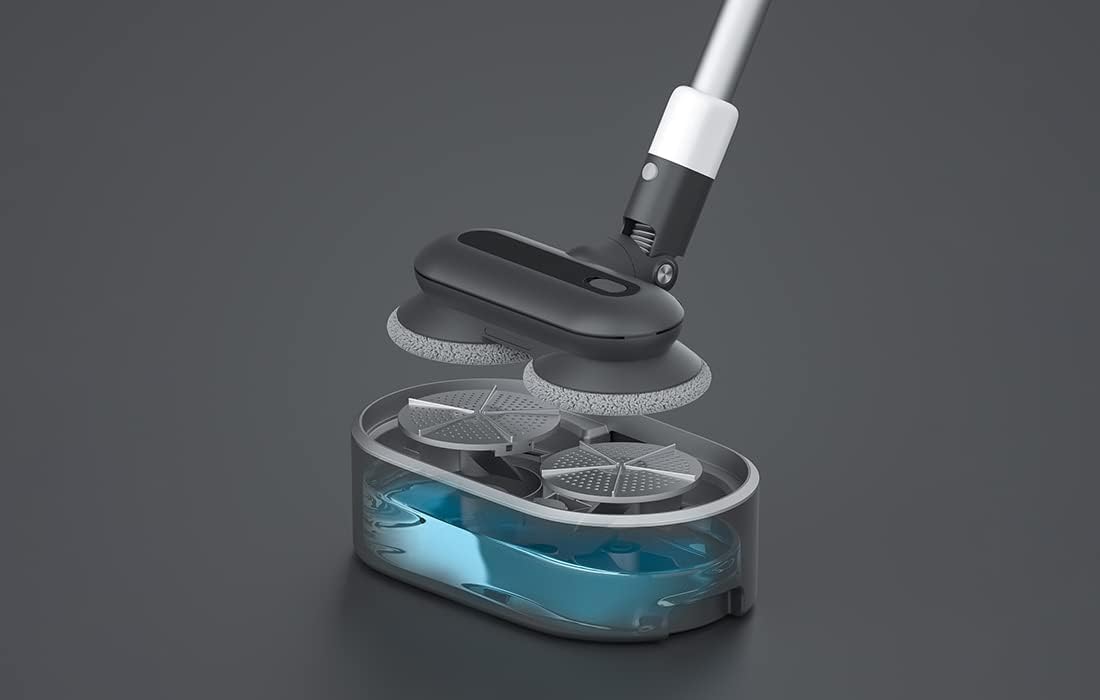
Figura 5: Un esploso view showing the internal components of the Roidmi X20S mop attachment, including the water tank.
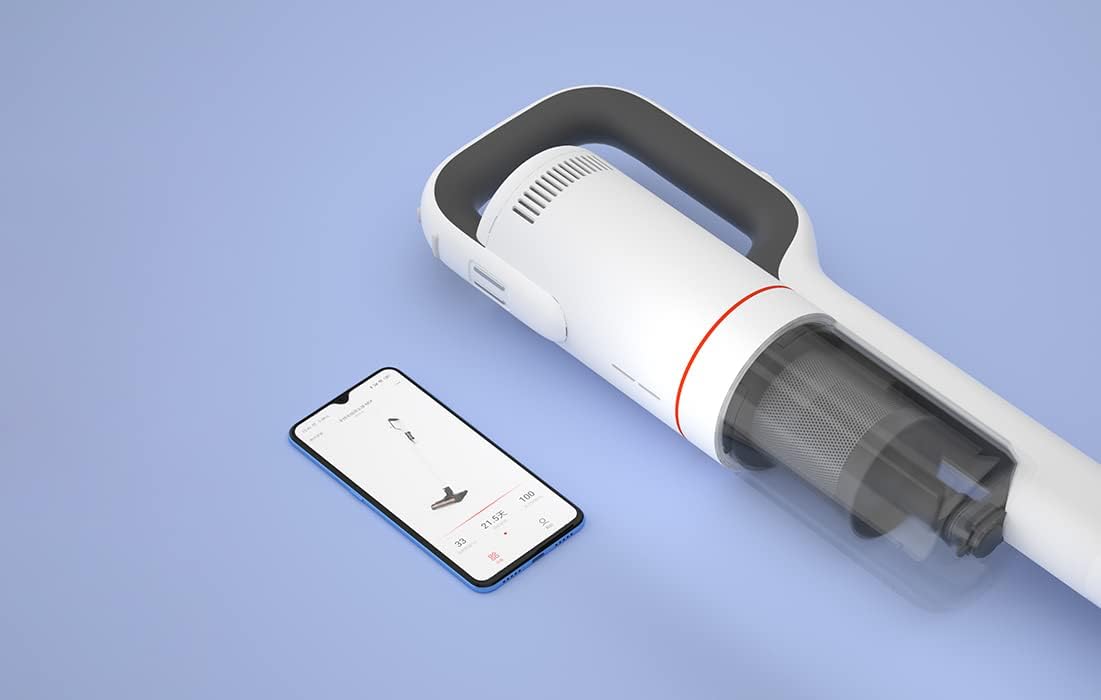
Figura 6: The Roidmi X20S main unit positioned next to a smartphone, illustrating its connectivity with the Roidmi mobile application.

Figura 7: A user demonstrating the Roidmi X20S in handheld mode, cleaning a sofa with an attachment.
5. Impostazione
5.1 Montaggio
- Connect the Vacuum Tube: Insert the vacuum tube into the main unit until it clicks into place.
- Attach Cleaning Head: Select the desired cleaning head (multi-function brush for vacuuming, or washing brush for mopping) and attach it to the end of the vacuum tube until it clicks.
- Install Mop Pads (for mopping): If using the washing brush, attach the mop pads to the bottom of the mop attachment.
5.2 Ricarica
Before first use, fully charge the appliance. The Roidmi X20S uses magnetic wireless charging.
- Mount the cleaning station to a wall in a convenient location, ensuring it is near a power outlet.
- Connect the wireless charger to the cleaning station and plug it into a power outlet (220 Volts).
- Place the Roidmi X20S onto the cleaning station. The magnetic connection will secure it, and charging will begin automatically.
- Monitor the battery status via the indicator lights on the device or through the Roidmi mobile application.
6. Istruzioni per l'uso
6.1 Aspirazione
- Ensure the multi-function brush or appropriate vacuum attachment is securely installed.
- Premi il pulsante di accensione per accendere l'aspirapolvere.
- Select the desired suction mode (if applicable) using the mode selection button.
- Begin vacuuming the desired surface. The LED light on the brush head will illuminate dark areas.
- After use, press the power button to turn off the vacuum.
6.2 Lavaggio
- Detach the vacuum brush head and attach the washing brush (mop attachment) with mop pads installed.
- Fill the water tank on the mop attachment with clean water. Do not use corrosive liquids or hot water.
- Press the power button to turn on the device. The mop pads will begin to rotate.
- Gently guide the mop attachment over the floor surface to clean.
- After use, press the power button to turn off the device. Empty any remaining water from the tank and clean the mop pads.
6.3 Mobile Application Usage
- Download the Roidmi app from your smartphone's app store (compatible with Android and iOS).
- Enable Bluetooth on your smartphone and open the Roidmi app.
- Follow the in-app instructions to pair your Roidmi X20S with your smartphone.
- Una volta connesso, puoi view battery status, remaining operating time, cleaning history, and receive notifications for dustbin full or filter replacement.
7. Manutenzione
Regular maintenance ensures optimal performance and extends the lifespan of your Roidmi X20S.
7.1 Svuotamento del cestino
- When the dustbin full notification appears on the app or when visibly full, detach the dustbin from the main unit.
- Aprire il cestino e svuotarne il contenuto in un cestino dei rifiuti.
- Close the dustbin and reattach it to the main unit.
7.2 Pulizia/Sostituzione dei filtri
- The Roidmi X20S features a washable filter. When the app notifies you to clean or replace the filter, remove the filter from the dustbin.
- Rinse the filter under running water until clean. Ensure it is completely dry before reinserting.
- Sostituire il filtro se è danneggiato o eccessivamente usurato.
7.3 Cleaning Brushes and Mop Pads
- Regularly remove hair and debris from the multi-function brush and electric mattress brush. Use the crevice tool or scissors if necessary.
- After mopping, detach the mop pads from the washing brush and rinse them thoroughly. Allow them to air dry completely before storing or reusing.
8. Risoluzione Dei Problemi
If you encounter issues with your Roidmi X20S, refer to the following common problems and solutions:
| Problema | Possibile causa | Soluzione |
|---|---|---|
| Nessuna alimentazione/Non si accende | La batteria è scarica Device not properly assembled | Caricare completamente la batteria Ensure all parts are clicked into place |
| Bassa potenza di aspirazione | La pattumiera è piena Il filtro è intasato La testina della spazzola è bloccata | Svuota la pattumiera Pulire o sostituire il filtro Remove any obstructions from the brush head |
| Mop function not effective | Il serbatoio dell'acqua è vuoto Mop pads are dirty or worn | Riempire il serbatoio dell'acqua Clean or replace mop pads |
| Il dispositivo si arresta inaspettatamente | La batteria è scarica Filtration system parts not installed correctly | Ricaricare la batteria Check all filter components are securely in place |
| Problemi di connettività dell'app | Il Bluetooth è disattivato Dispositivo non accoppiato | Ensure Bluetooth is enabled on your phone Follow app instructions to re-pair the device |
If the problem persists after attempting these solutions, please contact Roidmi customer support.
9. Specifiche
| Caratteristica | Specificazione |
|---|---|
| Marca | ROIDMI |
| Numero di modello | Modello XCQ06RM |
| Colore | Bianco |
| Energia | 34.2 Watt |
| Voltage | 220 Volt |
| Livello di rumore | 72 Decibels (A) |
| Durata della batteria | Circa 65 minuti |
| Peso dell'articolo | 3.95 chilogrammi |
| Tipo di filtro | Cartridge (Washable, HEPA) |
| Fonte di alimentazione | Alimentato a batteria (1 batteria agli ioni di litio inclusa) |
| Compatibilità | Android, iOS (via Roidmi App) |
| Caratteristiche speciali | Compact, Lightweight, Portable, Bagless, Wet/Dry (mop function) |
| Produttore | Wuxi Roidmi Information Technology Co., Ltd. |
10. Garanzia e supporto
For warranty information, please refer to the warranty card included with your product or contact Roidmi customer service directly. Information regarding the availability of spare parts is not provided in the product details.
For technical support or service inquiries, please visit the official Roidmi websito o contattare i loro canali di assistenza clienti.


