1. Introduzione
This manual provides essential information for the installation, operation, and maintenance of your KAILH Low Profile CHOC Brown Mechanical Keyboard Switches. These switches are designed for mechanical keyboards, offering a tactile feedback experience with a low-profile progetto.
2. Prodotto finitoview
The KAILH Low Profile CHOC Brown switch is a tactile mechanical switch featuring a compact design suitable for slim mechanical keyboards. It provides a distinct bump during actuation without an audible click, making it a balanced choice for typing and gaming.
Caratteristiche principali:
- Operation Force: 50±10gf
- Tactile Force: 60±10gf
- Operation Travel: 1.5 ± 0.5mm
- Totale viaggio: 3.0 +0/-0.5 mm
- Durata: Circa 50 milioni di battute
- Misurare: Dimensioni: 15x15x8mm
Switch Components:
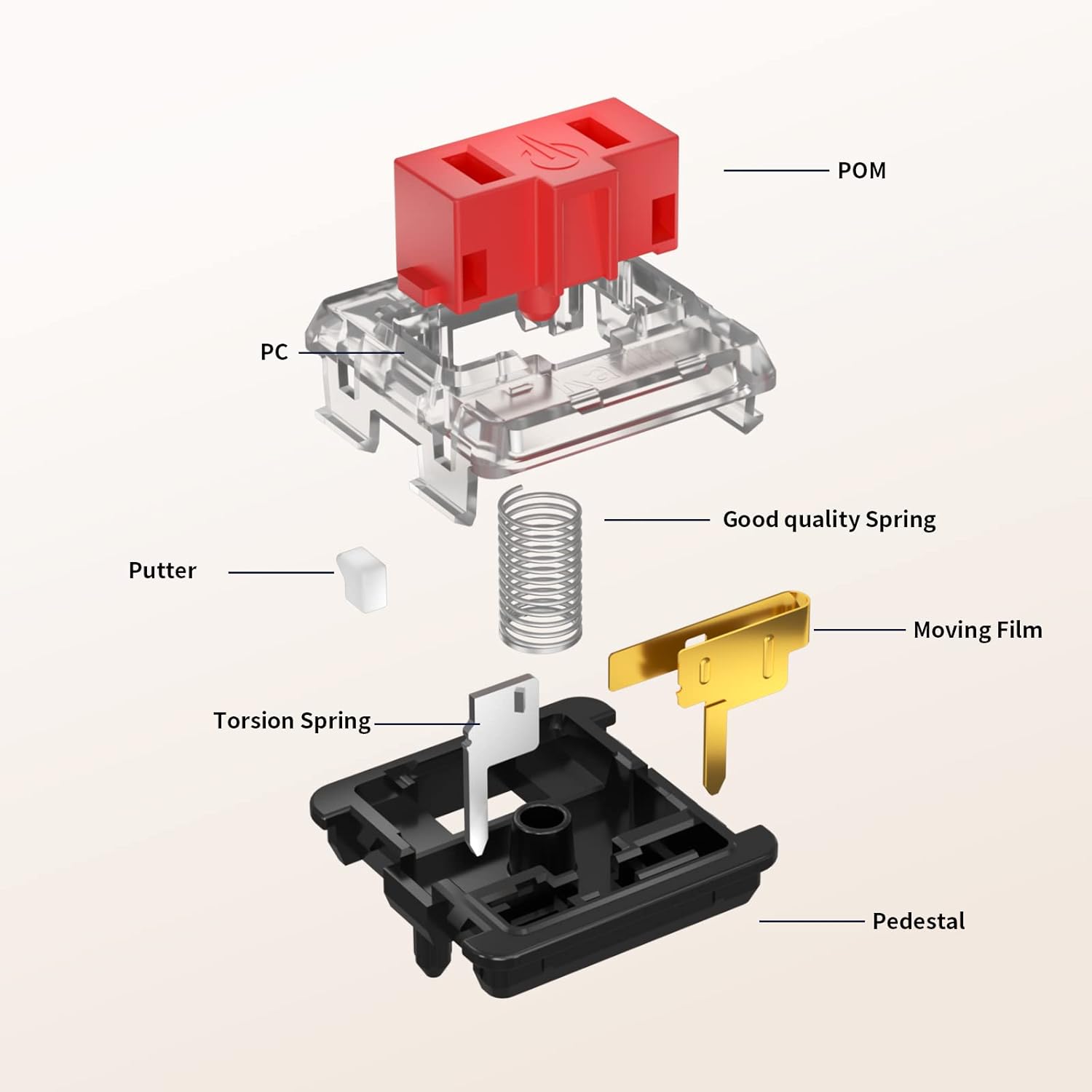

3. Installazione (configurazione)
Installing KAILH Low Profile CHOC Brown switches typically involves soldering them onto a compatible Printed Circuit Board (PCB) of a mechanical keyboard. This process requires precision and appropriate tools.
Strumenti necessari:
- Saldatore
- Filo di saldatura
- Desoldering pump or wick (for switch removal)
- Piccole pinze o pinzette
- Compatible mechanical keyboard PCB
- Keycap puller (if replacing existing switches)
Fasi di installazione:
- Preparare il PCB: Ensure your keyboard PCB is clean and free of dust. If replacing switches, carefully desolder and remove the old switches.
- Align the Switch: Position the CHOC Brown switch over the designated slot on the PCB. Ensure the two metal pins on the bottom of the switch align with the holes on the PCB.
- Insert the Switch: Gently press the switch into place until it sits flush with the PCB. The switch should click into the plate if your keyboard has one.
- Saldare i pin: Flip the PCB over. Carefully solder each of the two metal pins to the corresponding pads on the PCB. Ensure a strong, clean solder joint.
- Funzionalità di prova: Before installing all switches, test a few to ensure they register correctly.
- Installa i tasti: Once all switches are soldered and tested, attach your compatible keycaps.
Note on Keycap Compatibility:
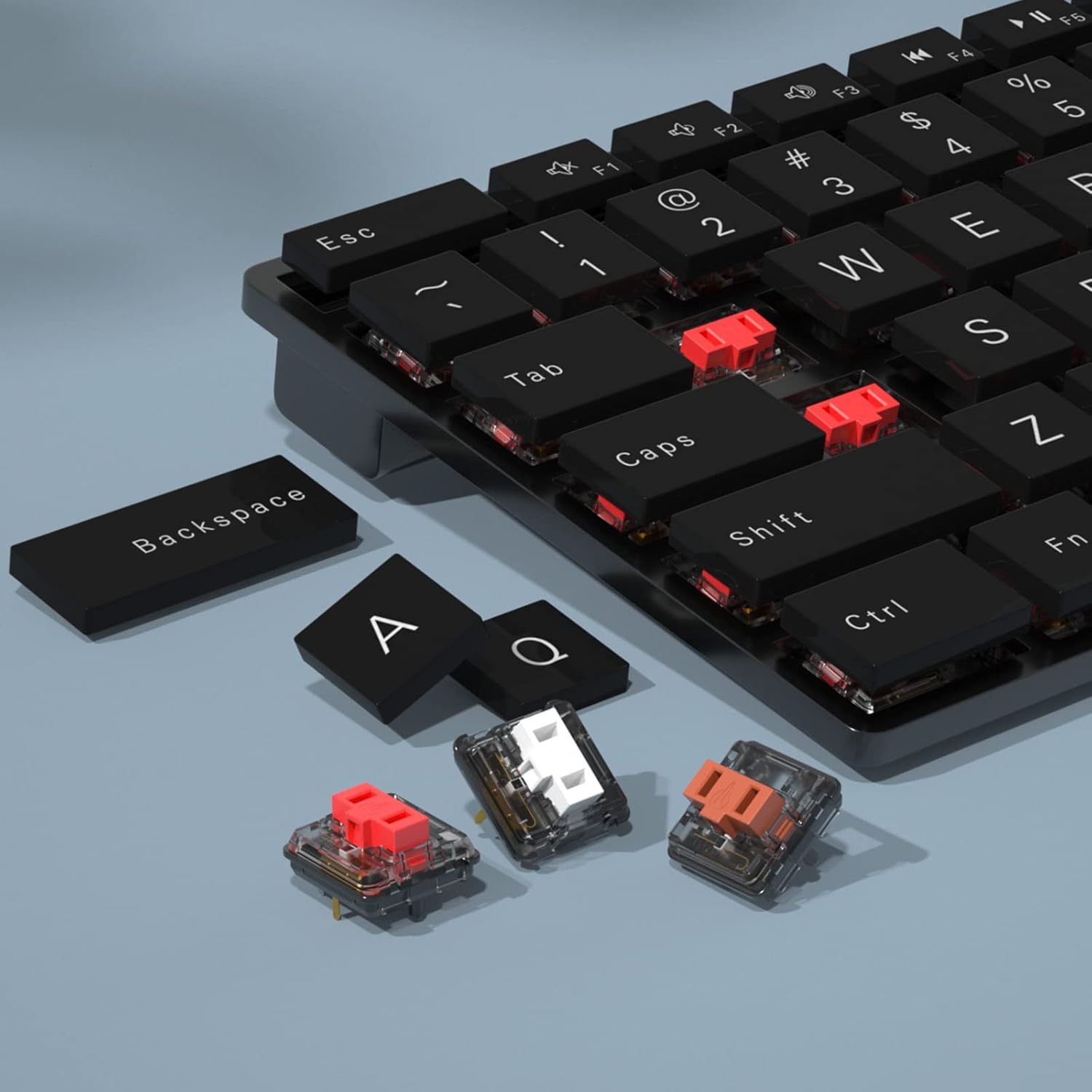
Some users have reported that keycaps from certain keyboards, such as the Logitech G915 TKL, may not fit perfectly on CHOC switches without modification due to slight differences in the keycap holder dimensions. Verify compatibility or be prepared for minor adjustments if using non-standard keycaps.
4. Operating the Switches
The KAILH Low Profile CHOC Brown switches are designed for standard mechanical keyboard operation. Each press of a keycap actuates the switch, sending an input signal to the computer.
Feedback tattile:
CHOC Brown switches provide tactile feedback. This means you will feel a small bump or resistance at the actuation point as you press the key. This tactile bump helps users know when a key press has registered without needing to bottom out the switch, potentially improving typing speed and accuracy.
Force-Travel Diagram:

5. Manutenzione
Proper maintenance can extend the lifespan and ensure optimal performance of your mechanical keyboard switches.
Pulizia:
- Spolverata regolare: Use compressed air to regularly clear dust and debris from around and under the keycaps.
- Rimozione dei tasti: Periodically remove keycaps using a keycap puller to clean the switches and keyboard plate more thoroughly.
- Pulisci: Utilizzare leggermente un panno morbido e privo di lanugine dampened with isopropyl alcohol to wipe down the switch housings if necessary. Avoid excessive moisture.
Lubrication (Advanced):
While not typically required for new switches, advanced users may choose to lubricate switches for a smoother feel or to alter acoustics. This process involves disassembling the switch and applying specialized lubricant. This should only be attempted by experienced individuals as improper lubrication can damage the switch.
6. Risoluzione Dei Problemi
If you encounter issues with your KAILH Low Profile CHOC Brown switches, consider the following common problems and solutions:
Problemi comuni:
- Switch non registrato:
- Causa: Poor solder joint, bent switch pin, or faulty switch.
- Soluzione: Inspect the solder joint for cold joints or bridges. Re-solder if necessary. Check for bent pins before installation. If the switch is faulty, replace it.
- Key Misfiring (Double Input/No Input):
- Causa: Dust/debris inside the switch, worn-out switch contacts, or poor solder joint.
- Soluzione: Try cleaning the switch with compressed air. If the issue persists, the switch may need replacement. Verify solder connections.
- Keycap Not Fitting Securely:
- Causa: Incompatible keycap stem, or slight manufacturing variance in the switch stem.
- Soluzione: Ensure your keycaps are designed for CHOC switches. If using MX-style keycaps, they are generally not compatible. For minor fit issues, some users have carefully filed the keycap stem or switch stem for a better fit, but this should be done with caution.
7. Specifiche
| Caratteristica | Dettaglio |
|---|---|
| Marca | KAILH |
| Modello | Basso Profile CHOC Brown |
| Modalità di funzionamento | Meccanico |
| Tipo di attuatore | Premere il pulsante |
| Tipo di contatto | Normalmente aperto |
| Forza Operativa | 50±10gf |
| Forza tattile | 60±10gf |
| Operation Travel | 1.5 ± 0.5mm |
| Viaggio totale | 3.0 +0/-0.5 mm |
| Durata | Circa 50 milioni di battute |
| Tipo di montaggio | Montaggio su PCB |
| terminale | Saldare |
| Volume di eserciziotage | 12 Volt |
| Valutazione attuale | 50 milioneamps |
| Materiale di contatto | Metallo |
| Peso dell'articolo | 1.13 once (per 10 interruttori) |
| Codice UPC | 701969869218 |
8. Informazioni sulla garanzia
No specific warranty information is provided in the product details. For warranty inquiries, please contact the seller or manufacturer directly.
9. Supporto
For further assistance, technical support, or product inquiries, please contact the KAILH Official Store or the retailer from whom you purchased the product.
Puoi visitare il KAILH Official Store on Amazon per ulteriori informazioni.