1. Introduzione
This manual provides essential information for the safe and efficient operation of your Vamvo Mini Projector. Designed for portability and versatility, this projector supports native 1080P resolution with 4K compatibility, features WiFi 6 and Bluetooth 5.4 connectivity, and includes a 180° adjustable stand for flexible projection. Please read this manual thoroughly before use and retain it for future reference.

Figure 1: Vamvo Mini Projector highlighting key features.
2. Cosa c'è nella scatola
Verifica che tutti i seguenti elementi siano inclusi nel tuo pacchetto:
- Vamvo Mini Projector
- Telecomando
- Cavo HDMI
- Adattatore di alimentazione
- Manuale d'uso
- Scheda di garanzia
3. Prodotto finitoview
The Vamvo Mini Projector is designed for ease of use and high-quality projection. Its compact form factor includes an integrated 180° adjustable stand, allowing for versatile placement and projection angles.
3.1 Caratteristiche principali
- Risoluzione nativa 1080P con supporto 4K: Fornisce immagini nitide e chiare.
- Elevata luminosità e contrasto: Features 15,000 lumens brightness and a 10,000:1 contrast ratio for vivid colors and sharp details.
- Supporto regolabile a 180°: Provides flexible positioning for projection on walls, ceilings, or other surfaces.
- Wi-Fi 6 e Bluetooth 5.4: Garantisce una connettività wireless veloce e stabile per lo streaming e l'audio.
- Altoparlanti incorporati: Gli altoparlanti integrati forniscono l'uscita audio.
- Auto Keystone & Motorized Focus: Simplifies setup by automatically correcting image distortion and allowing precise focus adjustments via remote.

Figure 2: Projector's visual performance metrics.
3.2 Porte e connessioni
Il proiettore offre diverse porte per il collegamento di dispositivi esterni:
- HDMI: For connecting TV sticks, laptops, gaming consoles (PS5, Xbox), etc.
- USB: For connecting USB drives or other USB-compatible devices.
- Tipo-C: For one-touch wireless mirroring with iOS/Android devices (adapters and cables not included).
- Ingresso ausiliario da 3.5 mm: Per collegare altoparlanti esterni o cuffie.
- Ingresso CC: Ingresso alimentazione.
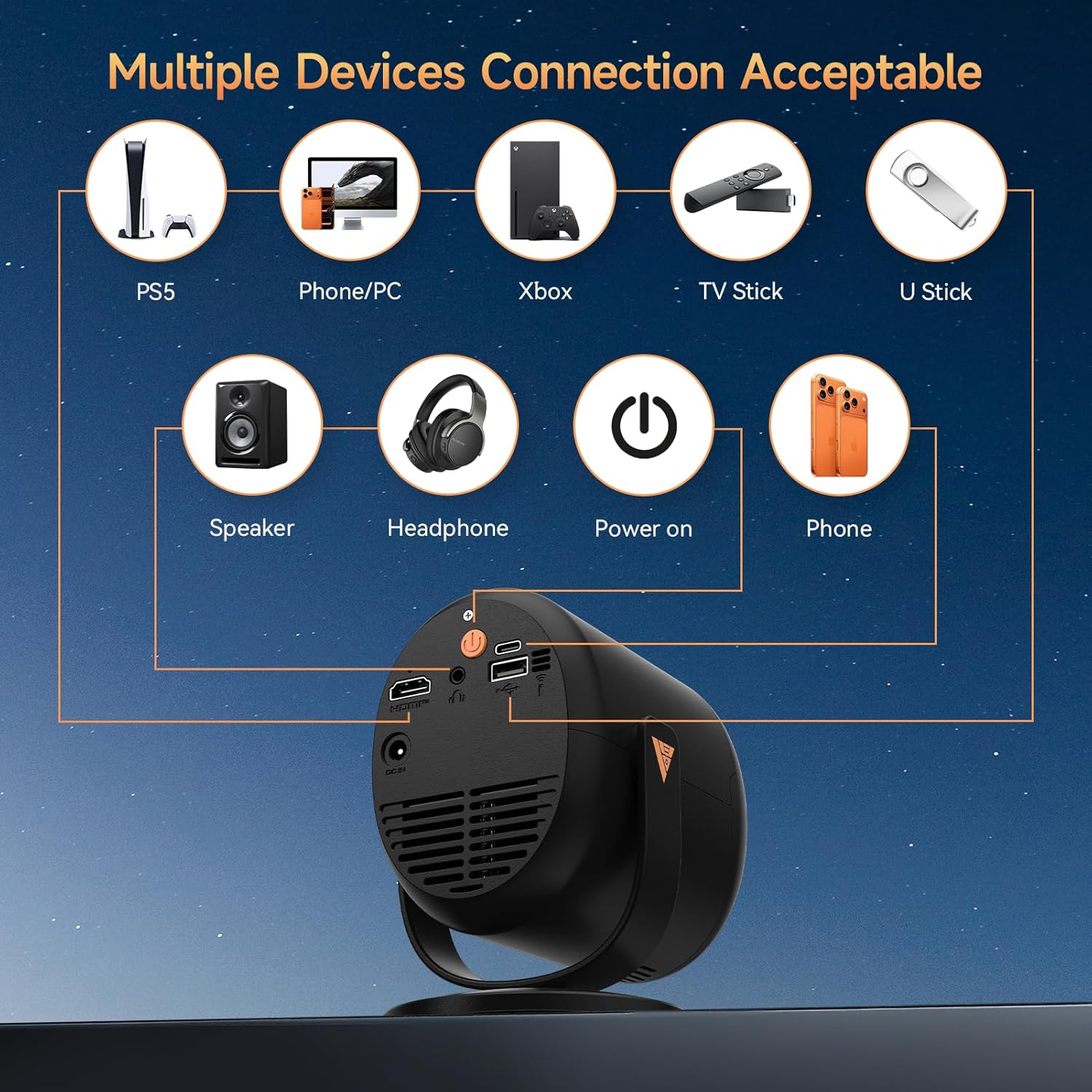
Figure 3: Available ports and compatible devices.
4. Impostazione
4.1 Accensione iniziale
- Connect the provided power adapter to the projector's DC In port and then to a power outlet.
- Premere il pulsante di accensione sul proiettore o sul telecomando per accenderlo.
4.2 Posizionamento e proiezione
Utilize the 180° adjustable stand to position the projector for optimal viewing. The projector can project images up to 180 inches. For the best projection experience, select a distance between 5ft to 10ft from the projection surface.

Figure 4: Flexible 180° projection angles.

Figura 5: Esample of a large 180-inch display.
4.3 Correzione della messa a fuoco e della distorsione trapezoidale
The projector features automatic vertical keystone correction and motorized focus. Use the remote control to fine-tune the focus (F+ / F- buttons) for a clear image. The auto keystone feature will adjust the image shape to be rectangular.

Figure 6: Motorized focus and keystone adjustment via remote.
5. Istruzioni per l'uso
5.1 Navigazione e streaming
Use the provided remote control to navigate the projector's interface. The projector comes with pre-installed streaming platforms like Netflix, Prime Video, and YouTube. You can also access the App Store to download additional applications.
5.2 Mirroring dello schermo
The projector supports screen mirroring from iOS and Android devices:
- Mirroring wireless: Connect your smartphone or tablet via WiFi 6 for a smooth audio and video experience.
- Mirroring cablato: Use a Type-C cable (not included) for one-touch mirroring with compatible devices.
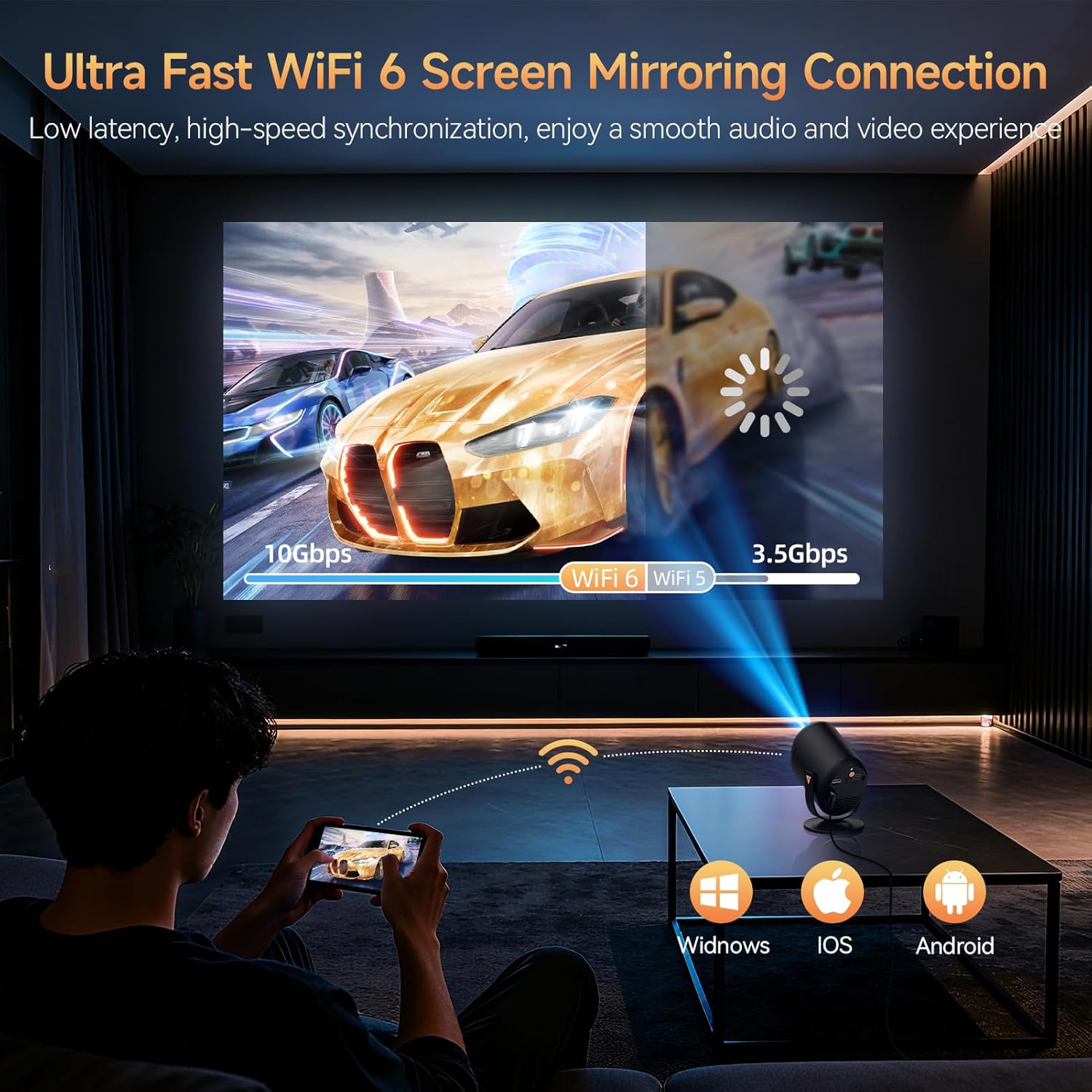
Figure 7: Ultra-fast WiFi 6 screen mirroring.
5.3 Collegamento di dispositivi esterni
È possibile collegare al proiettore diversi dispositivi:
- HDMI: For TV sticks (Fire TV Stick, Roku, Chromecast), laptops, and gaming consoles.
- USB: For U-sticks or other USB storage devices.
- Bluetooth 5.4: Per collegare altoparlanti esterni o cuffie.
- Ingresso ausiliario da 3.5 mm: For wired audio output to speakers or headphones.
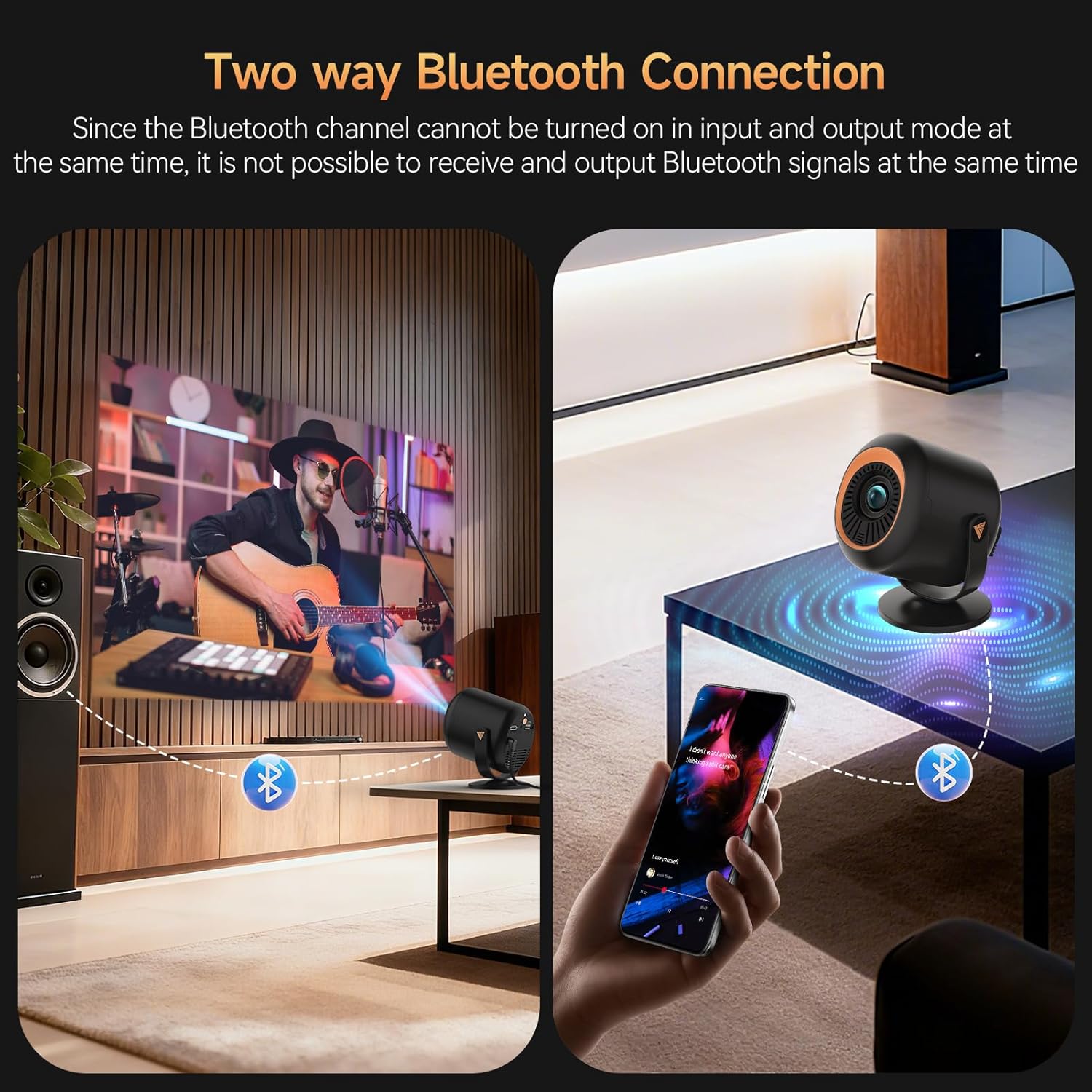
Figure 8: Two-way Bluetooth connection for audio.
Nota importante:
Due to content protection agreements (HDCP), screen mirroring may not display video or audio for certain apps like Amazon Prime Video, Hulu, or Netflix. For these apps, connect your streaming device (e.g., Fire TV Stick, Roku, Chromecast) directly to the projector via HDMI, or use an HDMI cable from your laptop/computer.
6. Impostazioni
The projector offers a comprehensive settings menu to customize your viewesperienza audio e video.
6.1 Impostazioni immagine
Adjust visual parameters to your preference:
- Modalità Immagine: Standard, Softness, Dynamic, Energy Saving, Vivid, User (customizable).
- Luminosità: Regola la luminanza complessiva dell'immagine.
- Contrasto: Controlla la differenza tra aree chiare e scure.
- Saturazione: Regola l'intensità dei colori.
- Nitidezza: Enhance edge definition.
- Tonalità di colore: Modify the color balance.
- Temperatura del colore: Adjust the warmth or coolness of the colors.
- Modalità di protezione degli occhi: Riduce la luce blu per un comfort viewing.
6.2 Impostazioni audio
Personalizza l'uscita audio:
- Modalità audio: Standard, Music, Movie, News, Game, User (customizable).
- Bilancia: Adjust audio balance between left and right channels.
- Audio Output Devices: Select between auto (speaker) or other connected devices.
6.3 Impostazioni di rete
Manage your projector's connectivity:
- Wifi: Connettiti alle reti Wi-Fi disponibili.
- Bluetooth: Cercare and connect to Bluetooth devices.
6.4 Lens Settings
Control projection display and adjustments:
- Direzione di proiezione: Anteriore, Posteriore, Soffitto Anteriore, Soffitto Posteriore.
- Impostazioni della messa a fuoco automatica: Enable/disable automatic refocus when moved or power-on autofocus.
- Correzione trapezoidale: Auto Keystone Correction, 4-corner correction, Obstacle Recognition, Screen Recognition.
- Zoom digitale: Regola le dimensioni dell'immagine proiettata.
6.5 Preferenze del dispositivo
General device management:
- Lingua: Seleziona la lingua preferita.
- Data e ora: Imposta la data e l'ora correnti.
- Tastiera: Configure keyboard settings.
- Salvaschermo: Adjust screen saver options.
- Sveglia: Imposta un timer per lo spegnimento automatico.
- Impostazioni di fabbrica: Reset the projector to its original factory settings.
- Reset Projector/Restart Projector: Perform a soft or hard reset.
7. Manutenzione
To ensure the longevity and optimal performance of your Vamvo Mini Projector, follow these maintenance guidelines:
- Pulizia delle lenti: Pulire delicatamente la lente del proiettore con un panno morbido e privo di lanugine. Evitare materiali abrasivi o prodotti chimici aggressivi.
- Ventilazione: Ensure the projector's ventilation openings are clear and unobstructed to prevent overheating. Regularly clean dust from the vents using a soft brush or compressed air.
- Magazzinaggio: Quando non in uso, conservare il proiettore in un luogo fresco e asciutto, lontano dalla luce solare diretta e da temperature estreme.
8. Risoluzione Dei Problemi
Se riscontri problemi con il proiettore, fai riferimento ai seguenti problemi comuni e alle relative soluzioni:
- Nessun segnale:
- Assicurarsi che il cavo HDMI sia collegato saldamente sia al proiettore sia al dispositivo sorgente.
- Verificare che sul proiettore sia selezionata la sorgente di ingresso corretta (HDMI, USB, ecc.).
- Check if the source device (laptop, TV stick) is powered on and outputting a signal.
- Fuzzy or Unclear Image:
- Adjust the focus using the F+ / F- buttons on the remote control.
- Ensure the projector lens is clean and free from dust or smudges.
- Check the projection distance and adjust if necessary to match the desired screen size.
- Nessun suono o volume basso:
- Aumentare il volume sia sul proiettore che sul dispositivo sorgente.
- Controllare se l'audio del proiettore è disattivato.
- Se si utilizzano altoparlanti esterni, assicurarsi che siano correttamente collegati e accesi.
- Screen Mirroring Issues (No Video/Audio):
- Some streaming apps (Netflix, Hulu, Prime Video) have HDCP content protection that prevents screen mirroring. Connect a streaming device directly via HDMI for these apps.
- Ensure your device and projector are connected to the same Wi-Fi network for wireless mirroring.
9. Specifiche
| Caratteristica | Dettaglio |
|---|---|
| Marca | Vamvo |
| Peso dell'articolo | 2.61 libbre |
| Dimensioni del pacco | 11.57 x 7.91 x 5.08 pollici |
| Nome del colore | Inchiostro |
| Caratteristiche speciali | Altoparlante incorporato |
| Usi consigliati per il prodotto | Giochi, Home Cinema |
| Tecnologia di connettività | Cavo HDMI |
| Risoluzione dello schermo | 1920x1080 |
10. Garanzia e supporto
Your Vamvo Mini Projector comes with a warranty. Please refer to the included Warranty Card for detailed information regarding warranty coverage, terms, and conditions. For technical support or further assistance, please consult the contact information provided on your Warranty Card or visit the official Vamvo websito.


