Introduzione
The Kami Smart Video Doorbell Camera provides advanced home security with features like 1080p HD video, motion detection, two-way audio, and AI-powered face recognition. Designed for easy installation and reliable performance, this manual will guide you through setting up, operating, and maintaining your doorbell camera.
Cosa c'è nella scatola
- Kami Smart Video Doorbell Camera
- Staffa di fissaggio
- Viti e ancoraggi di installazione
- Cavo di ricarica (USB)
- Manuale dell'utente (questo documento)
- Note: Chime is not included.

Figura 1: Fronte view of the Kami Smart Video Doorbell Camera, showing the camera lens, Kami logo, and doorbell button.
Impostare
1. Carica della batteria
Before initial use, fully charge the doorbell camera's battery. The battery is rechargeable and designed for long life. Connect the provided USB charging cable to the doorbell and a power source.

Figure 2: Illustration demonstrating the extended battery life of the Kami Doorbell Camera, indicating up to 2600 triggers or 6 months on a single charge.
2. Installazione dell'app e creazione dell'account
Download the Kami Home app from your smartphone's app store (iOS or Android). Follow the on-screen instructions to create an account and add your new doorbell camera.
3. Montaggio del campanello
Choose a suitable location near your front door. Use the mounting bracket as a template to mark drill holes. Secure the bracket to the wall using the provided screws and anchors. Attach the doorbell camera to the mounted bracket.
The doorbell supports multiple power options: rechargeable battery, USB, or hard-wiring to existing AC power. Ensure power is shut down before hard-wiring.
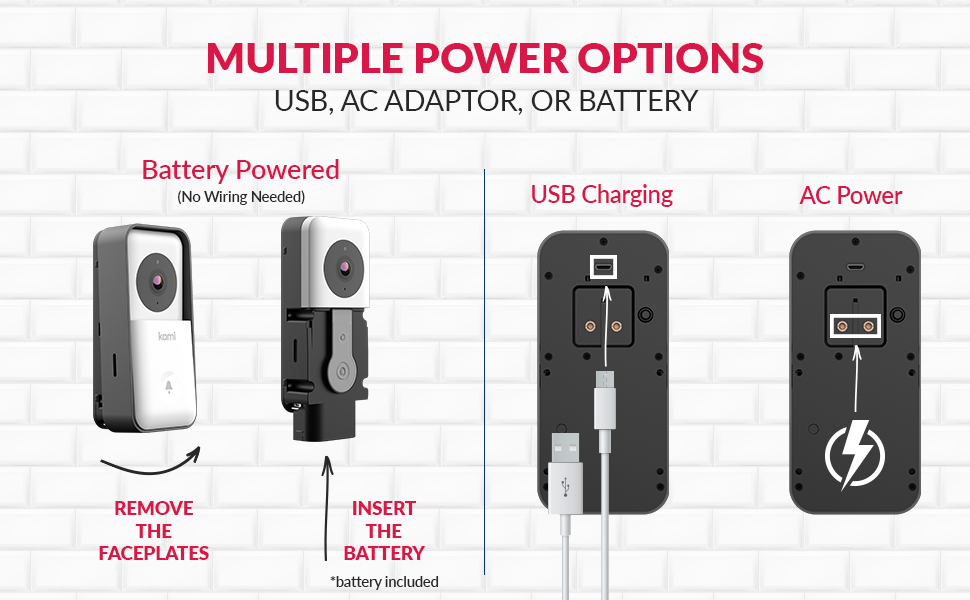
Figure 3: Diagram illustrating the multiple power options for the Kami Doorbell: battery powered, USB charging, and AC power hard-wiring.
4. Chime Installation (Optional)
If you are using a mechanical chime, install the chime connector. Refer to the diagram for connection methods. Ensure power is off before proceeding.

Figure 4: Detailed guideline for chime installation, showing connection methods for mechanical chimes and listing compatible digital and mechanical chime models.
Istruzioni per l'uso
Vivere View e audio bidirezionale
Access the live feed of your doorbell camera through the Kami Home app. You can see, hear, and speak to visitors at your door from anywhere using the two-way audio feature.

Figure 5: A smartphone screen showing a live view from the Kami Doorbell Camera, capturing a delivery person at the door, demonstrating the real-time monitoring capability.
Rilevamento del movimento e avvisi
The doorbell camera features advanced motion detection. You will receive real-time notifications on your smartphone when motion is detected. Customize activity zones and alert schedules within the Kami Home app to reduce false alerts.
AI-Powered Face Recognition
Utilize the AI face recognition feature to identify familiar faces. The doorbell can send specific notifications when it recognizes family members or friends, even before you view the video feed. This feature may require a subscription.

Figure 6: A smartphone displaying a notification from the Kami Doorbell Camera indicating "Face Recognized: JANET," highlighting the AI-powered face recognition feature.
Visione notturna
The doorbell camera provides enhanced night vision, delivering clear and sharp images up to 17 feet in low-light conditions.
Grandangolo View
Con un campo di 160 gradi di view, the camera monitors a wide area of your porch or front yard, ensuring comprehensive coverage.

Figure 7: An illustration demonstrating the 160-degree ultra-wide viewing angle of the Kami Doorbell Camera, showing its extensive coverage of a front yard and house.
Connettività Wi-Fi
The doorbell supports both 2.4GHz and 5GHz Wi-Fi networks for a faster and more stable connection.

Figure 8: Illustration highlighting the Kami Doorbell Camera's support for both 2.4GHz and 5GHz dual-band Wi-Fi networks, ensuring stable connectivity.
Manutenzione
Ricarica della batteria
When the battery level is low, you will receive a notification via the Kami Home app. Remove the doorbell from its mounting bracket and charge the battery using the provided USB cable. A full charge can last approximately 150 days depending on usage.
Pulizia
Pulisci l'obiettivo della telecamera e la parte esterna del campanello con un panno morbido e asciutto.amp panno. Evitare l'uso di prodotti chimici aggressivi o materiali abrasivi che potrebbero danneggiare il dispositivo.
Risoluzione dei problemi
| Problema | Possibile causa | Soluzione |
|---|---|---|
| Il campanello non si connette al Wi-Fi | Incorrect Wi-Fi password; Router too far; Interference; Wrong Wi-Fi band selected. | Verify Wi-Fi password. Move router closer or use a Wi-Fi extender. Ensure no strong interference sources. Confirm you are connecting to a 2.4GHz or 5GHz network as supported. |
| Durata breve della batteria | Frequent motion alerts; Cold weather; High usage of live view/two-way audio. | Adjust motion detection sensitivity and activity zones. Reduce frequency of live view. Consider hard-wiring the doorbell for continuous power. |
| Nessuna notifica ricevuta | App notification settings disabled; Phone's notification settings disabled; Poor Wi-Fi connection. | Check notification settings in the Kami Home app. Enable notifications for the app in your phone's system settings. Ensure a stable Wi-Fi connection. |
| Scarsa qualità video | Dirty lens; Poor Wi-Fi signal; Low light conditions. | Clean the camera lens. Improve Wi-Fi signal strength. Ensure adequate lighting for optimal night vision performance. |
Specifiche
| Caratteristica | Dettaglio |
|---|---|
| Numero di modello | YDS.20120 |
| Risoluzione video | Risoluzione 1080p |
| Campo di View | 160 gradi |
| Connettività | Wi-Fi (2.4 GHz e 5 GHz) |
| Fonte di alimentazione | Battery Powered (Rechargeable), USB, AC Power |
| Visione notturna | Yes, Enhanced Night Vision |
| Rilevamento del movimento | Yes, with customizable activity zones |
| Caratteristiche AI | Face Recognition, Human Detection |
| Audio bidirezionale | SÌ |
| Resistenza alle intemperie | IP65 (International Protection Rating) |
| Dimensioni (L x P x A) | 2.8 x 2.8 x 5.4 pollici |
| Peso dell'articolo | 8.3 once |
| Dispositivi compatibili | Smartphone, Amazon Alexa, Nest |
Garanzia e supporto
For warranty information and technical support, please refer to the official Kami website or contact Kami customer service. Keep your purchase receipt for warranty claims.
Visit the Kami Store for more information: Kami Store


