1. Introduzione
This manual provides essential information for setting up, operating, maintaining, and troubleshooting your Sony X800H 65-inch 4K Ultra HD Smart LED TV. Please read this manual thoroughly before using your television to ensure proper and safe operation.

Immagine 1.1: anteriore view della Smart TV LED Ultra HD 4K da 65 pollici Sony X800H.
2. Cosa c'è nella scatola
Upon unpacking your Sony X800H TV, ensure all the following items are present:
- Sony X800H 65-inch 4K Ultra HD Smart LED TV
- Telecomando
- Cavo di alimentazione
- Table-Top Stand (if not wall-mounting)
- Operating Instructions / Quick Setup Guide
- Batterie per telecomando
3. Impostazione
3.1 Attaching the Table-Top Stand
- Posizionare con cautela lo schermo del televisore su una superficie morbida e piana per evitare danni.
- Allineare le staffe del supporto con i fori delle viti nella parte inferiore del televisore.
- Fissare il supporto utilizzando le viti fornite. Assicurarsi che tutte le viti siano ben serrate.
3.2 Montaggio a parete (opzionale)
If you choose to wall-mount your TV, please refer to the instructions provided with your wall-mount bracket. Ensure the bracket is compatible with VESA mounting standards for your TV size and weight. Professional installation is recommended.

Immagine 3.1: Es.ample of a Sony TV mounted on a wall.
3.3 Collegamento di dispositivi esterni
Connect your external devices (e.g., cable box, Blu-ray player, gaming console) to the HDMI ports on the back of the TV. The Sony X800H features multiple HDMI inputs for your convenience.

Immagine 3.2: posteriore view showing various input ports including HDMI, USB, and Ethernet.
3.4 Collegamento dell'alimentazione e configurazione iniziale
- Collegare il cavo di alimentazione al televisore e poi a una presa a muro.
- Premere il pulsante di accensione sul telecomando o sul televisore.
- Follow the on-screen instructions to complete the initial setup, including network connection, language selection, and channel scanning.
4. Utilizzo del televisore
4.1 Funzioni di base del telecomando
The included remote control allows you to navigate menus, change channels, adjust volume, and access smart features. Familiarize yourself with the button layout for optimal use.
4.2 Smart Android TV Features
Your Sony X800H is an Android TV, providing access to a wide range of apps, streaming services, and smart home integration. Use the Google Assistant for voice control and content search.
- Assistente Google: Press the Google Assistant button on your remote and speak your commands to search for movies, shows, control smart home devices, or get answers.
- Accesso all'app: Navigate to the 'Apps' section to download and manage your favorite streaming applications like Netflix, Hulu, Disney+, and more.
- Compatibilità con Alexa: Connect your TV with an Alexa-enabled device to control your TV with voice commands, stream smart camera feeds, play music, and launch video apps.
- Apple AirPlay 2 e HomeKit: Seamlessly integrate your iPhone and Siri devices for content streaming and smart home management.
Video 4.1: Fine ufficialeview of the Sony X800H 4K HDR LED Android Smart TV features, including smart functionality and picture quality enhancements.
5. Caratteristiche principali
The Sony X800H TV is equipped with advanced technologies to enhance your viewesperienza di ing:
- Processore 4K HDR X1: Experience premium 4K pictures with rich detail and texture. Content is upscaled to near-4K resolution using 4K X-Reality PRO.
- Display TRILUMINOS: Enjoy expanded, vivid colors for a more true-to-life picture, as intended by the creator.
- Modalità di gioco: Optimized settings for a smoother, more responsive gaming experience, ideal for PlayStation.
- HDR e Dolby Vision: Brings scenes to life with striking highlights, deeper darks, and vibrant colors.
- Motionflow XR: Reduces blur in fast-moving scenes, making content appear with lifelike motion.
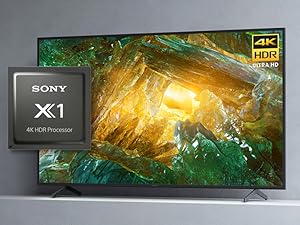
Image 5.1: The Sony X1 4K HDR Processor, central to enhanced picture quality.
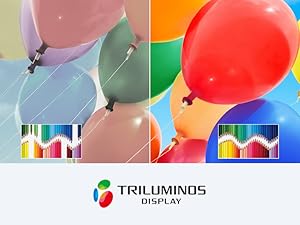
Image 5.2: Visual representation of the wide color gamut provided by the TRILUMINOS Display.
6. Manutenzione
6.1 Pulizia del televisore
- Schermo: Pulisci delicatamente lo schermo con un panno in microfibra morbido e asciutto. Per le macchie ostinate, dampPulire il panno con acqua o con una soluzione detergente specifica per schermi (non spruzzare mai direttamente sullo schermo).
- Telaio e supporto: Utilizzare un panno morbido e asciutto per rimuovere la polvere dalla cornice e dal supporto del televisore.
- Importante: Always unplug the TV before cleaning. Avoid using harsh chemicals, abrasive cleaners, or solvents.
6.2 Aggiornamenti software
Il tuo televisore potrebbe ricevere aggiornamenti software automatici per migliorare le prestazioni e aggiungere nuove funzionalità. Assicurati che il televisore sia connesso a Internet per ricevere questi aggiornamenti. Puoi anche controllare manualmente la presenza di aggiornamenti nel menu delle impostazioni del televisore.
7. Risoluzione Dei Problemi
Se riscontri problemi con la tua TV, prova a seguire i seguenti passaggi di base per la risoluzione dei problemi:
- Nessun potere: Assicurati che il cavo di alimentazione sia collegato saldamente sia al televisore che alla presa a muro. Prova una presa diversa.
- Nessuna immagine/suono: Check that the correct input source is selected. Verify all cable connections to external devices are secure.
- Il telecomando non funziona: Sostituisci le batterie del telecomando. Assicurati che non ci siano ostacoli tra il telecomando e il sensore IR del televisore.
- Problemi di connessione di rete: Riavvia il router e il modem. Controlla le impostazioni di rete del televisore per assicurarti che sia connesso alla rete Wi-Fi o al cavo Ethernet corretti.
- Problemi di qualità dell'immagine: Regola le impostazioni dell'immagine (luminosità, contrasto, colore) nel menu TV. Assicurati che la sorgente del contenuto sia di alta qualità.
For more detailed troubleshooting, refer to the comprehensive help guide accessible through your TV's settings menu or visit the Sony support websito.
8. Specifiche
| Caratteristica | Specificazione |
|---|---|
| Marca | Sony |
| Numero di modello | XBR65X800H |
| Dimensioni dello schermo | 64.5 pollici (diagonale) |
| Tecnologia di visualizzazione | GUIDATO |
| Risoluzione | Risoluzione 4K Ultra HD (3840 x 2160) |
| Frequenza di aggiornamento | Frequenza 60 Hz |
| Processore | Processore 4K HDR X1 |
| Sistema operativo | Android TV con Google Assistant |
| Connettività | HDMI, USB, Wi-Fi, Ethernet, Bluetooth |
| Dimensioni (L x P x A) | 57.63 x 13.5 x 35.38 pollici (con supporto) |
| Peso dell'articolo | 49.81 libbre (con supporto) |
9. Garanzia e supporto
Your Sony X800H TV comes with a manufacturer's warranty. For specific warranty details, please refer to the warranty card included with your product or visit the official Sony support websito. Per assistenza tecnica, registrazione del prodotto o per trovare centri di assistenza, visitare www.sony.com/elettronica/support.