1. Introduzione
The Pyle PD1000BA is a versatile 4-channel home theater preamplifier receiver designed to enhance your audio and video entertainment experience. It features a built-in Bluetooth receiver for wireless audio streaming, a front-loading CD/DVD player, AM/FM radio, and multiple input options including USB, SD card, and microphone inputs. This manual provides detailed instructions for setting up, operating, and maintaining your PD1000BA receiver.

Figure 1.1: Pyle PD1000BA 4-Channel 1000W Bluetooth Home Theater Preamplifier Receiver front view.
2. Istruzioni di sicurezza
Si prega di leggere attentamente tutte le istruzioni di sicurezza e di funzionamento prima di utilizzare questo prodotto. Conservare queste istruzioni per riferimento futuro.
- Fonte di energia: Connect the unit only to the power supply type marked on the unit.
- Ventilazione: Assicurare una ventilazione adeguata. Non ostruire le aperture di ventilazione.
- Acqua e umidità: Non esporre l'unità a pioggia o umidità. Non posizionare oggetti contenenti liquidi sull'unità.
- Calore: Tenere l'unità lontana da fonti di calore quali termosifoni, bocchette di ventilazione, stufe o altri apparecchi che producono calore.
- Pulizia: Pulire solo con un panno asciutto.
- Manutenzione: Non tentare di riparare questo prodotto da soli. Affidare tutte le operazioni di manutenzione a personale di assistenza qualificato.
3. Contenuto della confezione
Verificare che tutti gli articoli siano inclusi nel pacchetto:
- PreampRicevitore lifier (PD1000BA)
- Telecomando
- Staffe per montaggio su rack rimovibili
- Cavo di collegamento RCA
- Antenne AM + FM
- Cavo di alimentazione

Figure 3.1: Included accessories with the Pyle PD1000BA receiver.
4. Caratteristiche del prodotto
The Pyle PD1000BA offers a range of features for a comprehensive home audio and video experience:
- Sistema Home Theatre Audio + Video
- Built-in Bluetooth for Wireless Audio Streaming (Up to 35 ft range)
- Connects to TVs, Soundbars, and Speaker Systems
- Alimenta fino a (4) altoparlanti ad alto volume
- Lettore CD/DVD a caricamento frontale
- Sistema di ricezione a 4 canali
- Pannello di controllo frontale con display LCD digitale
- Radio AM/FM con 50 stazioni di memoria preimpostate
- Audio digitale MP3 File Playback via USB Flash Drive & SD Memory Card Readers
- Jack di ingresso Aux (3.5 mm)
- Two 1/4'' Microphone Inputs with Echo, Treble, Bass, and Volume Controls
- 1/4'' Headphone Jack
- Video Outputs: S-Video, RCA, YPbPr (Component Video)
- Display LED del livello di uscita dB (decibel)
- Uscita subwoofer RCA (L/R)
- Uscita audio ottica (digitale)
- Ventola di raffreddamento integrata
- Sistema montabile su rack

Figure 4.1: The PD1000BA supports numerous audio input methods.

Figure 4.2: The PD1000BA supports dual microphone inputs for karaoke with echo effect.
5. Configurazione e connessioni
Follow these steps to properly set up your Pyle PD1000BA receiver.
5.1 Posizionamento dell'unità
Place the receiver on a stable, flat surface or install it in a standard audio rack using the provided brackets. Ensure adequate ventilation around the unit to prevent overheating.
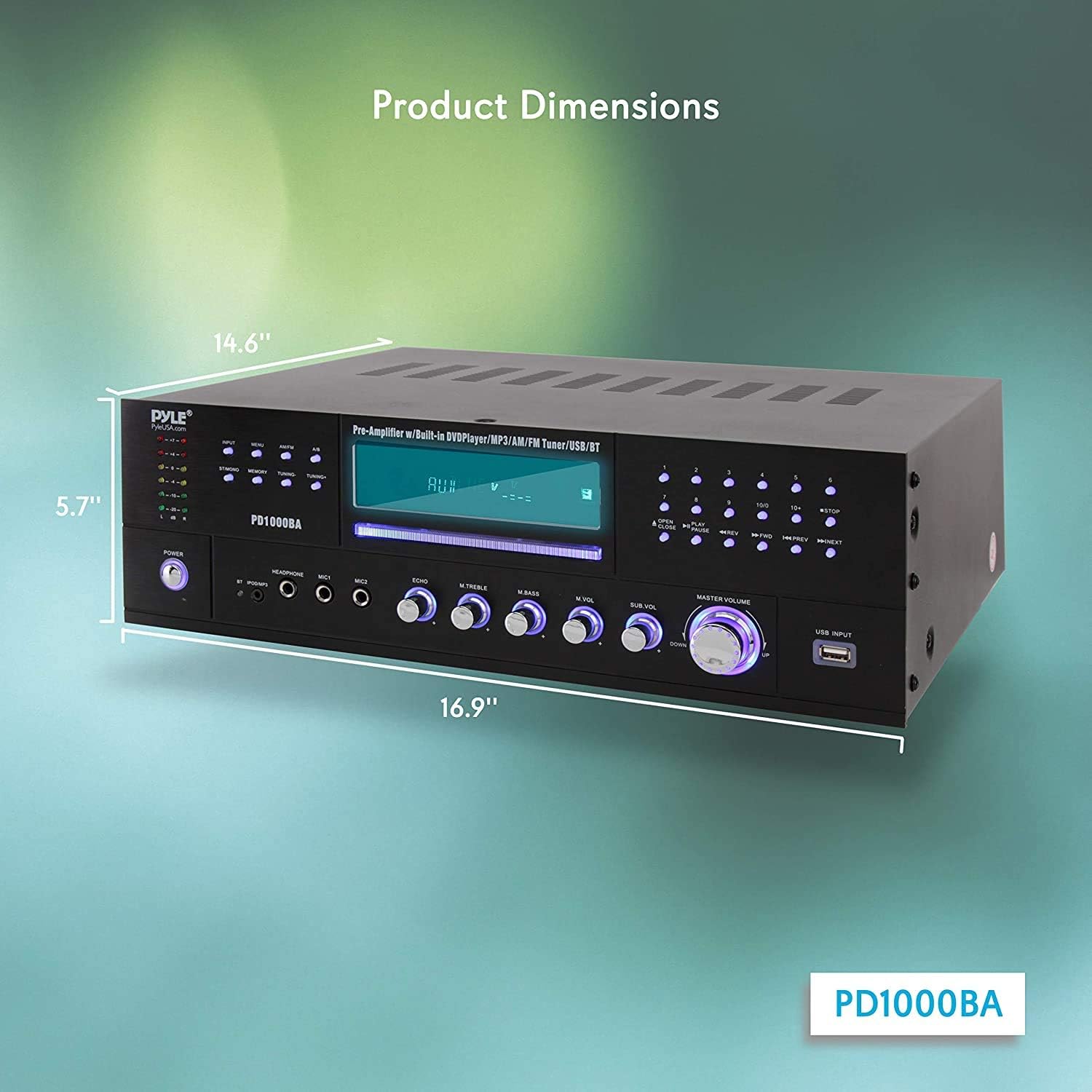
Figure 5.1: Product dimensions for placement and rack mounting.
5.2 Collegamenti degli altoparlanti
The PD1000BA can power up to four speakers. Connect your speakers to the speaker terminal binding posts on the rear panel. Ensure correct polarity (positive to positive, negative to negative) for optimal sound quality.
Ingressi audio 5.3
- RCA (L/R) Audio Inputs: Connect external audio sources like a turntable (with a pre-amp), cassette deck, or other audio players using RCA cables.
- Aux (3.5mm) Input: Use the 3.5mm jack on the front panel for quick connection of portable audio devices.
- USB & SD Card Readers: Insert a USB flash drive or SD memory card into the front panel slots for MP3 audio playback.
5.4 Video Outputs
Connect the receiver to your TV or display using one of the following video output options:
- Uscita S-Video: For S-Video compatible displays.
- Uscita video RCA: Standard composite video output.
- YPbPr (Component Video) Output: For higher quality component video connections.
5.5 ingressi microfono
Plug up to two 1/4'' microphones into the front panel MIC1 and MIC2 jacks for karaoke or public address functions.
5.6 Connettività Bluetooth
The built-in Bluetooth receiver allows wireless audio streaming from compatible devices. The Bluetooth wireless network name is 'PYLE'.

Figure 5.2: Wireless Bluetooth connectivity for streaming audio.

Figure 5.3: Rear panel connections for speakers, audio, and video.
6. Funzionamento
This section details the operation of various functions of your PD1000BA receiver.
6.1 Accensione/spegnimento
Premere il tasto ENERGIA button on the front panel to turn the unit on or off. The remote control also has a standby button.
6.2 Selezione della sorgente
Use the input selector buttons on the front panel or the remote control to choose your desired audio/video source (e.g., CD/DVD, FM/AM, Bluetooth, USB, AUX, RCA).
Lettore CD/DVD da 6.3 pollici
Insert a CD or DVD into the front-loading slot. The unit will automatically detect the disc and begin playback. Use the playback controls (Play, Pause, Stop, Skip) on the front panel or remote.
Radio AM/FM 6.4
Select the FM/AM input. Use the tuning buttons to scan for stations. You can save up to 50 stations in memory presets.
6.5 Streaming Bluetooth
Select the Bluetooth input. On your device (smartphone, tablet, etc.), search for Bluetooth devices and select 'PYLE' to pair. Once paired, you can stream audio wirelessly.
6.6 Riproduzione USB/SD
Inserire una chiavetta USB o una scheda SD contenente audio MP3 files into the respective front panel slot. The unit will automatically switch to USB/SD mode and begin playback. Use the playback controls.
6.7 Controllo del microfono e dell'eco
Adjust the microphone volume using the 'MIC VOL' knob. The 'ECHO' knob controls the echo effect for the microphones.
6.8 Equalizer (EQ) Controls
Use the 'TREBLE' and 'BASS' rotary controls on the front panel to adjust the high and low frequencies of the audio output.
6.9 Uscita cuffie
Connect headphones to the 1/4'' headphone jack on the front panel for private listening.
Video 6.1: Oltreview of the Pyle PD1000BA 4-Channel Wireless Bluetooth Power Amplifier, evidenziandone le caratteristiche e le opzioni di connettività.
7. Risoluzione Dei Problemi
If you encounter issues with your PD1000BA, refer to the following common problems and solutions:
- Nessun potere: Ensure the power cable is securely connected and the power outlet is functional. Check the power switch on the unit.
- Nessun suono: Verify speaker connections and polarity. Check the input source selection and volume levels. Ensure headphones are not plugged in if expecting speaker output.
- Problemi di accoppiamento Bluetooth: Make sure the unit is in Bluetooth mode. Ensure your device's Bluetooth is enabled and within range (up to 35 ft). Try unpairing and re-pairing the device.
- CD/DVD Not Playing: Ensure the disc is inserted correctly and is clean and free of scratches. Check disc compatibility (DVD/CD/VCD/CD-R/CD-RW/MP4).
- Scarsa ricezione radio: Extend and adjust the AM and FM antennas for better signal reception.
- Microfono non funzionante: Ensure microphones are securely plugged in and the 'MIC VOL' knob is turned up.
If the problem persists, contact Pyle customer support for assistance.
8. Specifiche
| Caratteristica | Specificazione |
|---|---|
| Potenza di uscita MASSIMA | 1000 Watt |
| Potenza in uscita (RMS) | 200 Watts x 2 @ 8 Ohm, 360 Watts x 2 @ 4 Ohm, 450 Watts x 2 @ 2 Ohm |
| Impedenza | 8 Ohm |
| Proporzioni | 4:3 / 16:9 |
| Sistema video | PAL/NTSC |
| Rapporto S/N audio | >90 dB |
| Gamma di frequenza | +/-14 dB |
| CD/DVD Disc Compatibility | DVD/CD/VCD/CD-R/CD-RW/MP4 |
| Versione Bluetooth | 3.0 |
| Gamma senza fili Bluetooth | Fino a 35 piedi. |
| Energia | Commutabile 110/220 Volt |
| Dimensioni (L x P x A) | 16.9'' x 14.6'' x 5.7'' pollici |
| Peso dell'articolo | 20.5 libbre |
9. Garanzia e supporto
I prodotti Pyle sono progettati per garantire affidabilità e prestazioni. Per informazioni sulla garanzia o assistenza tecnica, consultare la documentazione inclusa con l'acquisto o visitare il sito ufficiale Pyle. websito. Conservare la prova d'acquisto per eventuali reclami in garanzia.


