1. Introduzione
This manual provides essential information for the safe and efficient operation of your Digi International WR21-L52A-DE1-TB Cellular Wireless Router. Please read this manual thoroughly before installation and use, and retain it for future reference. This device is designed to provide reliable cellular connectivity for various applications.
2. Informazioni sulla sicurezza
- Alimentazione elettrica: Utilizzare solo l'alimentatore fornito con il dispositivo. L'utilizzo di un alimentatore non corretto potrebbe danneggiare il dispositivo e invalidare la garanzia.
- Ventilazione: Assicurare un'adeguata ventilazione attorno al router. Non ostruire le aperture di ventilazione.
- Ambiente: Avoid exposing the device to extreme temperatures, humidity, direct sunlight, or corrosive environments.
- Manutenzione: Non tentare di aprire o riparare il dispositivo da soli. Per qualsiasi intervento di assistenza, rivolgersi a personale qualificato.
- antenne: Ensure antennas are securely connected before powering on the device.
3. Contenuto della confezione
Verificare che tutti gli articoli siano presenti nel pacco:
- Digi International WR21-L52A-DE1-TB Cellular Wireless Router
- Adattatore di alimentazione
- Antennas (quantity may vary)
- Cavo Ethernet
- Guida rapida (se inclusa)
Se qualche articolo risulta mancante o danneggiato, contattare immediatamente il fornitore.
4. Prodotto finitoview
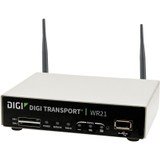
Immagine: Frontale view of the Digi International WR21-L52A-DE1-TB Cellular Wireless Router. This image displays the compact form factor of the device, likely showing ports for antennas, power, and network connections.
The Digi International WR21-L52A-DE1-TB is a robust cellular wireless router designed for reliable and secure connectivity. It features multiple connectivity options and is suitable for various industrial and enterprise applications requiring remote access and data transfer over cellular networks.
5. Impostazione
5.1. Installazione della scheda SIM
- Assicurarsi che il router sia spento e scollegato dalla fonte di alimentazione.
- Locate the SIM card slot(s) on the device. Refer to the device's physical markings for exact location.
- Insert the activated cellular SIM card into the slot with the gold contacts facing down and the notched corner oriented correctly. Push until it clicks into place.
- If applicable, secure the SIM card tray or cover.
5.2. Collegamento dell'antenna
- Identify the cellular antenna ports (typically labeled 'MAIN' and 'DIV' or similar).
- Screw the provided cellular antennas onto the corresponding ports until finger-tight. Do not overtighten.
- Posizionare le antenne per una ricezione ottimale del segnale.
5.3. Collegamento elettrico
- Collegare l'adattatore di alimentazione alla porta di ingresso dell'alimentazione del router.
- Collegare l'alimentatore a una presa elettrica adeguata.
- The router will power on automatically or may require pressing a power button. Observe the LED indicators for power status.
5.4. Connessione di rete (facoltativa)
- To connect a device via Ethernet, plug one end of an Ethernet cable into an available LAN port on the router.
- Plug the other end of the Ethernet cable into the network port of your computer or other network device.
6. Istruzioni per l'uso
6.1. Accensione/Spegnimento
- Accensione: Connect the power adapter. The device will typically power on automatically. Observe the power LED.
- Spegni: Disconnect the power adapter from the electrical outlet. For controlled shutdown, refer to the device's web interface or specific documentation for a software shutdown procedure if available.
6.2. Accedendo al Web Interfaccia
- Ensure your computer is connected to the router via Ethernet or Wi-Fi (if enabled).
- Aprire un web browser (ad esempio, Chrome, Firefox, Edge).
- Inserisci l'indirizzo IP predefinito del router (ad esempio, 192.168.1.1 or 192.168.0.1) into the address bar and press Enter. Refer to the Quick Start Guide or device label for the exact default IP address.
- Enter the default username and password when prompted. These are typically found on a label on the device or in the Quick Start Guide.
- Upon successful login, you will access the router's configuration interface.
6.3. Configurazione di base
All'interno del web interfaccia, è possibile configurare varie impostazioni:
- Cellular Settings: Verify APN settings, signal strength, and connection status.
- Impostazioni di rete: Configure LAN IP address, DHCP server, and port forwarding.
- Sicurezza: Change default login credentials, configure firewall rules, and VPN settings.
- Aggiornamento del firmware: Check for and apply firmware updates to ensure optimal performance and security.
7. Manutenzione
- Pulizia: Utilizzare un panno morbido e asciutto per pulire l'esterno del router. Non utilizzare detergenti liquidi o spray.
- Aggiornamenti del firmware: Controllare regolarmente le istruzioni del produttore websito per gli aggiornamenti del firmware. Mantenere il firmware aggiornato garantisce le funzionalità più recenti, le patch di sicurezza e i miglioramenti delle prestazioni.
- Condizioni ambientali: Ensure the router is operating within its specified temperature and humidity ranges to prevent overheating or damage.
8. Risoluzione Dei Problemi
8.1. Nessuna connessione cellulare
- Verify the SIM card is correctly inserted and activated with your cellular provider.
- Check antenna connections and ensure they are positioned for optimal signal.
- Accedi al web interface to check cellular signal strength and connection status.
- Riavviare il router.
8.2. Impossibile accedere Web Interfaccia
- Assicurati che il tuo computer sia collegato direttamente al router tramite Ethernet.
- Verify your computer's IP address is in the same subnet as the router (e.g., if router is 192.168.1.1, computer should be 192.168.1.x).
- Prova a svuotare la cache del browser o a utilizzare un browser diverso.
- If you forgot the password, a factory reset might be necessary (refer to specific device documentation for this procedure, as it will erase all configurations).
8.3. Velocità di connessione lenta
- Check cellular signal strength in the web interface. Weak signal can lead to slow speeds.
- Ensure antennas are properly positioned and unobstructed.
- Verify your cellular data plan has not reached its data cap or is being throttled.
- Restart the router and connected devices.
9. Specifiche
| Caratteristica | Descrizione |
|---|---|
| Modello | WR21-L52A-DE1-TB |
| Marca | Digi Internazionale |
| Protocollo di connettività | Cellulare |
| Tecnologia di connettività | USB |
| Metodo di controllo | Remoto |
| Caratteristica speciale | WPS |
| Dispositivi compatibili | Personal computer |
| Usi consigliati | Casa |
| Codice UPC | 747356312219 |
10. Garanzia e supporto
For detailed warranty information, please refer to the warranty card included with your product or visit the official Digi International website. Technical support is available through the manufacturer's support channels. Please have your product model number (WR21-L52A-DE1-TB) and serial number ready when contacting support.


