Introduzione
Thank you for choosing the Logitech K375s Multi-Device Wireless Keyboard. This keyboard is designed for comfortable and quiet typing, offering seamless switching between multiple devices such as computers, smartphones, and tablets. This manual provides detailed instructions to help you set up, operate, and maintain your new keyboard.

Image: The Logitech K375s keyboard, showing its full layout, the included universal stand, and the USB Unifying receiver.
Contenuto della confezione
Assicurarsi che tutti gli articoli siano presenti nel pacco:
- Logitech K375s Multi-Device Wireless Keyboard
- Supporto universale
- Ricevitore USB unificante
- 2 batterie AAA (preinstallate)
- Documentazione utente (questo manuale)
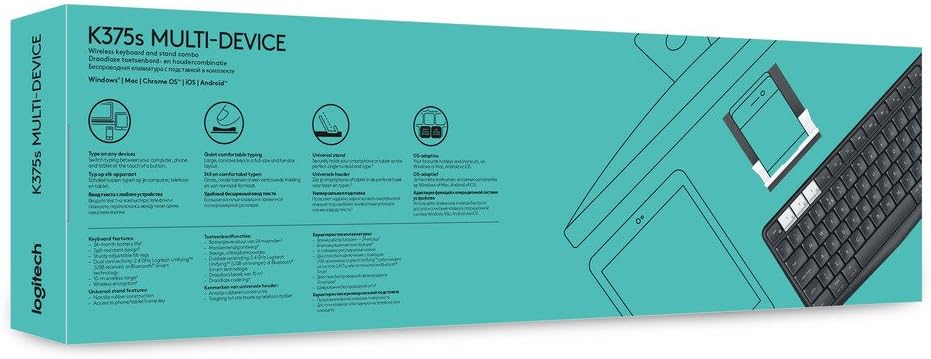
Image: Retail packaging for the Logitech K375s Multi-Device Keyboard, indicating its multi-device capabilities.
Impostare
1. Installazione della batteria
The keyboard comes with two AAA batteries pre-installed. If you need to replace them:
- Individuare il coperchio del vano batteria sul retro della tastiera.
- Togliere il coperchio facendolo scorrere.
- Inserire due batterie AAA nuove, assicurandosi della corretta polarità (+/-).
- Riposizionare il coperchio del vano batterie.
2. Connessione tramite ricevitore USB Unifying
For devices that support a USB receiver:
- Remove the USB Unifying receiver from the keyboard's battery compartment or packaging.
- Plug the USB Unifying receiver into an available USB port on your computer.
- The keyboard should automatically connect. If not, press one of the Easy-Switch keys (1, 2, or 3) to select a channel.
3. Connessione tramite Bluetooth
For devices with Bluetooth connectivity:
- Turn on the keyboard using the On/Off switch located on the top right side.
- Press and hold one of the Easy-Switch keys (1, 2, or 3) for three seconds until the LED light above the key starts blinking rapidly. This indicates the keyboard is in pairing mode.
- On your device (computer, smartphone, or tablet), open Bluetooth settings.
- Select "Logitech K375s" from the list of available devices.
- Follow any on-screen prompts to complete the pairing process. The LED light on the keyboard will turn solid for 5 seconds and then turn off once connected.

Image: The Logitech K375s keyboard positioned next to a smartphone securely placed in the included universal stand, demonstrating multi-device usage.
4. Funzionalità Easy-Switch
The K375s keyboard allows you to connect to up to three devices simultaneously and switch between them with ease.
- The keys labeled 1, 2, E 3 are the Easy-Switch keys.
- To switch to a connected device, simply press the corresponding Easy-Switch key. The LED light above the key will illuminate briefly to confirm the switch.

Image: A diagram highlighting the multi-device capabilities of the K375s keyboard, showing connections to a computer, tablet, and smartphone.
Utilizzo della tastiera
Esperienza di digitazione
The K375s keyboard features full-size keys with a familiar layout for comfortable and quiet typing. The integrated numeric keypad and dedicated function keys enhance productivity.
Function Keys (F-keys)
The F-keys (F1-F12) have secondary functions. To use these secondary functions (e.g., media controls, volume adjustment, screen lock), press the Fn tasto contemporaneamente al tasto F desiderato.
To toggle the default behavior of the F-keys (i.e., to make the secondary functions primary without pressing Fn), you may need to use the Logitech Options software (available for download from the Logitech website) or check your operating system settings.
Manutenzione
Pulizia
Per pulire la tastiera:
- Spegni la tastiera.
- Utilizzare un panno morbido e privo di lanugine leggermente damplucidato con acqua o una soluzione detergente delicata.
- Evitare l'eccessiva umidità e non spruzzare detergenti direttamente sulla tastiera.
- Non utilizzare detergenti abrasivi, solventi o spray aerosol.
Sostituzione della batteria
When the battery indicator light (if present) flashes red, or if the keyboard becomes unresponsive, it's time to replace the batteries. Refer to the "Battery Installation" section under Setup for instructions.
Risoluzione dei problemi
- La tastiera non risponde:
- Assicurati che la tastiera sia accesa.
- Controllare i livelli della batteria e sostituirla se necessario.
- Verify the USB Unifying receiver is securely plugged into a working USB port, or that Bluetooth is enabled on your device and the keyboard is paired.
- Try switching to a different Easy-Switch channel (1, 2, or 3).
- Move the keyboard closer to the receiver or Bluetooth device to ensure a strong connection.
- Connessione lenta o intermittente:
- Reduce interference by moving other wireless devices away from the keyboard and receiver.
- Ensure the keyboard is not too far from the connected device.
- Update your device's Bluetooth drivers or Logitech Unifying software.
- Keys not working correctly:
- Pulisci la tastiera per rimuovere eventuali detriti che potrebbero ostruire i tasti.
- If specific keys are consistently malfunctioning, contact Logitech support.
Specifiche
| Numero di modello | 920-008168 |
| Tecnologia di connettività | Bluetooth, RF (via USB Unifying Receiver) |
| Dispositivi compatibili | Computers, Smartphones, Tablets |
| Batterie | 2 batterie AAA (incluse) |
| Dimensioni del prodotto | 17.15 x 5.41 x 0.81 pollici (43.56 x 13.74 x 2.06 cm) |
| Peso dell'articolo | 15.9 once (450.7 grammi) |
| Materiale | Plastica |
| Componenti inclusi | USB Unifying Receiver, Universal Stand |

Immagine: Pro lateralefile view of the Logitech K375s keyboard, showcasing its slim design and key height.
Garanzia e supporto
Logitech products are manufactured to high quality standards and are designed to provide years of reliable service. For detailed warranty information, please refer to the warranty card included with your product or visit the official Logitech websito.
For technical support, frequently asked questions, or to download the latest software (such as Logitech Options for customizing your keyboard), please visit the Logitech support websito: support.logi.com


