Introduzione
This manual provides detailed instructions for the safe and effective use of your CATEYE Omni 3 Bike Safety Light. The Omni 3 is designed to enhance your visibility and safety during cycling, featuring omni-directional technology for 360-degree visibility. Its low-profile design and triple-LED performance make it an essential accessory for any cyclist.

Image: The CATEYE Omni 3 Bike Safety Light, a compact red light with its flexible mounting bracket attached.
Caratteristiche del prodotto
- Omni Directional Visibility: Equipped with a translucent design and 3 wide-angle, high-power LEDs, providing 360-degree visibility for enhanced safety on the road.
- Molteplici modalità di illuminazione: Offers three distinct light modes: constant, flashing, and rapid, allowing you to choose the best visibility setting for your riding conditions.
- Durata prolungata della batteria: Designed for long-lasting performance, providing up to 150 hours of battery life, ensuring reliable illumination for extended rides.
- Easy and Secure Mounting: Features the FlexTight Bracket for quick and tool-free mounting, adjustment, and removal of the light from your bicycle.

Image: A diagram illustrating the Omni 3's 360-degree light dispersion, highlighting its wide visibility angles.
Contenuto della confezione
Dopo aver aperto la confezione, verificare che siano presenti tutti i seguenti elementi:
- CATEYE Omni 3 Light (Rear)
- 2 batterie AAA
- SP-11 FlexTight™ Mount
- Clip (for alternative mounting)
- Distanziatore in gomma

Image: All components included in the CATEYE Omni 3 package: the light unit, FlexTight mount, clip, and two AAA batteries.
Configurazione e installazione
1. Installazione della batteria
- Locate the battery compartment cover on the back of the light unit.
- Using a coin or a flat tool, gently pry open the cover from the designated notch.
- Inserire le due batterie AAA, assicurandosi che la polarità sia corretta (+/-) come indicato all'interno del vano.
- Carefully close the battery cover, ensuring it snaps securely into place to maintain the light's waterproof integrity. Ensure the rubber gasket is properly seated.
2. Montaggio della luce
The Omni 3 offers versatile mounting options:
Using the FlexTight™ Bracket (Recommended for Seatpost)
- Attach the FlexTight™ bracket to your bicycle's seatpost. The bracket is designed to fit various diameters (12-32mm). Use the included rubber spacer if needed for a snug fit.
- Tighten the thumb screw on the bracket until it is firmly secured to the seatpost. Do not overtighten.
- Slide the Omni 3 light onto the bracket until it clicks into place. Ensure it is securely latched.
- Adjust the angle of the light as needed for optimal rear visibility. The light can swivel up and down.
Using the Clip (for Bags, Clothing, etc.)
- Attach the clip accessory to the back of the Omni 3 light.
- Securely clip the light onto a bag, backpack, clothing, or other suitable location that provides clear rear visibility.

Image: The CATEYE Omni 3 light securely mounted on a bicycle's seatpost, demonstrating its position for rear visibility.
Operazione
The Omni 3 features a single button for all operations.
- Accensione/spegnimento: Press and hold the power button for approximately 1 second to turn the light ON or OFF.
- Cambia modalità: While the light is ON, press the power button briefly to cycle through the three available modes:
- Costante
- Lampeggiante
- Rapid
- Modalità Memoria: The light will remember the last used mode when turned off and will resume in that mode when turned back on.
For optimal visibility, especially in low-light conditions or at night, ensure the light is positioned clearly and unobstructed.
Manutenzione
Sostituzione della batteria
When the light dims or stops functioning, it's time to replace the batteries. Follow the battery installation steps outlined in the "Setup and Installation" section. Always use fresh AAA alkaline batteries for best performance and battery life.
Pulizia
Wipe the light and lens with a soft, damp cloth. Do not use abrasive cleaners or solvents, as these can damage the plastic housing or lens. Ensure the battery compartment is dry before closing it.
Magazzinaggio
If storing the light for an extended period, remove the batteries to prevent leakage and potential damage to the unit.
Risoluzione dei problemi
| Problema | Possibile causa | Soluzione |
|---|---|---|
| La luce non si accende. | Batterie scariche o installate in modo errato. | Sostituire le batterie con nuove batterie AAA, assicurandosi della corretta polarità. |
| Light dims or flickers. | Batteria scarica. | Sostituire le batterie. |
| Light falls off mount. | Light not securely clicked into bracket; bracket not tight enough. | Ensure light clicks firmly into place. Tighten FlexTight™ bracket thumb screw. |
| Acqua dentro la luce. | Il coperchio della batteria non è sigillato correttamente. | Open battery cover, dry interior, ensure rubber gasket is correctly seated, and close securely. |
Specifiche
- Nome modello: OMNI 3
- Numero parte: CA475TL135
- Sorgente luminosa: 3 LED
- Fonte di energia: 2 batterie AAA
- Run Time (Approximate):
- Constant: Up to 150 hours
- Flashing: Up to 200 hours
- Rapid: Up to 200 hours
- Resistenza all'acqua: IP67 (impermeabile)
- Tipo di montaggio: FlexTight™ Bracket (SP-11), Clip
- Applicable Diameter: 12-32 mm (for FlexTight™ Mount)
- Materiale: Plastica
- Peso dell'articolo: Approximately 0.2 Pounds (90 grams)
- Dimensioni (LxWxH): Circa 5.9 x 1.45 x 3.97 pollici
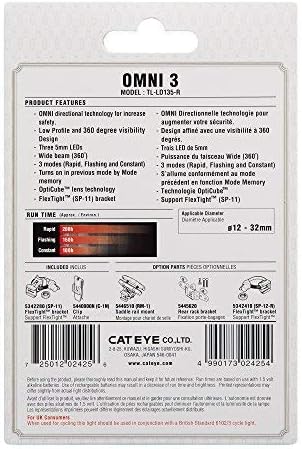
Image: The rear of the Omni 3 retail packaging, displaying detailed product features, run times, and applicable mounting diameters.
Garanzia e supporto
The CATEYE Omni 3 Bike Safety Light comes with a Garanzia del produttore di 2 anniLa presente garanzia copre i difetti di materiali e di fabbricazione in normali condizioni di utilizzo.
For warranty claims, technical support, or further inquiries, please contact CATEYE customer service through their official webo al rivenditore presso cui è stato acquistato il prodotto. Si prega di conservare la prova d'acquisto per la convalida della garanzia.
For more information, visit the official CATEYE websito: www.cateye.com


