

PC23d |PC43d |PC43t
Ethernet Module Installation Instructions
Turn the printer off and disconnect the power cable before you begin.
 Follow standard electrostatic discharge (ESD) guidelines to avoid damaging equipment.
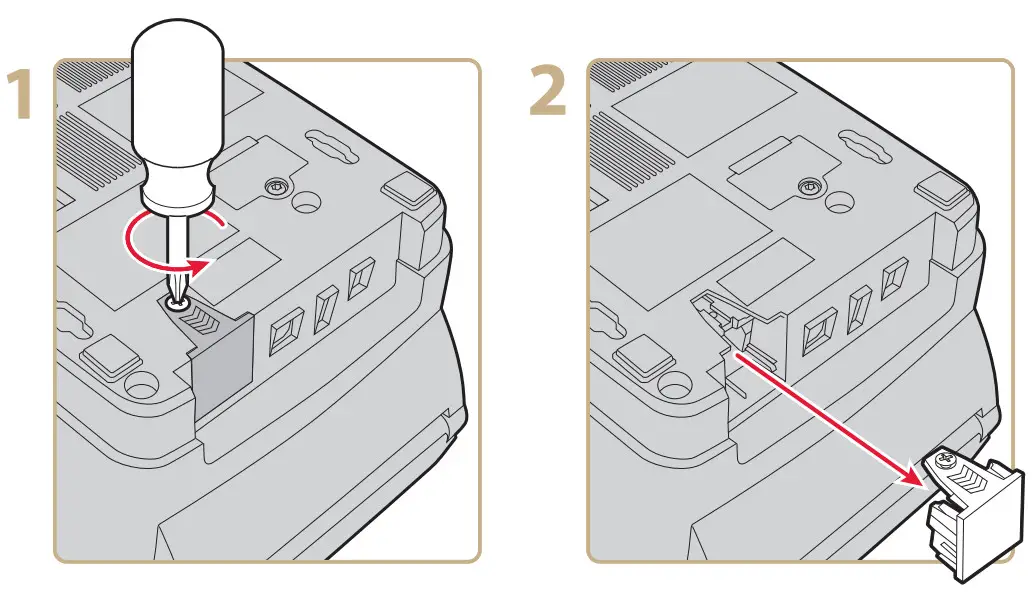

For more information, see the PC23 and PC43 Desktop Printer User Manual.

Worldwide Headquarters
6001 36th Avenue West
Everett, Washington 98203
U.S.A.
tel 425.348.2600
fax 425.355.9551
www.intermec.com
© 2011 Intermec Technologies
Corporation. All rights reserved.

PC23d, PC43d, and PC43t Ethernet Module Installation Instructions

Documents / Resources
 | Ethernet Module |
References
- User Manualmanual.tools
Published: November 29, 2021
Updated: November 30, 2021