1. Okwu mmalite
The Sony RX1R III is a full-frame premium compact camera designed for photographers seeking exceptional image quality in a portable form factor. It features a 61 MP CMOS sensor, a high-quality ZEISS Sonnar T* 35mm F2 lens, the advanced BIONZ XR™ processor, and AI-based subject recognition for precise autofocus and tracking. This manual provides essential information for setting up, operating, and maintaining your camera.
2. Nhazi
2.1. Mwepu na nyocha izizi
Jiri nlezianya wepụ ihe niile dị na nkwakọ ngwaahịa. Gbaa mbọ hụ na ihe ndị a dị:
- Sony RX1R III Camera Body
- Rechargeable Battery Pack (NP-FW50)
- Ihe nkwụnye AC
- USB Type-C USB
- Ubu eriri
- Lens mkpuchi
- Okpu akpụkpọ ụkwụ
- Iko Anya Anya
- Akwụkwọ ntuziaka (akwụkwọ a)
Inspect the camera and accessories for any signs of damage. If any items are missing or damaged, contact your retailer.
2.2. Na-ejikọta eriri ubu
Attach the provided shoulder strap to the camera's strap lugs for secure handling.

Image: User attaching a wrist strap to the camera, demonstrating how to secure it for carrying.
2.3. Ịchaji batrị
Insert the NP-FW50 rechargeable battery pack into the camera. Connect the camera to the AC adaptor using the USB Type-C cable, then plug the AC adaptor into a wall outlet. The charging indicator will light up during charging and turn off when complete. A full charge takes approximately 150 minutes.
Note: The camera is compatible with NP-FW50 rechargeable battery packs, offering up to 300 images on a single charge (CIPA standard, using LCD monitor). Fast charging via USB Power Delivery (PD) is supported with an 18 W (9 V/2 A) or higher output capacity USB Type-C cable.
2.4. Ịtinye kaadị ebe nchekwa
Open the memory card/battery cover. Insert a compatible SD card (sold separately) into the memory card slot with the label facing the front of the camera until it clicks into place. Close the cover securely.
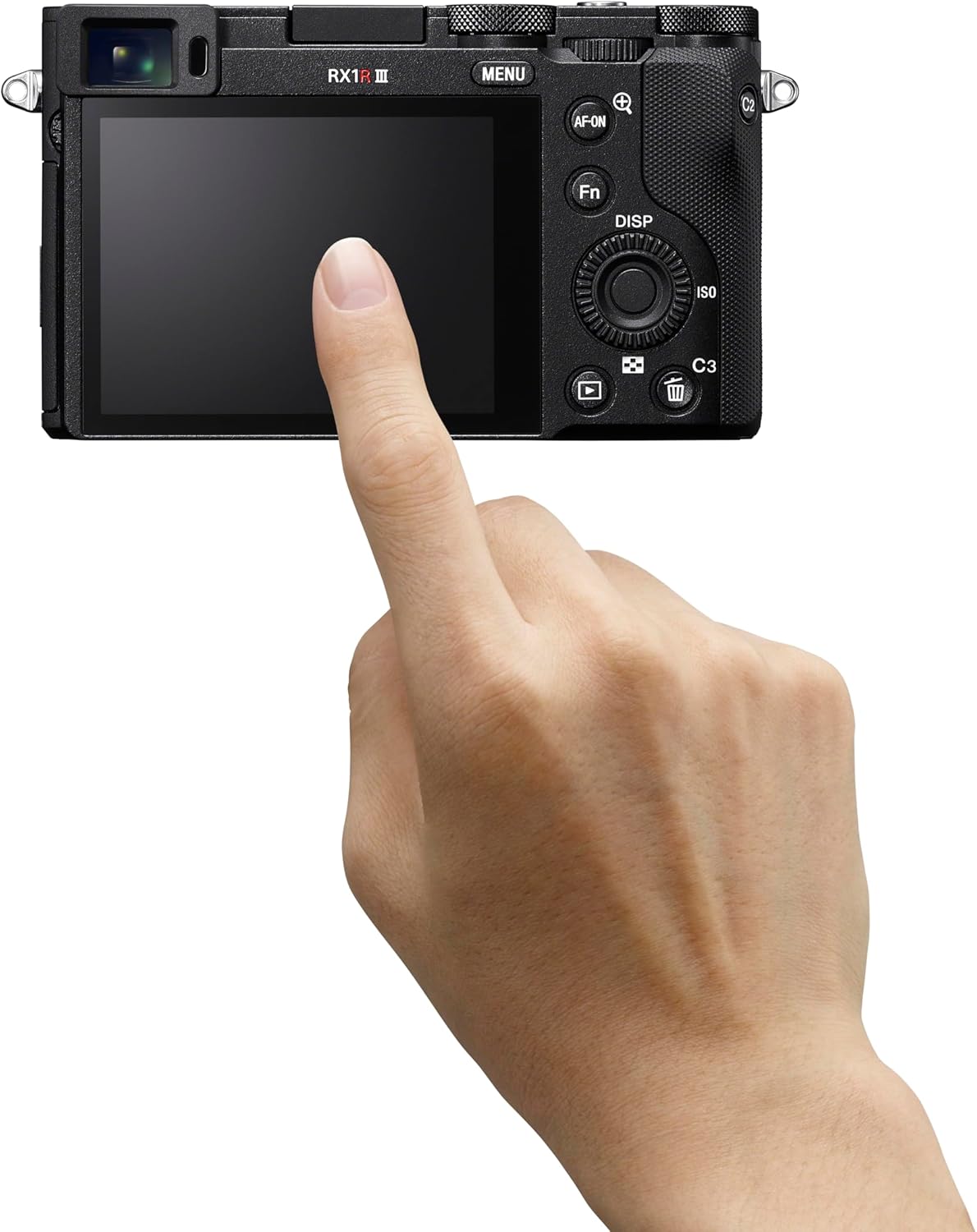
Foto: N'azụ view of the Sony RX1R III, showing the LCD screen and control buttons. The memory card slot is typically located near the battery compartment on the bottom or side.
2.5. Mmalite Ike na Ntọala
Turn the camera on using the ON/OFF switch. Follow the on-screen prompts to set the language, date, time, and time zone. These settings are crucial for proper image metadata.
3. Na-arụ ọrụ igwefoto
3.1. Ụdị Foto Ndị Dị Mkpa
The RX1R III offers various shooting modes accessible via the mode dial on the top of the camera:
- Mmemme akpaaka (P): The camera automatically sets aperture and shutter speed for optimal exposure.
- Mkpa Oghere (A): You set the aperture, and the camera adjusts the shutter speed. Ideal for controlling depth of field.
- Ihe Mkpuchi (S): You set the shutter speed, and the camera adjusts the aperture. Ideal for controlling motion blur.
- Manual Exposure (M): Ị na-achịkwa ma ọsọ oghere na ọsọ shutter.
- Auto (AUTO): Fully automatic mode for quick shooting.
- Nhọrọ Mpaghara: Pre-set modes for specific scenes like Portrait, Landscape, Sports.
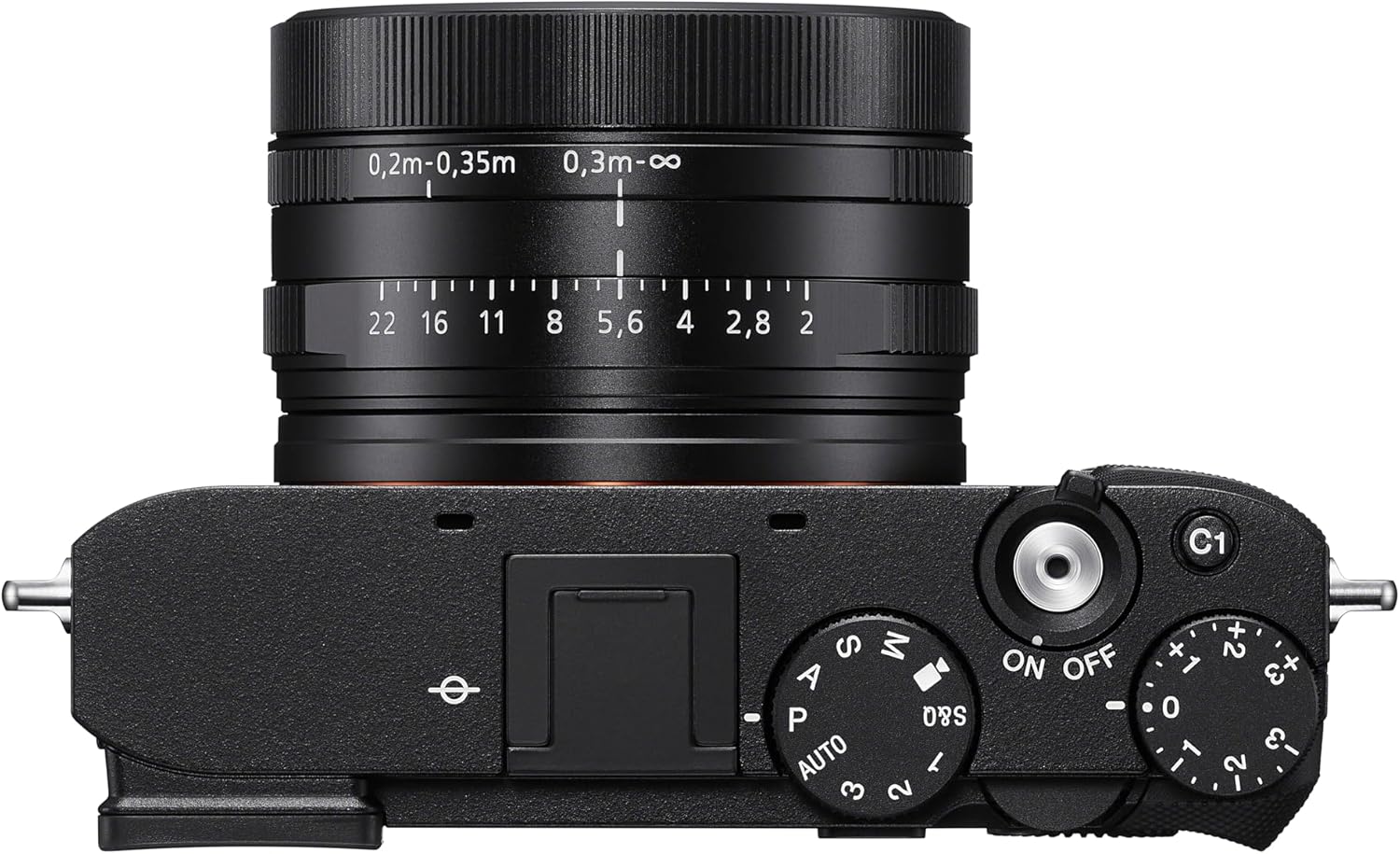
Foto: Top view of the Sony RX1R III, highlighting the mode dial, shutter button, and exposure compensation dial.
3.2. Autofocus (AF) System
The camera features an advanced 693-point phase-detection AF system with AI-based subject recognition and real-time tracking. This allows for fast and precise focusing on a wide range of subjects, including humans, animals, and birds.
- Nsonaazụ oge: The camera recognizes color, pattern, and spatial data to track subjects accurately.
- Subject Recognition: Automatically detects and focuses on human eyes/faces, animal eyes/bodies, and bird eyes/bodies.
- Bọtịnụ AF-ON: Use the dedicated AF-ON button to activate autofocus independently from the shutter button.
Video: Official Sony RX1R III Product Feature Video. This video demonstrates the camera's key features, including its advanced autofocus system and image quality.
3.3. Step Crop Shooting
Leverage the camera's 61 MP sensor with Step Crop Shooting to achieve different focal lengths without changing lenses. This feature allows you to crop images to 50mm equivalent (29 MP) or 70mm equivalent (15 MP) from the native 35mm lens, providing flexibility in composition. This function is not available for movies.
3.4. Creative Look Modes
The RX1R III includes Creative Look modes for expanded in-camera expression. These modes allow you to apply various stylistic effects to your photos directly, such as Standard, Portrait, Neutral, Vivid, Film, Instant, Soft Highkey, Black & White, and Sepia.
3.5. Ndekọ vidiyo
The camera supports high-quality video recording:
- Vidiyo 4K: Record stunning 4K video at 30 frames per second (4K/30p).
- Vidiyo HD zuru ezu: Capture smooth Full HD video at up to 120 frames per second (1080p/120fps) for slow-motion effects.
- XAVC Format: Videos are recorded in the XAVC format for high quality.
3.6. Njikọta
The RX1R III offers versatile connectivity options:
- Wi-Fi na Bluetooth: Connect wirelessly to your smartphone for remote control, image transfer, and direct upload to Creators' App or Creators' Cloud Web.
- USB Ụdị-C: For fast data transfer and charging.
- Ihe mmepụta HDMI: Connect to an external display for video playback.
4. Nlekọta
4.1. Na-ehicha igwefoto
- Igwe igwefoto: Wipe the camera body with a soft, dry cloth. For stubborn dirt, use a cloth lightly damptinye mmiri ma ọ bụ ihe ngwọta dị nro.
- oghere: Jiri ahịhịa lensi wepụ uzuzu, wee jiri ákwà nhicha lensi na mmiri nhicha lensi hichaa ya nwayọ. Zere imetụ elu lensi ahụ aka na mkpịsị aka gị.
- Ihe mmetụta: Cleaning the image sensor should only be performed by authorized service personnel to prevent damage.
4.2. Nlekọta batrị
To prolong battery life, avoid exposing the battery to extreme temperatures. Store batteries in a cool, dry place when not in use. Fully charge the battery before extended shooting sessions.
4.3. Nchekwa
Mgbe ị na-echekwa igwefoto ahụ ruo ogologo oge, wepụ batrị na kaadị ebe nchekwa. Debe igwefoto ahụ n'ebe kpọrọ nkụ, ikuku na-abata nke ọma, ọ kacha mma ka ọ dịrị n'ime akpa igwefoto nwere ihe na-eme ka mmiri ghara ịpụ apụ iji gbochie ebu na ebu.
5. Nchọpụta nsogbu
If you encounter issues with your Sony RX1R III, refer to the following common troubleshooting tips:
- Igwefoto anaghị agbanye: Gbaa mbọ hụ na chajịrị batrị zuru oke yana itinye ya nke ọma.
- Foto ndị a na-adịghị ahụkebe: Check your focus mode and ensure the subject is within the camera's focusing range. Verify shutter speed is fast enough to prevent motion blur.
- Njehie kaadị ebe nchekwa: Ensure the memory card is inserted correctly and is not full or corrupted. Try formatting the card (this will erase all data).
- Nsogbu njikọta: Check Wi-Fi/Bluetooth settings on both the camera and your smart device. Ensure the Creators' App is up to date.
Maka nsogbu nkọwa zuru ezu, biko gaa na nkwado Sony gọọmentị webgaa na weebụsaịtị ma ọ bụ gaa na ntuziaka zuru oke n'ịntanetị.
6. Nkọwapụta
| Njirimara | Nkọwa |
|---|---|
| Aha Nlereanya | DSCRX1RM3B |
| Mkpebi ihe mmetụta foto | 61 MP (Effective Still Resolution: 60 MP) |
| Nha ihe mmetụta foto | Okpokoro zuru oke (35mm) |
| Ụdị oghere | ZEISS Sonnar T* 35mm F2 lens (Fixed Focal Length) |
| Oghere kacha | F2 |
| Ndozi onyonyo | Dijitalụ |
| Nhazi | BIONZ XR™ |
| Ihe mgbado anya | 693 (Nchọpụta Oge) |
| Mkpebi vidiyo | 4K (30p), 1080p (120fps) |
| Nha ihuenyo | 3 sentimita asatọ |
| Njikọta | Bluetooth, Wi-Fi, USB Type-C, HDMI |
| Batrị | NP-FW50 Rechargeable Battery Pack |
| Ibu Ibu | 1 pound |
7. Akwụkwọ ikike na nkwado
7.1. Akwụkwọ ikike Ozi
This Sony RX1R III camera comes with a Akwụkwọ ikike dị afọ 1 site na ụbọchị ịzụrụ. Akwụkwọ ikike a na-ekpuchi ntụpọ dị na ngwa na arụ ọrụ n'okpuru ojiji nkịtị. Biko dowe ihe akaebe nke ịzụrụ ihe maka akwụkwọ ikike.
7.2. Nkwado ndị ahịa
For further assistance, technical support, or service inquiries, please visit the official Sony Support websaịtị:
You can also find additional resources, FAQs, and software updates on the support page.