1. Okwu mmalite
This manual provides comprehensive instructions for the KOSPET Magic R10 GPS Smart Watch. It covers device setup, operational procedures, maintenance guidelines, and troubleshooting tips to ensure optimal performance and user experience. Please read this manual thoroughly before using your device.

Image 1.1: KOSPET Magic R10 Smart Watch displaying time, date, battery, steps, and calories.
2. Kedu ihe dị na Igbe ahụ
Mgbe imepechara ngwugwu ahụ, chọpụta na ihe niile dị:
- 1 x KOSPET Magic R10 Stainless Steel Smart Watch
- 1 x eriri chaja
- Akwụkwọ ntuziaka onye ọrụ 1 x (akwụkwọ a)
3. Nhazi
3.1 Nchaji izizi
Before first use, fully charge your KOSPET Magic R10 Smart Watch. Connect the provided charger cable to the watch's charging port and a USB power source. The watch display will indicate charging status.
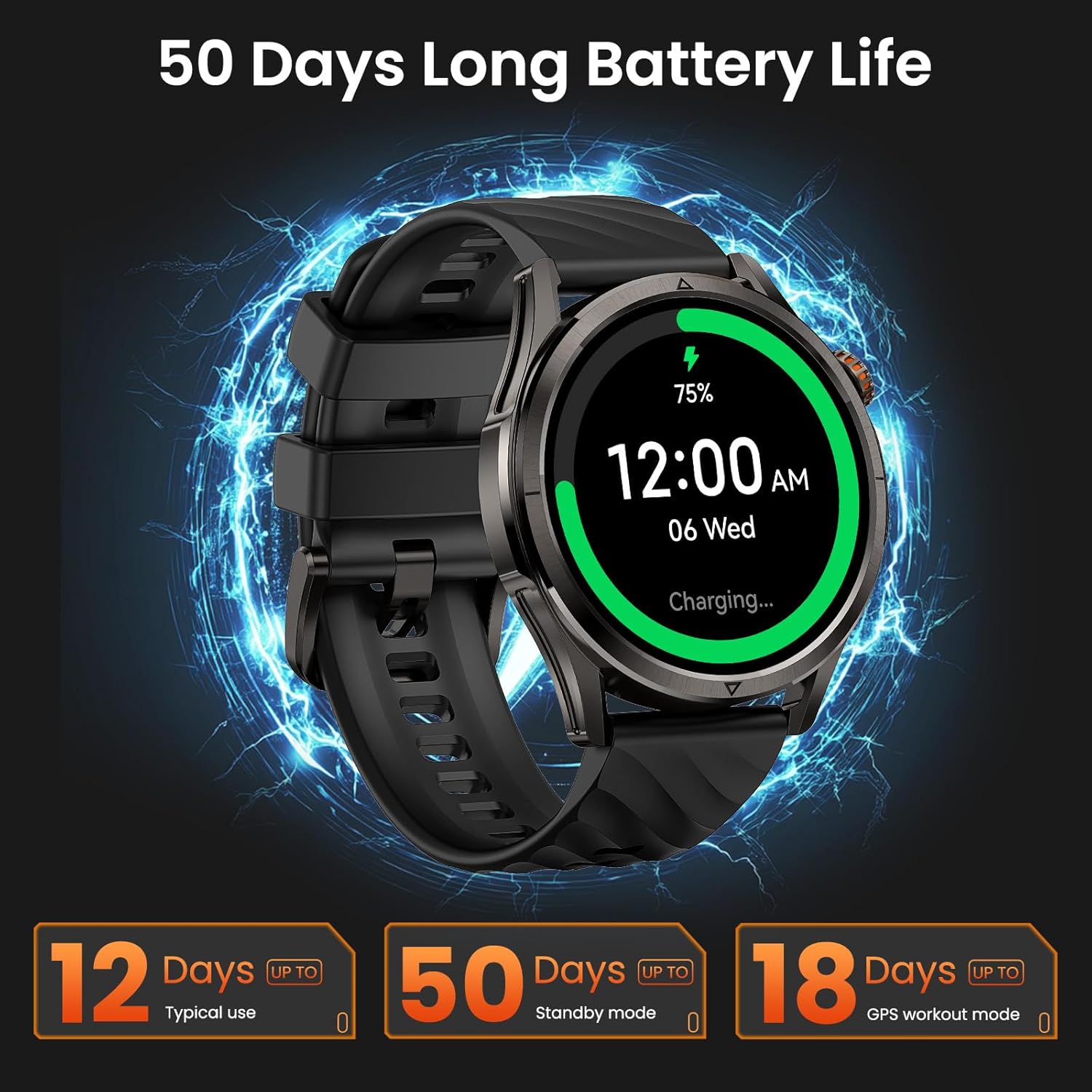
Image 3.1: KOSPET Magic R10 Smart Watch on a charger, indicating 75% battery and displaying battery life estimates.
3.2 App Installation (Apexmove)
The KOSPET Magic R10 Smart Watch requires the Apexmove application for full functionality. The app is compatible with iOS 10.0+ and Android 5.1+ devices.
- Download the 'Apexmove' app from the Apple App Store (for iOS) or Google Play Store (for Android).

Image 3.2: Download the Apexmove app from your device's app store.
3.3 Pairing with Phone
To connect your watch to your smartphone:
- Gbaa mbọ hụ na agbanyere Bluetooth ekwentị gị.
- Open the Apexmove app. Navigate to 'Device' and select 'Add a new device'.
- The app will search for your watch. Select 'KOSPET Magic R10' from the list.
- Kwado arịrịọ maka njikọta na ekwentị gị na elekere.

Image 3.3: Connection steps for iOS devices.
3.4 Notification Setup
To receive messages and app notifications on your watch, follow these steps:
Maka ngwaọrụ iOS:
- Ensure the Apexmove app remains active in the background.
- In the Apexmove app, go to 'Device' and open 'SMS Reminder' to enable SMS notifications.
- Still in 'Device', click 'App Notification' and enable notifications for desired applications.
- Go to your iPhone's 'Settings' > 'Notifications' > 'Apexmove' and allow notifications.

Image 3.4: iOS message and app notification setup.
Maka ngwaọrụ gam akporo:
- Keep the Apexmove app active (add to whitelist in settings if necessary).
- Turn off 'Do Not Disturb' and 'Low Power Mode' on your phone.
- In the Apexmove app, go to 'Device' and open 'SMS Reminder' to enable SMS notifications.
- Still in 'Device', click 'App Notification' and enable notifications for desired applications.
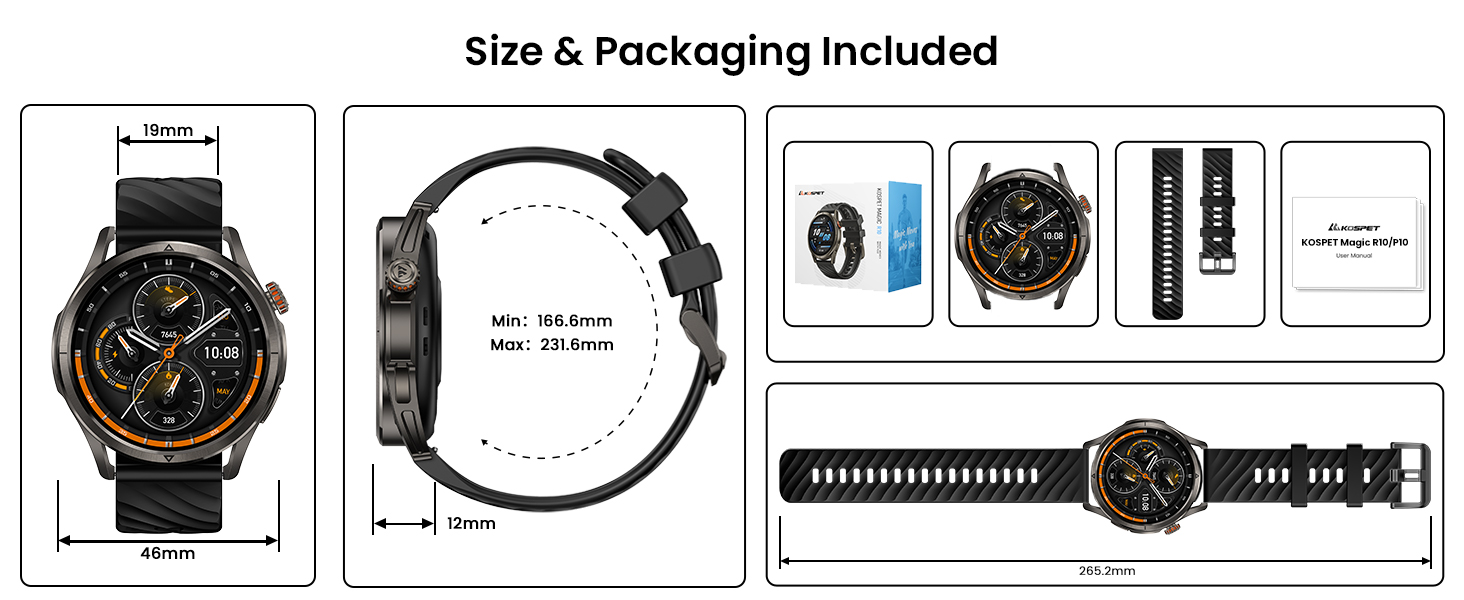
Image 3.5: Android message and app notification setup.
4. Ntuziaka ọrụ
4.1 Ngosipụta na Nsoro ụzọ
The Magic R10 features a 1.43" AMOLED display with Corning Gorilla Glass for durability and clear visibility. Navigate the watch interface using touch gestures and the physical buttons.
Ọrụ GPS 4.2
The watch includes built-in GPS that connects to 6 satellite systems, providing accurate location tracking. Dual-band GNSS ensures reliable signal strength, even in challenging environments. An integrated Altitude Pressure Compass provides elevation data and directional guidance.

Image 4.1: Multi-GNSS positioning and route tracking.
Ụdị egwuregwu 4.3
The Magic R10 supports 180 sport modes. It also features 6 smart recognition sports (walking, cycling, elliptical, etc.) that automatically detect and begin monitoring your activity without manual input.

Image 4.2: Apexmove app interface displaying activity data for various sports.
4.4 Nlekọta ahụike
The watch is equipped with a 4PD sensor for comprehensive health tracking, including:
- Ọnụọgụgụ obi: Continuous 24/7 heart rate monitoring.
- SpO2: Blood oxygen saturation tracking.
- Nleba anya ụra: Egwu ụra stages na oge.
- Stress and Emotions: Monitors stress levels.
- Menstrual Cycles: Provides tracking for women's health.
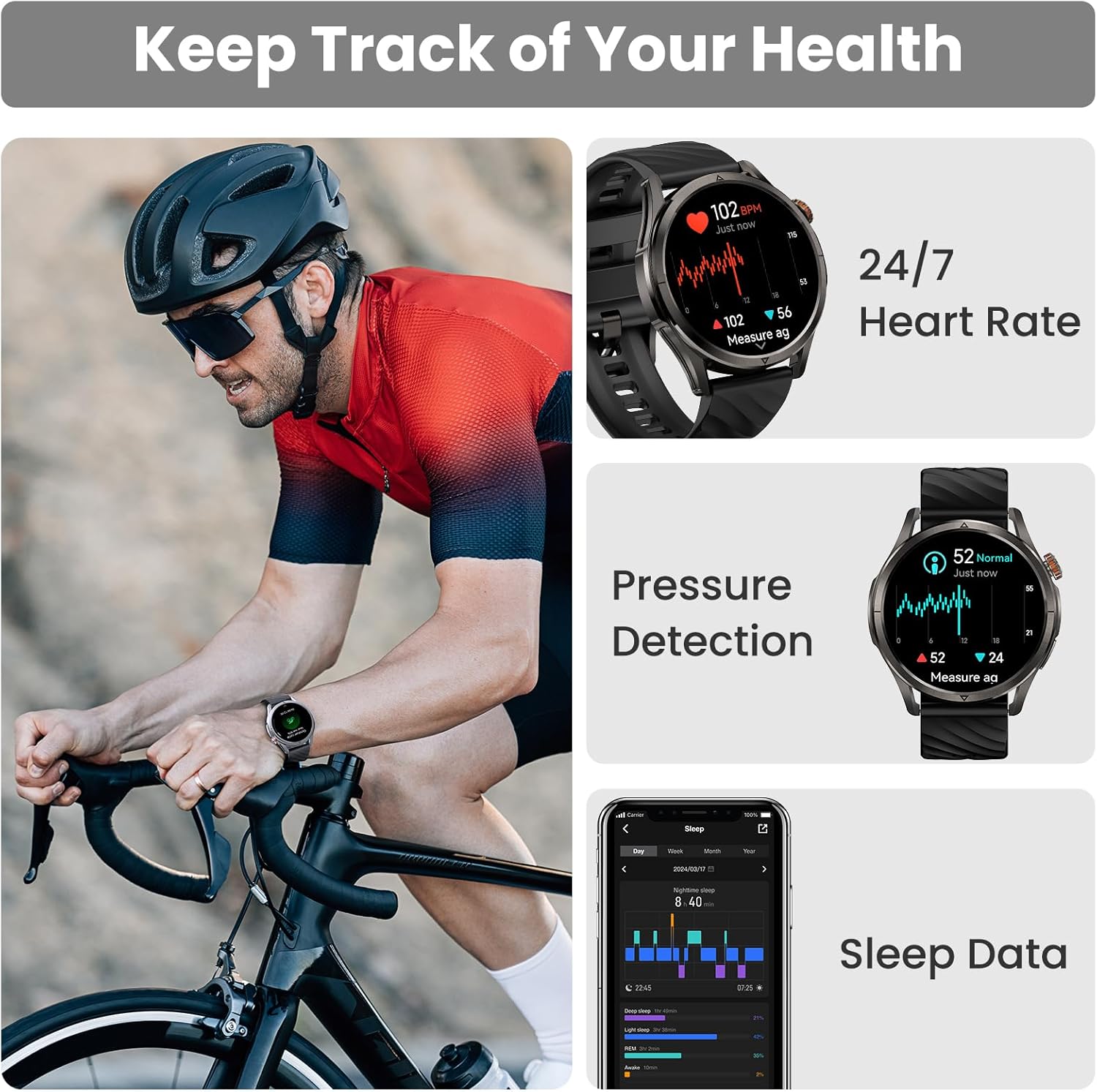
Image 4.3: Health monitoring features including heart rate, pressure, and sleep data.

Image 4.4: Menstrual cycle tracking interface.
Image 4.5: Heart rate monitoring during exercise.

Image 4.6: Sleep monitoring data display.
4.5 Calling and Notifications
The watch allows you to answer and make calls directly from your wrist when connected to your phone. It also displays message reminders and notifications from various applications.

Image 4.7: Call management, voice assistant, and message reminders.
4.6 Onye enyemaka olu
Utilize the built-in voice assistant for hands-free task execution, such as checking weather or initiating calls.
5. Nlekọta
5.1 Mmiri Nguzogide
The Magic R10 has a 5ATM water resistance rating, making it suitable for swimming and daily exposure to water (rain, sweat). It is not recommended for diving or high-pressure water activities.

Image 5.1: Watch being used for swimming, demonstrating 5ATM water resistance.
5.2 Nhicha
Na-ehicha elekere gị na eriri gị mgbe niile site na iji ihe dị nro, damp ákwà. Zere iji kemịkalụ siri ike ma ọ bụ ihe ndị na-emebi emebi. Hụ na kọntaktị chaja dị ọcha ma kpọọ nkụ tupu ị chaja.
5.3 Nlekọta batrị
Ka ịgbatị ndụ batrị:
- Zere oke okpomọkụ.
- Charge the watch fully before prolonged storage.
- Do not allow the battery to completely drain frequently.
6. Nchọpụta nsogbu
6.1 Okwu Njikọ Bluetooth
If your watch fails to connect or maintain a Bluetooth connection:
- Gbaa mbọ hụ na agbanyere Bluetooth na ekwentị gị na elekere.
- Malitegharịa ekwentị gị ma elekere.
- Ensure the Apexmove app is updated to the latest version.
- Try unpairing the watch from your phone's Bluetooth settings and then re-pairing through the Apexmove app.
- Check if other Bluetooth devices are causing interference. Temporarily disconnect other devices if necessary.
6.2 Ndụ batrị dị mkpụmkpụ
Ọ bụrụ na ndụ batrị dị mkpụmkpụ karịa ka a tụrụ anya:
- Belata nchapụta ihuenyo.
- Disable 'Always On Display' if enabled.
- Limit frequent GPS usage or long GPS tracking sessions.
- Gbanyụọ ọkwa na-enweghị isi.
- Ensure the watch is fully charged using the provided cable.
6.3 Data ahụike ezighi ezi
For accurate health monitoring:
- Gbaa mbọ hụ na etinyere elekere nke ọma na nkwojiaka gị, ọ bụghị nke siri ike ma ọ bụ nke tọgbọrọ chakoo.
- Debe ebe ihe mmetụta dị ọcha.
- Zere oke mmegharị n'oge nha (dịka ọmụmaatụ, SpO2).
7. Nkọwapụta
| Njirimara | Nkọwapụta |
|---|---|
| Nọmba nlereanya | Magic R10 |
| Nha ihuenyo | 1.43 sentimita asatọ |
| Ụdị ngosi | AMOLED |
| Akụrụngwa ahụ | Igwe anaghị agba nchara |
| Mmiri Nguzogide | 5ATM |
| GPS | Built-in GPS (6 satellite systems, Dual-band GNSS) |
| Ike batrị | 450 ndeamp Oge awa |
| Ndụ batrị (Ọkachamara ojiji) | Ruo ụbọchị 12 |
| Battery Life (GPS Workout Mode) | Ruo awa 18 |
| Battery Life (Standby Mode) | Ruo ụbọchị 50 |
| Ike Nchekwa ebe nchekwa | 128 MB |
| Ndakọrịta sistemụ arụmọrụ | Gam akporo 5.1+ na iOS 10.0+ |
| Njikọta | Bluetooth |
| Atụmatụ pụrụ iche | Activity Tracker, Always On Display, GPS, Notifications, Voice Assistant, Phone Call |
| Ibu Ibu | 9.6 ounces |

Image 7.1: Watch dimensions and package contents.
8. Akwụkwọ ikike na nkwado
For warranty information and customer support, please refer to the official KOSPET website or contact the retailer from whom you purchased the device. Keep your proof of purchase for warranty claims.


