1. Okwu mmalite
This manual provides detailed instructions for the LIGE EF14-G Smartwatch. Please read this manual thoroughly before using your device to ensure proper operation and to fully utilize its features. Keep this manual for future reference.
2. Ngwaahịa gafereview
The LIGE EF14-G Smartwatch is a robust and versatile wearable device designed for daily use and active lifestyles. It features a 1.62-inch HD AMOLED display, Bluetooth calling capabilities, comprehensive health monitoring, and multiple sport modes. Its durable construction and long-lasting battery make it a reliable companion.
Akụkụ ndị bụ isi:
- Ngosipụta AMOLED 1.62 inch: 480x480 resolution with 850 nits brightness for clear visuals.
- 730mAh Polymer Battery: Provides 5-7 days of typical use and up to 50 days standby.
- Ihe owuwu na-adịgide adịgide: Zinc Alloy casing, Polycarbonate back, and soft silicone strap.
- 3ATM Mgbochi mmiri: Suitable for rain, sweat, and swimming.
- 110+ Professional Sport Modes: Comprehensive activity tracking.
- 24/7 Nlekọta ahụike: Heart Rate, Blood Oxygen (SpO2), Blood Pressure, Sleep Analysis.
- Bluetooth Bluetooth: For calls, notifications, and music control.
- Integrated LED Tactical Flashlight.
- Nkwado ọtụtụ asụsụ: Compatible with Android 5.0+ and iOS 10.0+ via FitCloudPro app.

The LIGE EF14-G Smartwatch, showcasinnhazi ya na ihe ndị ọzọ dị na ya.

The LIGE EF14-G Smartwatch, highlighting its robust design for outdoor activities.
3. Nhazi
3.1 Ịchaji ngwaọrụ
Before initial use, fully charge your smartwatch. Connect the magnetic charging cable to the charging points on the back of the watch. Connect the other end to a USB power adapter (not included) or a computer's USB port. A full charge takes approximately 2.5 hours.

The smartwatch connected to its magnetic charging cable, illustrating the charging process.

An illustration highlighting the 730mAh battery capacity, indicating extended usage time.
3.2 Ngwa nwụnye
Budata ya FitCloudPro application on your smartphone. You can find it in the Apple App Store for iOS devices or the Google Play Store for Android devices. Alternatively, scan the QR code provided in the watch's packaging or on the watch screen to download the app.

The smartwatch displaying a QR code for easy FitCloudPro app download, shown alongside a smartphone with the app interface.
3.3 Njikọ Ngwaọrụ
Ensure Bluetooth is enabled on your smartphone. Open the FitCloudPro app, register or log in, and follow the on-screen instructions to add your device. Select 'EF14-G' from the list of available devices to establish a Bluetooth 5.3 connection. Grant all necessary permissions for full functionality.
4. Ntuziaka ọrụ
4.1 Nsoro ụzọ
The smartwatch features a full-touch AMOLED display and physical buttons for navigation. Swipe left/right, up/down to access different functions and menus. Press the side buttons to return to the home screen or access specific features.
4.2 Oku na Ọkwa Bluetooth
Once paired with your smartphone, the watch supports Bluetooth calls. You can answer, reject, or make calls directly from your wrist. The watch will also display notifications for messages, social media alerts, and other app updates.

A close-up of the smartwatch on a wrist, displaying an incoming call notification.

The smartwatch screen displaying multiple notification icons from various applications.
4.3 Nlekọta ahụike
The EF14-G smartwatch continuously monitors your health metrics. Access the dedicated sections on the watch or in the FitCloudPro app for detailed data.
- Ọnụọgụgụ obi: Nlekota obi n'oge a.
- Oxygen ọbara (SpO2): Na-enyocha ọkwa oxygen zuru oke n'ọbara.
- Ọbara Ọbara: Na-enye agụ ọbara mgbali.
- Nchicha ụra: Na-enyocha ụratages (deep, light, awake) and duration.

The smartwatch screen displaying detailed heart rate monitoring data and a historical graph.

A visual representation of the smartwatch's wellness features, including heart rate, daily activity, sleep, and breathing exercise tracking.
4.4 Sport Modes and Activity Tracking
The watch supports over 110 professional sport modes. Select your desired activity to track steps, calories burned, distance, and other relevant metrics. All fitness data synchronizes with the FitCloudPro app for detailed analysis.

The smartwatch displaying an active sport mode, showing real-time metrics like duration, heart rate, and step count.

A man wearing the smartwatch while engaged in rock climbing, demonstrating its use during outdoor sports.
4.5 LED Tactical Flashlight
The smartwatch is equipped with a powerful LED flashlight for emergencies or low-light conditions. Activate this feature through the watch's menu.
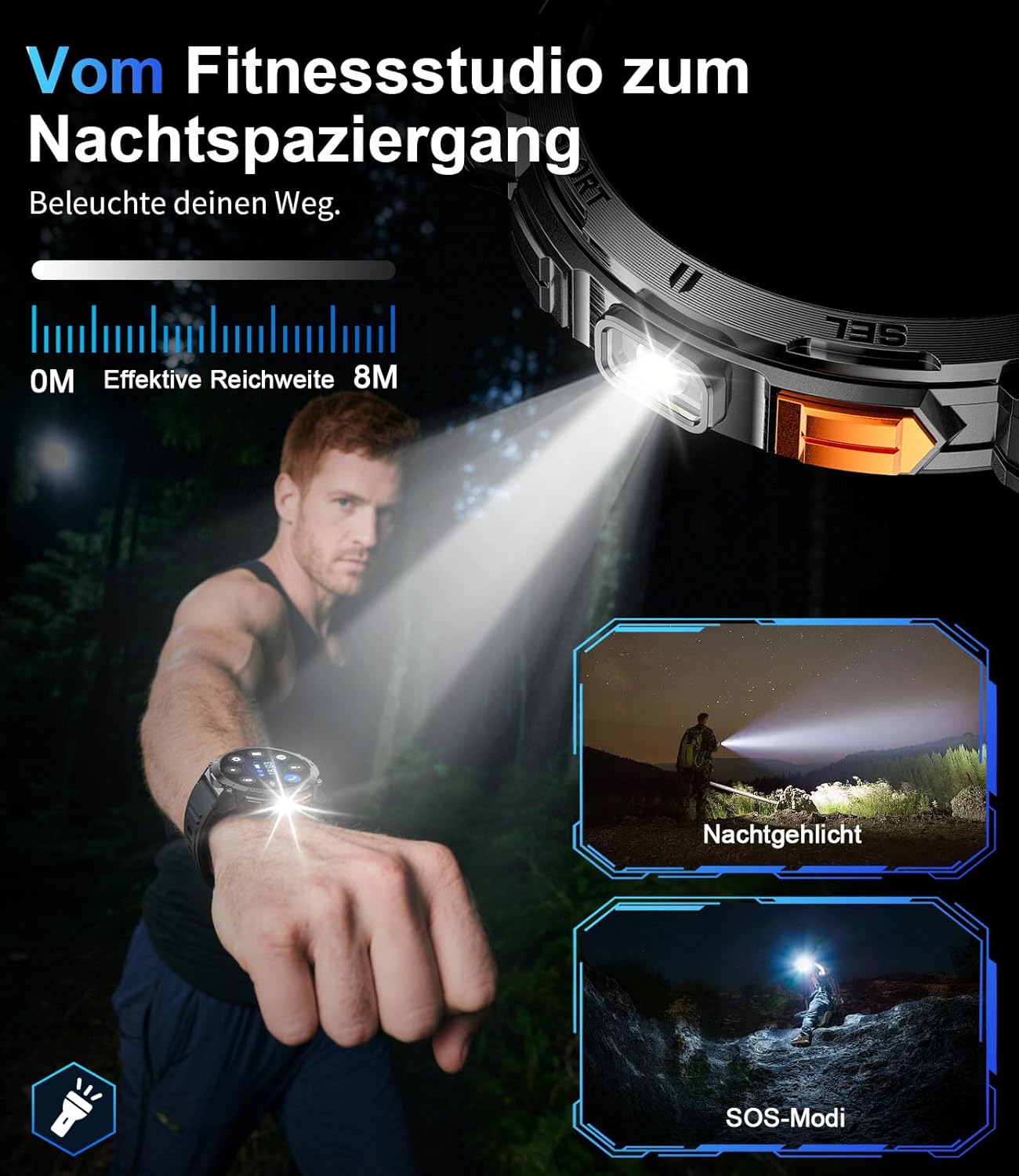
A nso-elu view of the smartwatch with its integrated LED flashlight activated.

A person using the smartwatch's LED light to navigate in a dark outdoor environment.
4.6 Nhazi
Personalize your smartwatch experience. Choose from a variety of pre-installed watch faces or create custom ones through the FitCloudPro app. The 22mm interchangeable straps allow for further personalization.
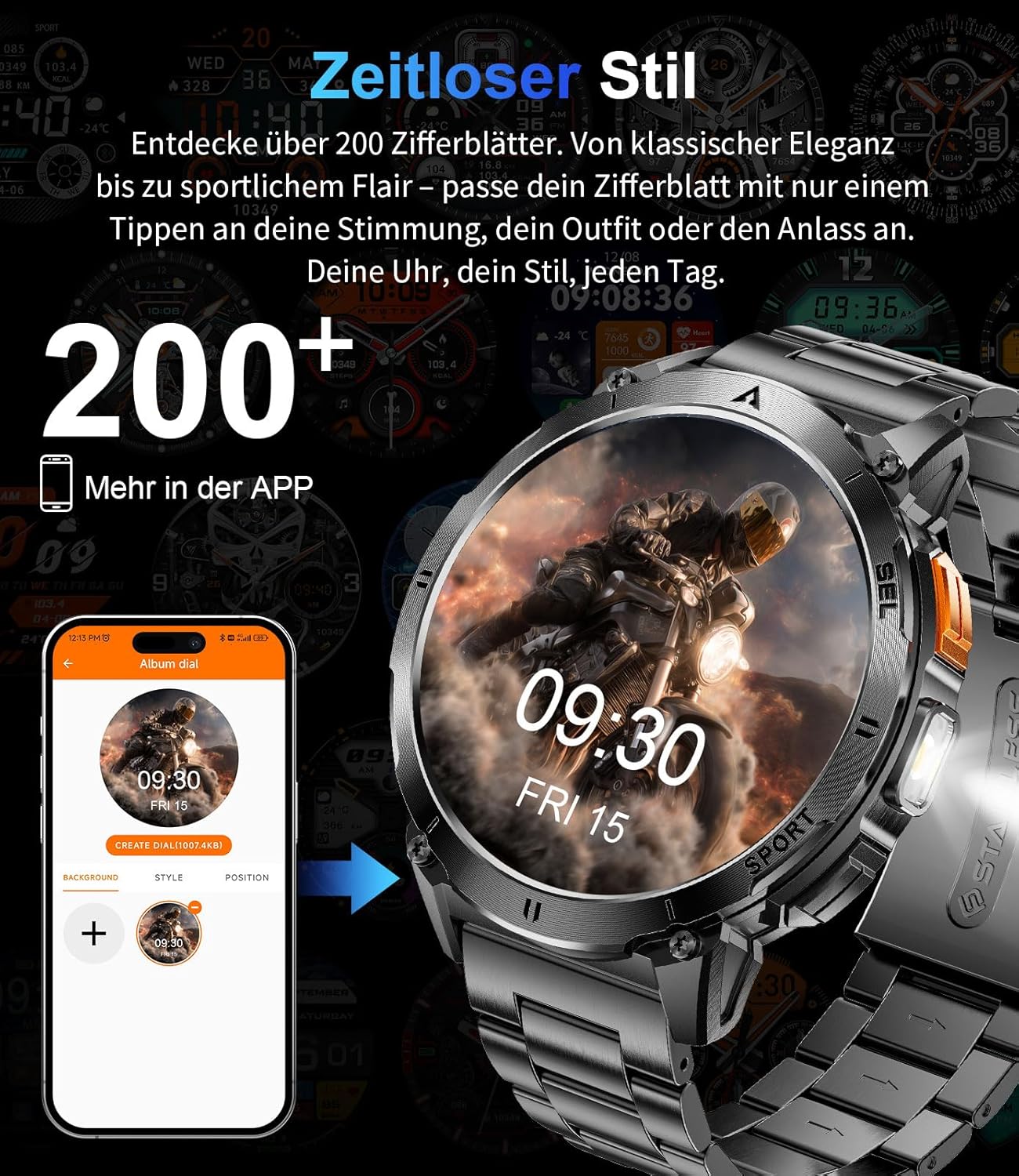
The smartwatch display showing various customizable watch face options.
5. Nlekọta
5.1 Nhicha
Regularly clean your smartwatch and strap to prevent skin irritation and maintain optimal performance. Use a soft, damp cloth to wipe the screen and casing. Avoid harsh chemicals or abrasive materials.
5.2 Mmiri Nguzogide
The EF14-G smartwatch is 3ATM water-resistant, meaning it can withstand splashes, rain, and brief immersion in water, making it suitable for swimming. However, it is not recommended for diving or exposure to hot water, steam, or high-pressure water jets, as this may compromise the seals.

A visual representation highlighting the smartwatch's durability, including its waterproof, shockproof, and dustproof capabilities.
6. Nchọpụta nsogbu
If you encounter issues with your LIGE EF14-G Smartwatch, refer to the following common solutions:
- Ngwaọrụ anaghị agbanwu: Gbaa mbọ hụ na chajịrị elekere ahụ nke ọma. Jikọọ ya na chaja opekata mpe nkeji iri atọ.
- Enweghị ike ijikọ na ekwentị mkpanaaka:
- Gbaa mbọ hụ na agbanyere Bluetooth na ekwentị gị.
- Gbaa mbọ hụ na elekere ahụ dị n'ime oke ekwentị gị.
- Malitegharịa ekwentị gị na smartwatch.
- Check if the FitCloudPro app has all necessary permissions.
- Try unpairing and re-pairing the device in the app.
- Ọgụgụ Ahụike Na-ezighi Ezi:
- Gbaa mbọ hụ na etinyere elekere nke ọma na nkwojiaka gị, ọ bụghị nke siri ike ma ọ bụ nke tọgbọrọ chakoo.
- Hichaa ihe mmetụta dị n'azụ elekere.
- Zere oke mmegharị n'oge nha.
- Ndụ obere batrị:
- Belata nchapụta ihuenyo.
- Disable unnecessary notifications or features.
- Ensure the watch is fully charged each time.
- Amamọkwa anaghị apụta:
- Check app permissions on your phone for FitCloudPro.
- Ensure notifications are enabled in both the phone's settings and the FitCloudPro app.
- Verify the Bluetooth connection is stable.
7. Nkọwapụta
Detailed technical specifications for the LIGE EF14-G Smartwatch:
| Ụdị | LIGE |
| Nọmba nlereanya | EF14-G |
| Agba | Nwa |
| Sistemụ nrụọrụ | Wear OS (Compatible with FitCloudPro app) |
| Nha ihuenyo | 1.62 sentimita asatọ |
| Ụdị ngosi | AMOLED, 480x480 pixels, 850 nits |
| Njikọta | Bluetooth 5.3 |
| Ike batrị | 730mAh Lithium-Polymer |
| Ndụ batrị | 5-7 days (typical use), up to 50 days (standby) |
| Mmiri Nguzogide | 3 ATM |
| Atụmatụ pụrụ iche | LED light, Pedometer, Fitness Tracker, Heart Rate Monitor, SpO2 Monitor, Sleep Tracker, Bluetooth Calls, Music Player, Voice Assistant, Reminders, Alarms, Notifications, Sedentary Reminder, Calculator |
| Ngwa dakọtara | Smartphone (Android 5.0+ / iOS 10.0+) |
| Ike Nchekwa ebe nchekwa | 256 MB |
| GPS | Enweghị GPS |
8. Akwụkwọ ikike na nkwado
LIGE provides comprehensive support for your EF14-G Smartwatch.
- Akwụkwọ ikike: Akwụkwọ ikike afọ 2 site na ụbọchị ịzụrụ.
- Iwu nloghachi: 30-day return service.
- Ndị ọrụ nlekọta ndị ahịa: 24-hour customer support is available for any inquiries or assistance.

An illustration detailing the customer support services: 24-hour customer service, 6-month return policy, and 2-year warranty service.


