
1. Okwu mmalite
This manual provides essential instructions for the safe and efficient use of your DCHK Haribo HBT-03 Wireless Earbuds. Please read this manual thoroughly before using the product and retain it for future reference.
Ọdịnaya ngwugwu:
- Haribo HBT-03 Wireless Earbuds (Left and Right)
- Charging Case with LCD Touchscreen
- USB-C ka eriri USB-A
- Three (3) Pairs of Eartips (Small, Medium, Large)
- Akwụkwọ ntuziaka onye ọrụ (Akwụkwọ a)

Image 1.1: Haribo HBT-03 Wireless Earbuds and Charging Case. The image displays the white earbuds seated in their open charging case, which features an LCD screen displaying 'HARIBO' and 'Swipe to Unlock'. A red gummy bear charm is attached to the case.
2. Ngwaahịa gafereview
The DCHK Haribo HBT-03 Wireless Earbuds are designed for a high-quality audio experience with convenient features.
Akụkụ ndị bụ isi:
- Bluetooth Bluetooth: Provides stable and efficient wireless connectivity.
- LCD Touchscreen Case: Offers intuitive control over various functions directly from the charging case.
- Ịkagbu mkpọtụ mkpọtụ (ANC): Na-ebelata mkpọtụ gburugburu maka ahụmịhe ige ntị nke ukwuu.
- Ụdị nghọta: Allows you to hear your surroundings while listening to audio.
- Ndị ọkwọ ụgbọ ala dị ike 13mm: Delivers powerful bass and clear audio.
- IPX4 Mgbochi mmiri: Na-echebe megide splashes na ọsụsọ.
- Nghaghachi agbatịgoro: Up to 12 hours of total playback time with the charging case.

Image 2.1: Key features of the Haribo HBT-03 Earbuds. Icons illustrate wireless earbuds, pocket size, LCD display, Bluetooth 5.4, 12-hour play time, and 13mm driver.
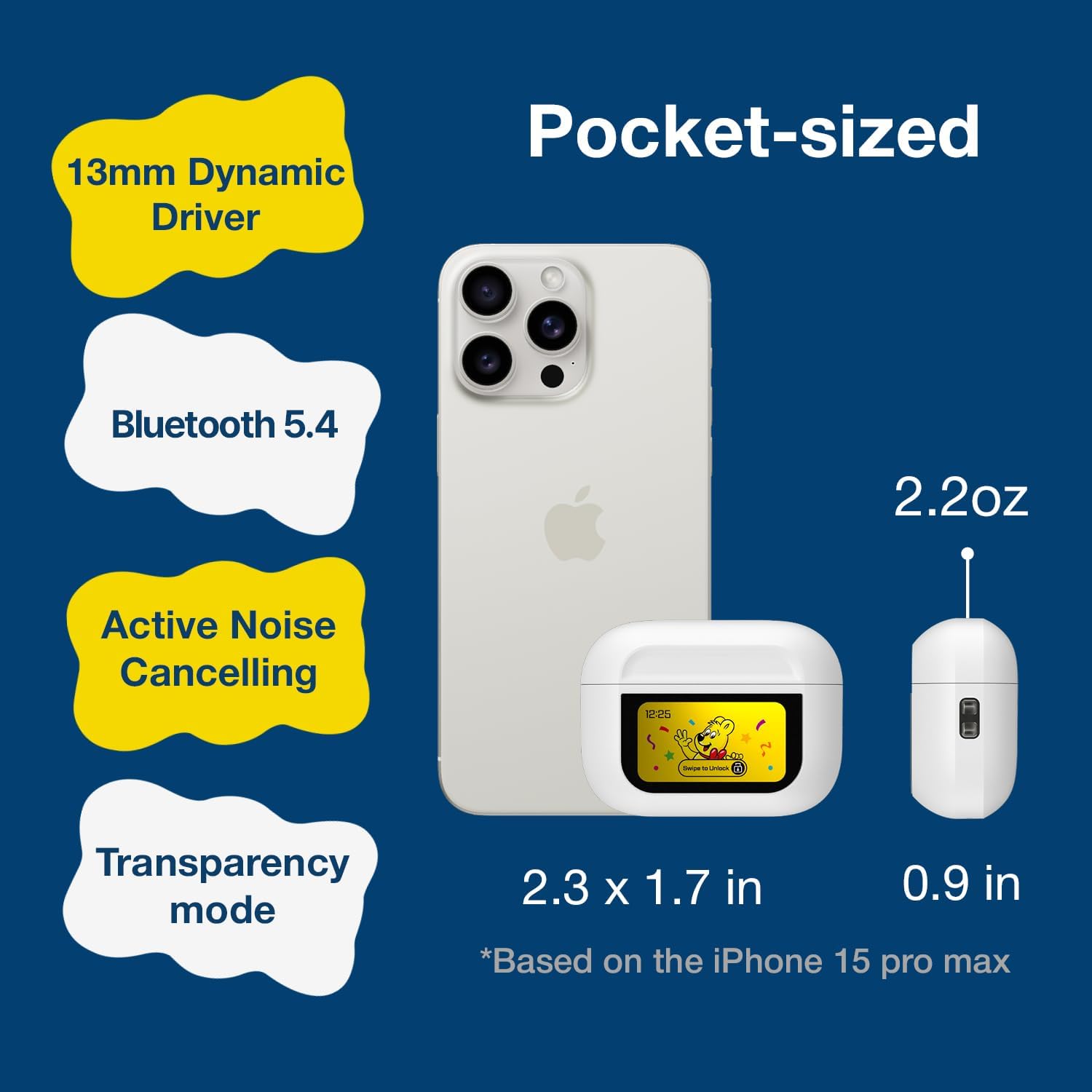
Image 2.2: The compact size of the Haribo HBT-03 Earbuds and case, shown next to a smartphone for scale. The case dimensions are approximately 2.3 x 1.7 inches, and the earbuds weigh 2.2 ounces.
3. Nhazi
3.1 Ịchaji ntị na akpa
- Tinye ntị ntị n'ime akpa nchaji. Gbaa mbọ hụ na ha nọ ọdụ nke ọma.
- Connect the USB-C end of the charging cable to the port on the charging case.
- Connect the USB-A end of the charging cable to a compatible USB power source (e.g., wall adapter, computer USB port).
- The LCD screen on the case will display the charging status and battery levels.
A full charge for the case takes approximately 1.5 hours. The earbuds charge while inside the case.

Image 3.1: Charging information for the Haribo HBT-03 Earbuds. The image indicates a 1.5-hour charging time, 5 hours of single play time, and up to 12 hours of total play time with the charging case.
3.2 Ijikọ na ngwaọrụ
- Gbaa mbọ hụ na a na-akwụ ụgwọ ekwe ntị ma tinye ya n'ime igbe nchaji.
- Mepee mkpuchi mkpuchi nchaji. Igwe ntị ga-abanye na ọnọdụ njikọta na-akpaghị aka.
- Na ngwaọrụ gị (smartphone, mbadamba, laptọọpụ), gbanye Bluetooth.
- Chọọ maka available Bluetooth devices and select "HBT-03" from the list.
- Once connected, the earbuds will indicate successful pairing, and the device will show them as connected.
The Bluetooth 5.4 technology provides an improved transmission range of up to 32 feet (10 meters).

Image 3.2: Bluetooth 5.4 connectivity features of the Haribo HBT-03 Earbuds, highlighting a 32ft improved transmission range, high-quality audio, optimized energy consumption, and extraordinary connection stability.
3.3 Fitting the Earbuds
- Select the eartips that provide the most comfortable and secure fit for your ears. A proper seal is crucial for optimal sound quality and noise cancellation.
- Gently insert each earbud into your ear canal and twist slightly to ensure a snug fit.

Image 3.3: Available eartip sizes (Small: 0.45in, Medium: 0.47in, Large: 0.51in) for the Haribo HBT-03 Earbuds, designed for a perfectly fitting and secure experience.
4. Ọrụ
4.1 Njikwa mmetụ ntị ntị
The earbuds feature touch-sensitive areas for controlling various functions:
- Gwuo/kwụsịtụ: Otu mgbata na ntị ntị.
- Track na-esote: Pịa ugboro atọ na ntị ntị aka nri.
- Gara aga Track: Pịa ugboro atọ na ekwe ntị aka ekpe.
- Olu elu: Swipe up on either earbud.
- Olu ala: Swipe down on either earbud.
- Azịza/Kwụsị Oku: Otu mgbata na ntị ntị.
- Jụ oku: Pịa ogologo na ntị ntị ọ bụla.
- Activate Voice Assistant (Siri, Bixby, Google Assistant): Long press on the left earbud.
- Toggle ANC/Transparency/Normal Mode: Long press on the right earbud.
- Game Mode/Music Mode: Kpatụ ntị ugboro anọ na ntị ntị.
4.2 LCD Touchscreen Case Functions
The charging case features a full-color LCD touchscreen for advanced controls and settings. Swipe to unlock the screen and navigate through the options.

Foto 4.1: Ofeview of the various functions available on the Haribo HBT-03 Earbuds' LCD touchscreen case. These include Battery Level Display, Change Song, Volume Control, Screen Brightness Adjustment, Equalizing (EQ modes), Like Button (for TikTok), Find My Earbuds, Remote Photo Capture, Set Current Time, Noise Reduction (ANC/Transparency), Flashlight, Screen Lock, Language Switch, Settings Menu (Power Off, Factory Reset), and Set Alarm.
Available functions on the LCD screen include:
- Battery Ọkwa Display: Shows battery status of both earbuds and the case.
- Njikwa ịkpọghachi egwu: Play, pause, skip tracks.
- Ndozi olu: Control audio output level.
- Ijikwa oku: Answer, end, or reject calls.
- Noise Cancelling & Transparency: Switch between ANC, Transparency, and Normal modes.
- Ụdị EQ: Select from 5 adjustable EQ modes (Standard, Classic, Jazz, Rock, Popular).
- Njikwa igwefoto: Remotely trigger your smartphone camera.
- Ịgbanwe Asụsụ: Gbanwee asụsụ ngosi.
- Wallpaper Customization: Personalize the screen background.
- Ndozi ihie ihuenyo: Modify display intensity.
- Chọta ntị m: Helps locate misplaced earbuds.
- Igwe ọkụ: Activates a small light on the case.
- Ngụ oge: Tọọ ngụ oge.
- Ntọala Ntọala: Access options like Power Off and Factory Reset.
4.3 Gbanyụọ ma ọ bụ gbanyụọ
- Ike Na: Mepee mkpuchi mkpuchi nchaji, na ntị ntị ga-agbanye ọkụ ozugbo.
- Gbanyụọ: Place the earbuds back into the charging case and close the lid. They will automatically power off and begin charging. You can also power off via the LCD screen settings.
5. Nlekọta
5.1 Nhicha
- Jiri akwa dị nro, kpọrọ nkụ na-adịghị na-ehicha ntị ntị na chaja mgbe niile.
- Remove eartips and clean them with mild soap and water if necessary. Ensure they are completely dry before reattaching.
- Use a cotton swab to gently clean the charging contacts on both the earbuds and inside the case.
- Zere iji ihe na-emebi emebi, mmanya na-egbu egbu, ma ọ bụ kemịkalụ ihicha.
5.2 Nchekwa
- Mgbe ejighị ya, chekwaa earbuds n'ime akpa nchaji ha iji chebe ha ma debe ha ebubo.
- Store the product in a cool, dry place, away from extreme temperatures and direct sunlight.
5.3 Mgbochi mmiri (IPX4)
The earbuds are rated IPX4, meaning they are resistant to splashing water from any direction. This makes them suitable for workouts and light rain. They are ọ bụghị designed for submersion in water or exposure to pressurized water jets.
6. Nchọpụta nsogbu
If you encounter issues with your earbuds, refer to the following common problems and solutions:
| Nsogbu | Ngwọta enwere ike |
|---|---|
| Igwe ntị anaghị ejikọta ya na ngwaọrụ |
|
| No sound from one or both earbuds |
|
| Nchaji anaghị akwụ ụgwọ |
|
| Njikwa mmetụ anaghị anabata ya |
|
| LCD screen not responding |
|
7. Nkọwapụta
| Njirimara | Nkọwa |
|---|---|
| Aha Nlereanya | HBT-03 |
| Ụdị Bluetooth | 5.4 |
| Oke Bluetooth | Ruo 32.8 ụkwụ (mita 10) |
| Nha ọkwọ ụgbọ ala ọdịyo | 13mm Dynamic ọkwọ ụgbọ ala |
| Nzaghachi ugboro ugboro | 20 Hz - 20 kHz |
| Mgbochi | 32 Ohm |
| Njikwa mkpọtụ | Nkagbu Noise nọchiri anya (ANC) |
| Mmiri Nguzogide | IPX4 |
| Ndụ batrị earbud | Approx. 4.5 - 8 hours (depending on usage) |
| Oge Mkpọghachi (na ikpe) | Ruo awa iri abụọ |
| Ịchaji Ike batrị Case | 300 mAh |
| Oge Njikere (Ikpe) | Ihe ruru. awa 1.5 |
| Nchaji ọdụ ụgbọ mmiri | USB-C |
| Ụdị njikwa | Touch Control (Earbuds), Touch Screen (Case) |
| Ihe onwunwe | ABS Plastic |
| Ibu Ibu | 2.2 ounces (total) |
| Akụkụ ikpe | 2.4 x 0.95 x 1.8 inch (ihe dị ka) |
8. Ozi nchekwa
- Ewepụla ma ọ bụ gbanwee ngwaahịa a.
- Avoid exposing the product to extreme temperatures, direct sunlight, or open flames.
- Keep the product away from water and liquids, except for the IPX4-rated resistance to splashes.
- Do not use the earbuds at excessively high volumes for prolonged periods to prevent hearing damage.
- Debe ebe ụmụaka na anụ ụlọ na-apụghị iru.
- Tụfuo batrị na akụrụngwa eletrọnịkị nke ọma dịka iwu obodo siri dị.
9. Akwụkwọ ikike na nkwado
DCHK provides a limited warranty for this product. For specific warranty terms and conditions, please refer to the warranty card included in your package or contact DCHK customer support.
Nkwado ndị ahịa:
If you have any questions, require technical assistance, or need to report an issue, please contact our customer support team through the retailer's platform or the official DCHK websaịtị.


