1. Okwu mmalite
This manual provides essential information and instructions for operating your Sony ZV-E10 II Mirrorless Vlogging Camera Kit with the 16-50mm OSS Lens. Designed for content creators and vloggers, this camera combines a 26 MP APS-C sensor with advanced features for high-quality video and stills. Please read this manual thoroughly before using the camera to ensure proper and safe operation.
2. Kedu ihe dị na Igbe ahụ
Your Sony ZV-E10 II kit includes the following items:
- Sony Alpha ZV-E10 II Mirrorless Camera (Black)
- Sony E PZ 16-50mm f/3.5-5.6 OSS II Lens
- Batrị Lithium-Ion nke Sony NP-FZ100 nke a na-akwụghachi ụgwọ (2280mAh)
- Okpu ahụ Sony ALC-B1EM maka igwefoto E-Mount
- Ubu eriri
- Ihuenyo ikuku
- Kaadị ebe nchekwa 64GB
- Akpa
- Onye na-agụ kaadị ebe nchekwa
- Micro HDMI USB
- Tripod Na-agbanwe Agbanwe nke Inchi 12
- Eriri aka
- Obere akpa kaadị ebe nchekwa
- Ngwa nhicha
3. Ngwaahịa gafereview
The Sony ZV-E10 II is a compact and lightweight mirrorless camera designed for ease of use and high-quality content creation. It features a 26 MP APS-C Exmor R CMOS sensor and a BIONZ XR processor for stunning image and video performance.

Foto 3.1: N'ihu view of the Sony ZV-E10 II camera with the 16-50mm lens and an external microphone attached.
Isi ihe:
- Ugwu oghere: E-mount for interchangeable lenses.
- Vari-angle LCD Screen: A 3-inch touchscreen that can be articulated for flexible framing, especially useful for vlogging.
- Igwe okwu arụnyere n'ime ya: Features a 3-capsule microphone with an included windscreen for clear audio.
- Multi-Interface Shoe: Allows attachment of external accessories like microphones and lights.
- Control Buttons and Dials: Ergonomically placed for intuitive operation.

Ọgụgụ 3.2: N'azụ view of the Sony ZV-E10 II camera, showing the fully articulating LCD touchscreen and control buttons.

Foto 3.3: Top view of the Sony ZV-E10 II camera, highlighting the power switch, shutter button, and mode dial.
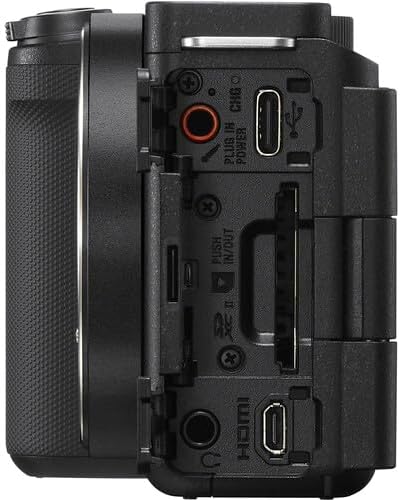
Foto 3.4: Akụkụ view of the Sony ZV-E10 II camera, displaying the various ports including USB-C, HDMI, and microphone/headphone jacks.
4. Nhazi
4.1. Ịtinye Batrị na Kaadị Ebe Nchekwa
- Open the battery/memory card cover located at the bottom of the camera.
- Insert the NP-FZ100 battery with the arrow pointing into the camera until it locks into place.
- Insert the memory card (SD card) into the slot with the contacts facing the correct direction until it clicks.
- Mechie mkpuchi ahụ nke ọma.

Onyonyo 4.1: N'okpuru view of the camera with the battery and memory card compartment open.
4.2. Na-agbakwunye oghere
- Wepu okpu ahụ na igwefoto yana okpu oghere azụ na oghere.
- Hazie akara ntụaka ọcha dị na lens ahụ na akara ntụaka ọcha dị na ahụ igwefoto ahụ.
- Tinye lenzi ahụ site n'ịtụgharị ya n'akụkụ aka nri ruo mgbe ọ pịrị aka n'ebe ọ nọ.

Foto 4.2: N'ihu view of the camera body with the lens removed, showing the E-mount sensor.
5. Na-arụ ọrụ igwefoto
5.1. Gbanyụọ / gbanyụọ
To turn the camera on or off, slide the Gbanye/ Gbanyụọ switch located on the top plate.
5.2. Ụdị Ịgba égbè dị mfe
The camera offers various shooting modes accessible via the mode dial or menu. Common modes include:
- Akpaaka nwere ọgụgụ isi: Automatically detects the scene and adjusts settings.
- Mmemme akpaaka (P): Igwefoto na-edozi ọsọ oghere na ihe mkpuchi, ebe ị na-achịkwa ntọala ndị ọzọ.
- Mkpa Oghere (A): Ị na-ahazi oghere ahụ, igwefoto na-ahazi ọsọ mkpuchi ahụ.
- Ihe Mkpuchi (S): Ị na-ahazi ọsọ ihe mkpuchi ahụ, igwefoto na-ahazi oghere.
- Akwụkwọ ntuziaka (M): Full control over aperture and shutter speed.
- Ọnọdụ ihe nkiri: Ụdị raara onwe ya nye maka ndekọ vidiyo.
5.3. Sistemụ Nchekwa Onwe
The ZV-E10 II features an advanced autofocus system with 759 phase-detection points and Real-Time Eye AF for both humans and animals, ensuring sharp focus on your subjects during photos and videos.
- Nchọgharị oge: Select a subject on the screen, and the camera will continuously track its movement.
- Ntinye Aka: Pịa na ihuenyo LCD iji tọọ ebe a na-elekwasị anya.
6. Advanced Atụmatụ
6.1. Product Showcase Setting
This mode is ideal for product reviews. When activated, the camera automatically shifts focus from your face to a product held up to the lens, then back to your face when the product is removed.
6.2. Background Defocus
Achieve a professional-looking blurred background (bokeh) with a single button press. This feature is perfect for isolating your subject and adding a cinematic touch to your content.
6.3. Cinematic Vlog Setting
This setting optimizes video capture for a cinematic look by automatically adjusting frame rate to 24fps and adding black letterbox bars. You can also choose from various "Looks" (e.g., Clean, Chic, Fresh) and "Moods" (e.g., Auto, Gold, Ocean, Forest) to customize the aesthetic.
Video 6.1: This video demonstrates the Cinematic Vlog Setting, showcasing how it locks the frame rate to 24fps, adds letterbox bars, and allows selection of various "Looks" and "Moods" for a cinematic video aesthetic (from 8:57 to 9:30 in the comparison video).
6.4. Creative Looks and S-Cinetone
The camera offers 10 Creative Look presets (e.g., FL, IN, SH, VV2) that allow you to fine-tune saturation, contrast, sharpness, and clarity directly in-camera. Additionally, the S-Cinetone picture profile (PP11) provides a cinematic look optimized for skin tones without extensive post-production grading.
6.5. In-Camera Time-lapse
Create stunning time-lapse videos directly within the camera without needing external intervalometers or complex software. You can set the frame rate and interval time to capture dynamic scenes like moving clouds or changing light conditions.
Video 6.2: This video demonstrates the in-camera time-lapse feature, showing how to access settings for frame rate and interval time to create time-lapse sequences (from 5:16 to 5:34 in the comparison video).
7. Audio Atụmatụ
7.1. Internal Microphone and Directivity
The ZV-E10 II features an improved internal 3-capsule microphone with adjustable directivity. You can select between N'ihu, N'azụ, ma ọ bụ Ntuziaka niile to optimize audio pickup based on your shooting scenario, effectively isolating your voice from ambient noise.
7.2. Multi-Interface Shoe for External Microphones
For enhanced audio quality, the camera's Multi-Interface (MI) Shoe allows for direct digital audio input from compatible Sony microphones (e.g., Sony ECM-M1) without the need for additional cables. This provides a clean, high-quality audio signal.
Video 7.1: This video illustrates the audio capabilities of the Sony ZV-E10 II, including the internal microphone's directivity settings (Front, Rear, All Directions) and the use of the Multi-Interface Shoe for external microphones like the Sony ECM-M1 (from 11:41 to 14:17 in the comparison video).
8. Nkwụsi ike onyonyo
The ZV-E10 II incorporates Optical SteadyShot image stabilization, particularly effective with the bundled 16-50mm OSS lens. This feature helps to reduce camera shake, resulting in smoother and more stable footage, karịsịa n'oge agbapụ aka.
Video 8.1: This video compares the image stabilization performance between the original Sony ZV-E10 and the ZV-E10 II, demonstrating the improved stability of the newer model's Active SteadyShot (from 14:18 to 15:10 in the comparison video).
9. Nlekọta
9.1. Nhicha igwefoto na Lensi
- Jiri ákwà dị nro, nke na-enweghị ihe e ji ehicha ahụ, hichaa ahụ igwefoto ahụ.
- For the lens, use a lens brush to remove dust, then a lens cleaning solution and a microfiber cloth. Avoid touching the lens surface with your fingers.
- Never use organic solvents such as alcohol, benzene, or thinner to clean the camera.
9.2. Nlekọta batrị
- Chajịa batrị zuru oke tupu ojiji mbụ.
- Chekwaa batrị n'ebe dị jụụ, kpọrọ nkụ mgbe anaghị eji ya.
- Zere ikpughe batrị na oke okpomọkụ.
10. Nchọpụta nsogbu
Ọ bụrụ na ị hụ nsogbu na igwefoto gị, lee ihe ngwọta ndị a na-ahụkarị:
- Igwefoto anaghị agba ọkụ: Gbaa mbọ hụ na chajịrị batrị zuru oke yana itinye ya nke ọma.
- Batrị anaghị akwụ ụgwọ: Check the charging cable and adapter. If the charging indicator light is yellow, it may indicate a fault with the battery or charging system. Try a different charging cable or contact support.
- Foto ndị a na-adịghị ahụkebe: Check focus settings (autofocus mode, focus area). Ensure the lens is clean and properly attached.
- Ndekọ vidiyo kwụsịrị na mberede: Ensure the memory card has sufficient space and is of a high-speed class suitable for 4K recording. Check battery level.
- Menu navigation issues: The ZV-E10 II features an updated, fully touchscreen-enabled menu. Ensure touch operation is enabled in settings if you prefer it.
For more detailed troubleshooting, please visit the Sony support websaịtị ma ọ bụ kpọtụrụ ndị ahịa.
11. Nkọwapụta
| Njirimara | Nkọwa |
|---|---|
| Akụkụ ngwaahịa | 1.8 x 4.5 x 2.5 sentimita asatọ |
| Ibu Ibu | 4.4 pound |
| ASIN | B0DFJTWDK6 |
| Nọmba ihe nlereanya | ZVE10M2KB |
| Batrị | 1 Batrị na-abụghị ọkọlọtọ (gụnyere) |
| Ụbọchị mbụ dị | Ọgọst 28, 2024 |
| Onye nrụpụta | Sony |
| Nkwalite dakọtara | Sony E |
| Akụkụ akụkụ | 4:3 |
| Teknụzụ ihe mmetụta foto | BSI CMOS |
| Akwadoro File Usoro | JPEG, MP4 |
| Ndozi onyonyo | Ngwakọ |
| Ogologo Focal kacha | 50 millimeters |
| Ụdị | Sony |
| Aha Nlereanya | ZVE10M2KB |
| Kachasị WebMkpebi onyonyo cam | 26 MP |
| Nha ihe mmetụta foto | 23.6 x 15.6 mm |
12. Akwụkwọ ikike na nkwado
Your Sony ZV-E10 II camera is covered by a manufacturer's warranty. For specific warranty terms and conditions, please refer to the documentation included with your product or visit the official Sony support websaịtị.
For technical support, product registration, or service inquiries, please contact Sony Customer Support through their official channels.


