Okwu mmalite
The Sony PDT-FP1 Portable Data Transmitter is designed for professionals requiring high-speed and stable communication. This device features an optimized antenna design, an efficient heat dissipation structure, and versatile input interfaces to ensure reliable performance in demanding environments. It supports a broad range of communication bands, including LTE, 5G Sub6, and mmWave, and offers enhanced reception sensitivity for faster, low-latency data transmission.
The PDT-FP1 is compatible with various communication environments, including local and private 5G networks, facilitating efficient data transmission globally. Its Dual SIM capability allows for automatic switching to the strongest available network, ensuring seamless data flow. The integrated cooling fan and duct structure prevent thermal shutdown, maintaining continuous operation even in temperatures up to 40°C (104°F).
Atụmatụ igodo
- Uninterrupted Streaming: Supports a wide range of LTE and 5G bands for reliable connectivity and live video transmission.
- Ultra-Fast Data Transfer: Equipped with a SuperSpeed USB 5Gbps (USB3.2) Type-C port and a Gigabit LAN terminal for rapid data handling and network connectivity.
- Ogo onyonyo kacha elu: HDMI Type-A connector supports high-resolution video transmission up to 4K at 60p/50p/30p/25p/24p.
- Ndụ batrị agbatịkwuru: Provides approximately 4 hours for FTP transfer via USB in LTE, or about 2 hours for video uploads via HDMI.
- Nbugharị ebulitere: Compact and lightweight design (approx. 10.9 oz / 309g, 6.7 x 3.2 x 1.1 inches) for easy transport and setup.
Ngwaọrụ agwụlaview

Ọgụgụ 1: N'azụ view of the PDT-FP1, highlighting the LAN, CHARGE (USB-C), and HDMI ports. A small camera lens is visible at the top.

Foto nke 2: Ọtụtụ views of the PDT-FP1, illustrating its slim profile and the placement of ports (USB-C, HDMI, LAN) on the top and bottom sections.
Ntuziaka nhazi
- Chaja ngwaọrụ: Connect the PDT-FP1 to a power source using the provided USB-C cable and a compatible charger. The CHARGE indicator will illuminate during charging.
- Fanye Kaadị SIM (Nhọrọ): If using cellular data, open the SIM card slot cover and insert up to two nano-SIM cards. Ensure they are correctly oriented.
- Connect to a Camera/Video Source:
- For video input, connect an HDMI cable from your camera or video source to the HDMI input port on the PDT-FP1.
- For data transfer from a camera, connect a USB cable from your camera to the USB-C port on the PDT-FP1.
- Jikọọ na netwọk (Nhọrọ):
- For wired network connection, connect an Ethernet cable to the LAN port.
- For wireless network, ensure SIM cards are active or configure Wi-Fi settings via the device interface.
- Ike Na: Press and hold the power button until the device powers on and the display illuminates.

Figure 3: The PDT-FP1 connected to a camera, demonstrating its use for transferring image files to a connected smartphone.

Figure 4: The PDT-FP1 mounted on a camera, showing its display interface with real-time 5G signal strength and data upload/download speeds.
Ntuziaka ọrụ
Mbufe data
- Họrọ Isi mmalite ntinye: Use the device's interface to select whether the input is from HDMI (for live video) or USB (for file mbufe).
- Nhọrọ netwọk: The PDT-FP1 automatically selects the strongest available network (LTE, 5G, Wi-Fi, or LAN). You can manually override this in the settings if needed. With Dual SIM, the device will switch to the SIM with better signal.
- Malite nnyefe: Depending on your application (e.g., live streaming software, FTP client), initiate the data transfer or stream. The device's display will show connection status and data rates.
- Nyochaa arụmọrụ: Regularly check the device's screen for signal strength, data transfer speeds, and battery level to ensure continuous operation.
Njikwa okpomọkụ
The PDT-FP1 features an active cooling system. Ensure the ventilation ducts are not obstructed during operation to maintain optimal performance and prevent thermal shutdown. The device is designed to operate stably up to 40°C (104°F).

Figure 5: The PDT-FP1 displaying streaming information, including resolution (3840x2160), frame rate (60fps), and audio input status, while connected to a camera.
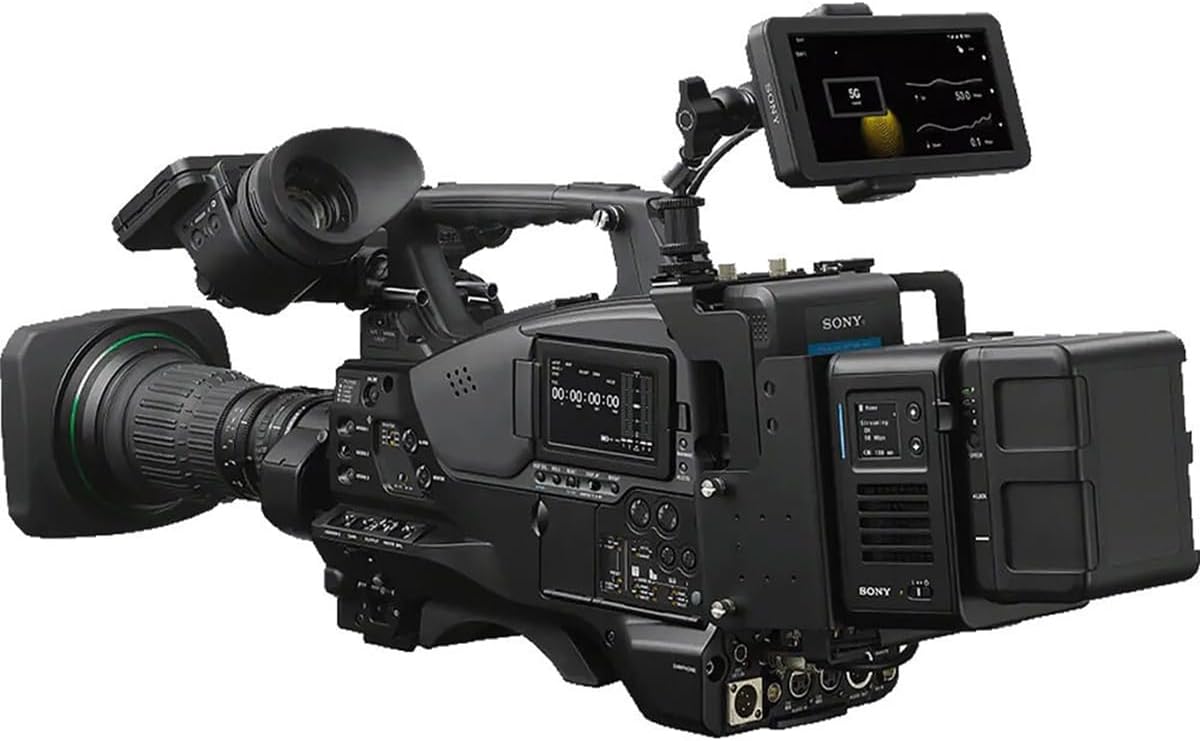
Figure 6: The PDT-FP1 integrated with a professional video camera, illustrating its application in high-end production environments for data transmission.
Nlekọta
- Nhicha: Use a soft, dry cloth to clean the exterior of the device. Do not use liquid cleaners or solvents. Ensure all ports are free of dust and debris.
- Nchekwa: Mgbe ọ naghị eji ya ogologo oge, chekwaa ngwaọrụ ahụ n'ebe dị jụụ na ebe kpọrọ nkụ na-adịghị na ìhè anyanwụ kpọmkwem na oke okpomọkụ.
- Mmelite ngwanrọ: Lelee nkwado Sony mgbe niile websaịtị maka mmelite firmware iji hụ na arụmọrụ kacha mma yana ịnweta atụmatụ ọhụrụ.
- Nlekọta batrị: Iji mee ka batrị dị ogologo, zere ịgbapụta batrị ahụ mgbe niile. Chaji ngwaọrụ ahụ mgbe niile, ọbụlagodi na ọ naghị arụ ọrụ nke ọma.
Nchọpụta nsogbu
| Nsogbu | Ihe nwere ike ime | Ngwọta |
|---|---|---|
| Ngwaọrụ anaghị agbanwu ọkụ. | Low battery; power button not pressed correctly. | Charge the device. Press and hold the power button for several seconds. |
| Enweghị njikọ netwọkụ. | No active SIM card; out of network coverage; Wi-Fi not configured; LAN cable disconnected. | Ensure SIM cards are active and correctly inserted. Move to an area with better signal. Configure Wi-Fi settings. Check LAN cable connection. |
| Slow data transmission. | Weak network signal; network congestion; device overheating. | Check signal strength on the device display. Try a different network (if Dual SIM is active). Ensure ventilation is clear. |
| Video input not detected. | HDMI cable loose or faulty; incorrect input source selected. | Check HDMI cable connection. Ensure the camera is outputting video. Select HDMI as the input source on the PDT-FP1. |
| Device feels hot. | Normal operation under heavy load; obstructed ventilation. | Ensure ventilation ducts are clear. If operating in high ambient temperatures, consider moving to a cooler environment. The device is designed to manage heat up to 40°C (104°F). |
Nkọwapụta
| Njirimara | Nkọwa |
|---|---|
| Nọmba nlereanya | PDT-FP1 |
| Ụdị | Sony |
| Ibu Ibu | Ihe dị ka ounce 10.9 (309g) |
| Akụkụ ngwaahịa | 6.7 x 3.2 x 1.1 sentimita (170 x 81 x 28 mm) |
| Njikọta | LTE, 5G Sub6, mmWave, Dual SIM, Wi-Fi, Gigabit LAN, SuperSpeed USB 5Gbps (USB3.2) Type-C, HDMI Type-A |
| Ntinye vidiyo | HDMI Type-A, up to 4K 60p/50p/30p/25p/24p |
| Ndụ batrị (ihe dị ka) | 4 hours (FTP transfer via USB in LTE), 2 hours (video uploads via HDMI) |
| Okpomọkụ na-arụ ọrụ | Stable operation up to 40°C (104°F) |
| UPC | 027242930377 |
Akwụkwọ ikike na nkwado
This Sony PDT-FP1 Portable Data Transmitter is covered by a manufacturer's warranty. Please refer to the warranty card included with your product or visit the official Sony support websaịtị maka nkọwa zuru oke usoro na ọnọdụ nke akọwapụtara mpaghara gị.
For technical support, troubleshooting assistance, or service inquiries, please contact Sony customer support through their official website or the contact information provided in your product documentation. Keep your proof of purchase for warranty claims.
Nkwado Sony Websaịtị: https://www.sony.com/electronics/support


