Ozi nchekwa dị mkpa
Please read all safety instructions carefully before using the camera. Keep this manual for future reference.
- Ewepụla igwefoto na mmiri ma ọ bụ mmiri.
- Avoid direct sunlight or high temperatures.
- Use only specified batteries and chargers.
- Do not attempt to disassemble or modify the camera.
- Debe ebe ụmụaka na-apụghị iru.
Ihe ngwugwu
Chọpụta na ihe niile dị na ngwugwu:
- Ahụ igwefoto Panasonic LUMIX G100
- 12-32mm Kit Lens
- Ngwungwu batrị
- Ihe nkwụnye AC
- USB Njikọ USB
- Ubu eriri
- Lens mkpuchi
- Okpu ahụ
Igwefoto gafereview
Familiarize yourself with the camera's physical components.
N'ihu View

N'ihu view shows the lens, lens release button, and the LUMIX branding.
N'azụ View

Azu view highlights the vari-angle LCD touchscreen, electronic viewfinder (EVF), and various control buttons.
N'elu View

N'elu view displays the mode dial, shutter button, video record button, and hot shoe for external accessories.
Ngwaahịa gafereview Vidiyo
Vidiyo a na-egosi etu esi eme ya ngwa ngwaview of the Panasonic LUMIX G100 camera and its key features.
Melite
Na-agbakwunye oghere
- Wepu okpu ahụ na igwefoto yana okpu oghere azụ na oghere.
- Hazie akara ntụaka ọcha dị na lens ahụ na akara ntụaka ọcha dị na ahụ igwefoto ahụ.
- Tụgharịa oghere n'akụkụ elekere ruo mgbe ọ pịrị na ya.
Inserting Battery and SD Card
- Open the battery/SD card compartment cover on the bottom of the camera.
- Insert the battery with the correct orientation until it locks.
- Insert an SD, SDHC, or SDXC memory card (UHS-I U3 V30 recommended) into the slot until it clicks.
- Mechie mkpuchi nkebi ahụ nke ọma.
Ịchaji batrị
- Gbaa mbọ hụ na agbanyụrụ igwefoto.
- Connect the USB cable to the camera's USB-C port and the AC adapter.
- Tinye ihe nkwụnye AC n'ime oghere ọkụ eletrik. Ihe ngosi chaja ga-enwu.
- Charging is complete when the indicator turns off.
Na-arụ ọrụ igwefoto
Ụdị Foto Ndị Dị Mkpa
Turn the mode dial to select your desired shooting mode:
- iA (Nkà na ụzụ akpaaka): Camera automatically optimizes settings for the scene.
- P (Mmemme AE): Camera sets aperture and shutter speed, but you can adjust other settings.
- A (Nkwado Oghere AE): You set the aperture, camera sets shutter speed. Ideal for controlling depth of field.
- S (Nkwado Ihe Mkpuchi AE): You set the shutter speed, camera sets aperture. Ideal for controlling motion blur.
- M (Ngosipụta Aka): Ị na-achịkwa ma ọsọ oghere na ọsọ shutter.
Ndekọ vidiyo
The LUMIX G100 supports high-resolution video recording:
- Vidiyo 4K: Record in 4K 24p/30p for detailed footage.
- FHD Video: Record in Full HD (1080p) at 60p for smoother motion.
- V-Log L Recording: For advanced videographers, V-Log L provides a flat color profile for greater flexibility in post-production color grading.
Ndekọ ọdịyo
The camera features OZO Audio by Nokia with a high-performance built-in microphone system:
- Three internal microphones (Surround, Front, Back) for spatial audio.
- Tracking function automatically adjusts microphone direction for clear audio.
Ndozi onyonyo
The 5-Axis Hybrid I.S. (Image Stabilizer) helps to reduce camera shake for both photos and videos, especially useful when shooting handheld.
Njikọta
Igwefoto nwere ọtụtụ nhọrọ njikọ:
- Bluetooth & Wi-Fi: Seamlessly transfer images and videos to a smartphone or tablet using the LUMIX Sync app.
- USB-C: Maka ịchaji na ịnyefe data.
- HDMI (Type D Micro HDMI): For video output to external monitors or TVs.
Webcam arụ ọrụ
The LUMIX G100 can be used as a high-quality webcam maka nkwanye ndụ ma ọ bụ oku vidiyo.
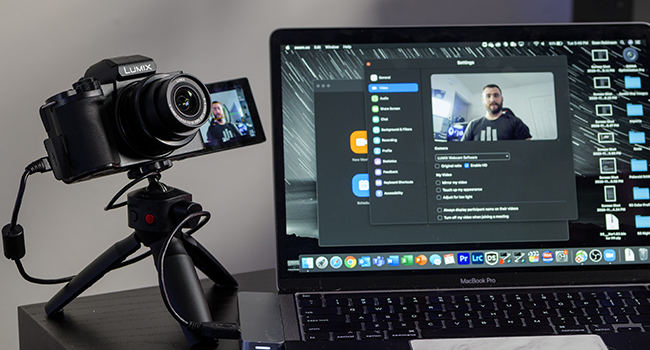
Connect the camera to your computer via USB and select it as your webcam source in your video conferencing software.
Nlekọta
- Na-ehicha oghere: Use a soft, lint-free cloth and lens cleaning solution. Avoid touching the lens surface with your fingers.
- Na-ehicha ahụ igwefoto: Wipe with a dry, soft cloth. For stubborn dirt, use a slightly damp akwa wee kpoo nke oma.
- Nchekwa: Store the camera in a cool, dry place away from direct sunlight and extreme temperatures. Remove the battery if storing for extended periods.
- Mmelite femụwe: Lelee nkwado Panasonic kwa oge website for firmware updates to ensure optimal performance and new features.
Nchọpụta nsogbu
| Nsogbu | Ngwọta |
|---|---|
| Igwefoto anaghị agba ọkụ. | Ensure the battery is charged and correctly inserted. Try charging the battery. |
| Onyonyo na-agba agba. | Check focus settings. Ensure lens is clean. Use a faster shutter speed or enable image stabilization. |
| Cannot record video in 4K. | Ensure you are using a compatible SD card (UHS-I Speed Class 3 / V30 or higher). Check available storage space. |
| E dekọghị ọdịyo ọ bụla. | Check audio recording settings. Ensure microphone is not obstructed. |
| Wi-Fi/Bluetooth connection fails. | Restart both the camera and the connected device. Ensure the LUMIX Sync app is updated. |
Nkọwapụta
| Njirimara | Nkọwa |
|---|---|
| Aha Nlereanya | DC-G100 |
| Ụdị ihe mmetụta | CMOS |
| Mkpebi ihe mmetụta foto | 20.3 MP |
| Nkwalite dakọtara | Micro Anọ Atọ |
| Ụdị oghere | 12-32mm Wide Angle Lens (Kit) |
| Ndozi onyonyo | 5-Axis Hybrid I.S. (Digital) |
| Mkpebi vidiyo | 2160p (4K) |
| Nha ihuenyo | 3 sentimita asatọ |
| Ụdị ngosi | Articulating LCD Touch Screen |
| Viewnchọta | Electronic (OLED EVF) |
| Njikọta | Bluetooth, USB-C, Wi-Fi, HDMI |
| Ibu Ibu | 14.88 ounces |
| Akwadoro File Usoro | JPEG |
| Ụdị ebe nchekwa Flash | SD, SDHC, or SDXC (UHS-I U3 V30) |
Akwụkwọ ikike na nkwado
This Panasonic LUMIX G100 camera comes with a Akwụkwọ ikike onye nrụpụta afọ 1.
For technical support, service, or warranty claims, please visit the official Panasonic support websaịtị ma ọ bụ kpọtụrụ ndị ahịa ha ọrụ.
Nkwado n'ịntanetị: https://www.panasonic.com/us/support.html