Okwu mmalite
This manual provides comprehensive instructions for the installation, operation, and maintenance of your BSTUOKEY WiFi Access Control Keypad. Please read this manual thoroughly before installation and use to ensure proper functionality and safety.
Ngwaahịa gafereview
Njirimara ngwaahịa
- Wireless Smartphone App Operation: Control the keypad remotely via the free Tuya App (iOS/Android).
- Ụdị nnweta ọtụtụ: Supports password, RFID card (125Khz EM Card), password + RFID card, and Android Smartphone NFC function.
- High User Capacity: Stores up to 2000 users.
- Na-adịgide adịgide & Nchekwa ihu igwe: High-quality ABS case with IP67 waterproof rating, suitable for outdoor use.
- Backlight Touch Keypad: Illuminated keys for easy operation in low-light conditions.
- Interface Wiegand: Supports Wiegand 26/34 input and output for integration with other access control systems.
- Ọrụ mgbịrịgba ọnụ ụzọ: Capacitive doorbell function.
- Unlock Record: View door opening records via the Tuya App.
- ndakọrịta: Compatible with various electric locks (strike lock, magnetic lock, electric mortise lock, electric gate lock, bolt lock).

Nyocha 1: N'eluview of the BSTUOKEY WiFi Access Control Keypad's main features, including its wireless capabilities, user capacity, and waterproof design.
Akụkụ ngwaahịa

Ọgụgụ 2: N'ihu na azụ views of the keypad with approximate dimensions (11.4cm x 7.3cm x 1.6cm) and visible wiring harness on the back.
Melite
Ntuziaka nwụnye
The keypad requires a 9-16V DC power supply. Ensure all connections are secure and follow the wiring diagram carefully. The keypad operates on a 2.4 GHz Wi-Fi network.

Figure 3: Typical product usage diagram illustrating the connection of the access controller with a magnetic lock, power supply, and an indoor exit switch.

Figure 4: Comprehensive wiring diagram for connecting the keypad to different types of electric locks (electric gate lock, strike lock, bolt lock, magnetic lock), power supply, exit button, and doorbell.
Initial Setup and Wi-Fi Pairing
- Connect the access controller to the power supply and the electric lock according to the wiring diagram.
- Na ahụ igodo, tinye
*999999#73#to activate Wi-Fi pairing mode. The keypad will indicate it's ready for pairing. - Download and open the free Tuya App on your smartphone (available on App Store for iOS and Google Play for Android).
- In the Tuya App, add the keypad as a new device. Follow the on-screen prompts to connect the keypad to your 2.4 GHz Wi-Fi network. Ensure your smartphone is connected to the same Wi-Fi network during pairing.
Video 1: Demonstrates the Wi-Fi pairing process for the BSTUOKEY Access Control Keypad with the Tuya mobile application, including entering the pairing code on the keypad and connecting via the app.
Ụdị arụ ọrụ
Multiple Access Methods
The keypad supports various methods for unlocking, providing flexibility and convenience:
- Kpọghe okwuntughe: Enter your programmed password directly on the keypad.
- Mmeghe Kaadị RFID: Swipe a registered 125Khz RFID EM Card over the keypad's sensor.
- Password + RFID Card Unlock: Requires both a correct password entry and a registered RFID card swipe for enhanced security.
- Tuya Mobile App Remote Control: Unlock the door remotely from anywhere using the Tuya App on your smartphone.
- Android Smartphone NFC Function: Use compatible Android smartphones with NFC enabled to unlock the door. (Note: iOS NFC is not supported for unlocking).
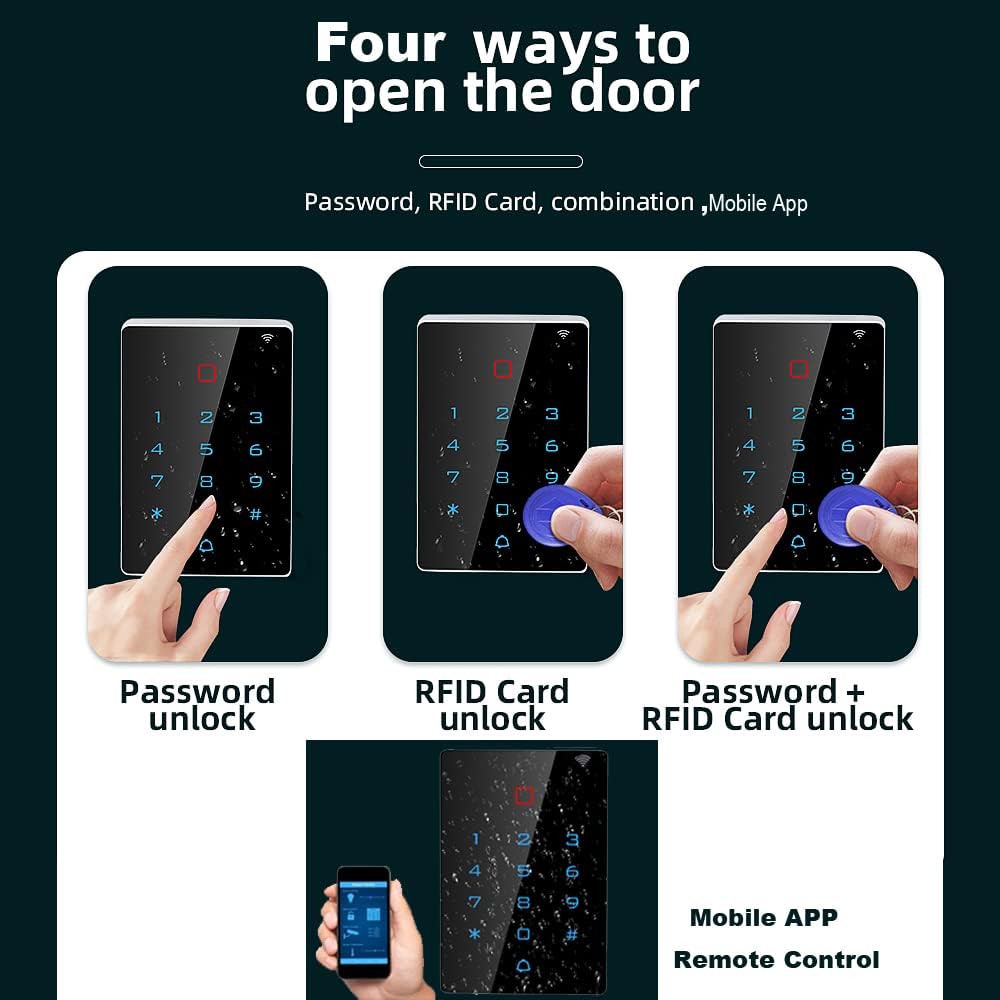
Figure 5: Visual representation of the four primary methods to unlock the access control keypad: using a password, an RFID card, a combination of both, or the mobile application.
Ngwa njikwa
User and Access Management via Tuya App
The Tuya App provides comprehensive tools for managing users, passwords, and access records:
- Tinye/Hichapụ Ndị Ọrụ: Easily add new users or remove existing ones as needed.
- Share/Modify Passwords/ID Cards: Manage access credentials for all users.
- Set Public/Private Passwords: Configure different password types based on access requirements.
- Koodu Nwa Oge: Generate temporary access codes for guests or service personnel with defined validity periods.
- View Door Opening Records: Access a detailed log of all door opening events, including time and method.
Nlekọta
Nlekọta na nlekọta
The BSTUOKEY Access Control Keypad is designed for durability with an IP67 waterproof rating. To ensure its longevity and optimal performance:
- Regularly wipe the keypad surface with a soft, damp akwa iji wepu uzuzu na uzuzu.
- Avoid using abrasive cleaners or solvents that could damage the surface or internal components.
- Ensure the wiring connections remain secure and free from corrosion.
- While waterproof, avoid submerging the device in water for extended periods.
Video 2: Short demonstration highlighting the IP68 waterproof capability of the keypad, showing it functioning while submerged in water.
Nchọpụta nsogbu
Okwu na ngwọta nkịtị
| Okwu | Ihe nwere ike ime | Ngwọta |
|---|---|---|
| Keypad not powering on. | Ọkụ ọkụ na-ezighi ezi voltage ma ọ bụ wiring. | Verify power supply is 9-16V DC and check all wiring connections against the diagram. |
| Enweghị ike ijikọ na Wi-Fi. | Incorrect Wi-Fi password; 5 GHz network; weak signal; keypad not in pairing mode. | Ensure you are on a 2.4 GHz network. Re-enter *999999#73# on keypad. Check Wi-Fi signal strength. |
| RFID card not recognized. | Card not properly registered or incorrect card type (not 125Khz EM Card). | Ensure the card is registered in the Tuya App. Verify it's a compatible 125Khz EM Card. |
| Temporary password expired. | The set validity period for the temporary code has passed. | Generate a new temporary code via the Tuya App. |
Nkọwa nka nka
- Akara: BSTUOKEY
- Ụdị: 48214a21-9335-4dfe-be74-4e900d30b35d
- Ihe: Acrylonitrile Butadiene Styrene (ABS)
- Ụdị mkpọchi: Ahụigodo
- Akụkụ ihe (L x W x H): 2.88 x 0.62 x 4.49 sentimita asatọ
- Ibu ihe: 7 ounces
- Ike onye ọrụ: Ndị ọrụ 2000
- Ụdị kaadị: 125Khz RFID EM Card
- Ọnụọgụ enweghị mmiri: IP67
- Protocol Njikọta: Wi-Fi (2.4GHz)
- Usoro njikwa: Ngwa, Remote
- Njikwa Type: iOS, Android
Akwụkwọ ikike na nkwado
For warranty information and technical support, please refer to the product packaging or contact BSTUOKEY customer service directly. Keep your purchase receipt for warranty claims.


