Okwu mmalite
This manual provides detailed instructions for the installation, operation, maintenance, and troubleshooting of the ADVANTECH PS8-500FATX-GB 80+ Gold Flex ATX Power Supply. This power supply unit (PSU) is designed to deliver stable and efficient power to your system, featuring 500W output with 3.3V, 5V, 12V, and -12V outputs, and RoHS compliance.
Ozi nchekwa
Please read all safety instructions carefully before installing or operating the power supply. Failure to follow these instructions may result in electric shock, fire, or damage to the product and connected equipment.
- Ensure the power supply is disconnected from the AC power source before installation or maintenance.
- Emeghela ọkụ ọkụ casing. Akwa voltage components inside pose a risk of electric shock.
- Install the power supply in a well-ventilated area to prevent overheating.
- Use only the cables provided or approved by ADVANTECH for this power supply.
- Emebere ngwaahịa a maka naanị ime ụlọ.
Ihe ngwugwu
Chọpụta na ihe niile dị na ngwugwu:
- ADVANTECH PS8-500FATX-GB Power Supply Unit
- Igwe ọkụ AC
- Ịkwanye kposara
- Akwụkwọ ntuziaka (akwụkwọ a)
Ntọala na nwụnye
Follow these steps to properly install the power supply into your system:
- Kwadebe Sistemu gị: Ensure your computer system is powered off and disconnected from the AC outlet. Open the computer case.
- Wepu Old PSU (ọ bụrụ na ọdabara): Disconnect all cables from the old power supply. Unscrew and remove the old PSU from the chassis.
- Wụnye PSU ọhụrụ: Carefully place the ADVANTECH PS8-500FATX-GB into the power supply bay of your computer case. Ensure the fan is facing the correct direction for optimal airflow (usually facing down or out of the case). Secure the PSU with the provided mounting screws.
- Connect Main Power Cables:
- Connect the 20+4 pin ATX main power connector to the motherboard.
- Connect the 4+4 pin EPS/ATX 12V connector to the motherboard CPU power socket.
- Jikọọ eriri ndị dị n'akụkụ: Connect SATA power connectors to hard drives, SSDs, and optical drives. Connect PCIe power connectors to graphics cards if required. Connect Molex connectors to other peripherals as needed.
- Njikwa USB: Route cables neatly to improve airflow and aesthetics.
- Mechie igbe wee jikọọ ike AC: Close your computer case. Connect the AC power cord to the power supply and then to a wall outlet or surge protector.
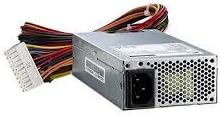
Foto nke 1: The ADVANTECH PS8-500FATX-GB 500W Flex ATX Power Supply, showing its compact form factor and various power connectors. This image illustrates the physical appearance of the unit and its attached cabling.
Ntuziaka ọrụ
Once installed, operating the power supply is straightforward:
- Ike Na: After connecting all necessary cables and the AC power cord, press the power button on your computer case. The power supply will automatically provide power to your system.
- Gbanyụọ: Shut down your computer through the operating system. The power supply will enter a low-power state. For complete power disconnection, switch off the power supply's main switch (if present) or unplug the AC power cord.
- Nleba anya: Modern motherboards and operating systems often provide tools to monitor power supply voltages. Refer to your motherboard manual for details.
Nlekọta
Ndozi nke ọma na-achọpụta ogologo ndụ yana ịrụ ọrụ kacha mma nke ọkọnọ ike gị:
- Nhicha uzuzu: Periodically clean the power supply fan and vents to prevent dust buildup, which can impede airflow and cause overheating. Use compressed air for this purpose, ensuring the system is powered off and unplugged.
- Nyocha USB: Regularly check all power cables for any signs of wear, fraying, or damage. Replace damaged cables immediately.
- Ọnọdụ gburugburu: Operate the power supply within its specified temperature and humidity ranges. Avoid extreme conditions.
Nchọpụta nsogbu
Ọ bụrụ na ị hụ nsogbu na ọkọnọ ike gị, lee nsogbu na ngwọta ndị a na-ahụkarị:
| Nsogbu | Ihe nwere ike ime | Ngwọta |
|---|---|---|
| Sistemụ anaghị agba ọkụ. |
|
|
| Sistemu na-agbanye mana ọ na-emechi ozugbo. |
|
|
| Unusual noises from PSU. |
|
|
If the problem persists after trying these solutions, contact ADVANTECH customer support for further assistance.
Nkọwapụta
| Njirimara | Nkọwa |
|---|---|
| Nlereanya | PS8-500FATX-GB |
| Ụdị | ADVANTECH |
| Ụdị Ihe | Flex ATX |
| Mpụta Wattage | 500 Watt |
| Ngosipụta arụmọrụ | 80+ Gold |
| Mmepụta Voltages | 3.3V, 5V, 12V, -12V |
| Ụdị njikọ | ATX (20+4 pin, 4+4 pin EPS/ATX 12V, SATA, PCIe, Molex) |
| nnabata | RoHS |
| Ibu Ibu | 12.99 pound |
| Onye nrụpụta | Advantech Co |
| ASIN | B08SMRH5V8 |
| UPC | 040048829683 |
Akwụkwọ ikike na nkwado
ADVANTECH products are designed for reliability and performance. For warranty information and technical support, please refer to the official ADVANTECH websaịtị ma ọ bụ kpọtụrụ ngalaba ọrụ ndị ahịa ha.
- Ndị ọchịchị Websaịtị: www.advantech.com
- Nkwado ndị ahịa: Gaa na ngalaba "Kpọtụrụ Anyị" na ngalaba gọọmentị websaịtị maka nkọwa nkwado mpaghara.
Biko dowe ihe akaebe nke ịzụrụ ihe maka akwụkwọ ikike.


