Okwu mmalite
The SENTRY HPXBT960B Mini True Wireless Earbuds provide a convenient and cable-free audio experience. Designed for comfort and ease of use, these earbuds connect wirelessly to your devices via Bluetooth, offering integrated controls and a portable charging case for extended listening.
Ozi nchekwa
- Nchedo Ntị: Zere ige ntị n'ogo dị elu ruo ogologo oge iji gbochie mmebi ntị.
- Nchekwa ịnya ụgbọ ala: Do not use earbuds while driving or operating machinery where the inability to hear ambient sounds could pose a danger.
- Mkpughe mmiri: Eriri ntị ndị a anaghị amị mmiri. Zere ka mmiri ghara iru gị ala ma ọ bụ oke mmiri ozuzo.
- Ụmụaka: Keep earbuds and small parts away from children to prevent choking hazards.
- mkpofu: Tụfuo ngwaahịa ahụ na batrị ya n'ụzọ kwesịrị ekwesị dịka iwu obodo si dị.
Ihe ngwugwu
- SENTRY HPXBT960B Mini True Wireless Earbuds (Left & Right)
- Akpa Nchaji enwere ike ibugharị
- Igwe nchaji USB
- Extra Silicone Earpads (S/M/L)
- Optional Silicone Ear Hooks
Ngwaahịa gafereview
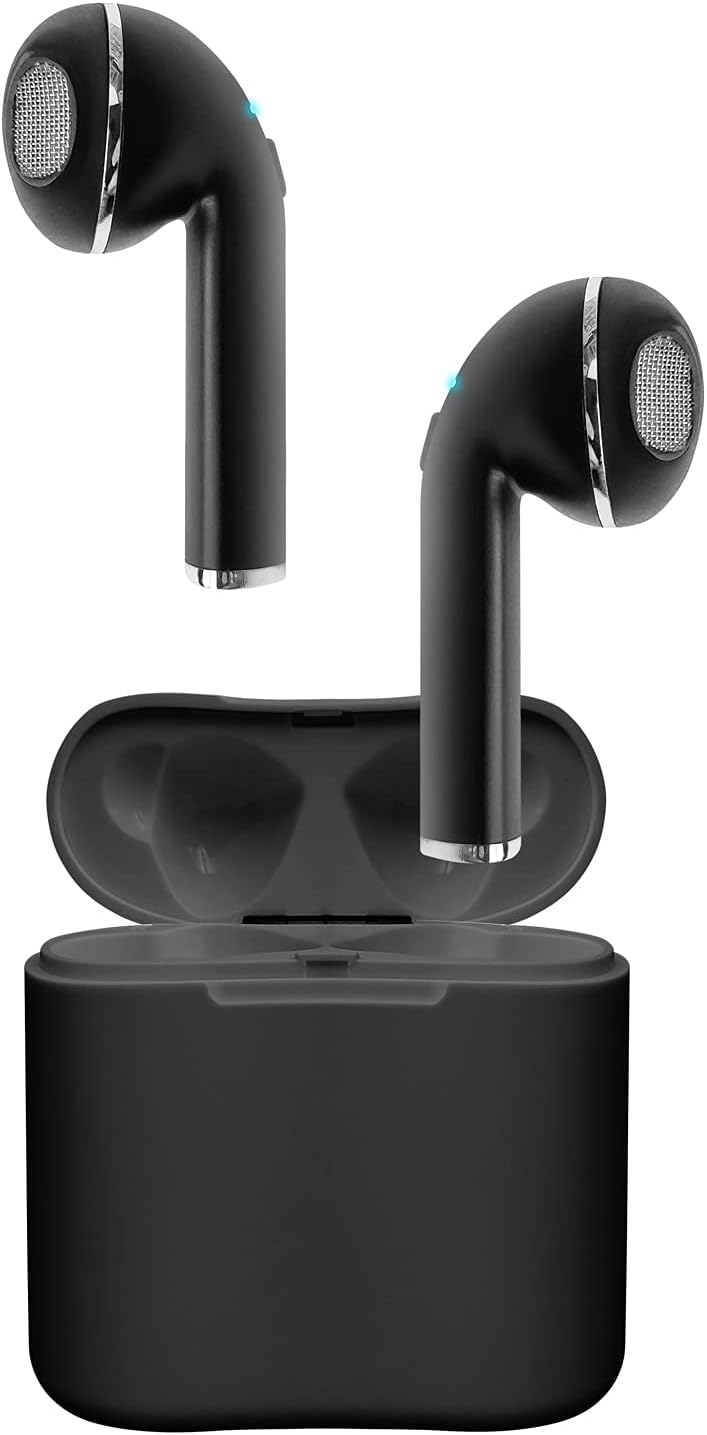
Image: The SENTRY HPXBT960B Mini True Wireless Earbuds in black, resting inside their open charging case. The earbuds feature a sleek design with visible ear tips and charging contacts.
The earbuds are designed for a comfortable in-ear fit. Each earbud features a touch-sensitive control area and a built-in microphone for hands-free communication. The portable charging case protects the earbuds and recharges them on the go.
Melite
1. Ịchaji ihe ntị na akpa
- Place the earbuds into the charging case. Ensure the charging contacts align.
- Jikọọ eriri chaja USB na ọdụ chaja dị na akpa ahụ na isi iyi ike.
- The indicator lights on the case and earbuds will show charging status. A full charge for the earbuds provides approximately 4 hours of playback at 50% volume. The charging case holds enough power for up to 2 full recharges, extending total playtime to about 12 hours.
2. Ijikọ na ngwaọrụ gị
- Gbaa mbọ hụ na ebubo na ekwe ntị.
- Open the charging case. The earbuds will automatically enter pairing mode (indicated by flashing LED lights).
- Na ngwaọrụ Bluetooth gị (dịka ọmụmaatụ, ekwentị mkpanaaka, mbadamba), gaa na ntọala Bluetooth.
- Chọọ maka available devices and select "HPXBT960B" (or similar name) from the list.
- Once connected, the earbud indicator lights will stop flashing or show a solid light. You are now ready to use your earbuds.
Video: Official product video demonstrating the setup and features of the Sentry HPXBT960B Mini True Wireless Earbuds, including pairing and charging.
Ntuziaka ọrụ
Njikwa mmetụ
The HPXBT960B earbuds feature touch controls for easy operation. Specific functions may vary slightly by device, but common controls include:
- Gwuo/kwụsịtụ: Otu mgbata na ntị ntị.
- Track na-esote: Pịa bọtịnụ ntị aka nri ugboro abụọ.
- Gara aga Track: Kpatụ ntị ugboro abụọ n'akụkụ aka ekpe.
- Azịza/Kwụsị Oku: Otu pịa ma ọ bụ ekwe ntị n'oge oku mbata ma ọ bụ oku nọ n'ọrụ.
- Jụ oku: Pịa ma jide otu ntị ntị maka sekọnd 2 n'oge oku mbata.
- Mee ka onye enyemaka olu rụọ ọrụ: Pịa ugboro atọ na ntị ntị.
Ịkpọ na ịnata oku
With the integrated microphone, you can make and receive calls hands-free. Ensure your earbuds are connected to your phone via Bluetooth. Audio will automatically route through the earbuds during a call.
Nlekọta
- Nhicha: Jiri akwa dị nro, kpọrọ nkụ, akwa enweghị lint iji hichaa ntị ntị na akpa chaja. Ejila ihe nchacha abrasive ma ọ bụ ihe mgbaze.
- Nchekwa: Mgbe ejighị ya, chekwaa earbuds n'ime akpa nchaji ha iji chebe ha ma debe ha ebubo. Chekwaa n'ebe dị jụụ, kpọrọ nkụ na-adịghị na ìhè anyanwụ kpọmkwem na oke okpomọkụ.
- Nlekọta batrị: Ka ịgbatị ndụ batrị ogologo, zere ịchaji ekwe ntị na chaja ugboro ugboro. Na-ana ha ebubo mgbe niile, ọbụlagodi na ọ bụghị iji ya eme ihe mgbe niile.
Nchọpụta nsogbu
| Nsogbu | Ngwọta enwere ike |
|---|---|
| Igwe ntị anaghị agbanwu | Ensure earbuds and charging case are fully charged. |
| Enweghị ụda sitere na ntị ntị | Check if earbuds are paired correctly. Adjust volume on both the earbuds and your connected device. |
| Ụda adịghị mma ma ọ bụ njikọ adịghị mma | Ensure your device is within the 10-meter Bluetooth range. Avoid obstacles between the earbuds and your device. Check for interference from other wireless devices. |
| Igwe ntị anaghị ejikọta ya na ngwaọrụ | Turn off Bluetooth on your device, then turn it back on. Forget the device in your Bluetooth settings and attempt to re-pair. Ensure no other devices are currently connected to the earbuds. |
Nkọwapụta
- Ụdị: HPXBT960B
- Akara: SENTRY
- Teknụzụ Njikọta: Bluetooth 4.0
- Oke ikuku: Ruo mita 10 (ụkwụ 30)
- Ike batrị earbud: 35mAh (Lithium-ion)
- Nchaji Okwu Battery ikike: 200mAh (Lithium-ion)
- Oge egwu ntị: Ruo awa 4 (na olu 50%)
- Oge Egwuregwu Nile (na ikpe): Ruo awa iri abụọ
- Igwe okwu: Ejikọtara
- Usoro njikwa: Metụ aka
- Akpa ntị: Extra Silicone Earpads (S/M/L), Optional Silicone Ear Hooks
- Arọ: 3.2 ounces (total product weight)
- Agba: Nwa
- Ihe: Plastic
- Akụkụ ngwaahịa: 1 x 1 x 1 inches (per earbud, approximate)
Akwụkwọ ikike & Nkwado
SENTRY products are manufactured with quality and care. For information regarding the product warranty, please refer to the documentation included with your purchase or visit the official SENTRY websaịtị.
For further assistance, troubleshooting, or to contact customer support, please visit the SENTRY Store on Amazon ma ọ bụ gaa na ọwa nkwado nke onye nrụpụta.


