Okwu mmalite
Thank you for choosing the NEDIS Wi-Fi Smart Fan Heater. This manual provides essential information for the safe and efficient operation of your new device. Please read these instructions carefully before use and retain them for future reference. Proper use and maintenance will ensure optimal performance and longevity of the product.
Ntuziaka nchekwa
Iji belata ihe egwu nke ọkụ, ujo eletrik, ma ọ bụ mmerụ ahụ, na-agbaso usoro nchekwa nchekwa ndị a mgbe niile:
- Gụọ ntụziaka niile tupu i jiri ikpo ọkụ a.
- Ejila ikpo ọkụ a na gburugburu ebe ịsa ahụ, ebe ịsa ahụ, ma ọ bụ ọdọ mmiri.
- Ekpuchila ihe na-ekpo ọkụ. Ikpuchi ihe na-ekpo ọkụ nwere ike ibute oke ọkụ na ọkụ.
- Keep combustible materials such as furniture, pillows, bedding, papers, clothes, and curtains at least 1 meter (3 feet) from the front of the heater and keep them away from the sides and rear.
- Kwụpụ igwe kpo oku mgbe ọ naghị eji ya.
- Ejila eriri ma ọ bụ plọg mebiri emebi rụọ ọrụ ọkụ ọ bụla ma ọ bụ mgbe ọkụ ahụ kwụsịrị, daa, ma ọ bụ mebie n'ụzọ ọ bụla.
- Ejila eriri n'okpuru kapeeti. Ejila akwa akwa, ndị na-agba ọsọ, ma ọ bụ ihe mkpuchi yiri ya kpuchie eriri. Hazie eriri pụọ na mpaghara okporo ụzọ yana ebe ọ na-agaghị akwụsị.
- Kpachara anya dị oke mkpa mgbe ọkụ ọkụ ọ bụla na-eji ma ọ bụ nso ụmụaka ma ọ bụ ndị na-adịghị mma na mgbe ọ bụla a na-ahapụ ikpo ọkụ na-arụ ọrụ na n'enweghị nlekọta.
- This heater is equipped with a tip-over protection switch that automatically shuts off the heater if it is accidentally knocked over.
- Gbaa mbọ hụ na etinyere ọkụ ọkụ n'elu kwụsiri ike, dị larịị.
- Maka naanị ime ụlọ.
Ngwaahịa gafereview
Familiarize yourself with the main components of your NEDIS Wi-Fi Smart Fan Heater.
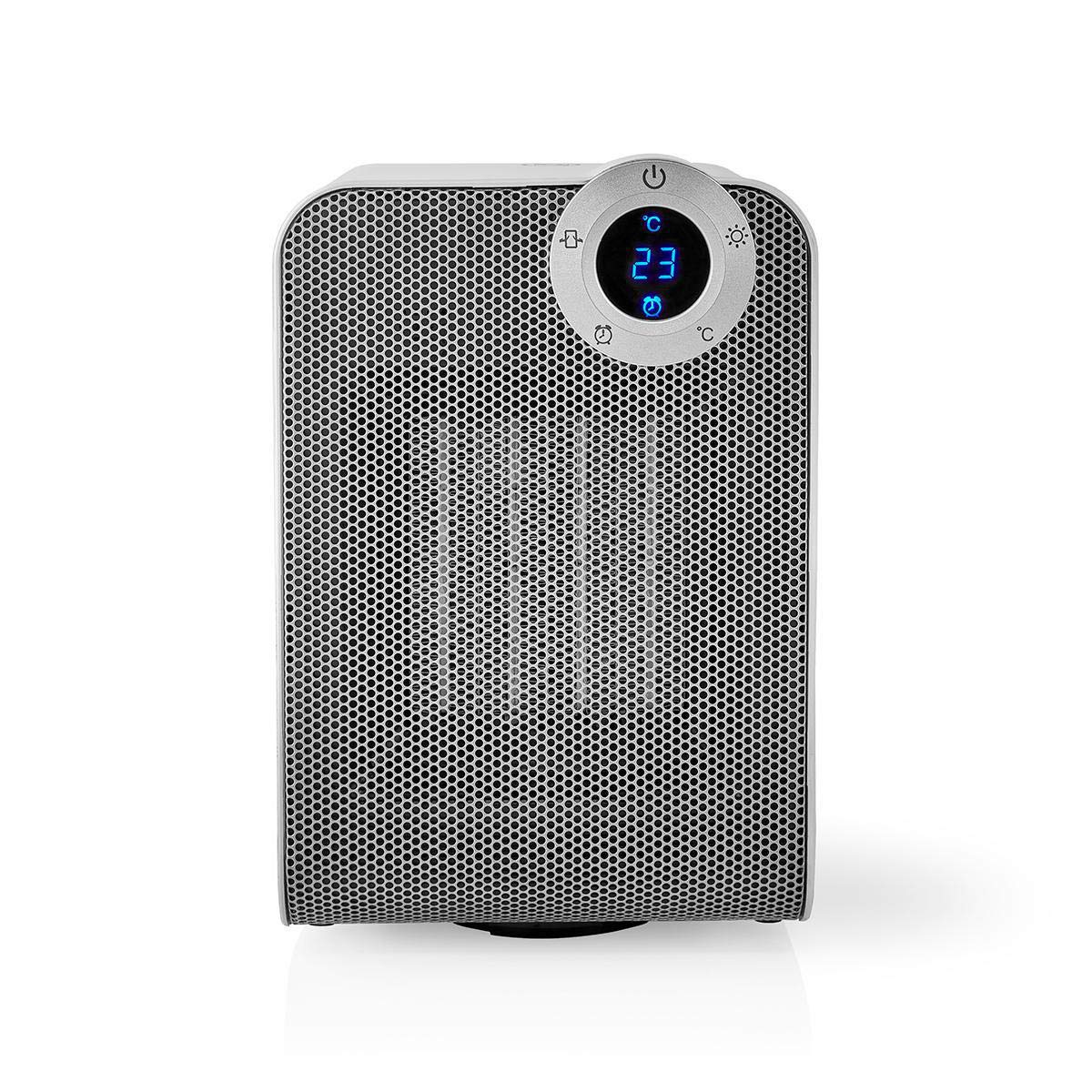
The front panel features a digital display that shows the current temperature and settings. Surrounding the display are touch-sensitive buttons for power, mode selection, oscillation, and timer functions.

The rear of the heater includes the main power switch (often a rocker switch) and the air intake grille. Ensure this area is not obstructed for proper airflow.

The compact design of the heater allows for easy placement in various indoor settings.
Melite
Iwepu ngwongwo
- Jiri nlezianya wepụ ihe na-ekpo ọkụ ahụ na ngwugwu ya.
- Lelee maka mmebi ọ bụla n'oge njem. Ọ bụrụ mebiri emebi, arụla ọrụ ma kpọtụrụ nkwado ndị ahịa.
- Jikwaa nkwakọ ngwaahịa maka nchekwa ma ọ bụ mbugharị n'ọdịnihu.
Ndokwa
- Debe igwe na-ekpo ọkụ n'elu elu siri ike, dị larịị.
- Ensure there is at least 1 meter (3 feet) of clear space around the heater to allow for proper air circulation and to prevent fire hazards.
- Do not place the heater near curtains, drapes, or other loose fabrics that could block the air intake or outlet.
- Hụ na eriri ọkụ eletrik adịghị apịachi ma ọ bụ tinye ya n'okpuru ihe dị arọ.
Ike mbụ Gbanye
- Plug the heater into a suitable electrical outlet (220-240V AC, 50/60Hz).
- Flip the main power switch on the back of the unit to the 'ON' position.
- The digital display on the front will illuminate, indicating the heater is in standby mode.
Wi-Fi Connection & App Setup
The NEDIS Wi-Fi Smart Fan Heater can be controlled via the Nedis SmartLife app, offering advanced features and remote control.
- Budata ya Nedis SmartLife ngwa sitere na App Store (iOS) ma ọ bụ Google Play Store (Android).
- Debanye aha maka akaụntụ ọhụrụ ma ọ bụ banye ma ọ bụrụ na ị nwere otu.
- Gbaa mbọ hụ na ejikọrọ ekwentị gị na netwọk Wi-Fi 2.4 GHz.
- N'ime ngwa ahụ, pịa akara ngosi '+' iji tinye ngwaọrụ ọhụrụ.
- Follow the on-screen instructions in the app to connect your heater to your Wi-Fi network. This usually involves putting the heater into pairing mode (refer to the app for specific instructions, often by pressing and holding a button on the heater).
- Once connected, you can control the heater from anywhere using the app.
Ntuziaka ọrụ
Njikwa akwụkwọ ntuziaka
The heater can be operated directly using the touch buttons on the front panel:
- Bọtịnụ ike: Pịa iji gbanye ihe na-ekpo ọkụ ma ọ bụ gbanyụọ ya.
- Bọtịnụ ụkpụrụ: Cycle through heating modes (e.g., High Heat 1800W, Low Heat 900W, Fan Only).
- Ndozi okpomọkụ: Use the '+' and '-' buttons (or similar) to set the desired temperature. The heater will operate at 1800W for rapid heating and automatically switch to 900W once the set temperature is approached.
- Bọtịnụ oscillation: Press to activate or deactivate the horizontal oscillation feature, distributing heat across a wider area.
- Bọtịnụ ngụ oge: Set a timer for the heater to automatically turn off after a specified duration.
SmartLife App Control
Once connected to the Nedis SmartLife app, you can access advanced control features:
- Remote Power On/Off: Control the heater from anywhere.
- Ndozi okpomọkụ: Precisely set and monitor the room temperature.
- Nhọrọ ụdị: Choose between different heating levels or fan-only mode.
- Njikwa Oscillation: Gbanyụọ ma ọ bụ gbanyụọ njirimara oscillation.
- Ịhazi oge: Create custom heating schedules for different times of the day or week.
- Ọrụ ngụ oge: Set a countdown timer for automatic shutdown.
Njikwa olu
The heater supports voice control through popular smart assistants. To enable this, link your Nedis SmartLife account with your preferred voice assistant (Google Home or Amazon Alexa) via their respective apps. Once linked, you can use voice commands such as:
- "Hey Google, turn on the heater."
- "Alexa, set the heater to 22 degrees."
- "Hey Google, turn off the heater."
Nlekọta
Nhicha
Regular cleaning helps maintain the heater's efficiency and extends its lifespan.
- Na-ewepụ ihe ọkụ ọkụ mgbe niile ma kwe ka ọ dị jụụ kpamkpam tupu ihicha ya.
- Jiri nwayọ hichaa elu mpụta, damp akwa . Ejila ihe nchacha abrasive ma ọ bụ ihe mgbaze.
- Use a vacuum cleaner with a brush attachment to remove dust from the air intake and outlet grilles.
- Hụ na mmiri adịghị abanye n'ime ihe na-ekpo ọkụ.
Nchekwa
Mgbe a naghị eji ya ogologo oge:
- Unplug the heater and clean it as described above.
- Store the heater in its original packaging or a suitable box to protect it from dust and damage.
- Keep it in a cool, dry place, away from direct sunlight and moisture.
Nchọpụta nsogbu
Ọ bụrụ na ị na-enwe nsogbu na kpo oku gị, rụtụ aka na nsogbu na ngwọta ndị a na-emekarị:
| Nsogbu | Ihe nwere ike ime | Ngwọta |
|---|---|---|
| Igwe ọkụ anaghị agbanye. | No power, main switch off, tip-over switch activated. | Check power outlet, ensure main switch is ON, place heater upright on a stable surface. |
| Enweghị mmepụta okpomọkụ. | Incorrect mode, thermostat setting too low. | Select a heating mode (High/Low), increase the thermostat setting above the current room temperature. |
| Njikọ Wi-Fi daa. | Incorrect Wi-Fi password, 5GHz network, distance from router. | Verify Wi-Fi password, ensure you are on a 2.4GHz network, move heater closer to the router, try re-pairing. |
| Igwe ọkụ na-agbanyụ na mberede. | Overheating protection, tip-over protection, timer activated. | Ensure heater is not covered, clear obstructions, place upright, check timer settings. Allow to cool before restarting. |
Nkọwapụta
| Njirimara | Nkọwapụta |
|---|---|
| Nọmba nlereanya | WIFIFNH20CWT |
| Isi Iyi Ike | Igwe ọkụ eletrik |
| Mpụta ike | 1800W (Elu), 900W (Ọ dị ala) |
| Usoro kpo oku | Okwuchi |
| Akụkụ (L x W x H) | 16.5 x 14.5 x 25 cm |
| Ibu Ibu | 1.8 n'arọ |
| Agba | Ọcha / ọlaọcha |
| Atụmatụ pụrụ iche | On/Off Timer, Oscillation, Tip-over Protection, Thermostat, Wi-Fi, App Control, Voice Control (Alexa, Google Home) |
| Ụdị nwụnye | Ala Ugwu |
| Akwadoro ojiji | Indoor, Home, Study Room |
| Batrị achọrọ | Mba |
Akwụkwọ ikike na nkwado
Your NEDIS Wi-Fi Smart Fan Heater is covered by a manufacturer's warranty. Please refer to the warranty card included with your purchase for specific terms and conditions, including the warranty period and coverage details.
For technical support, troubleshooting assistance, or warranty claims, please contact NEDIS customer service. Contact information can typically be found on the product packaging, the NEDIS websaịtị, ma ọ bụ risit ịzụrụ ihe gị.


