Okwu mmalite
This user manual provides comprehensive instructions for the assembly, operation, and maintenance of your Amazon Basics Single Computer Monitor Stand. This desk-mounted arm is designed to enhance your workspace ergonomics and free up valuable desk space by securely holding a single computer monitor.
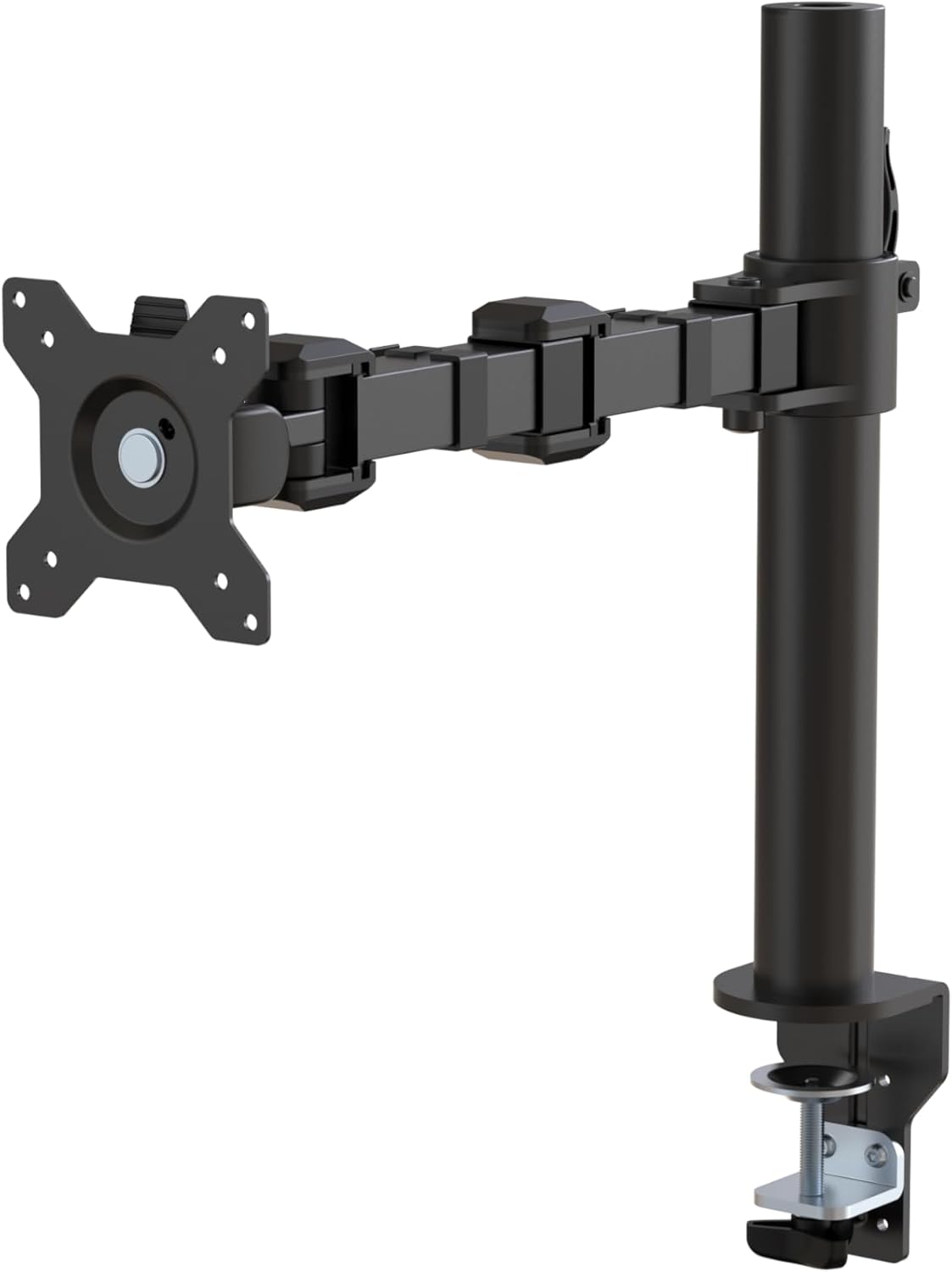
Nyocha 1: N'eluview of the Amazon Basics Single Computer Monitor Stand.
Ozi nchekwa dị mkpa
- Gụọ ntuziaka niile nke ọma tupu mgbakọ na iji.
- Agafela ikike ịdị arọ kacha nke kilogram 22 (10 n'arọ).
- Ensure your desk surface is stable and can support the combined weight of the monitor arm and your monitor.
- Verify that the desk thickness is between 0.8 to 3.9 inches (2 cm to 10 cm) for proper clamp echichi.
- Use only the provided hardware. If any parts are missing or damaged, contact customer support.
- Debe ụmụaka na anụ ụlọ n'oge mgbakọ.
- Lelee skru na njikọ niile iji hụ na ha kwụsiri ike na nchekwa.
Ihe ngwugwu
Biko chọpụta na akụrụngwa niile dị tupu ịmalite mgbakọ:
- Monitor Arm Assembly (Pre-assembled arm and VESA plate)
- Ogige Clamp Ntọala
- Osisi mgbanaka
- Hardware Kit (Screws for VESA mounting, Allen keys)
- Mpempe akwụkwọ njikwa eriri
- Akwụkwọ ntuziaka onye ọrụ
Ntuziaka nhazi
Step 1: Attach Desk Clamp Ntọala
Debe oche clamp base on your desk edge. Ensure the desk thickness is compatible (0.8 to 3.9 inches). Tighten the clamp screw securely until the base is firmly attached to the desk. Do not overtighten.

Figure 2: Securely attaching the desk clamp base to your desk.
Step 2: Install Mounting Pole
Insert the mounting pole into the hole on the desk clamp base. Secure it by tightening the set screw on the side of the clamp base using the provided Allen key.
Step 3: Attach Monitor Arm to Pole
Slide the monitor arm assembly onto the mounting pole. Adjust the height to your desired position and tighten the height adjustment screw on the arm collar to secure it.
Kwụpụ 4: Tinye efere VESA iji nyochaa
The monitor arm features a detachable VESA plate. Remove the VESA plate from the arm by lifting it up. Align the VESA plate with the mounting holes on the back of your monitor (compatible with 100x100mm and 75x75mm VESA patterns). Use the appropriate screws from the hardware kit to secure the plate to your monitor. Ensure the screws are tightened firmly but do not overtighten.

Figure 3: The detachable VESA plate for easy monitor attachment.
Step 5: Mount Monitor to Arm
Carefully slide the monitor (with the attached VESA plate) onto the monitor arm. Ensure it clicks securely into place. You may need to adjust the tension screws on the arm joints to support the monitor's weight and allow for smooth movement.

Figure 4: Monitor securely mounted on the arm, viewed site n'ihu.

Figure 5: Top-down perspective of the monitor mounted, showcasing desk space optimization.
Nzọụkwụ 6: Njikwa USB
Utilize the integrated cable management system to route your monitor cables (power, video, etc.) along the arm and down the pole. This helps maintain a tidy workspace and prevents cable clutter.
Ntuziaka ọrụ
The monitor arm offers a full range of motion to customize your viewahụmahụ nke:
- Ndozi elu: The horizontal arm can be adjusted from 7.9 to 14.2 inches high along the pole. Loosen the height adjustment screw on the arm collar, slide the arm to the desired height, and re-tighten.
- Gbaa: Adjust the screen tilt from -15 to +85 degrees to reduce glare and optimize viewakụkụ .
- Swivel: Swivel the monitor left or right up to 180 degrees at various joints for collaborative viewing or screen sharing.
- Ntughari: Rotate the monitor 360 degrees to switch between landscape and portrait modes without removing the monitor.

Figure 6: Visual representation of the flexible screen adjustment capabilities: Tilt (-85/+15 degrees), Swivel (±180 degrees), and Rotation (360 degrees).
Ọnọdụ ergonomic
Proper monitor positioning is crucial for ergonomic comfort and reducing strain. Adjust the monitor arm so that the top of your monitor screen is at or slightly below eye level when you are sitting upright. Your eyes should be approximately an arm's length away from the screen. Ensure your wrists are straight and your forearms are parallel to the floor when typing.

Figure 7: Comparison of correct and incorrect sitting postures, highlighting the importance of proper monitor height.
Nlekọta
- Nhicha: Jiri ihe dị nro hichaa ogwe aka ihe nlele ahụ, damp akwa . Zere ihe nhicha ma ọ bụ ihe mgbaze nke nwere ike imebi njedebe.
- Nleba anya nke siri ike: Periodically check all screws and connections, especially the desk clamp and VESA plate screws, to ensure they are tight and secure. Re-tighten if necessary.
- mmanu mmanu: No lubrication is required for the moving parts.
Nchọpụta nsogbu
| Nsogbu | Ihe nwere ike ime | Ngwọta |
|---|---|---|
| Monitor arm sags or does not hold position. | Tension screws are too loose. | Tighten the tension screws on the arm joints using the provided Allen key until the arm holds the monitor's weight. |
| Monitor wobbles on the arm. | VESA plate screws are loose or desk clamp is not secure. | Ensure the VESA plate screws attaching the monitor are tight. Re-tighten the desk clamp ịghasa. |
| Cannot adjust monitor height. | Height adjustment screw is too tight. | Loosen the height adjustment screw on the arm collar, adjust height, then re-tighten. |
Nkọwapụta
| Njirimara | Nkọwa |
|---|---|
| Nọmba nlereanya | DLB111-US290 |
| Akụkụ ngwaahịa | 20 x 18.13 x 4.5 sentimita asatọ |
| Ibu Ibu | 5.59 pound |
| Ihe onwunwe | Alloy Steel |
| Agba | Nwa |
| Ụdị nkwụnye | Tabletop Clamp Ugwu |
| Nha ihuenyo dakọtara | 13 ruo 30 sentimita asatọ |
| Ikike ịdị arọ kacha | 22 pound (10 n'arọ) |
| Ndakọrịta Ọkpụrụkpụ nke Tebụl | 0.8 ruo 3.9 sentimita asatọ |
| Ndakọrịta VESA | 75x75mm, 100x100mm |
| Oke ndozi ịdị elu | 7.9 to 14.2 inches (horizontal arm) |
| Tilt Angle | -15 ka ogo 85 |
| Ntughari | ogo 360 |
Akwụkwọ ikike na nkwado
This product is backed by an Amazon Basics limited 1-year warranty.
For detailed warranty information or technical support, please refer to the official documentation or contact Amazon Basics customer service.
- Akwụkwọ ntuziaka onye ọrụ (PDF): Budata akwụkwọ ntuziaka onye ọrụ
- Akwụkwọ ikike (PDF): Budata Ozi Akwụkwọ ikike


