1. Okwu mmalite
This user manual provides comprehensive instructions for the installation, operation, and maintenance of the Mitel IP 480G Gigabit Telephone. Designed for professional communication environments, this device offers advanced features and reliable performance for Voice over IP (VoIP) telephony. Please read this manual thoroughly before using the telephone to ensure proper functionality and to maximize your experience.

Foto 1.1: N'ihu view of the Mitel IP 480G Gigabit Telephone, showcasing its display, keypad, and function buttons.
2. Ihe ngwugwu
Verify that all items listed below are present in your product package. If any items are missing or damaged, please contact your vendor or Mitel support.
- Mitel IP 480G Gigabit Telephone Unit
- Ekwentị
- Handset Cord (coiled)
- eriri Ethernet
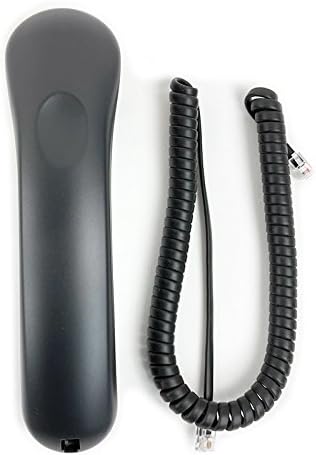
Figure 2.1: The telephone handset and its coiled cord.

Figure 2.2: Standard Ethernet cable included for network connection.

Figure 2.3: The product packaging box.
3. Nhazi
3.1 Njikọ anụ ahụ
- Jikọọ ekwentị: Plug one end of the coiled handset cord into the handset and the other end into the handset port on the side of the telephone base.
- Jikọọ na netwọk/Ike:
- If using Power over Ethernet (PoE): Connect one end of the Ethernet cable to the LAN port on the back of the telephone and the other end to a PoE-enabled network switch or injector.
- If not using PoE: Connect one end of the Ethernet cable to the LAN port on the back of the telephone and the other end to your network switch or router. Connect an optional 12V power adapter (not included) to the power port on the back of the telephone and then to a power outlet.
- Njikọ ekweisi nhọrọ: If using a headset, connect it to the dedicated RJ-22 headset port on the side of the telephone.

Ọgụgụ 3.1: N'azụ view of the telephone, showing the LAN port for network and power connection.
3.2 Mmalite Ike na Nhazi Netwọk
Once connected, the telephone will power on automatically. The backlit display will illuminate, and the phone will begin its boot sequence. During this process, it will attempt to obtain network settings.
- DHCP: By default, the phone is configured to obtain an IP address and other network settings automatically via DHCP. This is the most common setup for most networks.
- Static IP Addressing: If your network requires a static IP address, you may need to access the phone's network settings menu to manually configure the IP address, subnet mask, gateway, and DNS servers. Consult your network administrator for these details.
4. Ntuziaka ọrụ
4.1 Ọrụ oku bụ isi
- Ịkpọ oku:
- Welie ekwentị ma ọ bụ pịa Igwe okwu bọtịnụ.
- Jiri ahụ igodo pịa nọmba achọrọ.
- Pịa Ịkpọ oku or Ziga soft key (if available on display) or wait for the call to connect.
- Na-aza oku:
- Mgbe ekwentị na-ada, welie ekwenti ma ọ bụ pịa Igwe okwu bọtịnụ.
- Ịkwụsị oku:
- Dochie ekwenti n'ime okpuru ulo ma ọ bụ pịa Igwe okwu bọtịnụ ọzọ ka kwụghachi.
4.2 igodo atụmatụ
The Mitel IP 480G includes dedicated feature keys for enhanced call management:
- Nyefee: Used to transfer an active call to another extension or external number.
- Nzukọ: Initiates a multi-party conference call (supports up to 6 parties).
- Jide: Places the current active call on hold.
- History/Redial: Accesses a filterable and unlimited call history. Allows redialing previous numbers.
- Ozi olu: Direct access to your voicemail messages.
- Akwụkwọ ndekọ aha: Provides access to a searchable and filterable directory of contacts stored on the system.
4.3 Njikwa ọdịyo
Manage your audio experience with the following controls:
- Olu: Independent volume control for handset, speakerphone, headset, and alert/ring tones. Use the dedicated volume buttons.
- Mechie: Press to mute your microphone during a call. An LED indicator will illuminate when muted.
- Igwe okwu: Toggles the speakerphone function on or off. An LED indicator will illuminate when the speakerphone is active.
- Ekweisi: Activates or deactivates the headset mode. An LED indicator will illuminate when the headset is active.
4.4 Ngosipụta igodo
The 297 x 160 pixels backlit display provides clear information. Use the navigation cluster (up, down, left, right arrows, and select button) to browse menus, directories, and call history. Soft keys located below the display provide context-sensitive options.
5. Nlekọta
5.1 Nhicha
To maintain the appearance and functionality of your telephone, clean it regularly.
- Jiri nwayọọ, damp akwa iji hichapụ elu mputa.
- Avoid using abrasive cleaners, solvents, or strong chemicals, as these can damage the plastic and finish.
- Afesala mmiri mmiri ihicha ozugbo na ekwentị.
- Ensure the phone is unplugged from power before cleaning.
5.2 Mmelite ngwanrọ
Periodically, Mitel may release software updates to improve performance, add features, or address security vulnerabilities. These updates are typically managed by your system administrator. Do not attempt to manually update the phone's firmware unless instructed by qualified personnel.
6. Nchọpụta nsogbu
This section addresses common issues you might encounter with your Mitel IP 480G Gigabit Telephone.
| Nsogbu | Ihe nwere ike ime | Ngwọta |
|---|---|---|
| Ekwentị anaghị agbanye. | Enweghị ike sitere na ngbanwe PoE ma ọ bụ nkwụnye ọkụ. | Verify that the Ethernet cable is securely connected to a PoE-enabled port or that the optional power adapter is correctly plugged in and receiving power. |
| Enweghị ụda ọkpụkpọ. | Network connectivity issue; phone not registered with SIP server. | Check network cable connection. Ensure your network is operational. Contact your system administrator to verify SIP registration status. |
| Enweghị ike ịkpọ ma ọ bụ nata oku. | Network configuration error; SIP account issues. | Confirm network settings (DHCP/Static IP). Verify SIP account credentials with your system administrator. |
| Ogo ọdịyo adịghị mma (echo, static). | Njikọ netwọk; eriri ezighi ezi; nnyonye anya gburugburu ebe obibi. | Check network cable. Ensure sufficient bandwidth. Try a different handset or headset. If issues persist, contact support. |
If you encounter problems not listed here or if the suggested solutions do not resolve the issue, please contact your IT department or Mitel technical support for further assistance.
7. Nkọwapụta
- Ụdị: Mitel IP 480G
- Nọmba akụkụ: 10577
- Akụkụ (L x W x H): Ihe dịka 10 x 7 x 3 sentimita asatọ
- Arọ: Approximately 1.06 pounds (480 Grams)
- Agba: Nwa
- Ihe: Plastic
- Ngosipụta: 297 x 160 pixels backlit display
- ọdụ ụgbọ mmiri Ethernet: 10/100/1000 Gigabit Ethernet Switch
- Isi mmalite ike: 802.3af Power over Ethernet (PoE) or optional 12V power adapter (not included)
- Ogbugba ndu: SIP Protocol, VLAN and DiffServ/ToS supported Quality of Service
- Ndakọrịta ekweisi: RJ-22 ọdụ ụgbọ mmiri
- Igwe okwu: Igwe okwu igwe okwu duplex zuru oke
- Igodo njirimara: Transfer, Conference (6 party), Hold, History/Redial, Voicemail, Directory
- Njikwa ọdịyo: Independent volume control for handset, speakerphone, headset, alert/rings; Mute (LED indicator); Speakerphone (LED indicator); Headset (LED indicator)
8. Akwụkwọ ikike na nkwado
Maka ozi gbasara akwụkwọ ikike ngwaahịa, biko rụtụ aka na kaadị ikike nke gụnyere nzụta gị ma ọ bụ gaa na Mitel gọọmentị website. Technical support and additional resources can also be found on the Mitel support portal.
Onye isi ala Mitel Websaịtị: www.mitel.com


