Okwu mmalite
This instruction manual provides essential information for the safe and efficient operation of your SONY CFD-S70 Portable CD Cassette Boombox. Please read this manual thoroughly before using the unit and retain it for future reference. This unit allows playback of CDs, CD-R/RW, MP3 CDs, cassette tapes, and features an FM/AM radio tuner.
Ngwaahịa gafereview
The SONY CFD-S70 is a versatile portable audio system designed for various media playback. Below are images illustrating the unit's main components.
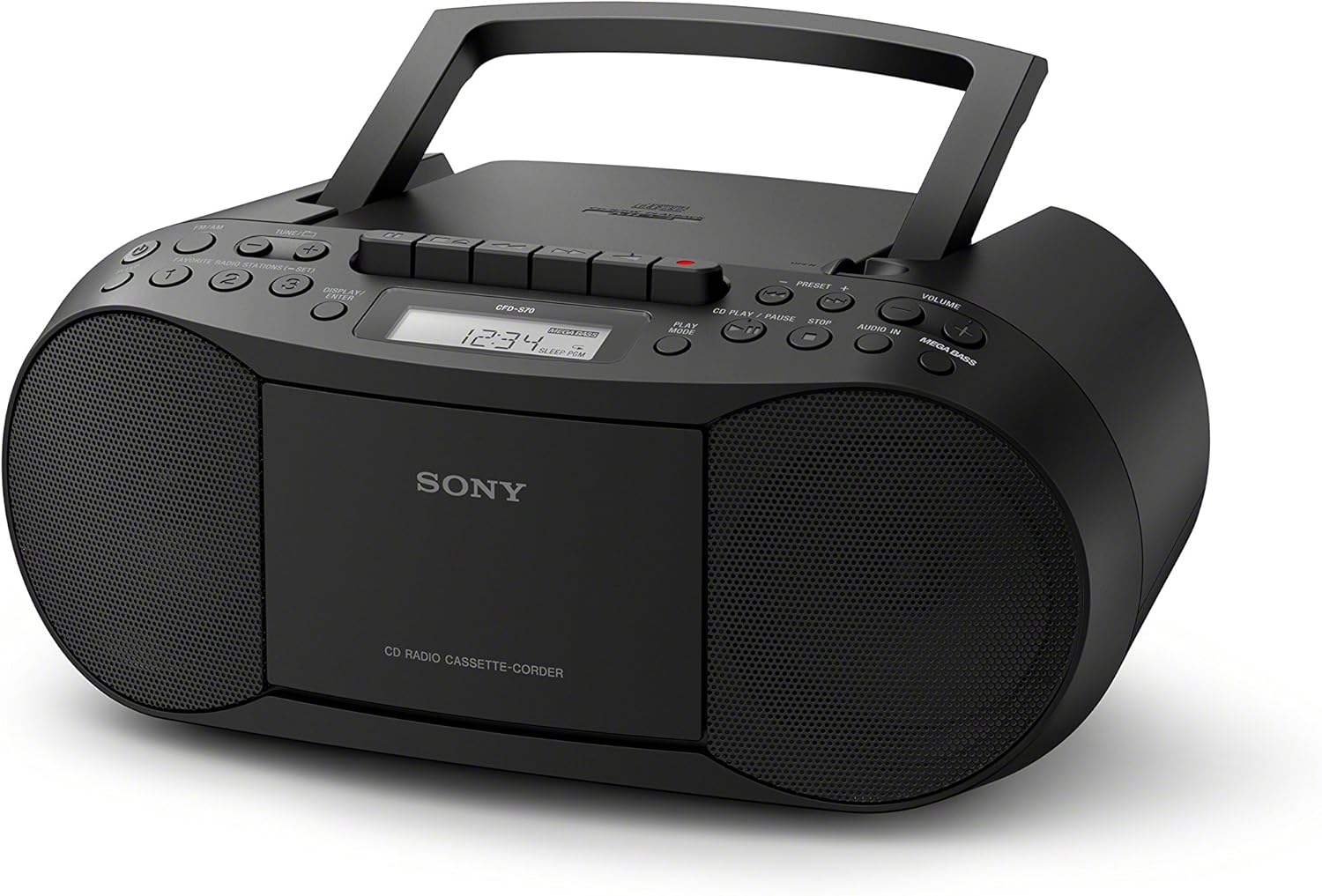
Foto 1: N'ihu view of the SONY CFD-S70 Portable CD Cassette Boombox with the handle in the upright position. This image shows the CD compartment, cassette deck controls, radio tuner, volume knob, and speakers.

Foto 2: N'ihu view of the SONY CFD-S70 Portable CD Cassette Boombox with the handle in the down position. This image provides a clear view of the control panel, including the display, function buttons, and speaker grilles.
Melite
1. Ịkwanye Unit
The CFD-S70 can be powered using either AC power or batteries.
Njikọ Ike AC:
- Gbaa mbọ hụ na agbanyụrụ unit ahụ.
- Jikọọ eriri ike AC enyere na jaket AC IN dị na ngwaọrụ ahụ.
- Tinye nsọtụ nke ọzọ nke eriri ike AC n'ime oghere mgbidi nkịtị.
Nwụnye batrị:
The unit requires 6 C-size batteries (not supplied).
- Mepee mkpuchi batrị nke dị na ala nke otu.
- Insert 6 C-size batteries, ensuring correct polarity (+/-) as indicated inside the compartment.
- Mechie mkpuchi nke batrị batrị nke ọma.
- Mara: Wepu batrị ma ọ bụrụ na agaghị eji nkeji ahụ ruo ogologo oge iji gbochie ntapu.
2. Ndozi antenna
For optimal FM radio reception, extend the telescopic antenna. For AM reception, the unit has a built-in ferrite bar antenna; rotate the unit itself for best reception.
3. Connecting External Devices (AUX IN)
You can connect an external audio device (e.g., smartphone, MP3 player) to the unit using an audio cable (not supplied) with a 3.5mm stereo mini plug.
- Connect one end of the audio cable to the headphone jack or line-out jack of your external device.
- Connect the other end to the AUDIO IN jack on the CFD-S70.
- Select the AUDIO IN function on the boombox.
- Adjust the volume on both the boombox and the external device.
Ntuziaka ọrụ
1. CD playback
- Pịa CD bọtịnụ iji họrọ ọrụ CD ahụ.
- Mepee mkpuchi nke CD site na ịpị bọtịnụ Mepee/mechie bọtịnụ.
- Place a CD with the label side facing up into the compartment.
- Close the CD compartment cover. The total number of tracks will appear on the display.
- Pịa KWURU/Kwụsịa button (►/⏸) to start playback.
- Ka ịkwụsịtụ, pịa KWURU/Kwụsịa ọzọ. Pịa ya ọzọ ka ịmaliteghachi.
- Iji kwụsị igwu egwu, pịa KWỤSỊ button (⏹).
- Ka ịwụ egwu, pịa gawa n'ihu (⏵) or AKA (⏶) buttons.
- Egwuregwu mmemme: While stopped, press the Mmemme button to select tracks in a desired order.
- Ngwakọta egwu: Pịa MKWUO button to play tracks in a random order.
2. Cassette Playback and Recording
- Pịa TAP. button to select the Cassette function.
- Mepee ọnụ ụzọ nke kaseti ahụ.
- Tinye teepu kaseti ka akụkụ achọrọ na-eche ihu.
- Mechie ọnụ ụzọ nke kaseti ahụ.
- Nkpọghachi: Pịa KWURU bọtịnụ (►).
- Ọsọ n'iru/Nweghachi: Pịa FFWD or REW bọtịnụ. Pịa Kwụsị/wepụ ịkwụsị.
- Kwụsị/ Wepụ: Pịa Kwụsị/wepụ button (⏹) to stop playback or eject the tape.
- Edekọ:
- Insert a blank cassette tape with the record-prevention tab intact.
- Select the desired source (CD, Radio, or AUX IN).
- Pịa Dekọọ button (⏺). The KWURU button will also engage automatically.
- Ka ịkwụsị ndekọ, pịa Kwụsị/wepụ bọtịnụ.
3. Ọrụ redio
- Pịa RADIO bọtịnụ iji họrọ ọrụ redio.
- Pịa BAND bọtịnụ iji gbanwee n'etiti eriri FM na AM.
- Akwụkwọ ntuziaka: Jiri ihe TUNE + or TUNE - bọtịnụ iji hazie ọdụ aka.
- Ndozi akpaaka: Pịa ma jide TUNE + or TUNE - for a few seconds to automatically scan for the next available station.
- Ụlọ atọrọ atọ:
- To store a station: Tune to the desired station, then press and hold a numbered preset button (1-30) until the preset number flashes on the display.
- To recall a station: Press the corresponding numbered preset button briefly.
4. Ndozi ụda
- Olu: Tugharia ihe Mpịakọta bọtịnụ iji bulie ma ọ bụ belata ọkwa ụda.
- MEGA BASS: Pịa MEGA BASS bọtịnụ iji mee ka atụmatụ bass boost rụọ ọrụ ma ọ bụ gbanyụọ.
Nlekọta
1. Ichacha Unit
- Jiri akwa dị nro hichaa mpụta nke unit ahụ.
- For stubborn stains, use a cloth lightly dampjiri mmiri dị nro sachaa ya, wee hichaa ya.
- Do not use abrasive pads, scouring powder, or solvents such as alcohol or benzene, as they may damage the finish.
2. CD and Cassette Care
- Handle CDs by their edges to avoid fingerprints on the playing surface.
- Store CDs in their cases when not in use.
- Keep cassette tapes away from strong magnetic fields and direct sunlight.
- Periodically clean the cassette deck's head and pinch rollers with a cotton swab lightly moistened with tape head cleaner.
3. Ngbanwe batrị
When the unit's performance degrades or the display dims during battery operation, replace all six C-size batteries with new ones. Do not mix old and new batteries, or different types of batteries.
Nchọpụta nsogbu
If you experience problems with your boombox, refer to the following table for possible solutions.
| Nsogbu | Ihe nwere ike ime | Ngwọta |
|---|---|---|
| Enweghị ike | Ejikọghị eriri AC; Batrị agwụla ma ọ bụ tinye ezighi ezi. | Hụ na e tinyere eriri AC n'ime ya nke ọma. Dochie batrị ma ọ bụ lelee polarity. |
| CD anaghị egwu ma ọ bụ na-amali elu | CD is dirty, scratched, or inserted incorrectly; Unit is subject to vibration. | Clean the CD with a soft cloth. Insert CD with label side up. Place unit on a stable surface. |
| Nnabata redio adịghị mma | Antenna not extended/adjusted; Interference from other devices. | Extend and adjust the FM telescopic antenna. Rotate the unit for AM reception. Move unit away from other electronic devices. |
| Cassette tape does not play or sounds distorted | Tape is tangled or damaged; Tape heads are dirty. | Check tape condition. Clean tape heads and pinch rollers. |
| No sound from AUX IN | Cable not connected properly; Incorrect function selected; Volume too low. | Ensure audio cable is fully inserted. Select AUDIO IN function. Increase volume on both boombox and external device. |
Nkọwapụta
| Njirimara | Nkọwa |
|---|---|
| Nọmba nlereanya | CFD-S70 |
| Ụdị | Sony |
| Akwadoro mkpọgharị mgbasa ozi | CD, CD-R/RW, MP3 CD, Cassette Tape |
| Tuner | FM/AM Digital Tuner with 30 Presets |
| Njikọta | Auxiliary Audio Input (3.5mm stereo mini jack) |
| Ụdị Ọkà Okwu | Ọkà Okwu Dual |
| Nkwalite ụda | MEGA BASS boost circuitry |
| Nhọrọ ike | AC Power, 6 x C-size Batteries (up to 19 hours battery life) |
| Akụkụ (L x W x H) | 13.68 x 6.12 x 9 inch (ihe dị ka) |
| Ibu | 2.5 pound (ihe dị ka.) |
| Igwe ikuku ikuku | Mba |
Ozi akwụkwọ ikike
This SONY CFD-S70 Portable CD Cassette Boombox comes with a 90-day limited warranty. For specific terms and conditions, please refer to the warranty documentation provided with your purchase or visit the official Sony support websaịtị.
Nkwado ndị ahịa
Maka enyemaka ndị ọzọ, nkwado teknụzụ, ma ọ bụ ajụjụ ọrụ, biko gaa na nkwado Sony gọọmentị website or contact their customer service hotline. Have your model number (CFD-S70) and purchase information ready when contacting support.
- Nkwado n'ịntanetị: Gaa leta www.sony.com/electronics/support
- Nkwado ekwentị: Refer to your product packaging or the Sony websaịtị maka nọmba kọntaktị mpaghara.


