1. Okwu mmalite
Thank you for choosing the Lenco PDR-030 DAB+/FM Portable Digital Radio. This manual provides essential information for setting up, operating, and maintaining your device. The PDR-030 offers high-quality digital radio reception (DAB+) and traditional FM radio, along with features such as an integrated rechargeable battery for portability, an RDS display, station memory, and an alarm clock function.
Ngwa gụnyere:
- Lenco PDR-030 Digital Radio
- AC Power Adapter (220 Volt)
- Akwụkwọ ntuziaka onye ọrụ
2. Ozi nchekwa dị mkpa
- Etinyela ngwaọrụ ahụ n'ime mmiri ozuzo ma ọ bụ mmiri iji gbochie ọkụ ma ọ bụ ọkụ eletrik.
- Hụ na ihe nkwụnye ike voltage dakọtara ọkụ ọkụ mpaghara gị.
- Emeghela casing. Kpọtụrụ ndị ọrụ ruru eru ọrụ niile.
- Zere idobe nkeji n'akụkụ ebe okpomọkụ ma ọ bụ na ìhè anyanwụ.
- Handle the integrated battery with care. Do not attempt to replace it yourself.
- Debe ngwaọrụ ahụ pụọ na oghere magnetik siri ike.
3. Ngwaahịa gafereview
Familiarize yourself with the main components and controls of your Lenco PDR-030 radio.
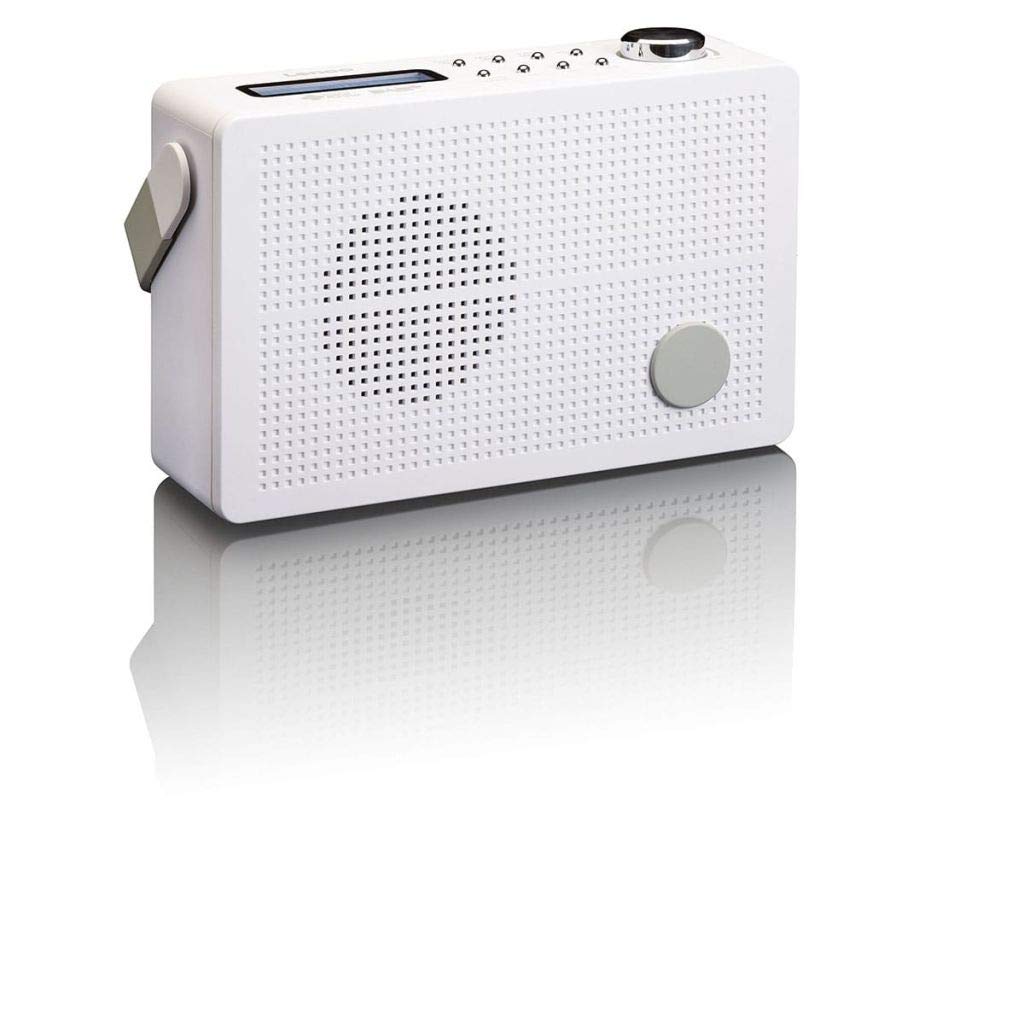
Foto 3.1: Front Panel of Lenco PDR-030 Radio. Features include a blue backlit LCD display, power/source button, alarm, sleep, info/menu, preset buttons, select/snooze, scan, previous, next buttons, and a rotary volume knob.
Key Controls and Features:
- Ngosipụta: Two-line illuminated LCD for time, date, station name, and information.
- Power/Source Button: Turns the radio on/off and switches between DAB+ and FM modes.
- Mpịakọta Mpịakọta: Na-emezi ọkwa mmepụta ọdịyo.
- Antenna telescopic: For optimal radio signal reception.
- Jack ekweisi (3.5mm): Maka ige ntị nkeonwe.
- Alarm/Sleep/Info/Menu/Preset Buttons: For various functions including setting alarms, sleep timer, accessing information, menu navigation, and managing station presets.
- Select/Snooze/Scan/Prev/Next Buttons: For station tuning, menu selection, and snooze function.
4. Nhazi
4.1 Ịkwanye redio
The PDR-030 can be powered by the included AC adapter or its integrated rechargeable battery.
- Ike AC: Connect the supplied 220V AC power adapter to the DC input jack on the radio and then to a wall outlet. The radio will automatically begin charging the internal battery.
- Ike batrị: The integrated Lithium-ion battery allows for portable use. Ensure the battery is sufficiently charged before use without the AC adapter.
4.2 Ntọala antenna
Extend the telescopic antenna fully for optimal reception of both DAB+ and FM signals. Adjust its position for the best signal quality.
4.3 Initial Power On and Station Scan
- Pịa Ike/Isi iyi bọtịnụ iji gbanye redio.
- Upon first use, the radio will automatically enter DAB+ mode and perform a full scan for available digital radio stations. This may take a few minutes.
- Once the scan is complete, the radio will tune to the first available station.
5. Ntuziaka ọrụ
5.1 Gbanyụọ ma ọ bụ gbanyụọ
Pịa Ike/Isi iyi bọtịnụ ka ịgbanwuo ma ọ bụ gbanyụọ redio.
5.2 Mode Selection (DAB+/FM)
Pịa Isi mmalite button repeatedly to switch between DAB+ and FM radio modes.
5.3 Ebe ntughari
- Ụdị DAB+:
- Mgbe nyocha mbụ gasịrị, jiri nyocha ahụ. Nke gara aga na Osote buttons to navigate through the list of available DAB+ stations.
- To perform a new full scan, press the NchNhr button, navigate to "Full Scan" using Nke gara aga/Na-esote, ma pịa Họrọ.
- Ọnọdụ FM:
- Pịa Nyochaa button to automatically scan for the next available FM station.
- Maka nhazi aka, pịa ma jide Nke gara aga or Osote buttons to fine-tune the frequency.
5.4 Saving and Recalling Preset Stations
The radio allows you to store up to 10 DAB+ and 10 FM preset stations.
- Iji chekwaa ihe edobere:
- Tinyegharịa n'ọdụ ụgbọ mmiri achọrọ.
- Pịa ma jide Ntọala button until "Preset Store" appears on the display.
- Jiri ihe Nke gara aga/Na-esote buttons to select a preset number (1-10).
- Pịa Họrọ to confirm and save the station.
- Icheta ihe atọrọ:
- Pịa Ntọala bọtịnụ nkenke.
- Jiri ihe Nke gara aga/Na-esote bọtịnụ iji họrọ nọmba achọrọ.
- Pịa Họrọ to tune to the preset station.
5.5 Njikwa olu
Tugharia ihe Mpịakọta Akpata clockwise to increase the volume and counter-clockwise to decrease it.
5.6 RDS Functionality (FM Mode)
In FM mode, the RDS (Radio Data System) function displays information such as station name, program type, and other broadcast data on the two-line LCD display.
5.7 Ọrụ Elekere Mkpu
The PDR-030 can be used as an alarm clock with two separate alarm times.
- Ịtọ ntọala mkpu:
- Pịa Oti mkpu bọtịnụ.
- Jiri Nke gara aga/Na-esote to select Alarm 1 or Alarm 2, then press Họrọ.
- Follow the on-screen prompts to set the alarm time, duration, source (Buzzer or Radio), frequency (Daily, Once, Weekdays, Weekends), and volume.
- Ensure the alarm is set to "On" and press Họrọ iji chekwaa.
- Ọrụ Sooze: Mgbe oti mkpu dara, pịa Tie mkpu button to temporarily silence it for a set period.
- Oge ụra: Pịa Ụra button repeatedly to set a sleep timer (e.g., 15, 30, 45, 60 minutes) after which the radio will automatically turn off.
5.8 Njikọ Ekweisi
Connect 3.5mm stereo headphones to the headphone jack for private listening. The internal speaker will be muted automatically.
6. Nlekọta
6.1 Nhicha
Wipe the radio's exterior with a soft, dry cloth. Do not use abrasive cleaners, waxes, or solvents as they may damage the finish. Ensure no liquids enter the device.
6.2 Nlekọta batrị
The integrated Lithium-ion battery is designed for long life. To maximize battery lifespan:
- Zere ịchaji batrị ugboro ugboro.
- If storing the radio for an extended period, charge the battery to approximately 50% and store in a cool, dry place.
- Do not attempt to replace the battery yourself. Contact qualified service personnel if battery issues arise.
7. Nchọpụta nsogbu
| Nsogbu | Ihe nwere ike ime | Ngwọta |
|---|---|---|
| Enweghị ike | AC adapter not connected or faulty; battery discharged. | Check AC adapter connection. Charge the battery. |
| Poor DAB+/FM reception | Antenna not extended; weak signal area; interference. | Fully extend and adjust the telescopic antenna. Move the radio to a location with better signal. Avoid placing near other electronic devices. |
| Enweghị ụda | Olu dị oke ala; ekweisi ejikọtara; agbanyere ogbi. | Increase volume. Disconnect headphones. Check if mute is active (if applicable). |
| Oti mkpu anaghị ada ụda | Alarm not activated; alarm volume too low; incorrect time setting. | Ensure alarm is set to "On". Check alarm volume. Verify current time and alarm time settings. |
8. Nkọwapụta
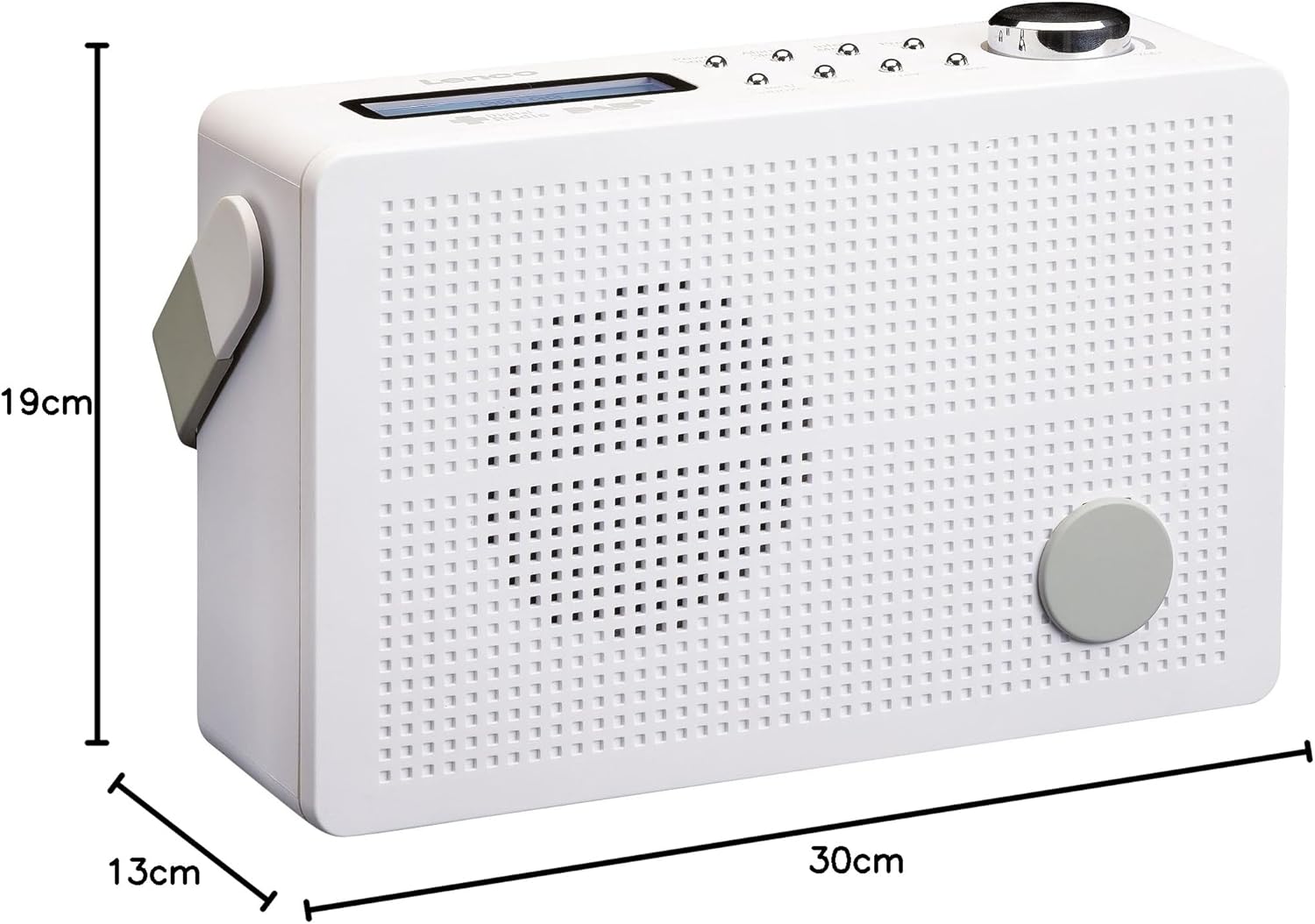
Foto 8.1: Lenco PDR-030 Dimensions.
| Njirimara | Nkọwa |
|---|---|
| Nọmba nlereanya | PDR-030 |
| Nkà na ụzụ Tuner | DAB+, FM (Ukw) |
| Isi Iyi Ike | Battery-Powered (Integrated Lithium-ion), AC Adapter |
| AC Voltage | 220 Volt |
| Akụkụ ngwaahịa (W x D x H) | 21.4 x 6.5 x 13.8 cm (approx. 22.5 x 8.5 x 15 cm as per another spec) |
| Ibu Ibu | 9 g (Note: This seems incorrect, likely 670g from description) |
| Ụdị ihe | Plastic |
| Ngwaọrụ Akụrụngwa | 3.5 mm Audio (Headphone Jack) |
| Atụmatụ pụrụ iche | Portable, RDS Display, Alarm Clock, Station Memory (10 DAB+, 10 FM) |
Note: Some dimensions and weight specifications provided by the manufacturer may vary slightly. The description states 670 grams for weight, while specifications list 9g. Please refer to the product packaging for the most accurate information.
9. Akwụkwọ ikike na nkwado
Lenco products are designed for reliability and performance. This product typically comes with a 24-month manufacturer's warranty from the date of purchase, covering defects in materials and workmanship. Please retain your proof of purchase for warranty claims.
For technical support, service, or warranty inquiries, please refer to the contact information provided on the Lenco official website or your local retailer. Do not attempt to repair the device yourself.
Maka ozi ndị ọzọ, ị nwere ike ịga na Lenco Store on Amazon.


