1. Okwu mmalite
This manual provides instructions for the safe and effective use of your Disney Frozen Bluetooth Speaker. This portable wireless speaker allows you to stream audio from Bluetooth-enabled devices or connect via a 3.5mm audio cable. It features a built-in microphone for speakerphone functionality and a rechargeable battery for portability.
2. Ihe ngwugwu
Biko hụ na ihe niile dị na ngwugwu:
- Disney Frozen Bluetooth Speaker
- Igwe nchaji USB
- 3.5mm Audio USB
3. Akụrụngwa Ngwaahịa
- Wireless audio streaming via Bluetooth
- Wired audio connection via 3.5mm headphone port
- Integrated microphone for speakerphone calls
- Batrị enwere ike ịchaji arụnyere n'ime ya
- USB chargeable
4. Njikwa na Ọdụ Ụgbọ Mmiri

Foto nke 1: N'ihu view of the speaker with control buttons on the top panel.
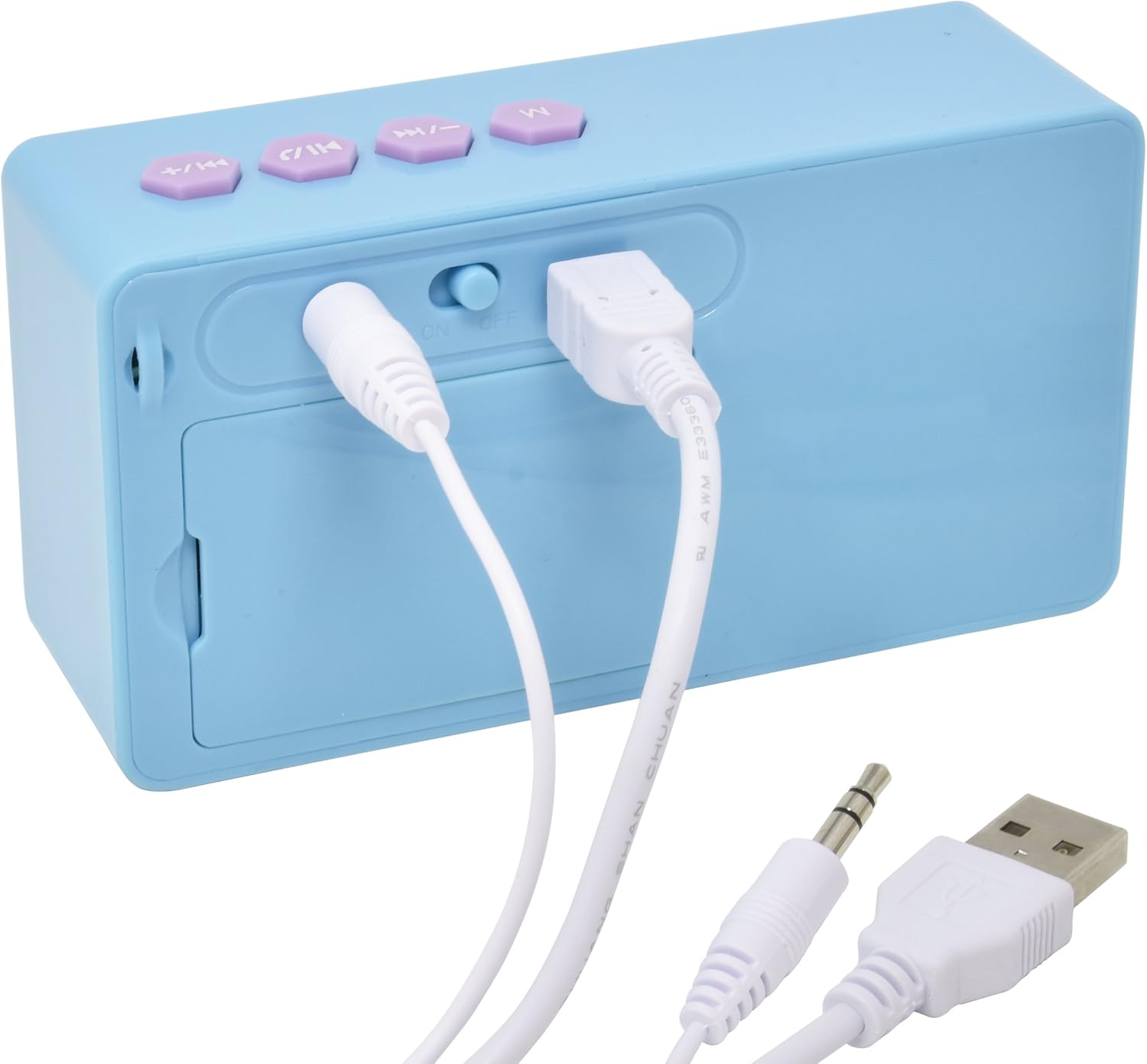
Foto nke 2: N'azụ view of the speaker showing the power switch and connection ports.
Njikwa panel kacha elu:
- M bọtịnụ: Mode selection (Bluetooth/AUX).
- Bọtịnụ ala / egwu gara aga: Press once for previous track, press and hold to decrease volume.
- Play/Pause / Call Button: Press once to play/pause music, press to answer/end calls.
- Bọtịnụ egwu / olu na-esote: Press once for next track, press and hold to increase volume.
Ọdụ ụgbọ mmiri azụ:
- Gbanyụọ/gbanyụọ Na-agbanyụ ma ọ bụ gbanyụọ ọkà okwu.
- USB Nchaji Port: Connect the USB cable for charging.
- Ntinye AUX 3.5mm: Connect the 3.5mm audio cable for wired playback.
5. gingchaji Okwu Okwu
Before first use, fully charge the speaker. The speaker charges quickly when connected to a USB port.
- Locate the USB Charging Port on the rear of the speaker (refer to Image 2).
- Connect the small end of the included USB charging cable to the speaker's USB port.
- Connect the larger end of the USB charging cable to a powered USB port (e.g., computer, USB wall adapter).
- The charging indicator light will illuminate. Once charging is complete, the light may change color or turn off.
Mara: Do not use damaged cables or chargers. Ensure the charging port is dry before connecting the cable.
6. Njikọ Bluetooth
To connect your speaker wirelessly to a Bluetooth-enabled device:
- Gbaa mbọ hụ na agbadoro ọkà okwu.
- Malite Mgbanwu / Gbanyụọ on the rear of the speaker to the 'ON' position. The speaker will power on and enter Bluetooth pairing mode, indicated by a flashing LED light and an audible prompt.
- On your Bluetooth-enabled device (smartphone, tablet, computer), go to the Bluetooth settings menu.
- Chọọ maka available devices. The speaker will appear as "Disney Frozen Speaker" or a similar name.
- Select the speaker from the list to pair. Once successfully paired, the LED indicator will stop flashing, and you will hear a confirmation tone.
- Ị nwere ike ugbu a kpọọ ụda site na ngwaọrụ gị site na ọkà okwu.
Mara: If prompted for a password, enter "0000". The speaker will automatically attempt to reconnect to the last paired device when powered on.
7. Wired Connection (AUX)
To connect your speaker using the 3.5mm audio cable:
- Gbaa mbọ hụ na agbanyere ọkà okwu.
- Connect one end of the included 3.5mm audio cable to the Ntinye AUX 3.5mm port on the rear of the speaker (refer to Image 2).
- Connect the other end of the 3.5mm audio cable to the headphone jack or AUX output of your audio device.
- Pịa M bọtịnụ on the top panel to switch to AUX mode if the speaker does not automatically detect the wired connection.
- Play audio from your device.
Mara: When using the AUX connection, playback controls (play/pause, track skip) on the speaker may not function, and you will need to control playback directly from your connected device.
8. Using as a Speakerphone
When connected via Bluetooth to a smartphone, the speaker can be used to handle phone calls.
- Na-aza oku: Mgbe oku batara, pịa Play/Pause / Call Button ozugbo ịza.
- Ịkwụsị oku: Mgbe oku na-aga, pịa Play/Pause / Call Button once to end the call.
- Ịjụ oku: Pịa ma jide Play/Pause / Call Button ruo ihe dị ka sekọnd abụọ iji jụ oku na-abata.
Audio will be routed through the speaker, and the built-in microphone will capture your voice.
9. Nlekọta
- Jiri akwa dị nro hichaa ọkà okwu. Ejila ihe nchacha abrasive ma ọ bụ ihe mgbaze.
- Keep the speaker away from water, moisture, and extreme temperatures.
- Agbalịla ịkwatu ma ọ bụ rụzie ọkà okwu ahụ n'onwe gị. Nke a ga-eme ka akwụkwọ ikike ahụ ghara ịdị irè.
- Chekwaa ọkà okwu n'ebe dị jụụ ma kpọọ nkụ mgbe ọ naghị eji ya ogologo oge.
10. Nchọpụta nsogbu
| Nsogbu | Ngwọta enwere ike |
|---|---|
| Ọkà okwu anaghị agbanwuo. | Ensure the speaker is charged. Connect to a power source using the USB cable. Check the ON/OFF switch. |
| Enweghị ike ijikọ site na Bluetooth. | Ensure the speaker is in pairing mode (flashing LED). Make sure Bluetooth is enabled on your device. Move the speaker closer to your device. Forget the device from your Bluetooth list and try pairing again. |
| Enweghị ụda ma ọ bụ obere olu. | Increase the volume on both the speaker and your connected device. Ensure the correct input mode (Bluetooth or AUX) is selected. Check if the audio cable is fully inserted for wired connections. |
| Njikọ Bluetooth na-adakarị. | Ensure there are no obstructions between the speaker and your device. Move closer to the speaker. Avoid interference from other wireless devices. |
| Igwe okwu anaghị arụ ọrụ n'oge oku. | Ensure the speaker is connected via Bluetooth and not AUX. Check your phone's audio output settings during a call to ensure it's routed to the Bluetooth speaker. |
11. Nkọwapụta
| Njirimara | Nkọwa |
|---|---|
| Nọmba nlereanya | 057-00-3417 |
| Teknụzụ Njikọta | Bluetooth, USB (maka ịchaji) |
| Njirimara Pụrụ Iche | Portable, Built-in Microphone |
| Isi Iyi Ike | Batrị kwadoro (enwere ike ịchaji) |
| Ike Nwepu kacha elu | 3 Watt |
| Akụkụ ngwaahịa | 6.2 x 6.1 x 2.3 sentimita asatọ |
| Ibu Ibu | 9.1 ounces |
| UPC | 092298925264 |
12. Akwụkwọ ikike Ozi
A na-ekpuchi ngwaahịa a 1 YEAR FACTORY WARRANTY. Please retain your proof of purchase for warranty claims. For support or warranty inquiries, please refer to the contact information provided with your purchase documentation.