1. Okwu mmalite
1.1. N'eluview
The Hager WITTY charging station is designed for charging electric vehicles in accordance with Mode 3 (IEC 61851-1) and Mode 2 standards. It supports both Type 3 and standard socket connections, offering flexible charging solutions for various electric vehicles. This device operates on a 3-phase + Neutral, 32A electrical supply, delivering power from 4 kW to 22 kW.
1.2. Ntuziaka nchekwa
- Installation must be performed by a qualified electrician in accordance with local and national electrical codes.
- Do not attempt to open or repair the charging station yourself. Contact qualified service personnel.
- Ensure the charging station is properly grounded.
- Do not use the charging station if it is damaged or shows signs of malfunction.
- Keep children and unauthorized persons away from the charging station during operation.
- Avoid exposing the charging station to extreme temperatures, direct sunlight for prolonged periods, or corrosive substances.
2. Nkọwa ngwaahịa
2.1. Atụmatụ
- Compatible with Mode 3 (Type 3) and Mode 2 charging.
- Free access operation.
- Power output: 4 kW to 22 kW.
- Input: 3-phase + Neutral, 32A.
- Integrated status indicator light.
2.2. Akụrụngwa
The Hager WITTY charging station typically includes:
- Charging station unit
- Akụrụngwa mgbago (skru, arịlịka)
- Akwụkwọ ntuziaka onye ọrụ (akwụkwọ a)

Foto 1: N'ihu view of the Hager WITTY charging station with a green operational light, mounted on a textured wall.
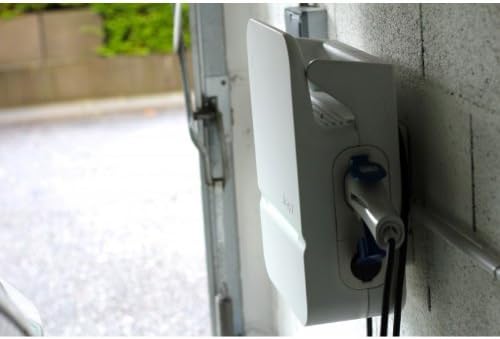
Foto 2: Akụkụ view of the Hager WITTY charging station, illustrating the cable connection point and the unit's profile.
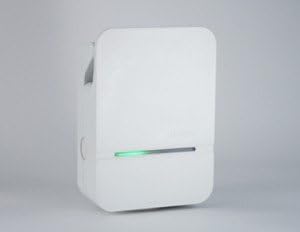
Foto 3: Zuru ezu n'ihu view of the Hager WITTY charging station, emphasizing the integrated green status light.
3. Nhazi
3.1. Ebe nwụnye
Choose a suitable location that is protected from direct impact, excessive moisture, and extreme temperatures. Ensure adequate ventilation and accessibility for maintenance.
3.2. Ịkwanye
- Jiri ihe atụ enyere (ọ bụrụ na ọ dị mkpa) ma ọ bụ tụọ oghere ndị e ji etinye ihe n'elu ihe ahụ, kaa akara ebe a na-egwupụta ihe n'elu mgbidi ahụ.
- Drill holes and insert appropriate wall anchors.
- Secure the charging station to the wall using the provided screws.
3.3. Njikọ Ọdụdọ
Ịdọ aka ná ntị: Ekwesịrị ịrụ ọrụ ọkụ eletrik site n'aka onye ọrụ ọkụ eletrik.
- Ensure the main power supply is disconnected before beginning any electrical work.
- Connect the 3-phase + Neutral (3Ph+N) 32A power supply to the designated terminals inside the charging station.
- Hụ na e guzobere ntọala kwesịrị ekwesị.
- Verify all connections are secure and correctly wired according to the wiring diagram provided with the unit (refer to the separate installation guide for detailed diagrams).
- Close the charging station cover securely.
4. .rụ ọrụ
4.1. Starting a Charge
- Ensure the charging station is powered on and the status indicator light is green (ready).
- Connect the charging cable to your electric vehicle's charging port.
- Connect the other end of the charging cable to the charging station's outlet (Type 3 or Mode 2 socket).
- The charging station will automatically initiate the charging process. The status indicator light may change to blue or flashing green, depending on the charging status.
4.2. Stopping a Charge
- Kwụpụ eriri chaja ahụ na ụgbọala eletrik gị mbụ.
- Disconnect the charging cable from the charging station.
- The charging station will return to a ready state (green indicator light).
4.3. Ngosipụta ọnọdụ
- Ọkụ ndụ ndụ: Ready for charging.
- Blue Light (or flashing green): Ịchaji na-aga n'ihu.
- Red Light (or flashing red): Error or fault detected. Refer to the Troubleshooting section.
- Enweghị ọkụ: Power off or system fault.
5. Nlekọta
5.1. Nhicha
Clean the exterior of the charging station with a soft, damp cloth. Do not use abrasive cleaners, solvents, or harsh chemicals. Ensure the unit is powered off before cleaning.
5.2. Nyocha
Periodically inspect the charging station for any signs of damage, wear, or loose connections. Check the charging cable for fraying or damage. If any damage is found, discontinue use and contact a qualified technician.
6. Nchọpụta nsogbu
| Nsogbu | Ihe nwere ike ime | Ngwọta |
|---|---|---|
| No power/No light | Power supply disconnected; Circuit breaker tripped. | Check power supply; Reset circuit breaker. If problem persists, contact a qualified electrician. |
| Ọkụ egosi uhie | Internal fault; Overcurrent; Ground fault. | Disconnect and reconnect the vehicle. If the error persists, power cycle the unit. If still red, contact service. |
| Ịchaji anaghị amalite | Cable not properly connected; Vehicle not ready to charge; Charging station fault. | Ensure cable is securely connected to both vehicle and station. Check vehicle's charging status. Power cycle the charging station. |
7. Nkọwapụta
| Njirimara | Nkọwa |
|---|---|
| Nlereanya | XEV103 |
| Ụdị Nchaji | Mode 3 (IEC 61851-1), Mode 2 |
| Ụdị njikọ | Type 3 / Standard Socket |
| Ntinye Voltage | 3-phase + Neutral |
| Max Ugbu a | 32A |
| Mpụta ike | 4 kW na 22 kW |
| Nweta | Nnweta efu |
| ASIN | B00CSJUVKA |
8. Akwụkwọ ikike na nkwado
For warranty information and technical support, please refer to the official Hager website or contact your local Hager distributor. Keep your purchase receipt for warranty claims.
Spare parts availability: Information not available.


