Okwu mmalite
This manual provides essential information for the safe and effective use of your Sony Cyber-shot DSC-WX50 digital camera. Please read it thoroughly before operating the camera and retain it for future reference. The DSC-WX50 is a compact digital camera featuring a 16.2 MP Exmor R CMOS sensor, 5x optical zoom, and Full HD 1080/60i video recording capabilities.
Kedu ihe dị na Igbe ahụ
Carefully unpack your camera and ensure all items are present. The standard package contents include:
- Igwefoto Dijitalụ DSC-WX50 nke Sony Cyber-shot
- Ngwungwu batrị enwere ike ịchaji
- Ihe nkwụnye AC
- USB Njikọ USB
- Eriri aka
- Instruction Manuals and Documentation
- HDMI Cable (Built-in Media)

Image: All contents of the Sony Cyber-shot DSC-WX50 package, including the camera, cables, and documentation, laid out.

Foto: Ihe dị nso view of the included accessories, such as the charger and USB cable, within their packaging.
Melite
1. Ịchaji batrị
Before first use, fully charge the supplied battery pack. Connect the camera to the AC adaptor using the USB cable, then plug the AC adaptor into a wall outlet. The charge lamp ga-enwu ọkụ n'oge ịchaji ma gbanyụọ mgbe emechara ya.
2. Ịtinye Batrị na Kaadị Ebe Nchekwa
Open the battery/memory card cover on the bottom of the camera. Insert the charged battery pack firmly until it locks into place. Insert a compatible memory card (SD/SDHC/SDXC or Memory Stick Duo/Pro Duo/Pro-HG Duo) into the memory card slot until it clicks. Close the cover securely.

Foto: N'ihu view of the Sony Cyber-shot DSC-WX50 camera, showing the lens and flash.
3. Ntọala mbụ
When you turn on the camera for the first time, you will be prompted to set the date, time, and time zone. Follow the on-screen instructions to complete these settings.
Na-arụ ọrụ igwefoto
Gbanyụọ/ Gbanyụọ
Pịa IKE bọtịnụ iji gbanye ma ọ bụ gbanyụọ igwefoto. Lensi ahụ ga-agbatị ma ọ bụrụ na agbanyere ya.
Basic Still Image Shooting (Intelligent Auto Mode)
- Gbanwuo igwefoto.
- Tọọ ọkpụkpọ mode ka Akpaaka nwere ọgụgụ isi (green camera icon).
- Frame your subject on the 2.7-inch LCD screen.
- Pịa bọtịnụ ihe mkpuchi ahụ ọkara ala iji lekwasị anya. Ihe ngosi lekwasị anya ga-agbanwe akwụkwọ ndụ akwụkwọ ndụ mgbe emechara lekwasị anya.
- Pịa bọtịnụ mkpuchi ahụ gbadaa kpamkpam iji see foto ahụ.
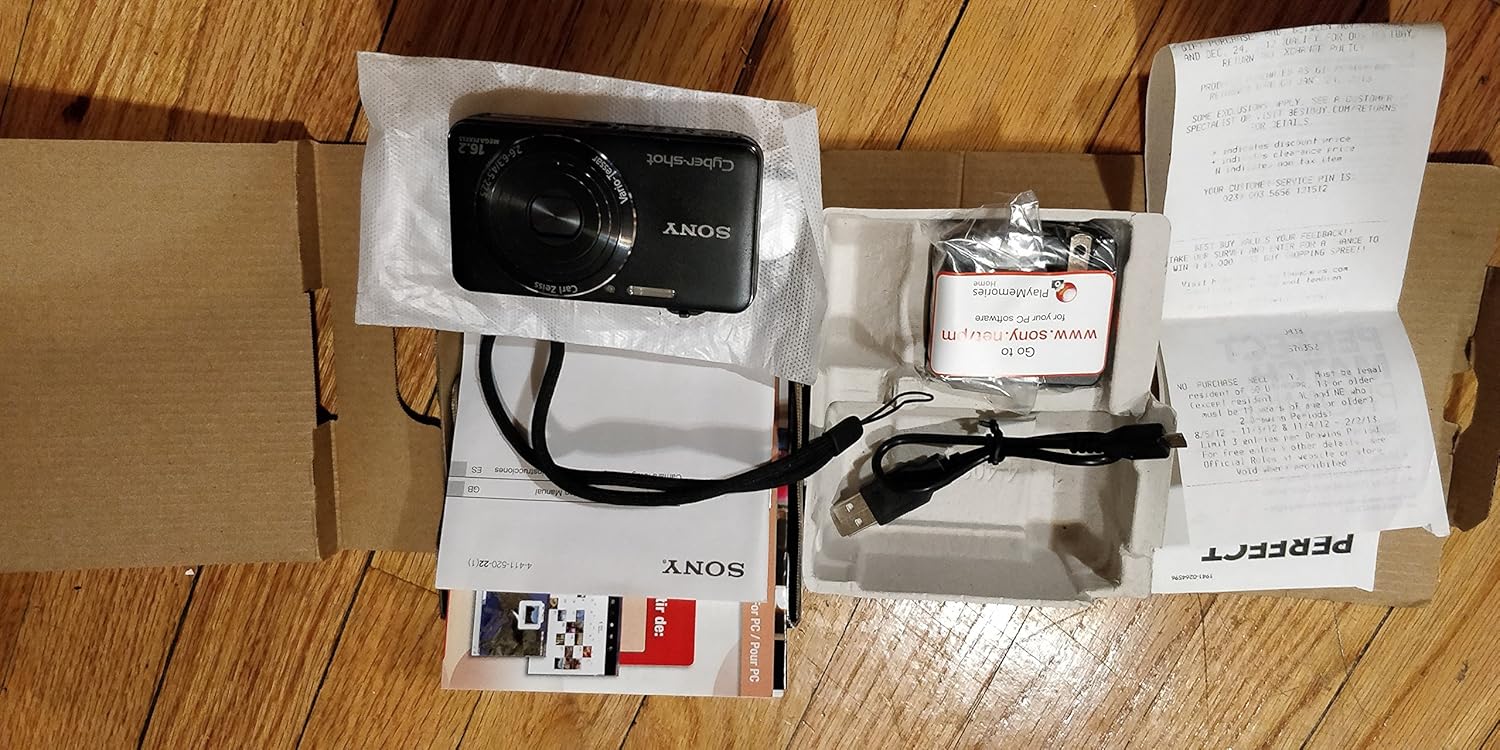
Foto: N'azụ view of the Sony Cyber-shot DSC-WX50, highlighting the 2.7-inch LCD screen and control buttons.
Ọrụ Mbugharị
Use the zoom lever around the shutter button to adjust the focal length. The camera features 5x optical zoom and Clear Image Zoom for enhanced magnification without significant quality loss.
Video Recording (Full HD 1080/60i)
To record movies, press the dedicated Ihe nkiri button. Press it again to stop recording. The camera supports Full HD 1080/60i video in AVCHD format, allowing for high-quality video capture with Optical SteadyShot Active Mode for reduced blur.
Special Shooting Modes and Features
- Ọnọdụ Nchekwa Onwe Kachasị Elu: Automatically detects 33 scenes and optimizes settings for dynamic pictures with reduced noise and improved clarity.
- Intelligent Sweep Panorama HR: Capture wide panoramic images by sweeping the camera. The camera stitches multiple frames automatically.
- 3D Still Image & 3D Sweep Panorama: Create 3D images for viewing on compatible 3D displays.
- Mmetụta Foto: Apply creative filters to your photos, such as Toy Camera, Pop Color, Partial Color, and more.
- Ndozi ndabere: Blurs the background to emphasize your subject, similar to DSLR effects.
- Ụdị Akpụkpọ Ahụ Dị Nro: Enhances portraits by reducing the appearance of blemishes and wrinkles.
- Face Detection & Smile Shutter: Automatically detects faces and can trigger the shutter when a smile is detected.
- Ọrụ Mgbochi Ihu Anya: Helps prevent photos with subjects blinking by capturing multiple shots.
- Ọkụ Eke: Corrects colors for more lifelike images when using flash.
- Nchọpụta ngagharị: Adjusts ISO and shutter speed to reduce blur in moving subjects.
- Sweep Multi Angle Mode: Captures 15 images at different angles to create a 3D-like view on the camera's LCD when tilted.
Nlekọta
Na-ehicha igwefoto
- Igwe igwefoto: Jiri ákwà dị nro ma kpọọ nkụ hichaa ya. Maka unyi siri ike, jiri ákwà dị nro.ampjiri mmiri ma ọ bụ ihe nhicha dị nro mee ya, wee hichaa ya.
- oghere: Jiri ahịhịa lensi wepụ uzuzu, wee jiri ákwà nhicha lensi hichaa ya nwayọ. Zere imetụ elu lensi ahụ aka na mkpịsị aka gị.
- Ihuenyo LCD: Jiri nwayọ hichaa akwa dị nro ma kpọọ nkụ. Zere ịpị ike na ihuenyo.
Nlekọta batrị
To prolong battery life, avoid exposing it to extreme temperatures. Store the battery in a cool, dry place when not in use. If the camera will not be used for an extended period, remove the battery.
Memory Card Care
Always format new memory cards in the camera before first use. Avoid removing the memory card while the camera is writing data (indicated by a flashing access lamp) to prevent data corruption.
Nchọpụta nsogbu
Ọ bụrụ na ị hụ nsogbu na igwefoto gị, lee ihe ngwọta ndị a na-ahụkarị:
| Nsogbu | Ngwọta |
|---|---|
| Igwefoto anaghị agba ọkụ. |
|
| "Writing to Memory card was incomplete" error. |
|
| Onyonyo na-agba agba. |
|
| Flash anaghị agba ọkụ. |
|
For further assistance, please contact Sony customer support.
Nkọwapụta
| Njirimara | Nkọwa |
|---|---|
| Mkpebi ka dị irè | 16.2 MP |
| Teknụzụ ihe mmetụta foto | BSI CMOS |
| Mbugharị anya | 5x |
| Dijitalụ mbugharị | 20x |
| Nha ihuenyo | 2.7 sentimita asatọ |
| Ụdị ngosi | LCD |
| Ndozi onyonyo | Optical SteadyShot |
| Mkpebi vidiyo | Full HD 1080p (1080/60i AVCHD) |
| Akwadoro File Usoro | JPEG (Exif 2.3), 3D: MPF, Video: MPEG-4, AVCHD |
| Ndakọrịta kaadị ebe nchekwa | SD/SDHC/SDXC, Memory Stick Duo/Pro Duo/Pro-HG Duo |
| Njikọta | HDMI, USB |
| Ogologo Fokalụ kacha nta | 25 millimeters |
| Ogologo Focal kacha | 125 millimeters |
| Oghere kacha | f/6.3 |
| Ọsọ shutter kacha nta | 4 sekọnd |
| Ọsọ shutter kacha | 1/1600 Sekọnd |
| Ibu Ibu | 0.26 pound |
Akwụkwọ ikike na nkwado
For warranty information and customer support, please refer to the documentation included with your product or visit the official Sony support websaịtị. Debe ihe akaebe nke ịzụrụ maka akwụkwọ ikike.
Nkwado Sony gọọmentị: www.sony.com/electronics/support