1. Pendahuluan
This manual provides essential information for the safe installation, operation, and maintenance of your Ducasa Ducaverre White 1200W Glass Radiant Panel Heater. Please read these instructions carefully before use and retain them for future reference.
1.1 Informasi Keselamatan
- Keamanan Listrik: Always ensure the heater is connected to a properly grounded electrical outlet. Do not operate with a damaged cord or plug.
- Penempatan: Maintain a safe distance from flammable materials (curtains, furniture) as indicated in the installation section. Do not cover the heater.
- Paparan Air: Do not install the heater near water sources (bathrooms, laundry rooms) unless specifically rated for such environments. Avoid direct water spray.
- Anak-anak dan Individu Rentan: Peralatan ini dapat digunakan oleh anak-anak berusia 8 tahun ke atas dan orang-orang dengan keterbatasan fisik, sensorik, atau kemampuan mental atau kurang pengalaman dan pengetahuan jika mereka telah diawasi atau diberi petunjuk mengenai penggunaan peralatan dengan cara yang aman dan memahami bahayanya. Anak-anak tidak boleh bermain-main dengan peralatan ini. Pembersihan dan perawatan pengguna tidak boleh dilakukan oleh anak-anak tanpa pengawasan.
- Pemeliharaan: Disconnect from power before cleaning or performing any maintenance.
1.2 Isi Paket
Verifikasi bahwa semua komponen ada dalam kemasan:
- Ducasa Ducaverre 1200W Glass Radiant Panel Heater
- Wall Mounting Bracket(s)
- Sekrup Pemasangan dan Sumbat Dinding
- User Manual (dokumen ini)
2. Pengaturan dan Instalasi
Proper installation is crucial for the safe and efficient operation of your heater. If you are unsure about any step, consult a qualified electrician.
2.1 Pemasangan di Dinding
The Ducasa Ducaverre heater is designed for wall mounting. Choose a suitable location away from direct drafts, windows, and areas where it might be accidentally covered. Ensure there is sufficient clearance around the heater as specified in the diagram below.
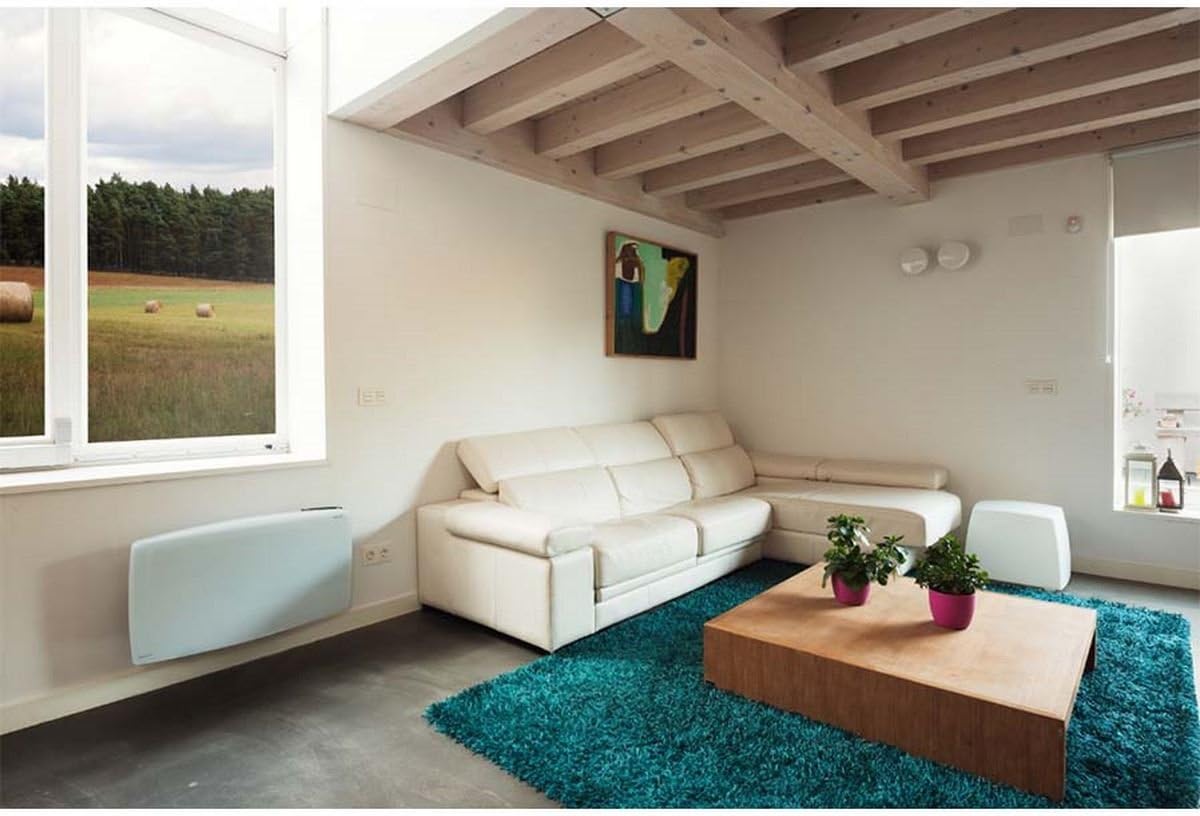
Gambar 1: Ducasa Ducaverre 1200W Glass Radiant Panel Heater mounted on a wall in a modern living room setting. The heater is white and rectangular, positioned low on the wall, illustrating a typical installation scenario.
- Menandai: Hold the mounting bracket against the wall at the desired height. Use a pencil to mark the drilling points.
- Pengeboran: Buat lubang pada titik yang ditandai menggunakan mata bor yang sesuai dengan jenis dinding Anda. Masukkan sumbat dinding.
- Pasang Braket: Pasang braket pemasangan ke dinding menggunakan sekrup yang tersedia. Pastikan braket rata dan terpasang dengan kuat.
- Gunung Heater: Carefully lift the heater and hook it onto the mounting bracket. Ensure it clicks securely into place. Some models may require additional screws to fix the heater to the bracket from below.
2.2 Koneksi Listrik
Once mounted, connect the heater to a standard electrical outlet. Ensure the outlet is easily accessible and rated for the heater's power consumption (1200W). Do not use extension cords or multi-plugs unless absolutely necessary and only if they are rated for the heater's power.
3. Petunjuk Pengoperasian
Your Ducasa Ducaverre heater features an intuitive control panel for setting temperature and operating modes.

Gambar 2: Sebuah close-up view of the black control panel located on the top right side of the white Ducasa Ducaverre heater. The panel features a digital display and several buttons labeled 'OK', '+', '-', 'MODE', and 'PROG', indicating user interface for settings and programming.
3.1 Panel Kontrol Selesaiview
- Tampilan digital: Shows current temperature, set temperature, and operating mode.
- Tombol MODE: Cycles through operating modes (Comfort, Eco, Frost Protection, Program).
- Tombol '+' / '-': Sesuaikan pengaturan suhu atau navigasikan opsi menu.
- Tombol Oke: Konfirmasikan pilihan.
- Tombol PROG: Mengakses fungsi pemrograman.
3.2 Mengatur Waktu dan Hari
Before using programmed modes, set the current time and day:
- Tekan dan tahan tombol MODE button until the time setting appears.
- Menggunakan '+' or '-' untuk mengatur jam, lalu tekan OK.
- Repeat for minutes and day of the week.
Mode Pengoperasian 3.3
- Mode Nyaman (C): Maintains your desired set temperature. Use '+' or '-' untuk mengatur suhu.
- Eco Mode (E): Maintains a temperature typically 3-4°C lower than the Comfort setting, saving energy.
- Frost Protection Mode (F): Mempertahankan suhu minimum (misalnya, 7°C) untuk mencegah pembekuan.
- Program Mode (P): Follows a pre-set weekly heating schedule.
3.4 Programming a Weekly Schedule
To set a custom heating schedule:
- Tekan tombol PROG button. The display will show the current day and a time segment.
- Menggunakan MODE to select the desired operating mode (Comfort, Eco, Frost Protection) for that specific hour.
- Menggunakan '+' to advance to the next hour or '-' untuk kembali.
- Repeat for all 24 hours of the day.
- Tekan PROG again to move to the next day.
- Once all days are programmed, press OK untuk menyimpan dan keluar.
4. Pemeliharaan
Regular cleaning ensures optimal performance and extends the lifespan of your heater.
4.1 Pembersihan
- Putuskan Daya: Always unplug the heater from the electrical outlet before cleaning.
- Luar: Wipe the glass panel and exterior surfaces with a soft, damp kain. Jangan gunakan pembersih abrasif, pelarut, atau bahan kimia keras, karena dapat merusak lapisan akhir.
- Debu: Use a soft brush or vacuum cleaner with a brush attachment to remove dust from air inlets and outlets.
- Pengeringan: Pastikan pemanas benar-benar kering sebelum mencolokkannya kembali.
4.2 Penyimpanan
If storing the heater for an extended period, ensure it is clean and dry. Store it in its original packaging or a protective cover in a cool, dry place, away from direct sunlight and extreme temperatures.
5. Penyelesaian masalah
Jika Anda mengalami masalah dengan pemanas Anda, lihat masalah umum dan solusi berikut:
- Pemanas tidak menyala:
- Periksa apakah kabel daya telah terpasang dengan benar ke stopkontak yang berfungsi.
- Verifikasi bahwa pemutus arus tidak tersandung.
- Ensure the heater is not in standby mode.
- Heater is on but not heating:
- Check the set temperature; it might be lower than the ambient room temperature.
- Ensure the heater is not in Frost Protection mode if you expect higher heat output.
- Verify that no objects are obstructing the air vents.
- Suara yang tidak biasa:
- Minor expansion/contraction noises are normal during heating and cooling cycles.
- If noises are loud or persistent, disconnect power and contact support.
- Kode Kesalahan: If an error code appears on the display, note the code and consult the manufacturer's support or a qualified technician.
If the problem persists after attempting these solutions, disconnect the heater from the power supply and contact customer support.
6. Spesifikasi
- Model: Ducasa Ducaverre 1200W
- Jenis: Glass Radiant Panel Heater
- Daya Keluaran: 1200W
- Jil.tage: 230V ~ 50Hz (Standard European)
- Bahan: Panel depan kaca
- Instalasi: Terpasang di dinding
- Ukuran: Refer to product packaging or manufacturer's website for exact measurements.
- ASIN: B01HZMXDAY

Gambar 3: A full, slightly angled view of the Ducasa Ducaverre 1200W Glass Radiant Panel Heater. The heater is white with a sleek glass surface, and the 'ducasa' brand name is visible on the top right, along with the small digital control panel.
7. Garansi dan Dukungan
Your Ducasa Ducaverre heater is covered by a manufacturer's warranty. Please refer to the warranty card included with your purchase or visit the official Ducasa websitus untuk syarat dan ketentuan rinci.
For technical assistance, spare parts, or warranty claims, please contact Ducasa customer support through their official channels. Have your product model and ASIN (B01HZMXDAY) ready when contacting support.


