1. Ներածություն
The INNOCN 40C1R is a 40-inch Ultrawide WQHD (3440 x 1440p) monitor designed to enhance your computing and gaming experience. Featuring a 144Hz refresh rate and AMD FreeSync Premium, it delivers smooth visuals. The monitor boasts HDR400 support, 95% DCI-P3 color gamut, and 500 Nits IPS display for vibrant and accurate colors. Its versatile connectivity options and ergonomic design make it suitable for various applications, from professional tasks to immersive gaming.

Image 1: The INNOCN 40C1R Ultrawide Monitor set up on a desk, showcasing its immersive display during a gaming session.
2. Փաթեթի բովանդակությունը
Համոզվեք, որ բոլոր իրերը առկա են փաթեթում։ 1.
- INNOCN 40C1R Monitor
- Հիմք
- Power Cable (US Power Adapter)
- USB B մալուխ
- DP Cable (DisplayPort)
- HDMI մալուխ
- USB C մալուխ
- Օգտագործողի ձեռնարկ
- Գույնի չափաբերման հաշվետվություն

Image 2: A visual representation of the INNOCN 40C1R monitor and its accompanying accessories, including various cables and the stand components.
3. Կարգավորում և հավաքում
Follow these steps to assemble and set up your monitor:
- Կցեք տակդիրի հիմքը կանգառի պարանոցին:
- Connect the assembled stand to the back of the monitor. The stand is designed for easy attachment and secure locking.
- For alternative mounting, the monitor supports VESA 100x100mm mounting standards.

Image 3: This diagram highlights the monitor's adjustable stand, showing its capabilities for height adjustment (120mm/4.72"), swivel (±30°), tilt (5°–15°), and VESA 100x100mm compatibility.
4. Միացում
The INNOCN 40C1R offers a variety of ports for broad compatibility:
- 1 x DisplayPort (DP 1.4): Supports up to 144Hz refresh rate.
- 1 x USB Type-C: Delivers powerful connectivity (up to 90W power delivery) and supports video input (Max 60Hz).
- 2 x HDMI (HDMI 2.0): Supports up to 100Hz refresh rate.
- 1 x 3.5MM Audio Jack: Արտաքին աուդիո սարքերի համար։
These ports allow direct connection to various devices such as laptops, Macs, phones, tablets, and gaming consoles (e.g., Switch, PS5/4/3, Xbox Series).
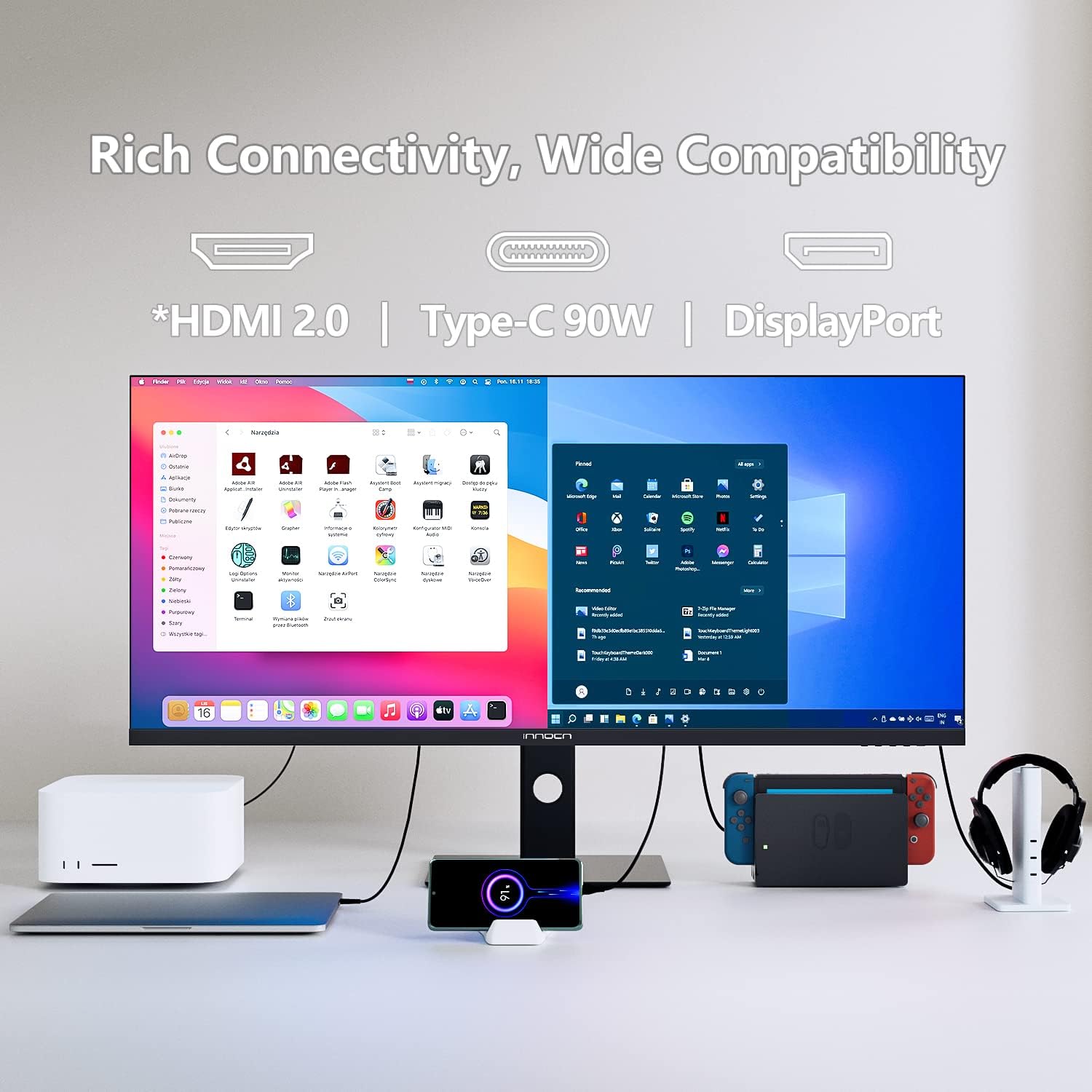
Image 4: The back of the monitor displaying the array of input ports, including USB-C, HDMI, DisplayPort, and an audio jack, highlighting its extensive compatibility.
5. Մոնիտորի շահագործում
Էկրանի վրա ցուցադրման (OSD) կառավարման տարրեր
The monitor's controls are located on the bottom right bezel. Pressing the home button once will bring up a legend for the buttons. Pressing it a second time will bring up the main OSD menu, allowing you to tailor various settings.
Picture-in-Picture (PIP) and Picture-by-Picture (PBP)
The 40C1R supports PBP/PIP technology, enabling enhanced productivity for multi-tasking. You can display content from multiple input devices simultaneously on the screen. Available modes include:
- PIP ռեժիմ. Displays one input source in a smaller window over another.
- PBP 2Win 11: Splits the screen into two sections, ideal for Windows 11 multitasking.
- PBP (Phone1/Phone2): Allows connecting and displaying content from two mobile devices.

Նկար 5: Մոնիտորը ցուցադրվում էasing its split-screen capability, displaying content from a laptop and a smartphone simultaneously, demonstrating its multi-input functionality.
Խաղի առանձնահատկությունները
Optimize your gaming experience with dedicated settings:
- Խաղի ռեժիմներ. Նախապես սահմանված պրոfiles for RTS/RPG, FPS Arena, and MOBA Arena.
- Adaptive-Sync. On/Off toggle for smoother gameplay.
- Արձագանքման ժամանակը: Adjust to Fast for reduced motion blur.
- Թարմացման արագություն. Set to 144Hz (via DP) or 100Hz (via HDMI) for fluid visuals.
- Խաղ Crosshair: On/Off toggle for an on-screen crosshair.

Image 6: A visual comparison demonstrating the effect of AMD FreeSync Premium, showing a clear and smooth frame when enabled versus screen tearing when disabled.
Պրոֆեսիոնալ կարգավորումներ
For creative professionals, the monitor offers various color profiles and adjustments:
- Գույնի ռեժիմներ. Standard, sRGB, Adobe, Uniformity.
- Գամմա. Adjustable settings.
- CT Settings: Natural and other options.
- Sharpness, Shadow Balance, Hue, Saturation, Dynamic Brightness: Fine-tune these settings for optimal visual output.

Նկար 7: Մոնիտորը ցուցադրվում էasing its ability to display true-to-life colors with a 95% DCI-P3 color gamut, ideal for creative tasks like photo and video editing.
6. Էրգոնոմիկ կարգավորումներ
The monitor's stand provides comprehensive ergonomic adjustments for comfortable viewing:
- Բարձրության ճշգրտում. Up to 120mm (4.72 inches).
- Պտտվող: ±30 degrees.
- Թեքություն. 5-ից 15 աստիճան:
These adjustments help you find the optimal viewing angle and reduce strain during prolonged use.
7. Աչքի խնամքի տեխնոլոգիա
The INNOCN 40C1R incorporates eye-care technologies to ensure comfort during long viewing or gaming sessions:
- Ցածր կապույտ լույս. Նվազեցնում է վնասակար կապույտ լույսի արտանետումները։
- Flicker-Free տեխնոլոգիա. Նվազեցնում է էկրանի թարթումը՝ աչքերի հոգնածությունը կանխելու համար։
These features are TÜV Rheinland certified, ensuring a comfortable and safe visual experience.

Image 8: A visual breakdown of the monitor's eye-care features, comparing a screen with flicker, a screen with general eye-care, and a screen with blue light reduction.
8. Տեխնիկական պայմաններ
| Առանձնահատկություն | Նկարագրություն |
|---|---|
| Էկրանի չափը | 40 դյույմ |
| Բանաձեւ | WQHD (3440 x 1440 Pixels) |
| Ասպեկտների հարաբերակցություն | 21։9 |
| Թարմացման արագություն | 144Hz (DP), 100Hz (HDMI) |
| Արձագանքման ժամանակը | 1 ms (MPRT) |
| Վահանակի տեսակը | IPS |
| Պայծառություն | 500 նից |
| Գունավոր գամմա | 95% DCI-P3 |
| HDR աջակցություն | VESA DisplayHDR 400 |
| Adaptive Sync | դրամ FreeSync Պրեմիում |
| Միացում | 1x DP 1.4, 1x USB-C (90W PD), 2x HDMI 2.0, 1x 3.5mm Audio Jack |
| Ներկառուցված բարձրախոսներ | Այո՛ |
| Էրգոնոմիկա | Height, Swivel, Tilt Adjustable |
| VESA լեռ | 100x100 մմ |
| Ապրանքի չափերը | 11.42 x 38.98 x 23.23 դյույմ |
| Նյութի քաշը | 34.6 ֆունտ |
9: Անսարքություն
If you encounter any issues with your INNOCN 40C1R monitor, please refer to the following common troubleshooting tips:
- Ցուցադրում չկա. Ensure all cables (power, DisplayPort/HDMI/USB-C) are securely connected. Verify the correct input source is selected in the OSD menu.
- Թարթող էկրան՝ Check cable connections. Ensure your graphics card drivers are up to date. Try adjusting the refresh rate in your computer's display settings.
- Աուդիո չկա. Confirm the audio cable (if used) is connected. Check monitor and computer volume settings. Ensure the correct audio output device is selected on your computer.
- Պատկերի որակի խնդիրներ. Adjust brightness, contrast, and color settings via the OSD menu. Ensure your display resolution is set to the native 3440x1440p.
- Ստենդի ճշգրտումներ. If the stand is stiff, ensure no locking mechanisms are engaged. Apply gentle, even pressure when adjusting.
For further assistance, please contact INNOCN customer support.
10. Երաշխիք և աջակցություն
INNOCN is committed to providing excellent customer service:
- 30 օրվա անվճար վերադարձ։ Վայելեք հոգեկան հանգստություն 30-օրյա վերադարձի քաղաքականությամբ։
- 12 Months Coverage: Ապրանքը ծածկված է 12 ամսվա երաշխիքով։
- 24 Hours Specialist Support: Access to specialist support within 24 hours for any technical queries.

Image 9: An illustration summarizing INNOCN's customer support offerings, including 24-hour specialist support, 30-day free returns, and 12-month product coverage.
11. Պաշտոնական արտադրանքի տեսանյութեր
INNOCN 40 Inch Ultrawide Monitor - 40C1R Overview
Տեսանյութ 1. Պաշտոնյան ավարտեցview video from INNOCN showcasing the features and design of the 40C1R Ultrawide Monitor.


