Ներածություն
The JBL Cruise Bluetooth Handlebar Speaker Kit is designed to provide audio entertainment for two-wheeled vehicles. This system features weather-resistant, Bluetooth-enabled speaker pods that mount to most motorcycles and scooters. It allows for wireless audio streaming from compatible devices and includes an integrated USB port for charging.

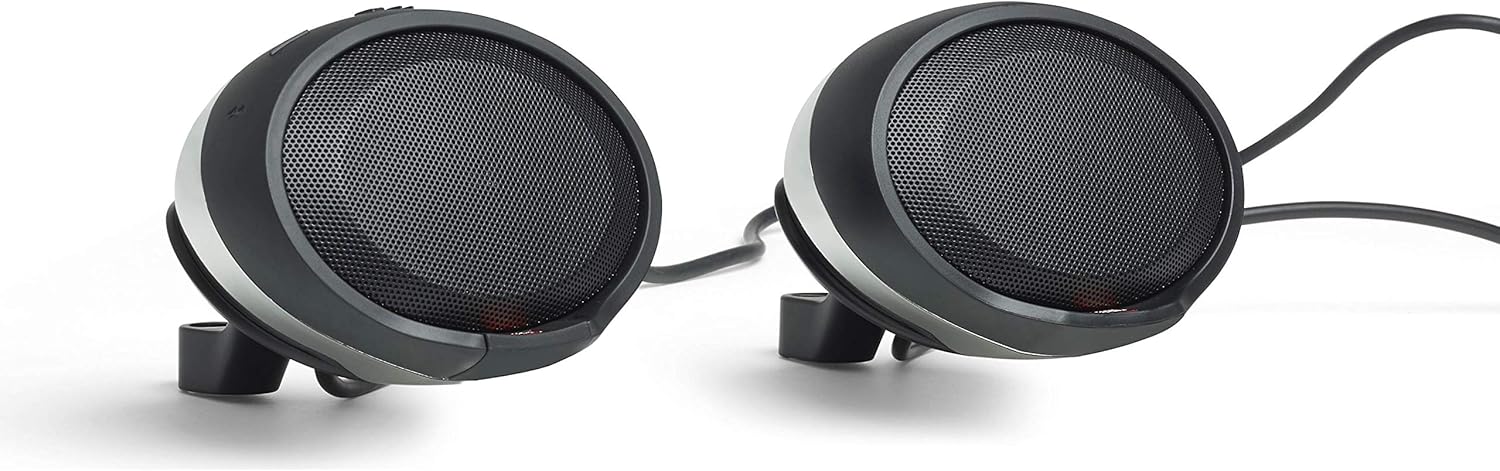
Պատկեր՝ առջևի view of the JBL Cruise Bluetooth Handlebar Speaker Kit, showing both speaker pods.
Փաթեթի բովանդակությունը
Ստուգեք, որ բոլոր իրերը առկա են փաթեթում.
- Two (2) Speakers: One speaker with an attached 9.5-foot harness and the other with an attached 22-inch harness.
- quickstart ուղեցույց
- Անվտանգության հրահանգներ
- Երաշխիքային տեղեկատվություն
Note: Mirror integration mount kits are sold separately and are required for installation. These kits are available for various motorcycle makes, including Harley-Davidson models, and most scooters.
Կարգավորում և տեղադրում
- Mounting Kit Selection: Obtain the appropriate JBL mirror integration mount kit for your specific vehicle (sold separately). Ensure compatibility with standard (right-handed) threaded mirrors.
- Բարձրախոսի տեղադրում. Position the speaker pods on your vehicle's handlebars using the selected mounting kit.
- Հաղորդալարերի միացում. Connect the speaker harnesses. The speaker with the longer 9.5-foot harness typically connects to the main power source or amplifier, while the speaker with the shorter 22-inch harness connects to the other speaker.
- Ապահով տեղադրում. Ensure all mounting hardware is securely fastened to prevent movement during operation.

Պատկեր՝ View of the JBL Cruise speakers showing the wiring harness connection point between the two pods.
Important: The JBL Cruise audio system is designed to work exclusively with standard (right-handed) threaded mirrors. Verify your vehicle's mirror type before purchasing a mounting kit.
Գործառնական հրահանգներ
Միացում/անջատում
Refer to the Quickstart Guide for specific power button location and operation. Typically, a long press on the power button will turn the unit on or off.
Bluetooth- ի զուգավորում
- Ensure the JBL Cruise speakers are powered on.
- Activate Bluetooth on your smartphone or other audio device.
- Որոնել available Bluetooth devices and select "JBL Cruise" from the list.
- Once paired, the speakers will indicate a successful connection (e.g., via an LED indicator or audio prompt).
The system uses Bluetooth 3.0 for connectivity, allowing wireless audio streaming from any Bluetooth-enabled device.
Աուդիո նվագարկում և ձայնի կարգավորում
Control audio playback (play/pause, skip tracks) and adjust volume directly from the speaker pods. The controls are designed for ease of use, even when wearing gloves.
USB լիցքավորման միացք
An integrated USB port is available to charge your smartphone or other USB-powered devices while riding.
Պատկեր՝ խոշոր պլան view of a JBL Cruise speaker pod, highlighting the control buttons and speaker grille.
Պահպանում և խնամք
The JBL Cruise speakers are IPX5-rated for weather resistance, meaning they are protected against low-pressure water jets from any direction. This rating ensures durability against rain and splashes during normal use.
- Մաքրում: Օգտագործեք փափուկ, դamp cloth to clean the speaker pods. Avoid abrasive cleaners or solvents that could damage the finish or internal components.
- Ջրի ազդեցությունը. While weather-resistant, avoid submerging the speakers in water or exposing them to high-pressure water jets.
- Պահպանում: When not in use for extended periods, store the speakers in a dry, cool environment.
- Ստուգում: Periodically check all connections and mounting hardware for tightness and signs of wear.
Անսարքությունների վերացում
- Հզորություն չկա.
- Ensure the speakers are properly connected to a power source.
- Ստուգեք բոլոր լարերի միացումները անվտանգության համար։
- Verify the vehicle's power supply is active.
- Ձայն չկա/ցածր ձայն։
- Confirm Bluetooth is successfully paired and connected to your device.
- Adjust the volume on both the speakers and your connected device.
- Ensure no audio cables are loose or damaged.
- In noisy environments, the perceived volume may be reduced. The speakers are designed to provide clear audio but may be affected by extreme external noise.
- Bluetooth-ի անջատում.
- Համոզվեք, որ ձեր սարքը գտնվում է Bluetooth-ի 10 մետր շառավղով։
- Ստուգեք այլ էլեկտրոնային սարքերի միջամտության առկայությունը:
- Փորձեք անջատել և նորից միացնել սարքը։
- Լիցքավորման խնդիրներ.
- Verify the USB cable is securely connected to both the speaker and the device.
- Ensure the speakers are powered on for the USB charging function to operate.
For more detailed troubleshooting steps, refer to the included Quickstart Guide.
Տեխնիկական պայմաններ
| Մոդելի անվանումը | PWSSPKCRUISECHAM |
| Բարձրախոսի տեսակը | Woofer, Tweeters |
| Բարձրախոսի չափը | 2.5 Inches (65 mm Audio Driver) |
| Առավելագույն ելքային հզորություն | 20 Վտ մեկ բարձրախոսի համար |
| Հաճախականության արձագանք | 90 - 15,000 Հց |
| Միացման տեխնոլոգիա | Bluetooth 3.0 |
| Bluetooth միջակայք | 10 մետր |
| Ջրի դիմադրության մակարդակը | IPX5 (եղանակային պայմաններին դիմացկուն) |
| Վերահսկման մեթոդ | Հպեք |
| Նյութ | Մետաղ, Պլաստիկ |
| Ապրանքի չափերը | 17"D x 15.25"W x 9.75"H |
| Նյութի քաշը | 3 ֆունտ |
| Ներառված բաղադրիչներ | 2x Speakers, Quickstart guide, Safety instructions, Warranty information |
Երաշխիքային տեղեկատվություն
This JBL Cruise Bluetooth Handlebar Speaker Kit is covered by a JBL 1 տարվա արտադրողի երաշխիք. Please refer to the included Warranty Information document for full terms and conditions, including details on coverage, limitations, and how to make a claim.
Keep your proof of purchase for warranty service.
Աջակցություն
For further assistance, technical support, or to inquire about replacement parts, please consult the Quickstart Guide provided with your product. You may also visit the official JBL support webկայքը լրացուցիչ ռեսուրսների և կոնտակտային տեղեկատվության համար:
Ensure you have your product model number (PWSSPKCRUISECHAM) and proof of purchase available when contacting support.


