Entwodiksyon
Welcome to the GOBOULT UFO True Wireless Earbuds user manual. These earbuds are designed to provide a superior audio experience with features like extended playtime, low latency gaming, advanced noise cancellation, and robust bass drivers. Please read this manual carefully to ensure proper use and optimal performance of your device.
Ki sa ki nan bwat la
- GOBOULT UFO True Wireless Earbuds
- Ka chaje san fil
- Kab chaje rapid tip C
- Siplemantè pè eartips
- Manyèl itilizatè
- Kat Garanti
Pwodwi souview
The GOBOULT UFO earbuds feature a distinctive design with integrated breathing LEDs on both the earbuds and the charging case. They are equipped with 13mm drivers for rich bass and Quad Mic ENC for clear calls.

Image: GOBOULT UFO Earbuds and Charging Case. This image highlights key features such as Bluetooth 5.3 connectivity, 48 hours of playtime, Quad Mic ENC, 13mm drivers, 45ms low latency, and Type-C fast charging.
LED pou respire
The breathing LEDs on the case and earbuds provide visual feedback for various actions, including opening/closing the case, charging, and when buds are connected.

Image: The GOBOULT UFO charging case and earbuds displaying their distinctive breathing LED lights, which indicate various operational states.
Kalite Audio
Experience high-fidelity sound with precision-tuned 13mm drivers, ensuring clear audio across all frequencies and rich bass. The Quad Mic ENC (Environmental Noise Cancellation) system ensures crystal-clear, interference-free calls.
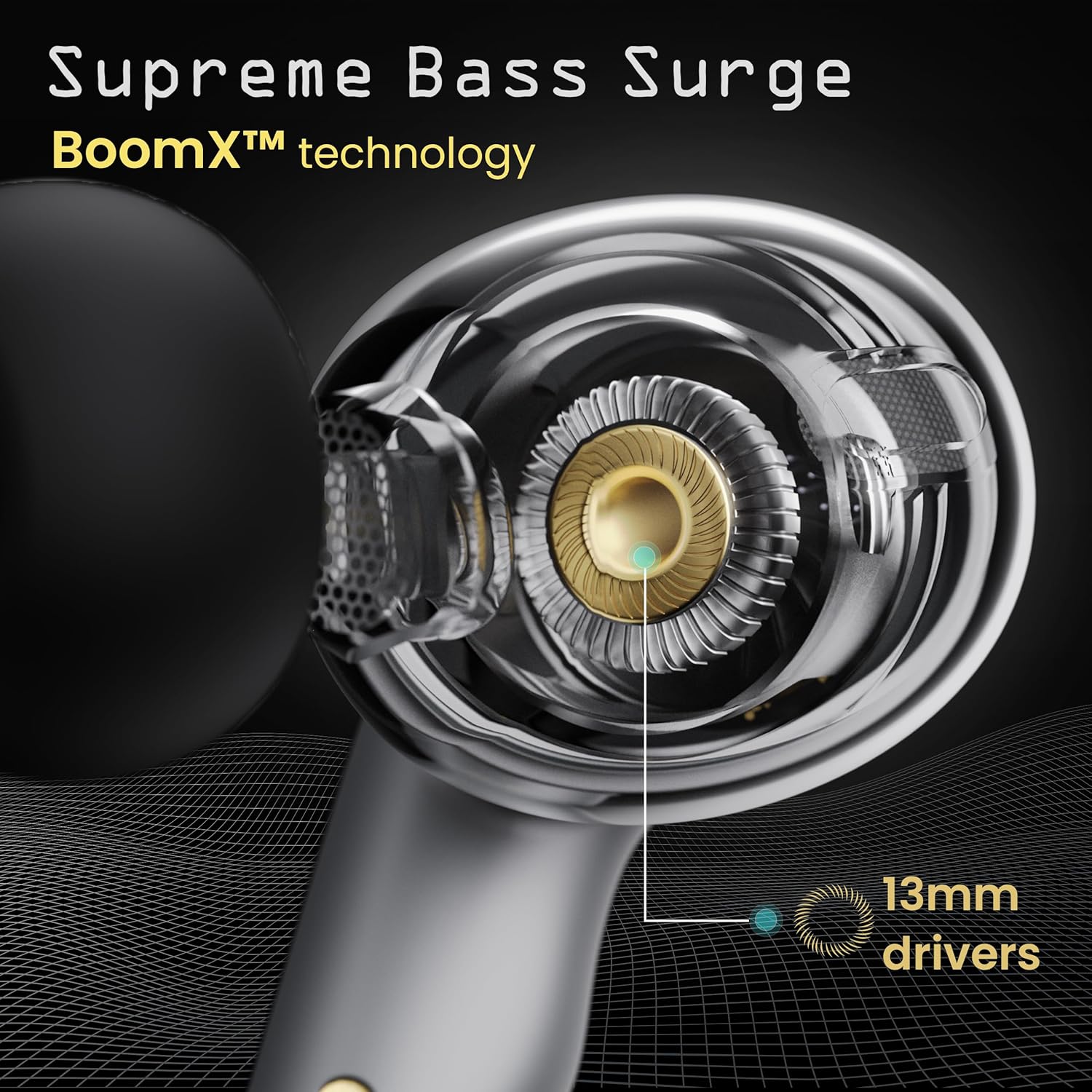
Image: A close-up of a GOBOULT UFO earbud, highlighting the 13mm drivers responsible for supreme bass surge.

Imaj: Yon imaj detaye view of a GOBOULT UFO earbud, showcasing the AI-powered Quad Mic AI-ENC technology for high-definition call clarity and Zen™ mode for silence.
Enstalasyon
Pwen inisyal
- Louvri bwat chaje a. Ekoutè yo ap antre otomatikman nan mòd koneksyon.
- Sou aparèy ou an (telefòn entelijan, tablèt, elatriye), aktive Bluetooth.
- Chèche pou "GOBOULT UFO" in the list of available Bluetooth devices and select it to connect.
- Yon fwa konekte, w ap tande yon enstriksyon odyo, epi endikatè LED yo sou ekoutè yo ap chanje.
The earbuds utilize Bluetooth 5.3 for stable and efficient connection, featuring Blink & Pair™ technology for fast pairing.

Image: GOBOULT UFO Earbuds illustrating stable connectivity with Bluetooth 5.3 and fast pairing technology.
Sipò pou aplikasyon an
Enhance your experience by downloading the dedicated GOBOULT app. The app allows you to:
- Switch between 6 Equalizer Modes.
- Pèsonalize kontwòl taktil yo.
- Chanje non ekoutè ou yo.
- Jwenn aksè a lòt paramèt ak fonksyonalite.
Enstriksyon Operasyon
Kontwòl manyen
The GOBOULT UFO earbuds feature intuitive touch controls on each earbud.
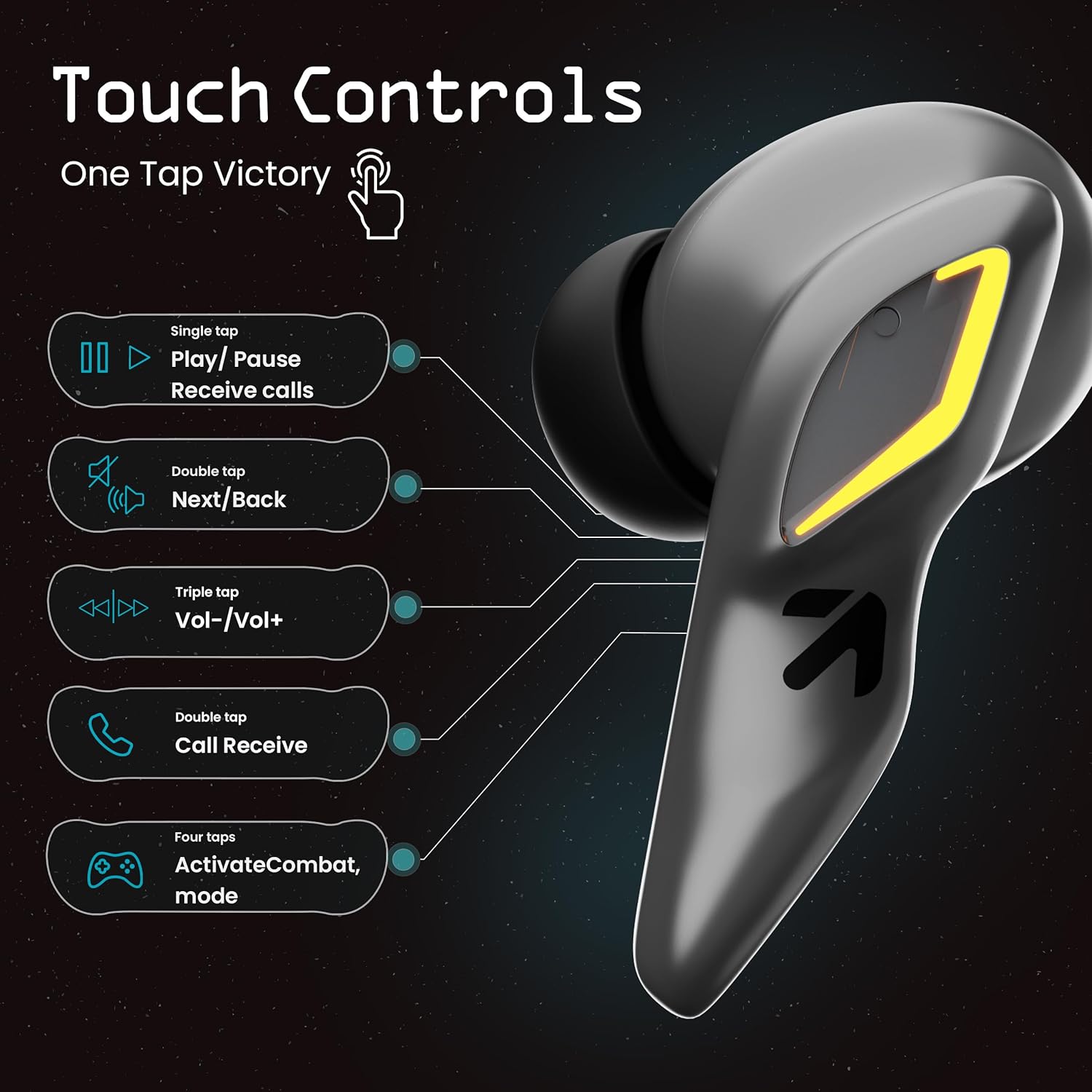
Image: A visual guide to the touch controls on the GOBOULT UFO Earbuds, detailing single, double, triple, and four-tap functions.
- Tap sèl: Play/Pause music, Receive calls.
- Double Tap: Next/Back track.
- Triple Tap: Volim monte/desann.
- Four Taps: Activate Combat Mode (Gaming Mode).
- Long Press: Activate Voice Assistant (Google Assistant, Siri).
Gaming Mode (Combat Mode)
Activate Combat Mode for an ultra-low latency experience of 45ms, ideal for gaming. Tap the earbud four times to toggle this mode.

Image: The GOBOULT UFO Earbuds case open, highlighting the Combat Gaming Mode with 45ms ultra-low latency, activated by four taps.
Asistan vwa
Long press the touch control area on either earbud to activate your device's voice assistant (e.g., Google Assistant, Siri).

Image: GOBOULT UFO Earbuds demonstrating the long-press gesture to activate the voice assistant feature.
Chaje
The GOBOULT UFO earbuds offer up to 48 hours of total playtime with the charging case.
Chaje ka a ak ekoutè
- Mete ekoutè yo nan bwat chaje a. Asire w yo byen chita.
- Connect the Type-C fast charging cable to the charging port on the case and to a power source.
- Endikatè ki ap dirije yo sou ka a pral montre estati chaj la.
- A full charge for the earbuds and case takes approximately 100 minutes.
- With Type-C fast charging, a 10-minute charge can provide up to 1.5 hours of playtime.
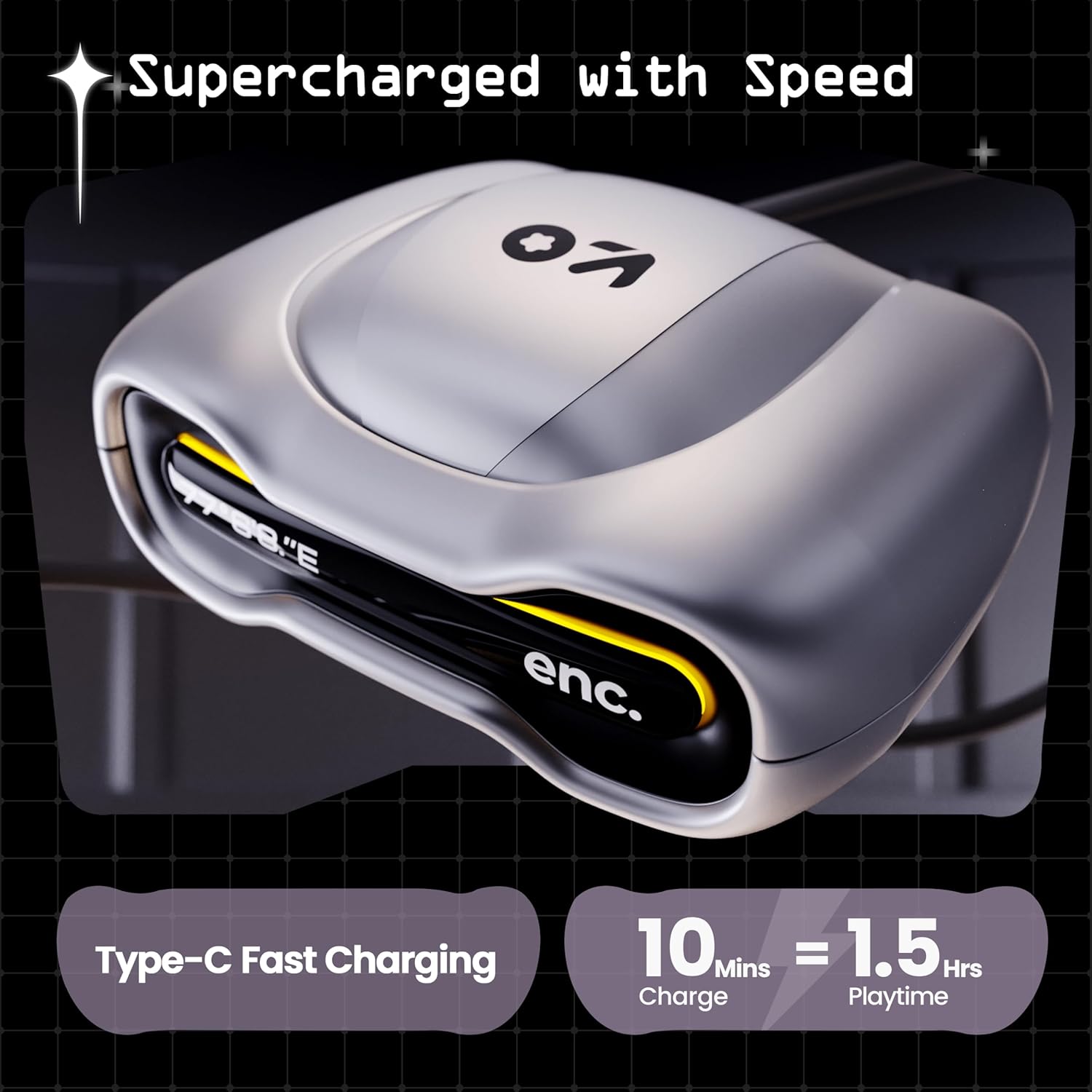
Image: The GOBOULT UFO charging case, illustrating its Type-C fast charging capability, providing 1.5 hours of playtime from a 10-minute charge.
Antretyen
Rezistans dlo
The GOBOULT UFO earbuds are IPX5 water-resistant, making them sweatproof, rainproof, and splashproof. This protection allows for use during workouts or in light rain.

Image: GOBOULT UFO Earbuds on a metallic surface, indicating their IPX5 water resistance, making them suitable for sweat, rain, and splashes.
Netwayaj
Pou kenbe pèfòmans ak ijyèn optimal, netwaye ekoutè ou yo ak bwat chaje ou yo regilyèman.
- Sèvi ak yon twal mou, sèk, ki pa gen pousyè pou siye ekoutè yo ak kouvèti a.
- Pou pousyè tè ki difisil pou retire, yon ti kras dampRense twal la avèk dlo. Evite itilize pwodui chimik ki agresif oswa materyèl abrazif.
- Asire w ke kontak chaje yo sou tou de ekoutè yo ak sou bwat la pwòp epi san debri.
- Allow all components to dry completely before placing earbuds back in the case or charging.
Depanaj
If you encounter any issues with your GOBOULT UFO earbuds, please refer to the following common solutions:
- Pa gen son: Ensure earbuds are charged and properly connected to your device. Check device volume.
- Pwoblèm kouple: Asire w ke Bluetooth aktive sou aparèy ou an. Eseye bliye aparèy la nan paramèt Bluetooth ou yo epi konekte l ankò. Asire w ke ekoutè yo byen chaje.
- Yon ekoutè pa travay: Place both earbuds back in the case, close it, and then open it again. This often resets the connection.
- Move Kalite apèl: Ensure microphones are clean. Check for strong Bluetooth connection.
- Kontwòl manyen ki pa reponn: Asire w dwèt ou yo pwòp epi sèk. Eseye rekòmanse ekoutè yo lè w mete yo nan bwat la epi retire yo.
Pou plis asistans, tanpri kontakte sèvis kliyan GOBOULT.
Espesifikasyon
| Karakteristik | Detay |
|---|---|
| Non modèl | UFO (Airbass Earbuds) |
| Bluetooth vèsyon | 5.3 |
| Playtime | Jiska 48 èdtan (ak bwat chaje) |
| Latansi Audio | 45 Milisegond (Mòd Jwèt) |
| Chofè yo | 13mm chofè dinamik |
| Mikwofòn | Quad Mic ENC (Environmental Noise Cancellation) |
| Rezistans dlo | IPX5 (Reziste kont swè, lapli, ak dlo) |
| Port chaje | Kalite-C vit chaje |
| Tan pou chaje | Apeprè. 100 minit |
| Gamme Bluetooth | 10 mèt |
| Repons Frekans | 20 Hz |
| Sansiblite | 115 dB |
| Enpedans | 32 Ohms |
| Pwa atik | 60 gram |
| Dimansyon pwodwi | 4.7 x 9 x 10 cm |
| Materyèl | Metal |
Garanti ak sipò
Enfòmasyon sou Garanti
The GOBOULT UFO True Wireless Earbuds come with a Garanti manifakti 1 ane from the date of purchase. Please retain your proof of purchase for warranty claims. The warranty covers manufacturing defects. It does not cover damage caused by misuse, accidents, or unauthorized modifications.
Sipò pou Kliyan
For any questions, technical support, or warranty claims, please contact GOBOULT customer service.
Manifakti: Exotic Mile Pvt. Ltd.
Adrès: B67 Wazirpur Industrial Area, New Delhi 110052, India.
Please refer to the warranty card included in your product packaging for specific contact details and procedures.


