1. Entwodiksyon
Welcome to the user manual for your Nokia 216 Dual SIM mobile phone. This guide provides essential information to help you set up, operate, and maintain your device. The Nokia 216 (RM-1187) is a classic feature phone designed for reliable communication, featuring dual SIM capability, a 2.4-inch display, and a VGA camera.
Please read this manual carefully to ensure proper use and to get the most out of your phone.
2. Pake kontni
Asire w tout atik yo prezan nan pake pwodwi w la:
- Nokia 216 Dual SIM Mobile Phone (RM-1187)
- Batri
- Adaptè pouvwa
- USB kab
3. Aparèy souview
Familiarize yourself with the key components of your Nokia 216 phone.
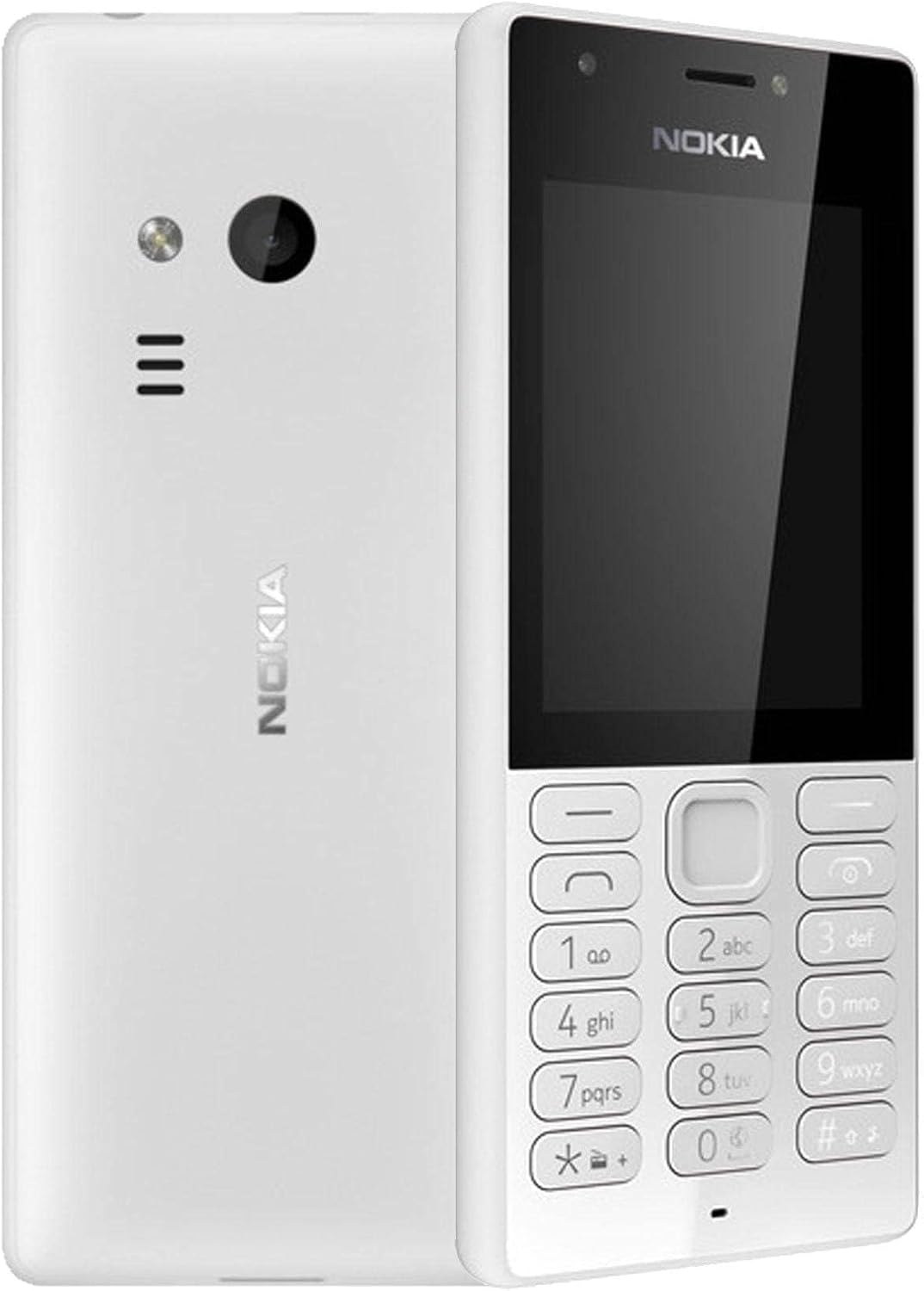
Figi 3.1: Devan ak dèyè view of the Nokia 216 Dual SIM mobile phone. The front shows the display, earpiece, and numeric keypad. The back features the rear camera, LED flash, and loudspeaker grille.

Figi 3.2: Devan view of the Nokia 216 Dual SIM mobile phone. This image highlights the 2.4-inch display, the navigation keys, and the alphanumeric keypad for dialing and text input.

Figi 3.3: Retounen view of the Nokia 216 Dual SIM mobile phone. This view shows the rear VGA camera lens, the LED flash, and the Nokia branding.
Konpozan kle:
- Ekspozisyon: 2.4-inch QVGA screen.
- Klavye: Alphanumeric keypad for dialing and text entry, with navigation keys.
- Kamera dèyè: VGA camera with LED flash.
- Oratè: For audio playback and hands-free calls.
- Mikwofòn: Pou antre vwa pandan apèl ak anrejistreman.
- 3.5mm Audio Jack: Pou kas ekoutè oswa oratè ekstèn.
- Pò chaje: Micro-USB port for charging and data transfer.
4. Enstalasyon
4.1. Mete kat SIM yo
- Turn off the phone and disconnect any charger.
- Carefully remove the back cover by prying it open from the notch.
- Si batri a antre, leve l deyò.
- Insert the SIM card(s) into the designated slot(s) with the gold contacts facing down. For dual SIM models, ensure both SIMs are correctly seated.
- If applicable, insert a microSD card into its slot for additional storage.
- Ranplase batri a.
- Align the back cover and press it firmly until it clicks into place.
4.2. Chaje Batri a
- Konekte adaptè pouvwa a nan yon priz miray.
- Plug the micro-USB end of the cable into the phone's charging port.
- Endikatè batri a sou ekran an ap montre eta chaj la.
- Once fully charged, disconnect the charger from the phone and then from the wall outlet.
5. Operasyon Enstriksyon
5.1. Power On/Off
- Pou limen: Press and hold the power key (usually the red 'End Call' key) until the phone vibrates and the Nokia logo appears.
- Pou etenn: Press and hold the power key until the 'Power off' option appears on the screen, then select it.
5.2. Fè apèl
- From the home screen, enter the phone number using the numeric keypad.
- Press the green 'Call' key to initiate the call.
- To end a call, press the red 'End Call' key.
5.3. Voye mesaj tèks (SMS)
- Ale nan Menu > Mesaj > Kreye mesaj.
- Tape mesaj ou a lè l sèvi avèk klavye a.
- Antre nimewo telefòn moun k ap resevwa a oubyen chwazi nan kontak yo.
- Chwazi Voye.
5.4. Sèvi ak Kamera a
- Ale nan Menu > Kamera.
- Ankadre foto ou a lè l sèvi avèk ekran an.
- Peze kle navigasyon santral la pou pran yon foto.
6. Antretyen ak Swen
To ensure the longevity and optimal performance of your Nokia 216, follow these care guidelines:
- Kenbe aparèy la sèk: Imidite ka domaje sikui elektwonik yo.
- Use original accessories: Only use batteries, chargers, and accessories approved by Nokia.
- Netwaye dousman: Use a soft, clean, dry cloth to clean the surface of the device.
- Evite tanperati ekstrèm: Do not expose your device to very high or low temperatures.
- Manyen ak atansyon: Evite jete oswa sibi aparèy la nan gwo enpak.
NAN. Depanaj
If you encounter issues with your Nokia 216, try these common troubleshooting steps:
| Pwoblèm | Solisyon |
|---|---|
| Telefòn pa limen | Asire w batri a chaje. Konekte chajè a epi eseye ankò. Tcheke si batri a byen mete. |
| Pa gen siyal rezo | Check if the SIM card is correctly inserted. Move to an area with better network coverage. Restart the phone. |
| Batri pa chaje | Ensure the charger is properly connected to both the phone and the power outlet. Try a different power outlet or charger. Check for any damage to the charging port. |
| Pa ka fè oswa resevwa apèl | Check network signal. Ensure your SIM card is active and has sufficient credit/plan. Verify that call barring is not enabled. |
8. Espesifikasyon
| Karakteristik | Detay |
|---|---|
| Mak | Nokia |
| Non modèl | RM-1187 |
| Sistèm operasyon | Symbian 9.1 (Series 30) |
| Gwosè ekran | 2.4 pous |
| Rezolisyon ekran | 240 x 320 piksèl |
| Rafrechisman pousantaj | 90 Hz |
| Gwosè RAM enstale a | 256 MB |
| Kapasite Depo memwa | 3.9 GB (Internal, likely for system/apps, expandable via microSD) |
| Modèl CPU | A10 |
| Teknoloji selilè | 2G |
| Teknoloji Kominikasyon San Fil | Selilè |
| Koneksyon teknoloji | USB, Bluetooth, Wi-Fi |
| GPS | A-GPS |
| Primary Device User Interface | Buttons, Numeric Keypad, Microphone |
| Lòt Karakteristik Kamera | Rear Camera (VGA) |
| Audio Jack | 3.5 mm |
| Faktè fòm | Klasik |
| Koulè | Gri |
| Tan pale | Jiska 18 èdtan |
| Pwa atik | 339 gram |
| Dimansyon pake | 13.4 x 12.6 x 3.6 cm |
| Ki sa ki nan bwat la | Adaptè pouvwa, kab USB |
9. Garanti ak sipò
For warranty information, please refer to the warranty card included in your product package or visit the official Nokia website. If you require further assistance or technical support, please contact Nokia customer service through their official channels.
Kenbe resi acha ou a kòm prèv acha pou reklamasyon garanti.