1. Entwodiksyon
This manual provides essential information and instructions for the safe and efficient use of your Nokia 8 Sirocco TA-1005 smartphone. Please read this guide thoroughly before operating your device to ensure optimal performance and longevity. This device is designed for use with GSM, 3G, and 4G LTE networks. Compatibility with CDMA networks, including Verizon, Sprint, and US Cellular, is not supported. Verify network compatibility with your service provider prior to use.
2. Ki sa ki nan bwat la
Upon unboxing your Nokia 8 Sirocco TA-1005, verify that all components are present:
- Nokia 8 Sirocco TA-1005 Device
- USB Kalite-C kab
- Adaptè pouvwa
- Headset
- Zouti èkstrè SIM
- Gid Quick Start
- Enfòmasyon sou sekirite ak garanti
3. Layout aparèy
Familiarize yourself with the physical components of your Nokia 8 Sirocco TA-1005.
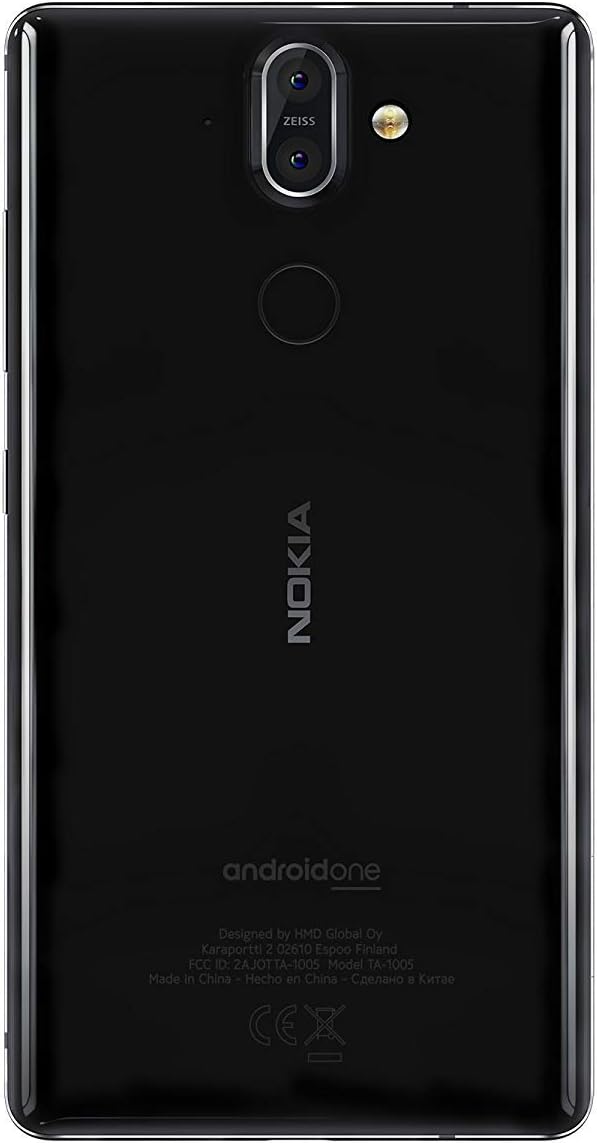
Figi 3.1: Dèyè view of the Nokia 8 Sirocco TA-1005. This image displays the dual camera setup with ZEISS optics, the circular fingerprint sensor below the camera, and the Nokia logo centrally placed. The 'androidone' branding is visible towards the bottom.
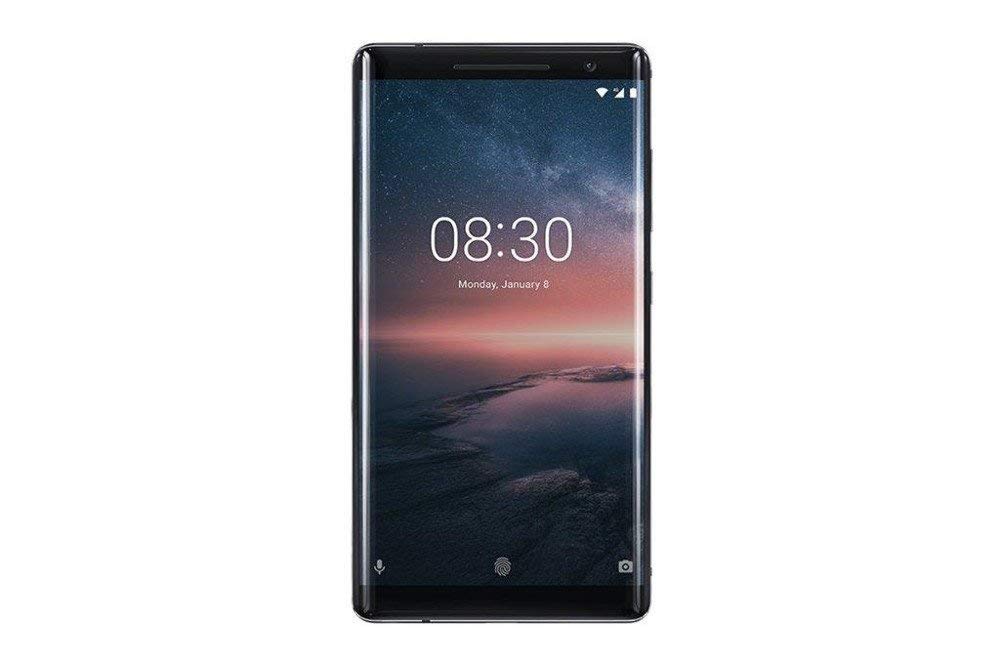
Figi 3.2: Devan view of the Nokia 8 Sirocco TA-1005. The image highlights the 5.5-inch P-OLED curved display, the front-facing camera at the top, and the on-screen navigation buttons. The device features minimal bezels.

Figi 3.3: Side view of the Nokia 8 Sirocco TA-1005. This image illustrates the slim profile of the device, with the power button and volume rocker located on the right side for easy access.
Konpozan kle:
- Kamera devan: Sitiye anlè ekran an.
- Ekouteur: For calls, located above the display.
- Ekspozisyon: 5.5-inch P-OLED capacitive touchscreen.
- Bouton Volim: On the right side, to adjust audio levels.
- Bouton Pouvwa/Bloke: On the right side, to power on/off or lock/unlock the screen.
- USB Kalite-C Port: Anba a, pou chaje ak transfè done.
- Mikwofòn: Located at the bottom and top.
- Oratè: Sitiye nan pati anba a.
- SIM/Memory Card Tray: On the side, for inserting SIM cards.
- Kamera dèyè: Dual cameras with ZEISS optics on the back.
- Flash: Dual-tone flash next to the rear cameras.
- Capteur anprent: On the back, below the rear cameras.
4. Enstalasyon
4.1. Mete kat SIM la
- Jwenn plato kat SIM lan sou bò aparèy ou an.
- Mete zouti pou retire kat SIM lan nan ti twou ki sou plato a pou ouvri li.
- Place your Nano-SIM card(s) into the designated slot(s) on the tray, ensuring the gold contacts face downwards.
- Ak anpil atansyon pouse plato a tounen nan aparèy la jiskaske li klike an plas.
Nòt: This device does not support external memory cards.
4.2. Limen ak Off
- Pou limen: Press and hold the Power/Lock button until the Nokia logo appears.
- Pou etenn: Press and hold the Power/Lock button until the power options menu appears, then select "Power off".
4.3. Inisyal Enstalasyon
Upon first power-on, the device will guide you through the initial setup process. This includes selecting your language, connecting to a Wi-Fi network, setting up your Google account, and configuring security features like fingerprint unlock or a PIN/pattern.
5. Operasyon Enstriksyon
5.1. Fè apèl
- Open the "Phone" application.
- Antre nimewo telefòn nan avèk klavye a oswa chwazi yon kontak nan liv adrès ou.
- Tape ikòn apèl la pou kòmanse apèl la.
5.2. Voye mesaj
- Open the "Messages" application.
- Tape sou ikòn "Kòmanse chat" la oswa ikòn "Nouvo mesaj".
- Antre nimewo moun k ap resevwa a oubyen chwazi nan kontak yo.
- Tape mesaj ou a nan jaden tèks la.
- Tape ikòn voye a.
5.3. Sèvi ak Kamera a
- Louvri aplikasyon "Kamera" a.
- Ankadreman sijè ou sou ekran an.
- Tape bouton deklanchè a pou pran yon foto.
- Switch between photo and video modes, or access advanced settings like portrait mode or panorama, as desired.
5.4. Koneksyon Entènèt
- Wi-Fi: Ale nan Anviwònman > Rezo ak entènèt > Wi-Fi. Turn Wi-Fi on and select an available network. Enter the password if required.
- Done mobil: Ale nan Anviwònman > Rezo ak entènèt > Rezo mobil. Ensure "Mobile data" is enabled.
5.5. Karakteristik sekirite
Your Nokia 8 Sirocco TA-1005 offers various security options:
- Degaje anprent: Anrejistre anprent dwèt ou yo atravè Settings > Security & Location > Fingerprint.
- Fèmen ekran: Set a PIN, pattern, or password via Settings > Security & Location > Screen lock.
6. Antretyen
6.1. Netwaye Aparèy la
Use a soft, lint-free cloth to clean your device. Avoid using harsh chemicals or abrasive materials, which can damage the screen or finish.
6.2. Swen batri
- Charge your device using only Nokia-approved chargers and cables.
- Evite ekspoze aparèy la nan tanperati ekstrèm.
- Pa kite batri a dechaje nèt souvan.
6.3. Mizajou lojisyèl
Tcheke epi enstale mizajou lojisyèl regilyèman pou asire aparèy ou an gen dènye karakteristik yo, patch sekirite yo, ak amelyorasyon pèfòmans yo. Ale nan Anviwònman > Sistèm > Mizajou sistèm.
NAN. Depanaj
Si ou rankontre pwoblèm ak aparèy ou an, gade solisyon komen sa yo:
| Pwoblèm | Solisyon |
|---|---|
| Aparèy pa limen | Asire w batri a chaje. Konekte l nan yon plato pou omwen 30 minit. Si li pa reponn, fòse rekòmanse aparèy la lè w kenbe bouton Pouvwa a pandan 10-15 segonn. |
| Siyal rezo pòv | Check SIM card insertion. Move to an area with better network coverage. Restart the device. Verify network settings in Anviwònman > Rezo ak entènèt > Rezo mobil. |
| Applications are crashing | Efase kach aplikasyon an (Anviwònman > Aplikasyon ak notifikasyon > [Non aplikasyon an] > Depo ak kach > Efase kachMete aplikasyon an ajou nan Google Play Store. Si pwoblèm nan pèsiste, dezenstale epi enstale aplikasyon an ankò. |
| Batri vide byen vit | Reduce screen brightness. Close unused background apps. Disable Wi-Fi, Bluetooth, and GPS when not in use. Check battery usage in Anviwònman> Batri pou idantifye aplikasyon ki konsome anpil enèji. |
| Aparèy la pa reponn | Perform a force restart by holding the Power button for 10-15 seconds. If the issue continues, consider a factory reset (Anviwònman> Sistèm> Opsyon Reyajiste> Efase tout done (reset faktori)). Avètisman: Yon reset faktori ap efase tout done ki sou aparèy ou an. Fè yon kopi done enpòtan yo anvan ou kontinye. |
8. Espesifikasyon
Detailed technical specifications for the Nokia 8 Sirocco TA-1005:
| Karakteristik | Detay |
|---|---|
| Non modèl | 8 Sirocco |
| Nimewo Modèl | TA-1005 |
| Sistèm operasyon | Android 8.0 (Oreo) |
| Processeur | Qualcomm MSM8998 Snapdragon 835, Octa-core (4x2.5 GHz Kryo & 4x1.8 GHz Kryo) |
| GPU | Adreno 540 |
| RAM | 6 GB |
| Depo Entèn | 128 GB |
| Ekspozisyon | 5.5 inches, P-OLED capacitive touchscreen, 1440 x 2560 pixels, Corning Gorilla Glass 5 |
| Kamera dèyè | 12MP Wide (f/1.7) + 13 MP Tele (f/2.6), dual-tone flash |
| Kamera devan | 5MP |
| Kapasite batri | 3250 mAh |
| Chaje | Sipò pou chaje rapid |
| Koneksyon | Wi-Fi 802.11a/b/g/n, Bluetooth, USB Type-C |
| Dimansyon | 43.36 x 43.17 x 0.75 cm |
| Pwa | 181 g |
| Kalite SIM | Nano-SIM |
| Sipò rezo | 2G GSM, 3G, 4G LTE (Note: Not compatible with CDMA networks) |
9. Safety and Warranty Information
9.1. Gid Sekirite
- Do not use the device in prohibited areas, such as aircraft or hospitals.
- Evite ekspoze aparèy la nan dlo oswa imidite twòp.
- Use only original or approved accessories.
- Pa eseye demonte oswa repare aparèy la tèt ou.
- Jete aparèy la ak batri li yon fason responsab dapre règleman lokal yo.
9.2. Enfòmasyon sou Garanti
Your Nokia 8 Sirocco TA-1005 is covered by a limited manufacturer's warranty. Please refer to the separate warranty document included in your product packaging or visit the official Nokia support websit la pou plis detay sou tèm ak kondisyon yo. Kenbe prèv acha ou pou reklamasyon garanti.


