Entwodiksyon
This manual provides essential information for the proper use and care of your Beats Studio Wireless Over-Ear Headphones. Please read these instructions carefully before using your headphones to ensure optimal performance and longevity. The Beats Studio Wireless headphones offer a premium audio experience with wireless connectivity and Adaptive Noise Canceling technology.
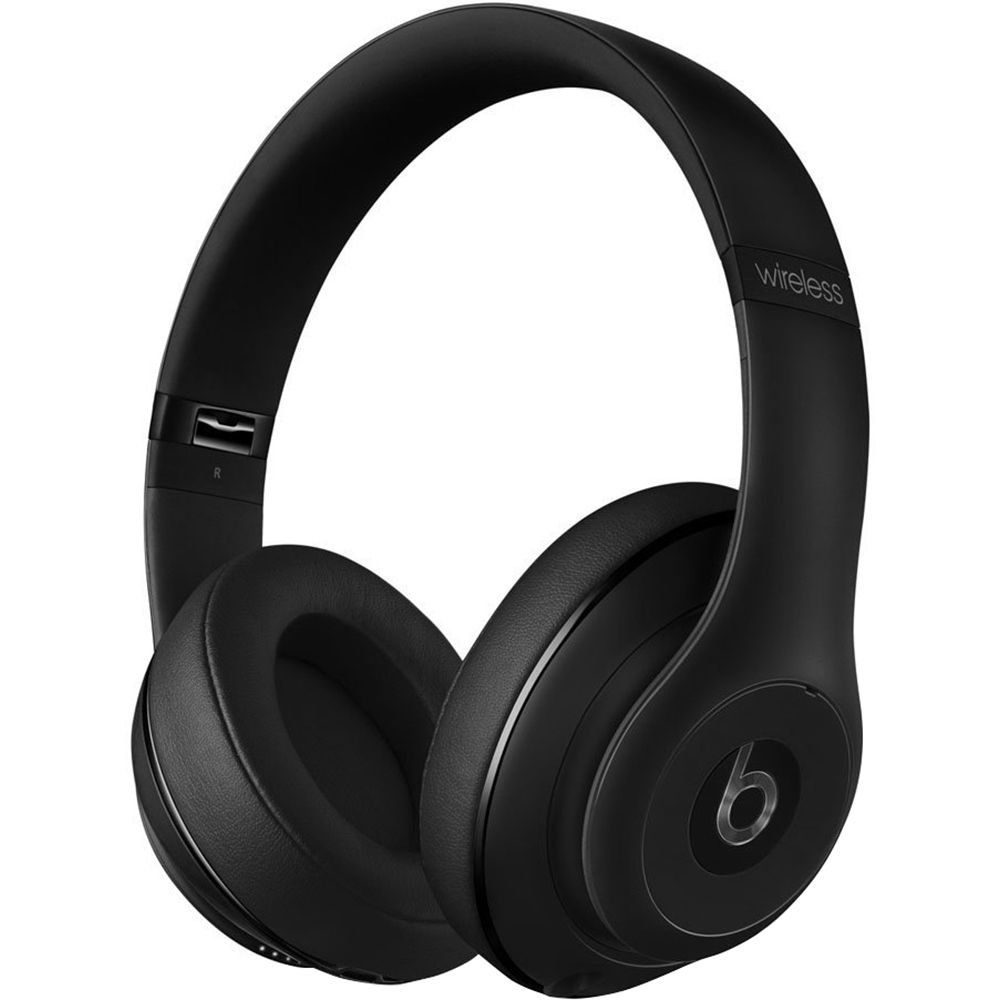
Image: Beats Studio Wireless Over-Ear Headphones in Matte Black, showcasing konsepsyon elegant la.
Ki sa ki nan bwat la
Verifye ke tout atik yo prezan nan pakè ou a:
- Beats Studio Wireless over-ear headphones
- 3.5mm audio cable with RemoteTalk (for wired connection and controls)
- Standard 3.5 mm audio cable (for wired connection without RemoteTalk features)
- USB 2.0 cable (USB-A to USB Micro-B) for charging
- Hard-shell carrying case with carabiner clip

Image: The Beats Studio Wireless headphones, hard-shell carrying case, and various cables laid out from the packaging.
Enstalasyon
1. Chaje kas ekoutè yo
Before first use, fully charge your Beats Studio Wireless headphones. A full charge provides approximately 12 hours of wireless playback or 20 hours of wired playback with Adaptive Noise Canceling enabled.
- Connect the small end of the USB 2.0 cable (USB-A to USB Micro-B) to the Micro-USB port on the right earcup of the headphones.
- Connect the larger end of the USB cable to a USB power adapter (not included) or a powered USB port on a computer.
- The Fuel Gauge LEDs on the right earcup will indicate charging status. When all five LEDs are solid white, the headphones are fully charged.
Nòt: The headphones cannot be used while charging.
2. Pè Bluetooth
Pair your headphones with your Bluetooth-enabled device for wireless audio.
- Ensure your headphones are charged and powered off.
- Press and hold the power button on the right earcup for 3-5 seconds until the Fuel Gauge LEDs begin to pulse. This indicates pairing mode.
- Sou aparèy ou an, ale nan paramèt Bluetooth yo epi aktive Bluetooth.
- Select "Beats Studio Wireless" from the list of available devices.
- Once paired, the Fuel Gauge LEDs will turn solid white.
The headphones have a Bluetooth range of up to 30 feet (9 meters).
3. Filè Koneksyon
For a wired connection, use the provided 3.5mm audio cables.
- Plug one end of the 3.5mm audio cable into the audio input port on the left earcup.
- Plug the other end into the 3.5mm audio output jack of your device.
The RemoteTalk cable allows for inline control of music and calls when connected to compatible devices.
Enstriksyon Operasyon
1. Power On/Off
- Pou limen: Press and hold the power button on the right earcup until the Fuel Gauge LEDs illuminate.
- Pou etenn: Press and hold the power button until the Fuel Gauge LEDs turn off.
2. Controls (Wireless Mode)
The "b" button on the left earcup and the volume buttons control playback and calls.
- Jwe/Poz: Press the "b" button once.
- Pwochen Track: Press the "b" button twice quickly.
- Track Previous: Press the "b" button three times quickly.
- Volim moute: Press the top volume button.
- Volim desann: Press the bottom volume button.
- Reponn/Fen Apèl: Press the "b" button once during an incoming call or active call.
- Rejte apèl: Press and hold the "b" button for 2 seconds during an incoming call.
- Aktive Asistan Vwa: Press and hold the "b" button for 2 seconds (functionality depends on device).
3. Adaptive Noise Canceling (ANC)
The Beats Studio Wireless headphones feature Dual-Mode Adaptive Noise Canceling. ANC is automatically active when the headphones are powered on. There are two modes:
- Full ANC: Engaged when listening to music or media, providing maximum noise reduction.
- ANC Only: When the audio cable is unplugged and the headphones are powered on, ANC will automatically switch to a more aggressive mode to reduce external noise without playing audio.
Antretyen
1. Netwayaj
To maintain the appearance and performance of your headphones:
- Siye ekoutè yo ak bann tèt la ak yon twal mou, sèk epi ki pa gen pousyè.
- Pa sèvi ak pwodui netwayaj abrazif, alkòl, oswa solvan chimik.
- Evite ke imidite antre nan nenpòt ouvèti.
2. Depo
When not in use, store your headphones in the provided hard-shell carrying case to protect them from damage.
- Fold the headphones carefully to fit into the case.
- Keep headphones away from extreme temperatures and humidity.
3. Swen batri
Pou pwolonje lavi batri:
- Evite dechaje batri a nèt souvan.
- Chaje kas ekoutè yo regilyèman, menm si ou pa itilize yo pou yon bon bout tan.
- Sere nan yon kote ki fre, sèk.
Depanaj
If you encounter issues with your Beats Studio Wireless headphones, try the following solutions:
Pa gen kouran / Pa limen
- Asire w ke kas ekoutè yo byen chaje. Konekte yo nan yon sous kouran avèk kab USB a.
- Tcheke kab USB a ak pò chaje pou nenpòt domaj.
No Sound / Intermittent Audio
- San fil:
- Ensure headphones are paired and connected to your device.
- Tcheke nivo volim yo sou kas ekoutè a ak sou aparèy ou an.
- Move closer to your device to avoid interference or exceeding Bluetooth range.
- Eseye dekonekte epi konekte kas ekoutè yo ak aparèy ou an ankò.
- Branche:
- Ensure the 3.5mm audio cable is securely plugged into both the headphones and your audio source.
- Try a different 3.5mm audio cable if available.
Pwoblèm Pairing
- Ensure the headphones are in pairing mode (pulsing Fuel Gauge LEDs).
- Etenn epi aktive Bluetooth aparèy ou an.
- Forget "Beats Studio Wireless" from your device's Bluetooth list and attempt to pair again.
- Asire w pa gen okenn lòt aparèy Bluetooth ki entèfere ak pwosesis koneksyon an.
Adaptive Noise Canceling (ANC) Not Working
- Ensure the headphones are powered on. ANC requires power.
- Check for any obstructions around the external microphones on the earcups.
Espesifikasyon
Key technical specifications for the Beats Studio Wireless Over-Ear Headphones:
- Non modèl: Studio
- Koneksyon Teknoloji: Bluetooth (Wireless), 3.5 mm Jack (Wired)
- Teknoloji kominikasyon san fil: Bluetooth
- Gamme Bluetooth: Jiska 30 pye (9 mèt)
- Kontwòl bri: Active Noise Cancellation (Dual-Mode Adaptive Noise Canceling)
- Lavi batri: Approximately 12 hours (wireless), 20 hours (wired with ANC)
- Kalite batri: 1 Lithium Ion battery (rechargeable)
- Kalite kontwòl: Media Control (on-earcup "b" button, volume buttons)
- Mikwofòn: Bati-an pou apèl men-gratis
- Faktè fòm: Sou Zòrèy
- Plasman Zòrèy: Sou Zòrèy
- Materyèl: Plastik
- Pwa atik: Apeprè 9.2 ons (0.26 kilogram)
- Dimansyon pwodwi: 9.6 x 7.3 x 4.5 pous
- Manifakti: Beats Electronics, LLC
- Dat premye disponib: 1 desanm 2013

Imaj: Yon gwo plan view of the headphone's inner band, displaying the model number B0501.
Garanti ak sipò
For warranty information and customer support, please refer to the official Beats websit la oubyen kontakte sèvis kliyan yo dirèkteman. Kenbe prèv acha ou pou reklamasyon garanti.
Nòt: This product is an older model. Specific warranty terms may vary based on purchase date and region. Please consult the manufacturer's official resources for the most accurate and up-to-date information.
Pou plis asistans, vizite: Beats sipò


