1. Entwodiksyon
This manual provides detailed instructions for the safe and efficient operation of your Samsung Glyde U940 mobile phone. Please read this manual thoroughly before using your device to ensure proper functionality and to understand all features.
2. Pake kontni
Verifye ke pake pwodwi ou a gen atik sa yo ladan l:
- Samsung Glyde U940 Mobile Phone
- Batri estanda
- Travel Adapter/Charger
- Manyèl Itilizatè (dokiman sa a)
- Remak: Akseswa espesifik yo ka varye selon rejyon an oswa magazen an.
3. Aparèy souview
The Samsung Glyde U940 features a large touch-sensitive display and a slide-out QWERTY keyboard for versatile input.
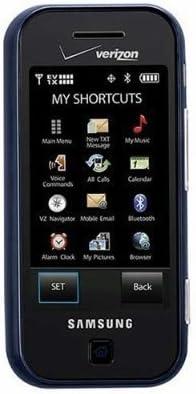
Figi 3.1: Devan view of the Samsung Glyde U940, showing the 2.8-inch display and navigation buttons. The screen displays "MY SHORTCUTS" with icons for various functions like Main Menu, New TXT Message, My Music, Voice Commands, All Calls, Calendar, Mobile Email, Bluetooth, Alarm Clock, My Pictures, and Browser. "SET" and "Back" buttons are visible below the screen.
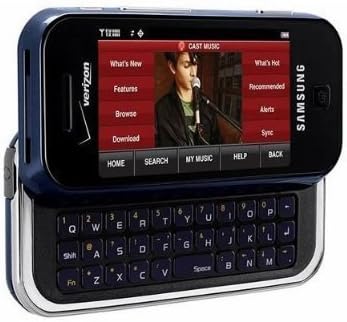
Figi 3.2: Samsung Glyde U940 with its full QWERTY keyboard extended. The phone is oriented horizontally, displaying a media interface on the screen with options like "What's New", "Features", "Browse", "Download", "What's Hot", "Recommended", "Alerts", and "Sync". Navigation buttons for "HOME", "SEARCH", "MY MUSIC", "HELP", and "BACK" are visible below the screen.
Karakteristik kle:
- Large 2.8" Display
- Slide-out QWERTY Keyboard
- Manyen ekran entèfas
- Full HTML Browser
- 2.0 MP Camera and Camcorder
4. Enstalasyon
4.1. Enstale batri a
- Locate the battery cover on the back of the phone.
- Gently remove the battery cover by sliding or lifting it.
- Aliyen kontak lò batri a ak kontak ki nan konpatiman batri a.
- Insert the battery firmly into place.
- Replace the battery cover, ensuring it clicks securely.
4.2. Chaje batri a
- Connect the travel adapter to the charging port on your phone.
- Plug the other end of the travel adapter into a standard electrical outlet.
- Kite telefòn nan chaje nèt anvan ou itilize li pou premye fwa. Endikatè batri a sou ekran an ap montre eta chaj la.
- Dekonekte plato a yon fwa batri a konplètman chaje.
4.3. Powering On / Off
- Pou limen: Press and hold the Power/End key until the screen lights up.
- Pou etenn: Press and hold the Power/End key until the power-off options appear, then select "Power off".
5. Operasyon Enstriksyon
5.1. Sèvi ak Touch Screen la
The Samsung Glyde U940 features a resistive touch screen. Use your fingertip or a stylus (if provided) to interact with the display.
- Tape: Lightly touch the screen once to select an item or open an application.
- Trennen: Touche epi kenbe yon atik, apresa deplase dwèt ou sou ekran an pou chanje pozisyon li.
- Scroll: Slide your finger up or down on the screen to navigate through lists or web paj.
5.2. Using the QWERTY Keyboard
Slide the screen horizontally to reveal the full QWERTY keyboard. This keyboard is ideal for typing messages, emails, and web adrès.
- Press individual keys to input characters.
- Sèvi ak la Chanjman key for uppercase letters and symbols.
- La Fn key provides access to additional functions or symbols.
5.3. Fè ak resevwa apèl
- Fè yon apèl: From the home screen, tap the Phone icon or dial the number using the keypad and press the Call key.
- Resevwa yon apèl: When a call comes in, tap the "Answer" button on the screen.
- Fini yon apèl: Tap the "End" button on the screen or press the Power/End key.
5.4. Messaging (SMS/MMS)
To send a text or multimedia message:
- From the main menu, select "Messages" or "New TXT Message".
- Antre nimewo telefòn moun k ap resevwa a oubyen chwazi nan kontak ou yo.
- Type your message using either the touch screen or the QWERTY keyboard.
- To add multimedia (pictures, videos, audio), select the attachment option.
- Tap "Send".
5.5. Camera and Camcorder Functions
The Glyde U940 is equipped with a 2.0 MP camera.
- Lè w ap pran foto: Open the Camera application, frame your shot, and press the dedicated camera button or tap the capture icon on the screen.
- Anrejistreman Videyo: Switch to camcorder mode within the Camera application, press the record button to start, and press again to stop.
- Access your captured media in the "My Pictures" or "Gallery" application.
5.6. Web Navigatè
Utilize the full HTML browser to access the internet.
- From the main menu, select "Browser".
- Antre vle a web adrès nan URL ba.
- Use the touch screen to navigate pages, zoom in/out, and click links.
6. Antretyen
6.1. Swen batri
- Evite ekspoze batri a nan tanperati ekstrèm.
- Pa pike oswa domaje batri a.
- For optimal battery life, avoid frequent partial discharges and charges.
- Si ou pa pral itilize telefòn nan pou yon bon bout tan, sere l ak yon batri ki prèske chaje.
6.2. Netwaye Aparèy la
- Sèvi ak yon twal mou ki pa gen pousyè pou netwaye ekran an ak deyò telefòn nan.
- Do not use harsh chemicals, cleaning sprays, or abrasive materials.
- Ensure no moisture enters openings such as the charging port or headphone jack.
6.3. Mizajou lojisyèl
Periodically check for available software updates to improve performance and add new features. Consult your service provider or the Samsung website for update procedures.
NAN. Depanaj
This section addresses common issues you might encounter with your Samsung Glyde U940.
| Pwoblèm | Solisyon posib |
|---|---|
| Telefòn nan pa limen. | Ensure the battery is correctly installed and fully charged. Connect the charger and attempt to power on. |
| Touch screen is unresponsive or erratic. |
|
| Batri vide byen vit. |
|
| Pa ka fè oswa resevwa apèl. | Check network signal strength. Ensure "Airplane Mode" is not enabled. Contact your service provider if network issues persist. |
| QWERTY keyboard input is incorrect. | Ensure the keyboard is fully extended and locked into position. Restart the device if keys are unresponsive. |
8. Espesifikasyon
| Karakteristik | Detay |
|---|---|
| Nimewo Modèl | U940 |
| Ekspozisyon | 2.8 Inches, Touch Screen |
| Metòd Antre | Touch Screen, Slide-out QWERTY Keyboard |
| Kamera | 2.0 MP (Camera and Camcorder) |
| Navigatè | Full HTML Browser |
| Pwa atik | 11.2 ons |
| Dimansyon | 8.1 x 5.4 x 2.2 pous (Dimansyon Pake) |
| Koneksyon | Wireless, USB 2.0 |
| Manifakti | Samsung |
9. Garanti ak sipò
Pou enfòmasyon sou garanti a, tanpri gade kat garanti ki vini ak pwodwi w la oswa vizite sit ofisyèl Samsung lan. website. For technical support, contact your service provider or Samsung customer service.
Sèvis Kliyan Samsung: www.samsung.com/us/support/


