Uvod
This manual provides essential information for setting up, operating, maintaining, and troubleshooting your new IPASON Gaming PC. Designed for high-performance gaming, video editing, and multitasking, this system features an AMD Ryzen 7 9700X processor, Geforce RTX 5060Ti graphics card, 32GB DDR5 RAM, and a 1TB NVME SSD, running on Windows 11.

Slika 1: Prednja strana view of the IPASON Gaming PC, showcasing its transparent side panel and internal blue LED lighting.
Vodič za postavljanje
Follow these steps to set up your IPASON Gaming PC:
- Raspakiranje: Pažljivo izvadite računalo iz ambalaže. Sačuvajte sav ambalažni materijal za budući transport ili servis.
- Plasman: Place the PC on a stable, flat surface with adequate ventilation around all sides. Avoid placing it in enclosed spaces or near heat sources.
- Povežite periferne uređaje:
- Connect your monitor(s) to the graphics card ports (HDMI, DisplayPort).
- Spojite tipkovnicu i miš na dostupne USB priključke.
- Spojite zvučnike ili slušalice na audio priključke.
- For internet access, connect an Ethernet cable to the LAN port or ensure Wi-Fi antennas are attached (if applicable).
- Priključak za napajanje: Connect the power cable to the PC's power supply unit (PSU) and then to a grounded electrical outlet.
- Prvo pokretanje: Press the power button located on the front panel. The system will boot into Windows 11. Follow the on-screen instructions for initial Windows setup.

Figure 2: Detail of the front I/O panel, showing USB 3.0, USB 2.0, microphone, headset jacks, and the power button.
Upravljanje računalom
Your IPASON Gaming PC comes pre-installed with Windows 11 64-bit, optimized for performance. It is free of bloatware to ensure maximum efficiency from day one.
- Početna instalacija Windowsa: Upon first boot, Windows 11 will guide you through setting up your user account, network connection, and privacy settings.
- Instalacija upravljačkog programa: All necessary drivers for your hardware components (graphics card, chipset, audio, network) are pre-installed. It is recommended to periodically check for updated drivers from the component manufacturers' websites for optimal performance and stability.
- Gaming and Applications: The system is capable of running demanding applications and games at high settings. Ensure your games and software are installed on the 1TB NVME SSD for fastest loading times.
- Višezadaćnost: With 32GB DDR5 RAM, the PC handles multiple applications simultaneously with ease, making it suitable for streaming, content creation, and productivity tasks.

Figure 3: The IPASON Gaming PC set up with a monitor, demonstrating its capability for gaming and other demanding applications.
Održavanje
Regular maintenance helps ensure the longevity and optimal performance of your PC.
- Upravljanje prašinom: Dust accumulation can lead to overheating. Periodically clean the interior of your PC using compressed air, focusing on fans (CPU cooler, case fans, GPU fans) and heatsinks. Ensure the PC is powered off and unplugged before cleaning.
- Ažuriranja softvera: Regularly update Windows, graphics drivers, and other software to benefit from performance improvements, security patches, and bug fixes.
- Uprava za kabele: Ensure internal cables are neatly managed to promote better airflow.
- Liquid Cooler Check: While the 240mm AIO liquid cooler is low-maintenance, occasionally check for any unusual noises or leaks.
Rješavanje problema
Evo rješenja za uobičajene probleme s kojima se možete susresti:
| Problem | Mogući uzrok | Otopina |
|---|---|---|
| Računalo se ne uključuje. | Power cable loose, PSU switch off, faulty power outlet. | Check all power connections. Ensure PSU switch is ON. Try a different power outlet. |
| Nema prikaza na monitoru. | Monitor cable loose, connected to motherboard instead of GPU, monitor off. | Ensure monitor is ON and connected to the graphics card ports. Check monitor input source. |
| Sustav je spor ili se zamrzava. | Too many programs running, insufficient RAM, overheating, malware. | Close unnecessary programs. Check task manager for high resource usage. Ensure proper ventilation. Run antivirus scan. |
| Glasna buka ventilatora. | Dust accumulation, high temperatures, fan malfunction. | Clean fans and heatsinks. Ensure good airflow. Monitor temperatures. If persistent, contact support. |
Tehnički podaci
Detailed technical specifications for your IPASON Gaming PC:
| komponenta | Detalj |
|---|---|
| Procesor | AMD Ryzen 7 9700X (3.8GHz, 5.5GHz Max Boost) |
| Grafička kartica | NVIDIA Geforce RTX 5060Ti 16G GDDR7 |
| OVAN | 32GB DDR5 6000MHz Gaming Memory (2 DIMM slots, upgradeable to 64GB) |
| Skladištenje | 1TB PCIe 4.0 NVME SSD |
| Operativni sustav | Microsoft Windows 11-bit |
| Matična ploča | MSI B650M |
| Napajanje | 650W 80PLUS Gold PSU (with triple protection) |
| Sustav hlađenja | 240mm AIO Liquid Cooler + 4 ARGB fans |
| Spis | IPASON G1 Gaming Case (Black) |
| USB priključci | 3 x USB 2.0, 3 x USB 3.0 |
| Broj modela | IPASON-G2-97X |
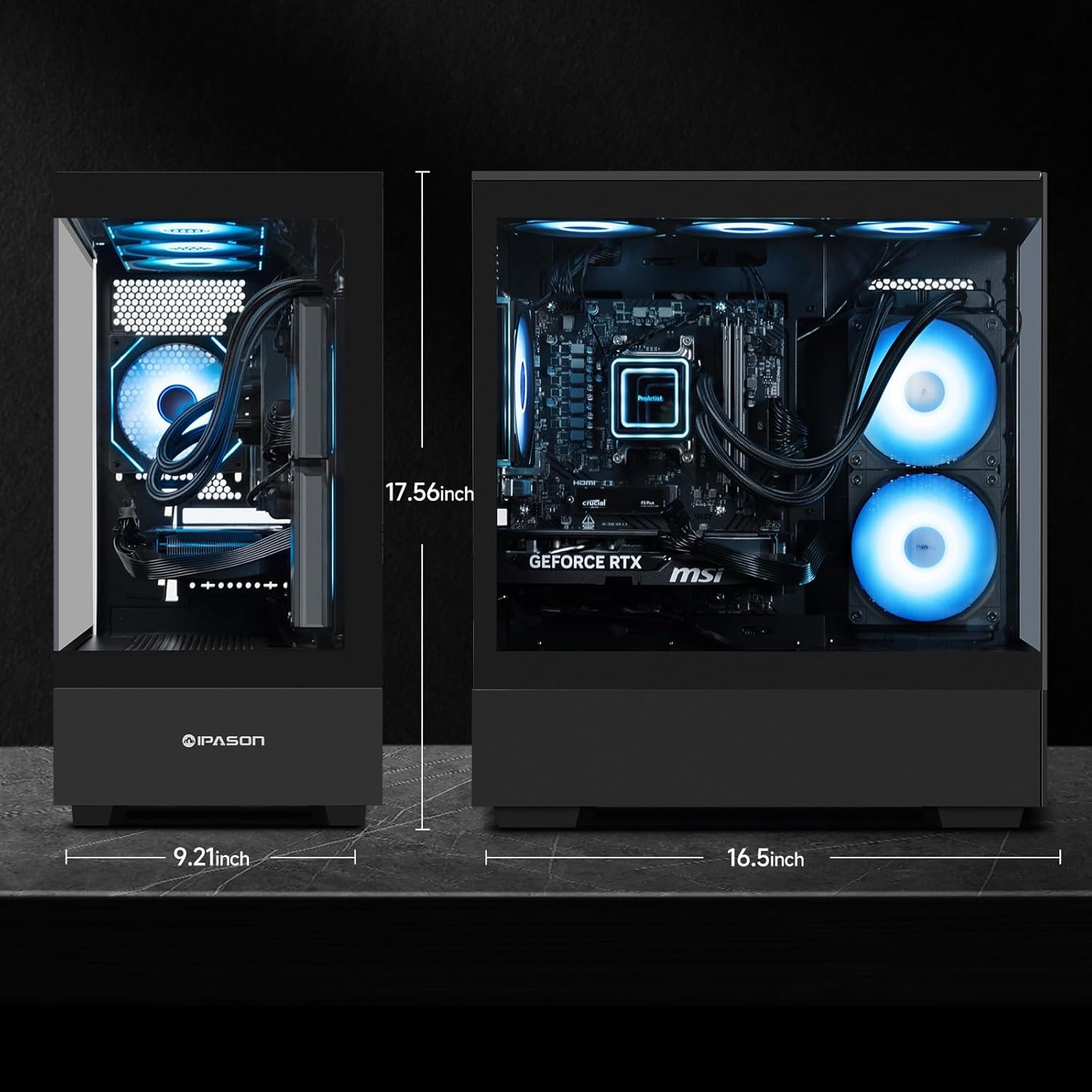
Figure 4: Physical dimensions of the IPASON Gaming PC case, showing height of 17.56 inches, width of 9.21 inches, and length of 16.5 inches.
Jamstvo i podrška
Your IPASON Gaming PC comes with a 1-godišnje jamstvo pokrivanje proizvodnih nedostataka i kvarova hardvera.
For technical assistance and support, IPASON engineers are available from 9 AM to 6 PM PST, 7 days a week. You can expect responses to Amazon messages within 4 hours. Additionally, 10-minute setup tutorials are available to assist with initial configuration and common queries.
For warranty claims or technical support, please contact IPASON through the Amazon messaging system or refer to the contact information provided with your purchase documentation.


