1. Uvod
This manual provides detailed instructions for the setup, operation, and maintenance of your ITECH Fusion 2 S Smartwatch and accompanying Wireless Headphones. The ITECH Fusion 2 S is designed to help you monitor your health and fitness goals, offering features such as heart rate tracking, step counting, sleep monitoring, and multi-sport modes. The included wireless headphones provide an integrated audio experience.
2. Sadržaj paketa
Molimo provjerite jesu li svi artikli prisutni u vašem paketu:
- ITECH Fusion 2 S Smartwatch
- Bežične slušalice
- USB kabel za punjenje (za pametni sat)
- USB Charging Cable (for headphones)
- Korisnički priručnik (ovaj dokument)

Image: The ITECH Fusion 2 S Smartwatch and Wireless Headphones displayed within their retail packaging.
3. Uređaj prekoview
3.1. ITECH Fusion 2 S Smartwatch

Image: The ITECH Fusion 2 S Smartwatch with a grey camouflage band shown alongside the matching wireless headphones.
The smartwatch features a touch screen display, a side button for navigation, and sensors on the rear for health monitoring. The display shows time, date, activity data, and notifications.

Image: A close-up of the ITECH Fusion 2 S Smartwatch display, highlighting features such as heart rate monitor, apps and notifications, multi-sports modes, water resistance, calorie tracker, music remote, pedometer, sleep monitor, hydration reminder, and extended 14-day battery life.
3.2. Wireless Headphones
The wireless headphones are over-ear style with cushioned earcups and an adjustable headband. Controls for audio playback and calls are located on the earcup.

Slika: Strana A view of the ITECH Wireless Headphones, illustrating features like powerful sound quality, convenient controls, comfort for hours, and a go-anywhere design.

Slika: Detaljna view of the ITECH Wireless Headphones, emphasizing noise isolating fit, built-in microphone, Bluetooth wireless technology, and up to 8 hours of playback.

Image: A diagram of the ITECH Wireless Headphones highlighting the flexible headband, comfortable ear cushion, foldable design, and convenient controls, along with key technical specifications.
4. Postavljanje
4.1. Punjenje uređaja
Before first use, fully charge both your smartwatch and wireless headphones.
- Pametni sat: Connect the USB charging cable to the charging port on the back of the smartwatch and to a USB power source. The battery icon on the screen will indicate charging status.
- Wireless Headphones: Connect the USB charging cable to the charging port on the headphones and to a USB power source. An indicator light will show charging status and turn off when fully charged.
4.2. Uključivanje/isključivanje
- Pametni sat: To power on, press and hold the side button until the screen illuminates. To power off, navigate to the 'Settings' menu on the smartwatch, then select 'Power Off'.
- Wireless Headphones: Za uključivanje pritisnite i držite gumb za uključivanje/isključivanje dok indikatorska lampica ne zatreperi. Za isključivanje ponovno pritisnite i držite gumb za uključivanje/isključivanje dok se indikatorska lampica ne ugasi.
4.3. Pairing the Smartwatch with Your Smartphone
The ITECH Fusion 2 S Smartwatch is compatible with both iPhone and Android devices.
- Preuzmite iTECH Wearables aplikaciju iz Apple App Store ili Google Play Store.
- Provjerite je li Bluetooth omogućen na vašem pametnom telefonu.
- Open the iTECH Wearables app and follow the on-screen instructions to create an account and pair your smartwatch.
- The app will guide you through connecting the smartwatch via Bluetooth. Confirm the pairing request on both your phone and smartwatch.
4.4. Pairing the Wireless Headphones
- Provjerite jesu li slušalice isključene.
- Pritisnite i držite gumb za uključivanje/isključivanje dok indikatorska lampica ne počne brzo treptati, što označava način rada za uparivanje.
- On your smartphone or other Bluetooth-enabled device, go to Bluetooth settings and search for available devices.
- Select "ITECH Headphones" (or similar name) from the list to connect. The indicator light will change to a steady blue when successfully paired.
5. Upravljanje pametnim satom
5.1. Navigacija
- Zaslon osjetljiv na dodir: Prijeđite prstom lijevo/desno, gore/dolje za navigaciju kroz izbornike i značajke. Dodirnite za odabir.
- Bočni gumb: Pritisnite za povratak na početni zaslon ili buđenje uređaja.
5.2. Brojčanici sata
Customize your smartwatch display by changing watch faces. On the home screen, press and hold the display, then swipe left or right to browse available watch faces. Tap to select your preferred design.
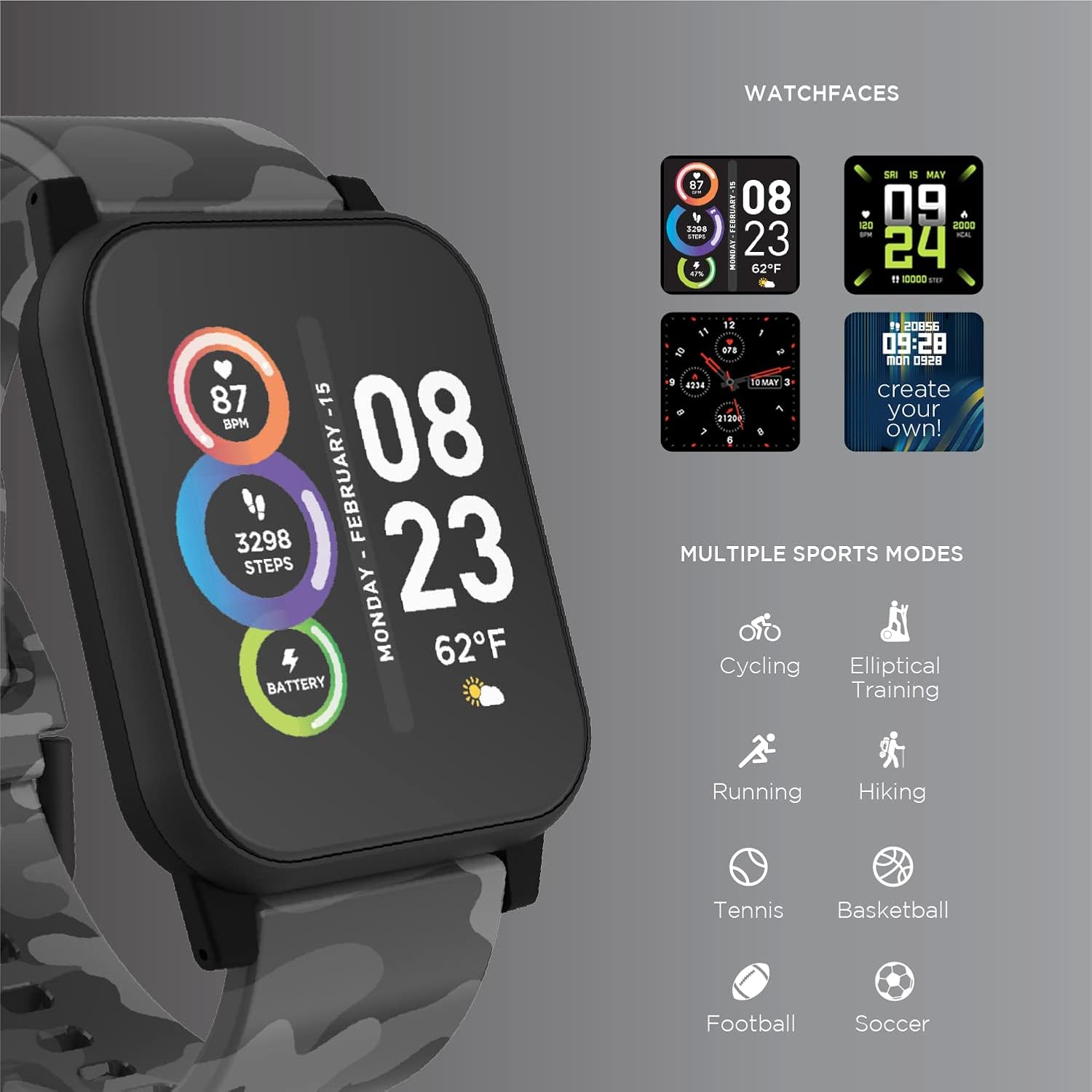
Image: The ITECH Fusion 2 S Smartwatch display showing various customizable watch faces and icons representing multiple sports modes including cycling, elliptical training, running, hiking, tennis, basketball, football, and soccer.
5.3. Osnovne značajke
- Monitor otkucaja srca: Access the heart rate feature on your smartwatch to measure your heart rate using the built-in optical sensor. Ensure the watch is snug on your wrist for accurate readings.
- Brojač koraka (pedometar): The smartwatch automatically tracks your daily steps, distance, and calories burned. View your progress on the device or in the iTECH Wearables app.
- Monitor spavanja: Wear your smartwatch to bed to track your sleep patterns, including light and deep sleep stages. Data is synchronized with the app for detailed analysis.
- Višesportski načini rada: Select from various sports modes (e.g., running, cycling, hiking) to track specific workout data, including duration, distance, and calories.
- Obavijesti o porukama: Receive notifications for calls, texts, and app alerts directly on your smartwatch when connected to your smartphone.
- Praćenje kalorija: Monitors calories burned throughout the day based on your activity level.
- Podsjetnik za hidrataciju: Set reminders to drink water at regular intervals through the app.
- Daljinski upravljač za glazbu: Control music playback on your smartphone directly from your smartwatch (play, pause, skip tracks).
5.4. Integracija aplikacije
Za sveobuhvatan view of your health and fitness data, regularly sync your smartwatch with the iTECH Wearables app. The app allows you to set goals, view historical data, customize settings, and manage notifications.
6. Operating the Wireless Headphones
6.1. Kontrole
The headphones feature intuitive controls for media playback and call management:
- Gumb za napajanje: Pritisnite i držite za uključivanje/isključivanje. Kratki pritisak za reprodukciju/pauzu.
- Gumbi za glasnoću: Pritisnite '+' za povećanje glasnoće, '-' za smanjenje glasnoće.
- Kontrola staze: Press and hold '+' for next track, '-' for previous track.
- Upravljanje pozivima: Short press power button to answer/end calls. Press and hold to reject calls.
6.2. Zvučne značajke
- Powerful Sound Quality: Designed to deliver clear and rich audio.
- Noise Isolating Fit: The over-ear design helps to reduce external noise for an immersive listening experience.
- Ugrađeni mikrofon: Omogućuje hands-free pozive.
6.3. Trajanje baterije
The wireless headphones provide up to 8 hours of playback on a single charge, depending on usage and volume levels.

Image: A person wearing the ITECH Fusion 2 S Smartwatch on their wrist and the matching wireless headphones, demonstrating typical use.
7. Održavanje
7.1. Čišćenje
- Pametni sat: Wipe the screen and band with a soft, damp, krpa koja ne ostavlja dlačice. Izbjegavajte jake kemikalije ili abrazivne materijale.
- Slušalice: Gently wipe earcups and headband with a soft, dry cloth. Do not immerse in water.
7.2. Water Resistance (Smartwatch)
The ITECH Fusion 2 S Smartwatch is IP67 water resistant. This means it is protected against dust and can withstand immersion in water up to 1 meter for up to 30 minutes. It is suitable for daily use and light splashes, but not recommended for swimming, showering, or prolonged water immersion.
7.3. Skladištenje
Store your devices in a cool, dry place away from direct sunlight and extreme temperatures when not in use.
8. Rješavanje problema
If you encounter issues with your ITECH Fusion 2 S devices, please refer to the following common solutions:
- Uređaj se ne uključuje: Ensure the device is fully charged. Try connecting it to a different USB power source.
- Smartwatch not pairing with phone: Ensure Bluetooth is enabled on your phone and the smartwatch is within range. Restart both devices and try pairing again through the iTECH Wearables app.
- Slušalice se ne uparuju: Ensure headphones are in pairing mode (rapidly flashing indicator light). Check your device's Bluetooth settings and try reconnecting.
- Inaccurate heart rate/step readings: Ensure the smartwatch is worn snugly on your wrist, not too tight or too loose. Clean the sensor on the back of the watch.
- Obavijesti se ne prikazuju: Check app permissions on your smartphone to ensure the iTECH Wearables app has access to notifications. Verify notification settings within the app.
- Audio issues with headphones: Ensure headphones are fully charged and properly paired. Check volume levels on both the headphones and the connected device.
If problems persist, consider performing a factory reset (refer to the smartwatch settings menu or contact customer support for headphones). For further assistance, please contact Itech customer support.
9. Specifikacije
| Značajka | Detalj |
|---|---|
| Dimenzije proizvoda | 22.86 x 5.08 x 22.86 cm; 621 g |
| Broj modela artikla | 900366B-40-G57 |
| Operativni sustav | Android (Compatible with iPhone and Android) |
| Posebne značajke | Heart Rate Monitor, Step Counter, Sleep Monitor, Message Notifications, Multi-Sport Modes |
| Tehnologija povezivanja | USB |
| Standard bežične komunikacije | Bluetooth |
| Sastav baterije | Litij ion |
| GPS | Pravi |
| Smartwatch Shape | Kvadrat |
| Veličina zaslona pametnog sata | 1.3 inča |
| Marka | Itech |
| Naziv modela | Fusion 2 Bundle |
| Vodootpornost | IP67 |
| Headphones Playback Time | Do 8 sati |
| Headphones Driver Diameter | 40 mm |
| Headphones Connection Type | Bluetooth® 5.0 |
| Impedancija slušalica | 32 Ohma ±15% |
| Frekvencijski odziv slušalica | 20Hz - 20KHz |
10. Jamstvo i podrška
Your ITECH Fusion 2 S Smartwatch and Wireless Headphones are covered by a manufacturer's warranty. Please refer to the warranty card included in your package or visit the official Itech webstranicu za detaljne uvjete jamstva.
For technical support, troubleshooting assistance, or warranty claims, please contact Itech customer service through their official webweb-mjesto ili kontaktne podatke navedene u dokumentaciji proizvoda.


