Uvod
This manual provides essential information for the safe and efficient operation of your AuKing Mini Projector. Please read it thoroughly before use and retain it for future reference.
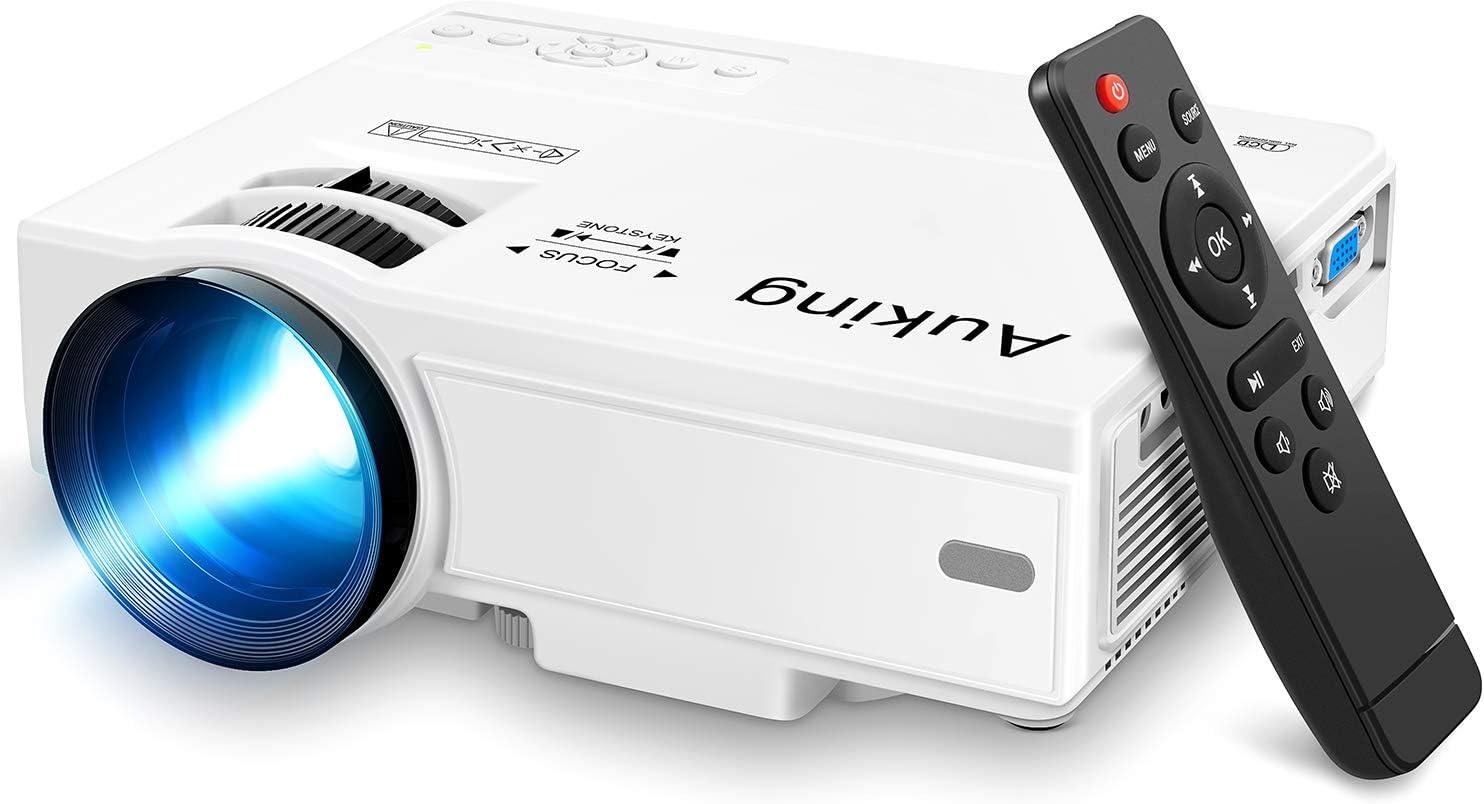
Image: The AuKing Mini Projector, a compact white device, is shown alongside its black remote control. The projector features a prominent lens and control buttons on its top surface.
Značajke proizvoda
- Full HD 1080P Support: Experience clear and sharp detailed images with the latest color reproduction technology for a vibrant viewing efekt.
- Large Projection Screen: Uživajte u impresivnom viewing experience with a projection size ranging from 35 to 200 inches, suitable for distances between 3.6ft and 16.4ft.
- Dug vijek trajanja žarulje: The powerful cooling system effectively dissipates heat, extending the lamp's life up to 55,000 hours for over 15 years of use.
- Low Noise & Dual Stereo Speakers: Advanced noise reduction technology reduces fan noise by 80%. Built-in dual stereo speakers provide clear sound quality. External speakers can be connected for enhanced audio.
- Povezivanje više uređaja: Equipped with HDMI, VGA, AV, and USB interfaces, compatible with smartphones, laptops, pads, USB drives, and TV boxes. (Note: An extra HDMI adapter may be needed for phone connection, and copyrighted apps like Netflix, Prime Video, Hulu require a TV Stick or Roku.)

Image: A split image demonstrating the AuKing projector's superior color reproduction and 1080P support compared to a generic projector.
Što je u kutiji
Your AuKing Projector package includes:
- AuKing mini projektor
- Daljinski upravljač
- Kabel za napajanje
- AV kabel
- HDMI kabel
- korisnički priručnik
Vodič za postavljanje
1. plasman
Choose a suitable location for your projector. It can be placed on a table, mounted on a tripod, or ceiling-mounted. Ensure the projection surface is flat and clear.

Image: Demonstrates various placement options for the AuKing projector, including tripod installation, ceiling mount, and simple table placement.
2. Priključak za napajanje
Spojite kabel za napajanje na projektor, a zatim na utičnicu.
3. Povezivanje uređaja
Connect your desired input device (e.g., laptop, USB drive, smartphone) to the projector using the appropriate cable (HDMI, USB, AV, VGA). For smartphone connections, an additional HDMI adapter may be required (sold separately).

Image: Illustrates the projector's compatibility with multiple devices, showing connections for smartphones, laptops/PCs, PS4, DVD players, memory cards, and USB drives.
4. Fokus i podešavanje trapezoidne korekcije
Use the FOCUS and KEYSTONE rings on the projector to adjust the image clarity and shape until it appears rectangular and sharp on your screen.
Upute za rad
1. Uključivanje/isključivanje
Pritisnite gumb za napajanje na projektoru ili daljinskom upravljaču za uključivanje ili isključivanje uređaja.
2. Odabir izvora unosa
Use the "Source" button on the remote or projector to select the correct input source (HDMI, USB, AV, VGA) corresponding to your connected device.
3. Reprodukcija medija
Navigacija kroz medije files using the remote control. For streaming services like Netflix, Prime Video, or Hulu, ensure you are using a compatible TV Stick or Roku device connected to the projector due to copyright restrictions.

Slika: Demonstracija postavki dnevnog boravkaasing the projector's ability to create a large 200-inch projection, providing an immersive home theater experience.
4. Audio izlaz
The projector has built-in dual stereo speakers. For a higher sound quality, connect external speakers via the audio output port.
Održavanje
To ensure optimal performance and longevity of your AuKing projector:
- Čišćenje prašine: Regularly clean the lens with a soft, lint-free cloth. Avoid abrasive cleaners.
- Ventilacija: Ensure the projector's ventilation ports are not blocked to allow proper airflow and prevent overheating. The advanced cooling system is designed to manage heat effectively.
- Skladištenje: Kada se projektor ne koristi dulje vrijeme, pohranite ga na hladnom i suhom mjestu, dalje od izravne sunčeve svjetlosti i ekstremnih temperatura.

Image: An illustration highlighting the projector's advanced cooling system, showing arrows indicating airflow to prevent overheating and extend lamp život.
Rješavanje problema
| Problem | Mogući uzrok | Otopina |
|---|---|---|
| No image or "No Signal" | Odabran pogrešan ulazni izvor; Labav kabelski priključak; Uređaj nije uključen. | Select the correct input source. Check all cable connections. Ensure the input device is powered on. |
| Mutna slika | Izvan fokusa; Nepravilno podešavanje trapezoidnog iskrivljenja. | Adjust the FOCUS ring until the image is clear. Adjust the KEYSTONE ring to correct image distortion. |
| Nema zvuka | Glasnoća preniska; Zvuk isključen; Vanjski zvučnici nisu pravilno spojeni. | Povećajte glasnoću. Uključite zvuk projektora. Provjerite priključke vanjskih zvučnika. |
| Pregrijavanje projektora | Blokirana ventilacija; Dugotrajna upotreba u vrućem okruženju. | Ensure vents are clear. Turn off and allow to cool. Use in a well-ventilated area. |
Tehnički podaci
| Značajka | Detalj |
|---|---|
| Marka | AuKing |
| Broj modela | M8-F |
| Razlučivost zaslona | 1920 x 1080 (Full HD supported) |
| Veličina projekcije | 35-200 inča |
| Udaljenost projekcije | 3.6 stopa do 16.4 stopa |
| Lamp Život | Do 55,000 sati |
| Tehnologija povezivanja | VGA, USB, HDMI, AV |
| Vrsta zvučnika | Built-In Dual Stereo Speakers |
| Težina artikla | 2.87 funti |
| Dimenzije proizvoda | 7.95 x 6.3 x 2.91 inča |
Jamstvo i podrška
AuKing offers a 2-godišnje jamstvo za zamjenu proizvoda and lifetime after-sales service for your projector. If you encounter any issues or have questions, please do not hesitate to contact our support team. We are committed to providing 100% customer satisfaction.
Za podršku posjetite AuKing Store on Amazon ili se obratite na kontaktne podatke navedene na pakiranju proizvoda.


