1. Uvod
Welcome to the user manual for your Rowkin Ascent Charge+ True Wireless Earbuds. This guide provides comprehensive instructions for setting up, operating, maintaining, and troubleshooting your new earbuds. Please read this manual thoroughly to ensure optimal performance and longevity of your device.
Što je u kutiji
- 2 Bluetooth slušalice
- 1 prijenosna kutija za punjenje
- 1 Dual-Function Portable Charger (integrated with case)
- 1 USB-C kabel za punjenje
- 3 Sets of Ear Tips (Small, Medium, Large)
- 1 Qi podloga za bežično punjenje
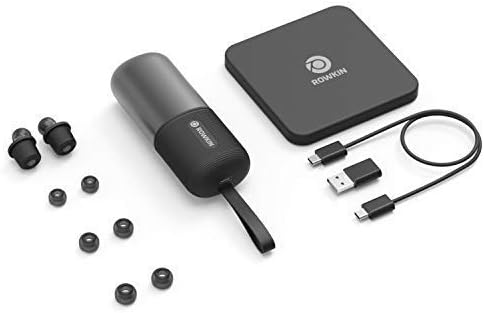
Prije nego što nastavite s postavljanjem, provjerite jesu li svi elementi prisutni.
2. Proizvod je gotovview
The Rowkin Ascent Charge+ system consists of two true wireless earbuds and a versatile charging case that also functions as a power bank and supports Qi wireless charging.

Ključne komponente
- slušalice: Each earbud features a dynamic driver for premium sound, a microphone for calls, and capacitive touch controls.
- Kutija za punjenje: Stores and charges the earbuds. It supports both USB-C and Qi wireless charging. The case also functions as a power bank for other mobile devices.
- Qi jastučić za bežično punjenje: Provided for convenient wireless charging of the case.
3. Postavljanje
3.1 Početno punjenje
Before first use, fully charge the portable charging case and the earbuds.
- Place the earbuds into their respective slots in the charging case. Ensure they are seated correctly to initiate charging.
- Za punjenje kućišta:
- Putem USB-C: Connect the provided USB-C cable to the charging port on the case and to a USB power source.
- Via Qi Wireless Charging: Place the charging case on the included Qi wireless charging pad. Ensure the case is centered on the pad for efficient charging.

The charging case provides over 50 hours of music/play time for the earbuds, allowing for approximately 15 full charges of the earbuds.
3.2 Bluetooth uparivanje
The Ascent Charge+ earbuds feature easy auto-on pairing.
- Provjerite jesu li slušalice napunjene.
- Izvadite obje slušalice iz kutijice za punjenje. Automatski će se uključiti i ući u način rada za uparivanje.
- Na svom uređaju (pametnom telefonu, tabletu itd.) idite na postavke Bluetootha.
- Select "Rowkin Ascent Charge+" from the list of available devices.
- Nakon povezivanja, čut ćete zvučnu potvrdu, a indikatorska svjetla na slušalicama će se promijeniti.

Slušalice će se automatski ponovno povezati s posljednjim uparenim uređajem kada se izvade iz kutijice, ako je Bluetooth omogućen na uređaju.
3.3 Postizanje najboljeg prilagođavanja
Proper fit is crucial for sound quality and comfort. The Ascent Charge+ comes with three sizes of ear tips (Small, Medium, Large).
- Experiment with different ear tip sizes to find the one that creates a comfortable seal in your ear canal. A good seal enhances bass response and noise isolation.
- Gently insert the earbud into your ear and twist slightly to secure it. The secure retention wheel helps keep the earbud in place.

4. Operacija
4.1 Capacitive Touch Controls
The Ascent Charge+ earbuds feature intuitive touch controls for managing audio playback and calls.
- Reproduciraj/pauziraj: Jednom dodirnite bilo koju slušalicu.
- Sljedeća pjesma: Dvaput dodirnite desnu slušalicu.
- Prethodni zapis: Dvaput dodirnite lijevu slušalicu.
- Odgovori/prekini poziv: Jednokratno dodirnite bilo koju slušalicu tijekom dolaznog poziva.
- Odbij poziv: Pritisnite i držite bilo koju slušalicu tijekom dolaznog poziva.
- Aktivirajte glasovnog asistenta (Siri/Google Assistant): Triput dodirnite bilo koju slušalicu.
4.2 Rowkin App Features
Enhance your experience with the accompanying Rowkin app, available for iOS and Android devices.

- Postotak baterijetage: View the current battery level of each earbud.
- Izjednačivač zvuka: Customize your audio experience with various sound profileili stvorite vlastite.
- "Find My Earbuds": Use the in-app locator to help find misplaced earbuds. The app records the last known location where the earbuds were connected.
5. Održavanje
To ensure the longevity and optimal performance of your Ascent Charge+ earbuds, follow these maintenance guidelines:
- Čišćenje: Regularly clean the earbuds and charging case with a soft, dry, lint-free cloth. Do not use abrasive cleaners or solvents. For ear tips, remove them and clean with mild soap and water, then dry thoroughly before reattaching.
- Vodootpornost: The earbuds are IPX5 water resistant, meaning they can withstand splashes and sweat. They are not designed for submersion in water. Do not expose them to running water or wear them while swimming. Ensure earbuds are dry before placing them back in the charging case.
- Skladištenje: When not in use, store the earbuds in their charging case to protect them and keep them charged. Store the case and earbuds in a cool, dry place away from extreme temperatures.
- Njega baterije: For best battery health, avoid fully discharging the case or earbuds frequently. Charge them regularly.
6. Rješavanje problema
If you encounter issues with your Ascent Charge+ earbuds, refer to the following common solutions:
| Problem | Mogući uzrok | Otopina |
|---|---|---|
| Slušalice se ne uparuju s uređajem | Slušalice nisu u načinu uparivanja; Bluetooth isključen na uređaju; prethodno upareni uređaj ometa rad. | Ensure earbuds are removed from case. Turn Bluetooth off and on again on your device. Forget "Rowkin Ascent Charge+" from your device's Bluetooth list and re-pair. |
| Samo jedna slušalica reproducira zvuk | Jedna slušalica nije spojena; slaba baterija na jednoj slušalici. | Place both earbuds back in the charging case for a few seconds, then remove them. Ensure both are charged. |
| Slušalice se ne pune u futroli | Poor contact; case battery low. | Ensure earbuds are correctly seated in the case. Clean charging contacts on earbuds and case. Charge the case. |
| Poor sound quality / low bass | Improper ear tip fit; ear tips dirty. | Try different ear tip sizes to achieve a better seal. Clean ear tips and earbud nozzles. |
| Kontrole na dodir ne reagiraju | Slušalice je potrebno resetirati; površina dodira je prljava. | Place earbuds in case, close lid, wait 10 seconds, then remove. Clean the touch surface. |
For further assistance, please refer to the Rowkin app or visit the official Rowkin support webmjesto.
7. Specifikacije
Detailed technical specifications for the Rowkin Ascent Charge+ True Wireless Earbuds:
| Značajka | Specifikacija |
|---|---|
| Naziv modela | Ascent Charge+ |
| Broj modela artikla | NAAT10AA |
| Tehnologija povezivanja | Bežični |
| Bežična komunikacijska tehnologija | Bluetooth 5.0 |
| Frekvencijski odziv | 20 Hz - 20 kHz |
| Trajanje baterije (slušalice) | Do 3.5 sati (jedno punjenje) |
| Ukupno vrijeme reprodukcije s kutijicom za punjenje | 50+ sati |
| Sučelje za punjenje | USB-C, Qi Wireless Charging |
| Razina vodootpornosti | IPX5 (otporan na vodu) |
| Vrsta kontrole | Kapacitivni dodir |
| Mikrofon | Uključeno |
| Materijal | Mylar |
| Težina artikla | 4.9 unci (ukupno pakiranje) |
| Dimenzije proizvoda | 4.45 x 1.71 x 1.28 inča |
8. Jamstvo i podrška
Rowkin products are designed for durability and performance. For information regarding warranty coverage and terms, please refer to the warranty card included with your product or visit the official Rowkin webmjesto.
For technical support, frequently asked questions, or to contact customer service, please visit the Rowkin Store on Amazon ili službene kanale podrške proizvođača.


