


DS
Hom-C Interface Series
Cov neeg siv phau ntawv
Khoom Tshajview
1.1 Phau ntawv ntawm ORICO DS disk chaw nres tsheb
Qhov no series ntawm hard disk ark belongs rau ORICO tso cov ntaub ntawv cia rau cov neeg siv desktop.
Siv cov qauv sib nqus ntawm cov qauv tsim tshwj xeeb, thiab cov tsos zoo nkauj, kom tag nrho cov khoom muaj tus cwj pwm; Hom-C interface nrog Hom-C Rau SATA3.0 qhov kev pab cuam, txhawb hom-C 5Gbps kev sib kis ceev thiab UASP Acceleration Protocol; ORICO disk chaw nres tsheb yuav coj koj ntau yam khoom lag luam nrog kev tsim tshiab.
1.2 Daim ntawv ceeb toom
Txhawm rau kom tsis txhob poob cov ntaub ntawv ntawm koj lub hard drive, nyeem phau ntawv no, sim siv lub hard drive uas tsis muaj cov ntaub ntawv khaws tseg, kom koj thiaj li paub zoo txog koj tus kheej nrog kev siv cov ntaub ntawv.
cov khoom no.
1.3 Nta
1.3.1 Cov khoom ua haujlwm
- Txhawb SATA3.0 ceev txog 6Gpbs.
- Cov khoom muaj ib tug built-in kiv cua txias, muaj zog cua txias muaj nuj nqi.
- Txhawb UASP Acceleration Protocol.
- Sab nraud high-power fais fab mov rau lub hard drives ruaj khov ua haujlwm.
- Cov qauv sib nqus tshwj xeeb tsim, cov cuab yeej-dawb hloov ceev ntawm hard disk.
- Txhawb kev txawj ntse pw tshuab, txuag hluav taws xob thiab kev tiv thaiv ib puag ncig txhim kho hard disk lub neej.
- Txhawb kub-swappable, plug-and-play.
1.3.2 Tus qauv tsim, zoo li tus yam ntxwv
- Npog nrog cov qauv sib nqus tshwj xeeb, lub hau maj mam ze rau ntawm cov khoom tuaj yeem raug kaw.
- Tsheb vaj huam sib luag loj cheeb tsam mesh txias tsim, nrog built-in bearing kiv cua, ruaj khov thiab ua kom txias.
- fuselage ib molding, yooj yim thiab ruaj khov.
1.4 Dab tsi hauv lub thawv

Vim yog qhov yuav tsum tau hloov kho cov khoom, cov tsos ntawm cov khoom thiab cov ntim lossis cov khoom siv hloov pauv, thov nqa cov khoom tiag tiag uas koj tau txais, ua tsaug rau koj qhov kev txhawb nqa! Yog tias koj muaj lus nug, thov hu rau koj tus neeg muag khoom.
1.5 Hais txog phau ntawv
Phau ntawv no yog sib xws nrog DS cov khoom nrog hom-C interface thiab RAID muaj nuj nqi. Cov khoom sib thooj yog raws li hauv qab no.
| Qauv | DS200C3, DS500C3 |
Kev siv phau ntawv
2.1 Kev tshwm sim

- Qhov taw qhia LED
- Top Cover
- Hloov fais fab
- Hom-C Interface
- DC Fais fab Interface
- Qhov Qhov Ncauj

- Qhov taw qhia LED
- Top Cover
- Hloov fais fab
- Hom-C Interface
- DC Fais fab Interface
- Qhov Qhov Ncauj
2.2 Khoom parameter
| Catalog | Parameter |
| Series | Khoom siv nrog Type-C interface |
| Interface | USB 3.1 Hom-C |
| Ceev | 5gbps ua |
| Disk txhawb | 3.5 nti SATA HDD |
| Qhov taw qhia | Yog lawm |
| Kev teeb tsa | Tool-dawb |
| Kev ntxhib los mos | ABS |
| Kev txhawb nqa | Windows / Mac OS / Linux |
| Qauv | Dimension |
| DS200C3 | 140 (L) × 90 (W) × 185 (H) hli |
| DS500C3 | 220 (L) × 140 (W) × 190 (H) hli |
2.3 Cov lus qhia
2.3.1 Hard Drive Installation
Kauj Ruam 1: Cov koob no siv cov qauv sib nqus ntawm cov qauv tsim tshwj xeeb, maj mam tshem lub hau sab sauv yam tsis muaj cov cuab yeej. Kauj ruam 2: Kho lub hard disk qhov SATA interface rau hauv lub hard disk, ntxig thiab kaw lub hau.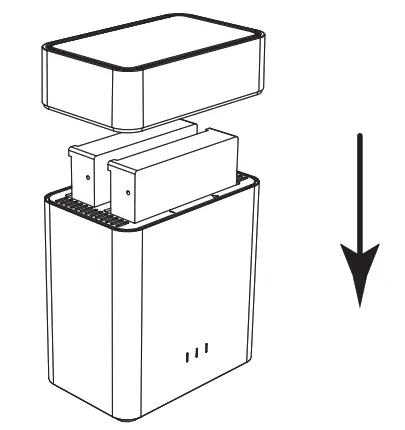
Kauj ruam 3: Txuas lub hwj chim adapter rau lub hwj chim mov.
Kauj ruam 4: Siv cov ntaub ntawv cable txuas mus rau lub computer, qhib lub hwj chim hloov, koj siv tau.
2.3.2 Tshem tawm cov khoom siv
(1) Tshem tawm ntawm Windows system
Ua ntej, nres qhov kev nyeem ntawv thiab sau cov haujlwm ntawm lub hard drive, thiab tom qab ntawd nyem rau ntawm USB lub cim me me ntawm lub taskbar, xaiv lub disk uas xav tau los tshem tawm kom tiav.
tshem tawm.
(2) Tshem tawm ntawm MAC
Ua ntej, nres qhov kev nyeem ntawv thiab sau cov haujlwm ntawm lub hard drive, thiab rub lub disk tsav mus rau Recycle Bin kom ua tiav qhov kev tshem tawm.
Pib thiab Format New Drives hauv Microsoft Windows
Ib tug tshiab tsav yuav tsum tau pib thiab formatted los yog nws yuav tsis ua hauj lwm. Thov ua raws li cov lus qhia hauv qab no txhawm rau pib thiab format koj lub tsav yog tias koj tab tom txhim kho lub tsav tshiab.
- Thov xyuas kom meej tias koj tau txuas lub tsav mus rau ORICO dock kom zoo thiab txuas lub orico dock rau lub computer.
- Txoj cai-nias ntawm lub computer, xaiv "Manage", qhib "Disk Management" nyob rau hauv "Storage" ntawm lub qhov rais qhib. ib tug popup yuav tuaj ntawm no qhia tias yuav tsum tau pib tsav tshiab. thov xaiv cov disks thiab nyem ok yuav tau txais nws pib.
 Nco tseg:
A. Yog tias koj tab tom txhim kho lub tsav uas tsis loj dua 2TB thiab siv tau rau ntawm lub qhov rais vista lossis lub khoos phis tawj ua ntej, pib nrog kev faib style MBR raug pom zoo.
B. Yog tias koj tab tom txhim kho lub tsav loj dua 2TB, pib nrog kev faib tawm style GPT raug pom zoo. lossis koj yuav tau txais 2TB ntawm tus tsav siv tau thiab tus so yuav tsis tuaj yeem pib.
C. Yog tias koj kaw cov qhov rais no los ntawm kev ua yuam kev lossis lub qhov rais tsis tau tshwm sim, right-click ntawm "Disk Number" thiab xaiv "Initialize Disk" yuav tau lub qhov rais tuaj. - Txoj cai-nias rau ntawm tus tsav tshiab uas tsis tau muab faib, xaiv "Tshiab Simple Volume" yuav pib ntxiv ntim tshiab thiab format nws.

- teem lub ntim loj ntawm koj lub ntim tshiab. Koj tuaj yeem kho qhov loj me uas koj xav tau. Lossis koj tuaj yeem teeb tsa qhov loj ntawm qhov ntim ntawm qhov siab tshaj plaws disk los teeb tsa lub tsav mus rau ib qho
ntim.
- Muab tsab ntawv tsav tsheb tshiab rau lub ntim tshiab. tsav tsab ntawv xws li C, D, E, F, G yuav qhia hauv computer thiab explorer rau daim ntawv thov.

- Format koj lub ntim tshiab. Koj tuaj yeem teeb tsa cov ntaub ntawv kaw lus (NTFS lossis FAT32), faib chav tsev loj thiab ntim daim ntawv lo ntawm no. Ua ib hom ntawv ceev yog pom zoo. Thov nias
"Tom ntej" thaum txhua yam teeb tsa.
- Nyem "Finish" yuav pib Format lub ntim.

- Lub formatting yuav siv sij hawm 5 mus rau 30 vib nas this. Thaum formatting tiav lawm, lub ntim tshiab yuav npaj rau txhua daim ntawv thov.

Lwm tus
4.1 Kev daws teeb meem:
- Thov xyuas seb usb hosts ntawm lub computer puas ua haujlwm zoo. Txuas ORICO ntaus ntawv thiab tsav mus rau rear usb hosts yog pom zoo yog tias koj siv lub desktop computer.
- Mounting ib tsav rau qhov kev xeem yog pom zoo. thov xyuas yog tias ORICO ntaus ntawv yuav ua haujlwm zoo thaum ib lub tsav txuas rau HDD qhov 1.
- Thov xyuas kom meej tias lub cable thiab lub hwj chim adapter txuas tau zoo.
- Thov xyuas kom meej tias tus tsav tau raug formatted zoo. Txoj cai-nias rau ntawm lub computer, xaiv "Manage", qhib "Disk Management" nyob rau hauv "Storage" ntawm lub qhov rais qhib yuav pom ib tug tsav mounted rau koj lub computer thiab yog hais tias lawv yog formatted los yog tsis. thov ua raws li cov kev taw qhia ntawm "Initialize thiab Format New Drives nyob rau hauv Microsoft Windows" yog tias koj tab tom txhim kho cov tsav tshiab.
- Thov sim ORICO ntaus ntawv thiab tsav ntawm lwm lub usb3.0 lossis 2.0 hosts lossis lwm lub computer yog tias muaj.
- Thov sim cov khoom ORICO nrog lwm 12V fais fab adapter yog tias muaj.
Yog tias qhov teeb meem tseem tshuav, thov hu rau ORICO lub chaw saib xyuas cov neeg siv khoom:
ORICO Customer Care Center
Webqhov chaw: http://www.oirco.cc
ORICO pab neeg saib xyuas cov neeg siv khoom: supports@orico.com.cn
Xovtooj: 86-755-25196059
4.2 Kev tshaj tawm
ORICO Technologies Co., Ltd., txhua txoj cai.
Ua tsaug ntau rau kev yuav khoom ORICO. Thov xa mus rau phau ntawv no thaum siv cov khoom orico lossis muaj teeb meem. Tsis tas li ntawd, thov hu rau ORICO pab neeg saib xyuas cov neeg siv khoom yog tias muaj kev txhawj xeeb.
ORICO® yog ib lub npe lag luam ntawm ORICO Technologies Co., Ltd.. Ib yam khoom lag luam, kev lag luam, kev pabcuam lossis tuam txhab uas tau hais hauv no yog lub cim lag luam lossis cov cim lag luam ntawm cov tswv. Phau ntawv no yog rau siv xwb thiab nws tsis yog ib tug guarantee.
ORICO Technologies Co., Ltd. tseg tag nrho cov cai ntawm kev saib xyuas rau phau ntawv no thiab yuav tsis lav rau ib qho kev poob lossis kev puas tsuaj los ntawm phau ntawv no. Thov hu rau orico
pab neeg saib xyuas cov neeg siv khoom thaum muaj kev txhawj xeeb. ORICO Technologies Co., Ltd yuav tsis lav them nyiaj thiab kho cov xwm txheej hauv qab no.
- Tej yam tshwj xeeb, xwm txheej, tsis ncaj, thiab theem nrab poob lossis puas tsuaj.
- Cov nyiaj tau los thiab cov nyiaj tau los poob lossis puas.
- Files, cov ntaub ntawv, tsav tsheb, thiab cov khoom siv poob lossis puas.
Nco tseg: Kev them nyiaj rau kev poob lossis kev puas tsuaj uas tshwm sim los ntawm Phau ntawv no lossis cov khoom siv orico yuav tsum tsis pub tshaj qhov nyiaj ntawm koj qhov kev yuav khoom rau cov khoom no.
FCC
Cov cuab yeej no ua raws li Tshooj 15 ntawm FCC Cov Cai.
Kev ua haujlwm yog ua raws li ob qho xwm txheej hauv qab no: (1) Cov cuab yeej no yuav tsis ua rau muaj kev cuam tshuam tsis zoo, thiab (2) cov cuab yeej no yuav tsum lees txais kev cuam tshuam tau txais, suav nrog
kev cuam tshuam uas yuav ua rau kev ua haujlwm tsis zoo.
 http://www.orico.cc
www.orico.cc
ORICO Technologies Co., Ltd.
Xovtooj: 400-6696298 Tel: 86-755-25196059
Webqhov chaw: www.orico.cc
E-mail: supports@orico.com.cn
Tuam txhab ntxiv: 19/F, Block 14A, Zhonghaixin Science & Technology Park, Longgang District,
Shenzhen, Suav teb
Factory Ntxiv: Chav 201, Tsev 11, No. 24, Tangjiao Road, Changping Town, Dongguan City, Guangdong, Suav
Cov ntaub ntawv / Cov ntaub ntawv
 |
ORICO DS Hom-C Interface Series [ua pdf] Tus neeg siv phau ntawv DS Hom-C Interface Series, DS Hom-C, Interface Series |


