


ChatterBox BiT-2 Bluetooth Kev Sib Txuas Lus
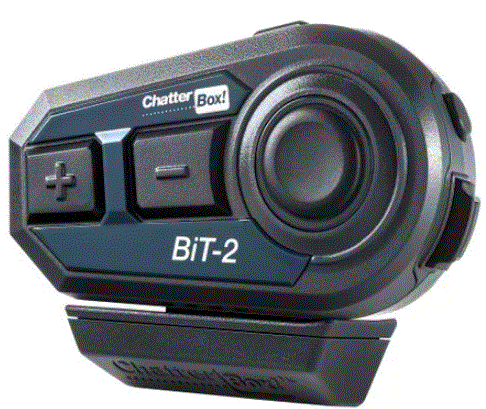
Cov ntaub ntawv khoom
- Lub ChatterBox BiT-2 yog Bluetooth Kev Sib Txuas Lus Tsim los rau cov kaus mom caij tsheb kauj vab.
- Nws yog dej-resistant thiab tuaj nrog microphones rau ob lub ntsej muag qhib thiab lub ntsej muag puv lub kaus mom.
- Cov pob muaj xws li hais lus, Velcro rau cov hais lus, Velcro rau microphones, ua npuas ncauj microphone npog, kaus mom hlau mounting txaj, bracket, screws, thiab L-wrench.
Lub ntsiab nta:
- Dej Resistant
- Microphones rau ob lub ntsej muag qhib thiab lub ntsej muag puv ntsej muag
Cov ntsiab lus pob:
- Cov neeg hais lus
- Velcro rau cov neeg hais lus
- Velcro rau microphones
- Ua npuas ncauj microphone npog
- Lub kaus mom hlau mounting cradle
- Bracket
- Ntsia hlau
- L- ciaj ntswj
Roj teeb them:
- Nco ntsoov them cov khoom siv los ntawm kev them nyiaj cable. Nws raug pom zoo kom them nrog lub charger ib txwm lossis lub roj teeb ntxiv nrog kev them nyiaj ceev (9V, siab dua 1.2A). Lub sijhawm them nyiaj yog kwv yees li 2.5 ~ 3 teev, nyob ntawm lub charger siv.
- Koj tuaj yeem them tus nqi BiT-2 nrog lub txhab nyiaj fais fab thaum siv nws. Hauv qhov no, qhov taw qhia liab yuav tshwm sim.
Cov lus qhia siv khoom
Kev teeb tsa:
Txhawm rau nruab ChatterBox BiT-2, ua raws cov kauj ruam hauv qab no:
- Nruab cov hais lus thiab microphones raws li cov lus qhia.
- Mount lub kaus mom hlau mounting txaj siv lub bracket, screws, thiab L-wrench.
Buttons thiab Inputs:
Xa mus rau cov neeg siv phau ntawv rau cov ncauj lus kom ntxaws ntawm cov nyees khawm thiab cov khoom siv ntawm BiT-2.
Basic Functions:
- Volume Up / Down: Kho qhov ntim theem ntawm BiT-2.
- Lub Suab Command: Qhib lub suab hais kom ua ntawm BiT-2.
Kev sib txuas ntawm txawb-Phone:
Xa mus rau tus neeg siv phau ntawv qhia kom ntxaws cov lus qhia ntawm kev sib txuas xov tooj ntawm tes, kev sib txuas xov tooj thib ob, thiab hloov xov tooj tshiab.
Hom suab paj nruag:
- Suab Nkauj Ua Si / Nres: Tswj suab paj nruag playback ntawm BiT-2.
- Tsiv Mus Rau Lwm Tiam Song / Previous Song: Nkag mus los ntawm cov nkauj thaum nyob hauv hom suab paj nruag.
- Switching Music Ua Si Ntawm Ob Lub Xov Tooj Ntawm Tes: Hloov cov suab paj nruag playback ntawm ob lub xov tooj txuas nrog.
VOX (Voice-Activated Transmission):
- Ua kom VOX: Qhib lossis kaw lub suab-activated kis ntawm BiT-2.
- VOX Sensitivity Setting: Kho qhov rhiab heev ntawm lub suab-activated kis tau tus mob.
Rov Pib Dua:
- Rebooting: Rov pib dua BiT-2.
- Factory Default Reset: Restore lub BiT-2 rau nws lub Hoobkas nqis.
- Yog xav paub ntxiv thiab cov lus qhia ntxiv, saib mus rau BiT-2 Phau Ntawv Ceev thiab Phau Ntawv Yooj Yim uas muab.
- American Communication Systems Tshawb nrhiav lub zog ntawm kev sib txuas lus '" http://www.ameradio.com
THOV KOM TAU
- Ua tsaug rau koj xaiv peb ChatterBox BiT-2, Bluetooth Communication System rau tsheb tuam kaus mom hlau.
Cov yam ntxwv tseem ceeb
- Bluetooth V4.1
- Dej Resistant
- Dual pairing nrog ob lub Bluetooth li (Xov tooj-xov tooj, MP3, Navigation)
Cov ntsiab lus ntawm BiT-2
- Chav tsev loj nrog lub roj teeb ua ntej
- USB them cable
- Microphones rau ob lub ntsej muag qhib thiab lub ntsej muag puv ntsej muag.
- Velcro rau cov hais lus, Velcro rau microphones, ua npuas ncauj microphone-npog
- Lub kaus mom hlau mounting cradle, bracket, screws, thiab L-wrench
- Cov neeg siv phau ntawv thiab ChatterBox log sticker
Roj teeb them
- Txuas cov khoom siv USB cable rau lub PC lossis phab ntsa charger.
- Nco ntsoov them cov khoom siv los ntawm kev them nyiaj cable. Them nrog ib txwm charger ntawm 5V lossis tsawg dua 1.2A. Siv lub charger ceev ceev rau cov xov tooj ntawm tes lossis lub roj teeb ntxiv nrog kev them nyiaj ceev (9V, siab dua 1.2A) tuaj yeem ua rau lub roj teeb ua kom tawg, ua rau tawg, lossis puas tsuaj rau cov khoom siv hluav taws xob.
- Nrog lub charger ib txwm, nws yuav siv sij hawm 2.5 ~ 3 teev kom them tag nrho. Lub sijhawm them nyiaj nyob ntawm qhov kub thiab txias. Lub teeb liab LED flashes thaum them nyiaj thiab lub teeb xiav LED thiab nyob twj ywm qhia tias them nyiaj tiav.
- Yog tias qhov kev them nyiaj tiav lawm, disconnect lub charging cable. Kev them nyiaj ntau dhau tuaj yeem ua rau lub roj teeb nce ntxiv.
- Koj tuaj yeem them BiT-2 nrog lub txhab nyiaj fais fab thaum koj siv nws. Hauv qhov no, liab
- LED thiab ntshav LED (liab thiab xiav LED tib lub sijhawm) flashes ua ke. Thaum them nyiaj tiav, xiav LED flashes.
Roj teeb
- Nco ntsoov khaws koj lub roj teeb kom txaus. Txhua lub roj teeb tso tawm los ntawm nws tus kheej. Yog tias lub roj teeb raug tso tawm thiab tsis them rau lub sijhawm ntev, voltage poob qis dua 2.0V, lub roj teeb tsis tuaj yeem them rov qab. Hauv qhov no, koj yuav tsum tau hloov lub roj teeb yog tias muaj kev hloov roj teeb. Txawm li cas los xij, qhov kev hloov pauv no tsis tuaj yeem them los ntawm warranty.
- Lithium Polymer roj teeb muaj kev tiv thaiv Circuit Court (PCM) sab hauv. Lub roj teeb nrog lub voltage poob qis dua 2.0V xav tau siab voltage nrog cov tam sim no siab kom rov them nws. Kev tiv thaiv Circuit Court thaiv qhov tam sim no siab, yog li lub roj teeb tsis tuaj yeem them.
- Tsis txhob disassemble cov khoom los yog disconnect lub roj teeb. Nws tuaj yeem ua rau cov khoom tsis ua haujlwm.
- Lub peev xwm roj teeb yuav raug txo nyob ntawm ib puag ncig thiab kev siv.
- Lub neej voj voog ntawm Lithium lon, Lithium Polymer roj teeb, cov chaw tsim khoom lav tsuas yog 300 npaug ntawm cov nqi tag nrho thiab tawm.
- Siv lossis khaws cov khoom ntawm -15 ° C thiab + 50 ° C. Qhov kub siab dua lossis qis dua tuaj yeem ua rau txo qis lub peev xwm, roj teeb lub neej, lossis ua haujlwm tsis ua haujlwm ib ntus.
- Ntev ntev ntawm cov khoom mus rau lub hnub ncaj qha tuaj yeem ua rau tsis ua haujlwm lossis lub roj teeb tsis ua haujlwm.
- Tsis txhob siv cov khoom puas los ntawm kev cuam tshuam, Circuit Court lossis roj teeb tsis ua haujlwm yuav tshwm sim.
INSTALLATION
Kev txhim kho BiT-2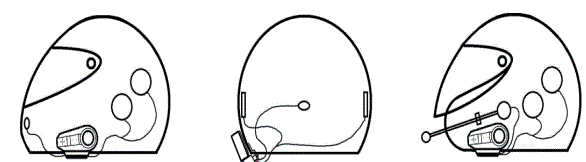
Installation hais lus thiab microphone
Muaj ob lub microphones rau ob lub kaus mom qhib lub ntsej muag thiab lub kaus mom lub ntsej muag puv.
Thov xaiv qhov koj xav siv rau hom koj lub kaus mom hlau.
- Tshem cov ntaub qhwv sab hauv ntawm lub kaus mom hlau uas koj xav nrhiav cov neeg hais lus thiab lub microphone.
- Nco ntsoov ntxuav hauv koj lub kaus mom hlau nrog cawv thiab kom qhuav qhov chaw uas koj xav muab Velcro rau cov hais lus thiab lub microphone.
- Rau lub kaus mom qhib lub ntsej muag, muab cov mos Velcro disk sab hauv ntawm lub kaus mom hlau ntawm qib nqaij thiab tso lub boom-microphone rau nws. Tsis tas li ntawd, kho lub boom-stick los ntawm kev siv tus npauj npaim zoo li tus tuav los txhawb nws.
- Rau lub kaus mom lub ntsej muag tag nrho, muab cov mos mos Velcro disk rau ntawm lub puab tsaig ntawm lub kaus mom hlau thiab txuas cov tawv Velcro disk rau lub microphones.
- Mount cov mos Velcro disks ntawm lub liner ntawm koj lub kaus mom hlau, nyob rau hauv indentation ntawm lub kaus mom hlau padding, qhov twg koj pob ntseg yuav kab. Rau qhov zoo tshaj plaws suab zoo, nco ntsoov nrhiav cov neeg hais lus mus rau qhov chaw zoo.
- Txuas tus neeg hais lus zoo (nrog rau cov xaim ntev) rau qhov sib thooj Velcro disk uas koj tau thov rau ntawm lub kaus mom hlau. Txuas tus hais lus sab laug (nrog rau cov hlau luv) rau lwm qhov Velcro disk.
- Re-install tshem tawm sab hauv ncoo rov qab rau ntawm lub kaus mom hlau.
CEEB TOOM: Hloov txoj hauj lwm ntawm Velcro stickers rau cov neeg hais lus thiab microphones ntau tshaj ib zaug yuav ua rau tsis zoo adhesion. (Koj tuaj yeem yuav Velcro cais ntawm peb webqhov chaw.)
Kev teeb tsa ntawm BiT-2 siv lub txaj txaj
- Npaj cov menyuam txaj, bracket, screws, thiab L-wrench.
- Txuas cov hlau bracket rau lub txaj txaj siv cov ntsia hlau tab sis tsis txhob nruj nruj ntawm qhov stage.
- Xaub lub phaj hlau rau hauv qhov sib txawv ntawm lub plhaub kaus mom hlau thiab cov ntaub qhwv sab hauv.
- Tam sim no ceev cov ntsia hlau ntawm lub bracket kom haum lub txaj rau lub kaus mom hlau ruaj khov siv L wrench.
- Txuas lub microphone thiab hais lus rau lub txaj txaj. Ceev faj kom phim tus xub ntawm qhov txuas txuas thiab jack.
- Ntxig cov lus qhia fin rau sab nraum qab ntawm cov khoom raws li tus swb ntawm lub txaj thiab thawb nws mus txog thaum koj hnov cov suab 'dick'.
CEEB TOOM: Over-tightening cov screws yuav ua rau cov swb yuav khoov thiab ua rau nws nyuaj rau haum cov khoom.
BiT-2 Cradle Mounting Method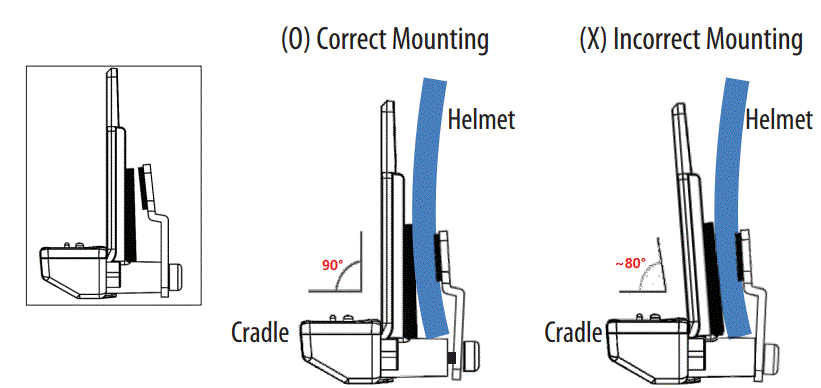
- Yog tias koj tuav lub bolts nrog lub zog tsim nyog, lub txaj txaj tsis poob ntawm lub kaus mom hlau, vim tias cov roj hmab txuas nrog lub txaj thiab kho cov hlua khi.
- Thaum haum lub txaj rau lub kaus mom hlau, yog tias lub txaj txaj yog khoov vim qhov nruj ntawm lub ntsia liaj qhov rooj (hexagon), nws yuav ua rau cov khoom tsis xws luag.
- (Lub diav rawg ntawm lub txaj yuav muaj kev sib cuag tsis zoo nrog lub cev loj, yog li lub microphone lossis tus hais lus yuav tsis ua haujlwm.)
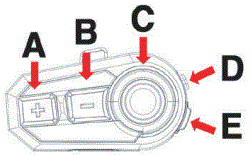 |
A | PLUS (+) khawm |
| B | MINUS (-) khawm | |
| C | FUNCTION khawm | |
| D | POWER khawm | |
| E | USB chaw nres nkoj |
PHOOJ YWG SAWV DAWS
- Hwj chim On: Nias lub POWER khawm ntev li 3 vib nas this.
- Fais fab tawm: Nias lub POWER khawm ntev li 6 vib nas this.
- CEEB TOOM: Lub zog ua haujlwm tsis tuaj yeem rov pib dua 8 vib nas this tom qab lub hwj chim qhib lossis kaw. Thov rov sim dua tom qab 8 vib nas this.
- Ntim Tuaj: Nias lub pob PLUS (+) ntawm lub sijhawm ntev dua 0.5 vib nas this.
- Ntim Cia: Nias lub pob MINUS (-) ntawm lub sijhawm ntev dua 0.5 vib nas this.
- CEEB TOOM: Kev nias ceev ob zaug hauv tsawg dua 0.5 vib nas this yuav ua rau kev xaiv zaj nkauj tom ntej / yav dhau los hauv hom suab paj nruag lossis channel nrhiav hauv FM xov tooj cua hom.
- Lub Suab Command: Tom qab tso tseg Suab paj nruag, nias thiab tuav lub PLUS (+) khawm tib lub sijhawm rau ntau tshaj 1 thib ob kom siv lub suab lees paub (Siri, S- suab, thiab lwm yam) hauv koj lub xov tooj ntawm tes. Lub suab paub feature ntawm koj lub xov tooj ntawm tes yuav tsum tau qhib.
MOBILE-PHONE CONNECTION
Mobile-phone Pairing
- Xyuas kom tseeb tias koj lub chav tsev BiT-2 raug kaw.
- Nias thiab tuav lub POWER khawm rau 8 vib nas this kom ruaj khov kom txog thaum lub LED tig thiab flashes liab thiab xiav alternated.
- Qhib Bluetooth muaj nuj nqi hauv koj lub xov tooj ntawm tes thiab tshawb nrhiav thiab xaiv lub npe ntawm chav tsev (ChatterBox BiT-2 Vxx)
- Qee lub xov tooj ntawm tes yuav xav tau tus password <Password: 0000>
- Tom qab ua khub tiav, lub xiav LED maj mam flashes ob zaug. Tom qab kev sib koom ua ke tiav lawm, tua lub hwj chim ntawm chav tsev thiab tig rau chav tsev dua kom tsis txhob muaj qhov ntim tam sim ntawd.
Nco tseg rau cov neeg siv iPhone: Tom qab kev sib txuas ua tiav, thov teeb tsa chav tsev ntawm qib ntim yam tsawg kawg nkaus kom tsis txhob muaj qhov ntim tam sim ntawd.
Thib ob mobile-phone pairing
- Cov kev sib txuas ua ke yog tib yam li thawj zaug kev sib txuas ntawm lub xov tooj.
- CEEB TOOM: Thov nco ntsoov tias koj tua lub Bluetooth muaj nuj nqi ntawm thawj khub-lub xov tooj ntawm tes ua ntej pib qhov thib ob lub xov tooj sib txuas.
- Tshiab mobile-xov tooj (lub xov tooj thib peb) hloov
- Tua ib qho ntawm lub xov tooj ntawm tes uas tau txuas yav dhau los lub Bluetooth ua haujlwm lossis tshem tawm ib qho ntawm cov npe ua khub (ChaatterBox BiT-2 Vxx) los ntawm kev sib txuas.
- Bluetooth ntaus ntawv teev nyob rau ntawm lub xov tooj txawb chaw.
- Cov kev sib txuas ua ke yog tib yam li thawj zaug kev sib txuas ntawm lub xov tooj.
PHONE FUNCTIONS
- Teb ib qho hu tuaj: Luv nias lub MAIN FUNCTION khawm.
- Tsis lees txais ib qho kev hu tuaj: Ntev nias lub MAIN FUNCTION khawm rau 1 thib ob.
- Hu rau: Ntev nias lub MAIN FUNCTION khawm rau 1 thib ob.
- Tuav qhov kev hu tam sim no, teb lwm qhov kev hu tuaj: Luv nias MAIN FUNCTION khawm rau 1 thib ob.
- Thaum hu, tsis kam txais lwm tus hu tuaj: Ntev nias MAIN FUNCTION khawm rau 1 thib ob.
- Tus lej kawg rov qab: Ntev nias lub MINUS (-) khawm rau 1.5 vib nas this tom qab lub suab paj nruag nres lossis FM xov tooj cua kaw.
- Thaum nyob hauv xov tooj, hloov khoom siv ntawm BiT-2 thiab xov tooj ntawm tes: Thaum koj hais lus hu xov tooj rau hnav kaus mom hlau yog tias koj xav tshem lub kaus mom hlau thiab xav tham nrog koj lub xov tooj ntawm tes ncaj qha.
- Nias thiab tuav lub PLUS (+) thiab MINUS (-) nyees khawm ib txhij ntev dua 1.5 vib nas this, ces tus hu mus rau koj lub xov tooj ntawm tes. Ua tib yam haujlwm wi hloov koj lub xov tooj ntawm tes ua khub rau koj BiT-2 dua.
QUB QAB ZIB
- Suab paj nruag Play / Nres: luv nias lub MAIN FUNCTION khawm.
- Tsiv mus rau zaj nkauj tom ntej: Ob npaug nias PLUS (+) khawm.
- Tsiv mus rau zaj nkauj dhau los: Ob npaug nias MINUS (-) khawm.
- Hloov suab paj nruag ua si ntawm ob lub xov tooj sib txuas ua ke: Ntev nias MAIN
- FUNCTION khawm rau 1 thib ob (tsawg nias MAIN FUNCTION khawm dua los ua si suab paj nruag los ntawm koj lub xov tooj thib ob.)
- Yog tias ob lub xov tooj ntawm tes txuas nrog, kev ncua hauv suab paj nruag yuav tshwm sim.
- Rau qee hom xov tooj ntawm tes, suab paj nruag ntim tuaj yeem tswj tau ib txhij lossis sib cais.
VOX (Lub suab hloov mus rau hom intercom)
- VOX yog lub luag haujlwm los teb kev hu xov tooj los ntawm kev siv tus kheej lub suab yam tsis siv lub POWER khawm
- Ua kom VOX: Hauv hom suab paj nruag, suab nrov nrov kom teb ib qho kev hu tuaj.
RESET
Rebooting
- Reboot lub tsev thaum lub luag haujlwm tsis ua haujlwm lossis yog tias koj tsis tuaj yeem tua lub zog ntawm chav tsev. Txhawm rau rov pib dua lub tsev, ntxig USB them cable thaum nias MINUS (-) khawm.
- Cov ntaub ntawv sib txuas, hom lus, thiab cov xov tooj cua FM tau khaws tseg yuav tsis raug muab tshem tawm.
Hoobkas pib ua dua
- Txhawm rau pib tag nrho cov kev teeb tsa thiab teeb tsa lub tsev rov qab mus rau lub Hoobkas teeb tsa, nias ntev
- MAIN FUNCTION khawm thiab MINUS (-) khawm tib lub sijhawm rau 8 vib nas this
- Tag nrho cov ntaub ntawv khaws tseg ntawm kev ua khub, khaws tseg FM xov tooj cua raws, thiab kev teeb tsa lus yuav raug muab tshem tawm.
Txhawb nqa
Ceev faj
- Txawm hais tias BiT-2 yog Water Resistant, thov khaws cov khoom kom deb ntawm cov nag hnyav thiab dej. Kev nthuav tawm cov khoom rau los nag lossis dej rau lub sijhawm ntev yuav ua rau cov khoom puas tsuaj.
- Khaws lossis siv cov khoom ntawm qhov kub ntawm -15 ° C ~ + 50 ° C. Qhov kub thiab txias dhau heev tuaj yeem ua rau muaj kev puas tsuaj, txo lub peev xwm thiab lub neej ntawm lub roj teeb, lossis tej zaum yuav ua rau cov khoom tsis ua haujlwm.
- Tsis txhob disassemble lub unit. Nws tuaj yeem ua rau muaj kev ua haujlwm tsis zoo thiab cov khoom siv tsis tuaj yeem tsis tuaj yeem muaj kev pabcuam lav.
- Khaws cov khoom tawm ntawm tshav ntuj ncaj qha. Kev nthuav tawm cov khoom mus rau lub hnub ci ncaj qha tuaj yeem ua rau hluav taws xob thiab roj teeb puas. Nws yog qhov txaus ntshai tshwj xeeb kom nthuav tawm cov khoom kom ncaj qha tshav ntuj hauv lub tsheb kaw thaum lub caij ntuj sov.
- Tsis txhob siv cov kev cuam tshuam lub cev rau lub tsev. Nws yuav ua rau muaj teeb meem hauv Circuit Court thiab roj teeb.
- Tsis txhob disassemble lub unit. Nws tuaj yeem ua rau muaj kev ua haujlwm tsis zoo thiab cov khoom siv tsis sib xws yuav tsis tuaj yeem muaj kev pabcuam lav.
- Kev tuav tsis zoo, cuam tshuam rau lub cev, hluav taws xob poob siab, kev poob qis lossis kev tuav tsis zoo yuav ua rau lub luag haujlwm tsis ua haujlwm thiab ua rau muaj kev puas tsuaj loj rau cov khoom.
- Tsis txhob siv cov tshuaj ntxuav tes xws li Benzol, Acetone thiab tsis txhob siv cov tshuaj muaj zog los ntxuav cov khoom.
- Khaws cov khoom kom deb ntawm qhov ncav cuag cov menyuam yaus thiab tsiaj txhu.
- Khaws cov khoom kom deb ntawm cov khoom siv cua sov xws li qhov cub, qhov cub roj, micro-yoj thiab lwm yam, Nws tuaj yeem tawg.
- Tsis txhob sim khiav cov khoom thaum khiav lub tsheb. Qhov kev coj cwj pwm no yuav ua rau muaj kev phom sij txaus ntshai heev.
- Yog tias chav tsev zoo li puas lossis ua haujlwm tsis zoo, tsis txhob siv tam sim ntawd thiab hu rau lub chaw pabcuam.
- Kev raug lub suab nrov ntev yuav ua rau koj lub pob ntseg puas thiab ua rau muaj teeb meem tsis hnov lus.
- Tsis ua raws li cov lus ceeb toom saum toj no yuav ua rau cov khoom puas tsuaj thiab / kev ua haujlwm tsis zoo.
- Thov nyeem cov lus qhia ua ntej siv cov khoom.
- Cov qauv tsim, nta, thiab kev ua haujlwm yuav raug hloov pauv kom txhim kho.
Tsawg warranty
- Peb lub warranty tsis pub dhau 24 lub hlis nkaus xwb rau chav tsev loj thiab 12 lub hlis rau cov roj teeb thiab cov khoom siv.
- Lub sij hawm warranty pib thaum lub sij hawm ntawm qhov kev yuav khoom los ntawm thawj tus neeg siv kawg.
- Nyob rau hauv rooj plaub ntawm kev xa rov qab los ntawm kev xa khoom, tus neeg siv kawg yuav tsum tuaj yeem xa rov qab cov khoom tsis zoo nrog nws cov pob qub nrog rau daim ntawv luam ntawm daim ntawv txais nyiaj thawj zaug los ntawm lub khw muag khoom qhov chaw yuav khoom.
- Qhov kev pab cuam warranty yuav muab los ntawm lub khw muag khoom uas thawj zaug yuav khoom. Yog tias koj muaj teeb meem hu rau lub khw, thov hu rau peb ntawm cov ntaub ntawv tiv tauj hauv phau ntawv no.
Yog vim li cas rau liabilities
- Yog tias koj tsis xa rov qab cov khoom tom qab thov, koj tso tseg tag nrho cov cai rau kev lav phib xaub, kev poob, kev thov, thiab kev thov nyiaj rov qab rau cov nuj nqis (nrog rau tus kws lij choj tus nqi).
- Yog li ntawd, Chatterbox yuav tsis raug them rau kev raug mob ntawm lub cev, tuag, lossis kev poob lossis kev puas tsuaj ntawm kev thauj mus los, cov khoom ntiag tug, lossis cov khoom muaj nqis uas yog koj lossis cov neeg thib peb uas yuav tshwm sim thaum koj siv cov khoom. Tsis tas li ntawd, ChatterBox yuav tsis lav qhov kev puas tsuaj loj heev uas tsis cuam tshuam txog qhov xwm txheej, ib puag ncig, lossis kev ua haujlwm tsis zoo ntawm cov khoom. Txhua qhov kev pheej hmoo cuam tshuam nrog kev ua haujlwm ntawm cov khoom lag luam yog nyob ntawm tus neeg siv tsis hais nws siv los ntawm thawj tus neeg yuav khoom thib peb.
- Kev siv cov khoom no tuaj yeem ua txhaum cai hauv zos lossis hauv tebchaws. Tsis tas li ntawd, nco ntsoov ib zaug ntxiv tias kev siv cov khoom raug thiab nyab xeeb yog tag nrho koj lub luag haujlwm.
Kev txwv kev lav ris
- Raws li txoj cai lij choj Chatterbox tsis suav nrog nws tus kheej thiab nws cov neeg muag khoom los ntawm ib qho kev lav phib xaub, txawm tias raws li daim ntawv cog lus lossis kev tsim txom (nrog rau kev tsis saib xyuas) rau qhov xwm txheej, qhov tshwm sim, tsis ncaj, tshwj xeeb, lossis raug nplua ntawm txhua yam, lossis rau kev poob nyiaj lossis cov txiaj ntsig. , poob ntawm kev lag luam, poob ntawm cov ntaub ntawv lossis cov ntaub ntawv lossis lawv cov nyiaj txiag poob los ntawm, nrog rau kev muag khoom, kev teeb tsa, kev saib xyuas, kev siv, kev ua haujlwm, tsis ua haujlwm, lossis cuam tshuam ntawm nws cov khoom, txawm tias ChatterBox lossis nws cov neeg muag khoom tau tso cai tau qhia. ntawm qhov muaj peev xwm ntawm qhov kev puas tsuaj, thiab txwv nws txoj kev lav phib xaub los kho kev hloov pauv, lossis cov nyiaj rov qab ntawm tus nqi yuav them ntawm Chatterbox qhov kev xaiv. Qhov kev lees paub ntawm kev lav phib xaub rau kev puas tsuaj yuav tsis raug cuam tshuam yog tias ib qho kev kho mob uas tau muab hauv no yuav ua tsis tiav ntawm nws lub hom phiaj tseem ceeb. Txawm li cas los xij, tag nrho cov nyiaj them poob haujlwm ntawm ChatterBox lossis nws cov neeg muag khoom yuav tsum tsis pub tshaj tus nqi them rau cov khoom los ntawm tus neeg yuav khoom.
Liabilities disclaimer
- Ntxiv nrog rau kev puas tsuaj uas yuav tshwm sim los ntawm kev siv cov khoom,
- Chatterbox yuav tsis lav qhov kev puas tsuaj ntawm cov khoom uas tshwm sim vim muaj cov xwm txheej hauv qab no.
- Hauv qhov xwm txheej, cov khoom siv tsis raug lossis siv rau lub hom phiaj uas tsis yog nws lub hom phiaj.
- Nyob rau hauv qhov kev tshwm sim cov khoom puas vim hais tias tus neeg siv tsis ua raws li cov ntsiab lus ntawm cov khoom phau ntawv.
- Nyob rau hauv qhov xwm txheej cov khoom puas vim nws tau raug tso tseg tsis muaj neeg saib xyuas lossis tau ntsib lwm yam xwm txheej.
- Nyob rau hauv qhov xwm txheej cov khoom puas vim hais tias tus neeg siv tau siv tej qhov chaw los yog software uas tsis yog muab los ntawm cov chaw tsim tshuaj paus.
- Nyob rau hauv qhov xwm txheej cov khoom puas vim tus neeg siv tau disassembled, kho, los yog hloov nws.
- Nyob rau hauv qhov kev tshwm sim cov khoom puas los ntawm ib tug thib peb tog.
- Thaum cov khoom raug puas tsuaj vim yog Vajtswv Txoj Cai (xws li hluav taws, dej nyab, av qeeg, cua daj cua dub, nag xob nag cua lossis lwm yam kev puas tsuaj ntuj tsim.)
- Nyob rau hauv qhov xwm txheej ntawm qhov chaw ntawm cov khoom puas los ntawm kev siv.
Technical Specification
- BLUETOOTH VERSION: Hauv 4.1
- RF zog: Chav 2, Chav 1
- Lub roj teeb muaj peev xwm: 3.7V 550 mAh
- AUDIO POWERLoj: 250mW x 2
- LUB SIJ HAWM NTAWM CHAW UA HAUJ LWM: 11 hnu
- SANDBY HOURS: 284 teev / 11 hnub
- Kev ua haujlwm kub: -15 ° C ~ + 50 ° C
- DIMENSIONS: 69 × 37 × 17 hli
- NYIAJ: BiT-1: 36g / BiT-2: 48g (lub txaj nrog)
- NTSIAB LUS: FCC, CE, KC tau ntawv pov thawj
- Customer Service Center nyob rau teb chaws USA
- Webqhov chaw: www.chatterboxusa.com
Lub chaw pabcuam neeg siv khoom hauv EUROPE
- Chaw nyob: Talstrasse 39 D-77887-SASBACHWALDEN, Lub teb chaws Yelemees
BiT-2 phau ntawv ceev
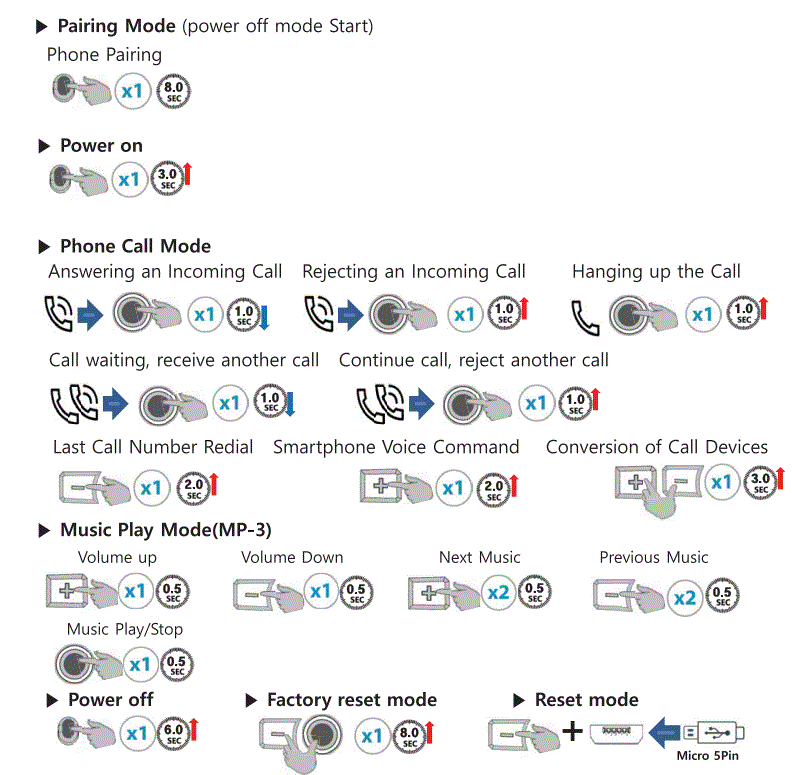
LOOJ YIM RAUG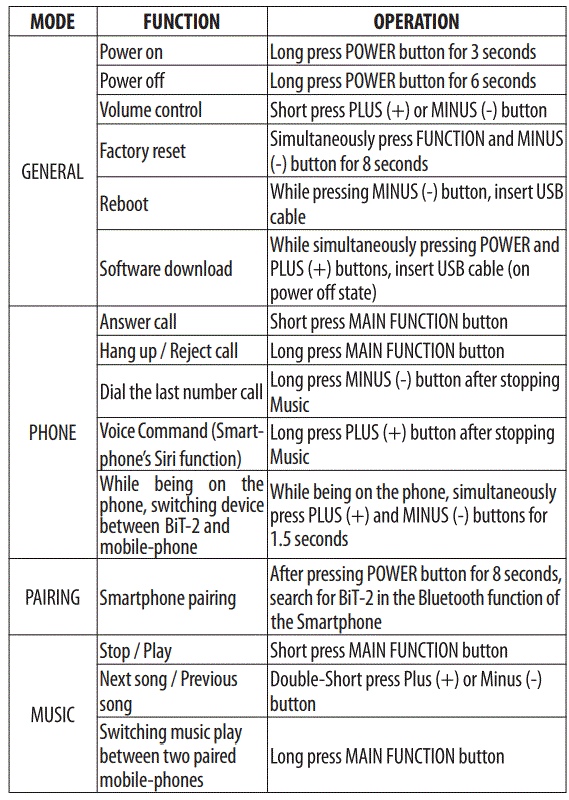
ChatterBox USA
ChatterBox Ntiaj teb no
Cov ntaub ntawv / Cov ntaub ntawv
 |
ChatterBox BiT-2 Bluetooth Kev Sib Txuas Lus nrog [ua pdf] Tus tswv phau ntawv BiT-2 Bluetooth Kev Sib Txuas Lus nrog, BiT-2, Bluetooth Kev Sib Txuas Lus nrog, Kev Sib Txuas Lus nrog, System nrog, nrog |