Gabatarwa
The JBL GRIP is a compact, portable Bluetooth speaker designed to deliver powerful JBL Pro Sound. It features AI Sound Boost technology for optimized audio output with minimal distortion. With its durable, dustproof, and waterproof design, the JBL GRIP is suitable for various environments and activities. This manual provides essential information for the proper use and maintenance of your speaker.

Image: The JBL GRIP speaker lineup in different colors, highlighting its portability.
Me ke cikin Akwatin
Upon unboxing your JBL GRIP speaker, please ensure all components are present:
- JBL GRIP Portable Bluetooth Speaker
- Jagoran Fara Mai Sauri
- USB-C Charging Cable (Note: USB charging cable is not included in some regions, please check packaging)

Image: A purple JBL GRIP speaker, representing the main product.
Samfurin Ƙarsheview
Familiarize yourself with the key features and components of your JBL GRIP speaker.
Sarrafa da Tashoshi
- Maɓallin Wuta: Located on the top panel.
- Maɓallin Haɗa Bluetooth: Located on the top panel, for connecting to devices.
- Maɓallin Kunna/Dakata: Located on the top panel.
- Maɓallin Upara sama / Downasa: Located on the top panel.
- Tashar Cajin USB-C: Located on the side panel, protected by a cover.
- Hasken yanayi: Integrated on the side panel, offering customizable lighting effects.

Hoto: Sama view of the JBL GRIP speaker, highlighting the control buttons.
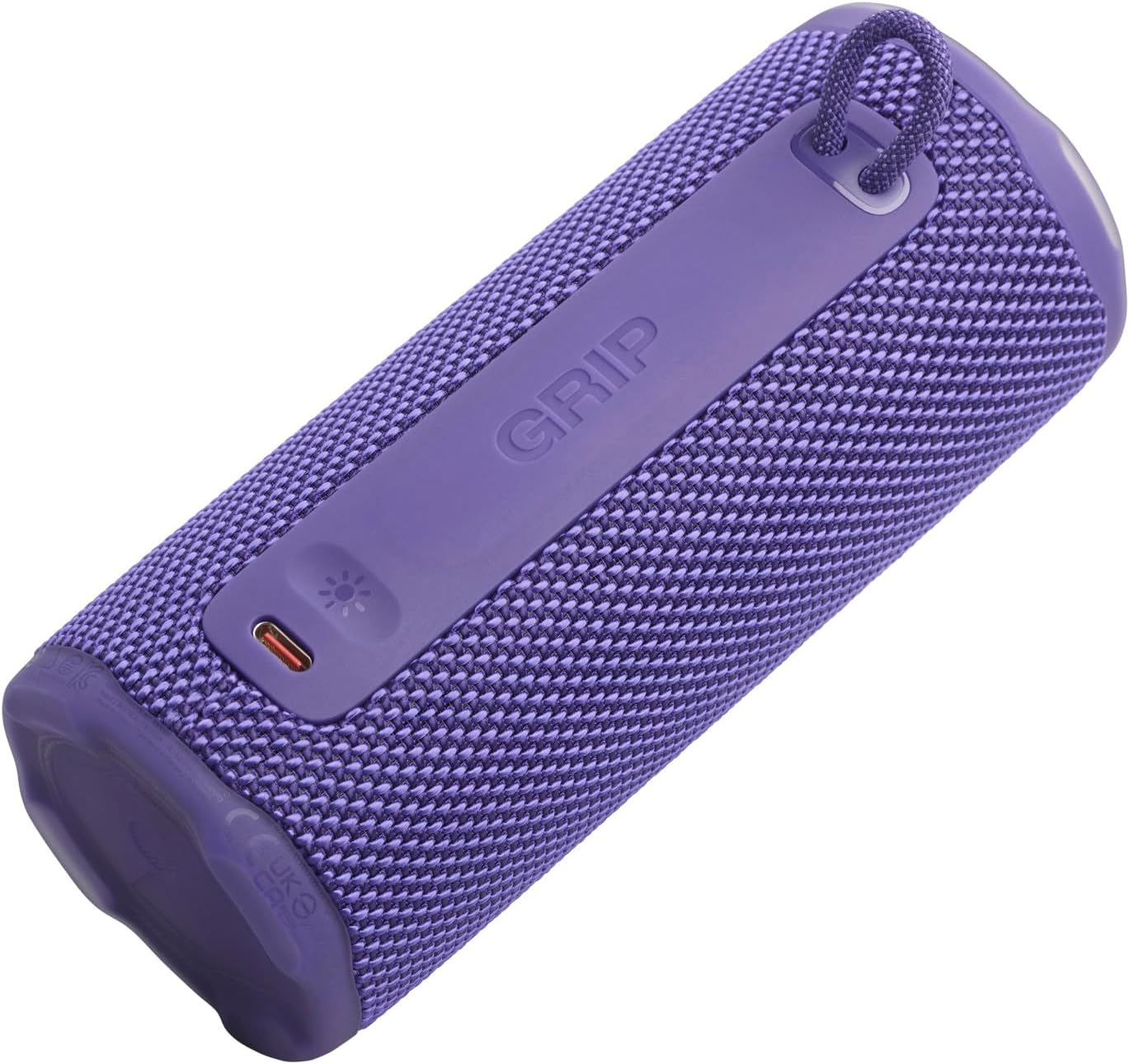
Hoto: Gefe view of the JBL GRIP speaker, showing the USB-C charging port and the ambient light strip.
Mabuɗin Siffofin
- Sautin AI: Real-time music analysis algorithm optimizes output and suppresses distortion for enhanced sound quality.
- IP68 Mai hana ƙura da hana ruwa: Designed to withstand immersion in water and protect against dust ingress.
- Hasken yanayi: Customizable LED light on the speaker's rear panel to set the mood.
- Dogon lokacin sake kunnawa: Up to 12 hours of continuous playback, extendable by an additional 2 hours with Playtime Boost.
- Aura Cast Multi-Speaker Connection: Connect multiple JBL GRIP speakers for a wider sound experience.
- JBL Portable App Compatibility: Control settings, customize ambient light, and manage features via the dedicated app.

Image: An internal diagram of the JBL GRIP speaker, illustrating the AI Sound Boost chip and dual passive radiators for enhanced bass.
Saita
Cajin Kakakin Majalisa
- Locate the USB-C charging port on the side of the speaker.
- Buɗe murfin kariya na tashar USB-C.
- Connect one end of the USB-C charging cable to the speaker and the other end to a compatible USB power adapter (not included).
- Alamar LED zata nuna halin caji. Cikakken caji yana ɗaukar kusan awa 3.
- Once fully charged, disconnect the cable and securely close the protective cover to maintain IP68 rating.
Haɗa Bluetooth
- Power on the JBL GRIP speaker by pressing the Power button.
- Press the Bluetooth button on the top panel. The LED indicator will flash, indicating pairing mode.
- On your device (smartphone, tablet, etc.), go to Bluetooth settings and select "JBL GRIP" from the list of available devices.
- Once connected, the LED indicator on the speaker will turn solid.
Umarnin Aiki
Sake kunnawa na asali
- Kunna/Dakata: Danna maɓallin Play/Dakata sau ɗaya.
- Sarrafa ƙara: Yi amfani da maɓallin Ƙara Girma (+) da Ƙara Girma (-).
- Tsallake Waƙa: Double-press the Play/Pause button for next track. Triple-press for previous track.
Kula da Hasken yanayi
The JBL GRIP features an ambient light that can be customized to match your mood.
- Default Modes: Cycle through pre-set light themes by pressing the dedicated light button (if available, otherwise use app).
- Keɓancewa: For advanced customization of brightness and color, download and use the JBL Portable app.

Image: A JBL GRIP speaker displaying its customizable ambient light feature.
Aura Cast Multi-Speaker Connection
Aura Cast allows you to connect multiple JBL GRIP speakers for a synchronized audio experience.
- Ensure all JBL GRIP speakers are powered on and in pairing mode.
- Follow the instructions in the JBL Portable app to initiate Aura Cast pairing.
- Once connected, audio will play simultaneously across all linked speakers.

Image: A visual representation of multiple JBL speakers connected using Aura Cast for multi-room audio.
JBL Portable App
Download the JBL Portable app from your device's app store to unlock additional features and control options for your JBL GRIP speaker. The app allows you to:
- Daidaita saitunan daidaita sauti.
- Customize ambient light themes and brightness.
- Manage Aura Cast connections.
- Update speaker firmware.

Image: A screenshot of the JBL Portable app interface, showing customization options for sound and lighting.
Kulawa
Mai hana ruwa da ƙura (IP68)
The JBL GRIP speaker is rated IP68, meaning it is dust-tight and protected against continuous immersion in water up to 1.5 meters for up to 30 minutes. To maintain this rating:
- Tabbatar cewa murfin tashar USB-C yana rufe amintacce kafin fallasa lasifikar zuwa ruwa ko ƙura.
- Do not expose the speaker to salt water or other chemicals. If exposed, rinse with fresh water and dry thoroughly.
- Avoid using the speaker in extreme temperatures.

Image: A JBL GRIP speaker in water, demonstrating its IP68 waterproof capability.
Tsaftacewa
Don tsaftace lasifikarka, yi amfani da lasifikar mai laushi, damp zane. Kada a yi amfani da masu tsabtace abrasive ko sauran ƙarfi.
Shirya matsala
| Matsala | Magani mai yiwuwa |
|---|---|
| Kakakin ba ya kunna wuta. | Tabbatar da cajin baturi. Haɗa lasifikar zuwa tushen wuta ta amfani da kebul na USB-C. |
| Ba za a iya haɗa ta Bluetooth ba. |
|
| Babu sauti ko ƙaramin ƙara. |
|
| Ambient light not working. | Check settings in the JBL Portable app. Ensure the speaker is powered on. |
Ƙayyadaddun bayanai
| Siffar | Daki-daki |
|---|---|
| Sunan Samfura | JBL GRIP |
| Lambar Samfur | JBLGRIPPUR |
| Nau'in Kakakin | Kakakin Kakakin |
| Fasaha mara waya | Bluetooth |
| Ƙwaƙwalwar Mita | 2400MHz - 2483.5MHz |
| Amsa Mitar | 20 kHz |
| Matsakaicin Ƙarfin fitarwa | 16 W |
| Tushen wutar lantarki | Battery (Lithium Ion) |
| Rayuwar Baturi | Up to 12 hours (extendable by 2 hours with Playtime Boost) |
| Lokacin Caji | Kusan awanni 3 |
| Ƙididdiga mai hana ruwa / ƙura | IP68 |
| Girman samfur (D x W x H) | 6.5 x 6.4 x 15.3 cm |
| Nauyin samfur | 385g ku |
| Hanyar sarrafawa | App |
| Abubuwan da aka haɗa | Jagoran Fara Mai Sauri |

Image: A diagram illustrating the dimensions and weight of the JBL GRIP speaker.
Garanti da Taimako
The JBL GRIP speaker comes with a limited warranty. Please refer to the included Quick Start Guide or visit the official JBL webshafin yanar gizo don cikakkun bayanai game da garanti da lambobin tallafi.
For technical assistance, troubleshooting, or to register your product, please visit www.jbl.com/support.


